Our Top Picks
To replace a CMOS battery, power the computer off and unplug it (and disconnect the main battery on a laptop), open the case or service panel, release the old coin cell from its holder, and fit a new CR2032 with the positive side facing up, the same way the old one sat. Expect to set the date, time and any custom BIOS options again afterward.
What the CMOS Battery Does
The small coin cell on the motherboard keeps the real-time clock running and holds BIOS settings while the computer is switched off and unplugged. The standard part on most desktop boards is the CR2032, a 3 volt lithium coin cell, and ASUS support pages describe the replacement in exactly those terms. It does not recharge, so it eventually runs down; makers and repair guides commonly mention a lifespan measured in years rather than months.

LeFix 2 Pins 2 Wires BIOS CMOS Battery for DELL(D830 E6530 N4050 E7270 .) HP(CQ41 8440p G4.) ASUS(S56 X611.) Samsung(R467 R458) Backup Reserve Button Cell Batteries (Regular Polarity)
Picked as a relevant option in this category.
View on Amazon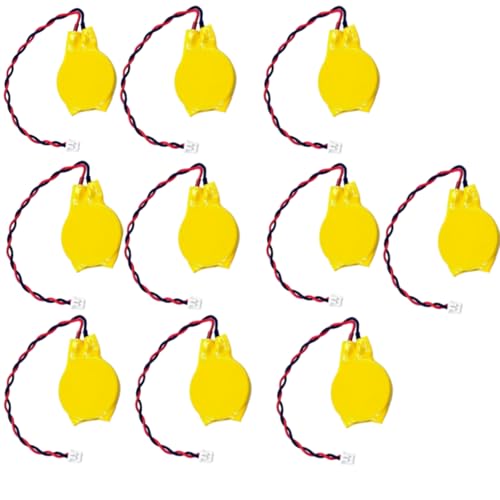
CMOS Battery Pack with Wire Leads, 3V CR2032, MOLEX Connector, 10-Pack
Chosen because it specifies 3V CR2032 and MOLEX Connector.
View on Amazon
QLQXQTy 3V 2032 CMOS Battery with Wire Leads and MOLEX Connector 5PACK
Picked as a relevant option in this category.
View on Amazon
LJCELL CMOS Battery for IBM Lenovo ThinkPad Laptop X1 Carbon 2-nd Carbon 3rd Carbon 4th Carbon 5th Carbon 6th BIOS RTC CR2016 Battery with 2 Wire Cable and Connector
Picked as a relevant option in this category.
View on AmazonSigns the Battery Is Weak
| Symptom | Likely link to the battery | Other possible cause |
|---|---|---|
| Clock resets after shutdown | Common sign of a depleted coin cell | Windows time sync settings |
| BIOS settings revert to defaults | Cell cannot hold configuration | Failed BIOS update or a recent clear |
| Message such as a checksum or CMOS error at start-up | Often battery related | Corrupt settings |
| Boot drive not detected until settings are re-entered | Settings lost between sessions | Cable or drive fault |
| Wrong date causes browser certificate warnings | Clock reset | Time zone mismatch |
If the clock is wrong after every power cycle, the battery is the first thing to check. Some users measure the cell with a multimeter; one source cites readings below about 2.8 volts as a sign it needs replacing, though a cell that low is usually already causing symptoms.
Desktop Replacement, Step by Step
- Back up settings. Enter setup and photograph any custom pages (boot order, memory profile, fan curves). Replacement resets them.
- Shut down and unplug. Turn the power supply off if it has a switch, and unplug the cable. Press the power button once to drain residual charge.
- Open the case and ground yourself by touching bare metal, or use an anti-static strap.
- Locate the battery. It is a silver coin about the size of a dime, in a small holder, often near the chipset or below the graphics slot. A large graphics card may hide it; the card might need to be taken out first.
- Release the old cell. ASUS describes pressing the latch holding the battery down with a screwdriver so it pops up, and notes that some boards include a rubber plug to be pulled straight up. Others use a metal clip to push aside. Do not pry hard against the socket.
- Insert the new CR2032 with the positive side up, matching the orientation of the old one. Slide it under the clip and press until it sits flat. Replace any rubber plug.
- Close up and power on. Reconnect power, enter setup, set the date and time, and restore your photographed settings.
Laptop Differences
Laptops vary much more than desktops, and gaming laptops, with their compact layouts, are no exception. Many use a small wired battery pack with a connector or a coin cell on a short lead, tucked under the keyboard or bottom cover. Some designs place it on the board and are meant to be serviced by the maker. Follow these precautions:
- Find the service manual for your exact model on the maker’s support site; it shows where the cell sits and which screws to remove.
- Shut down, unplug the charger, and disconnect the main battery connector as the manual instructs before touching internals.
- Use the right replacement type, which may be a pre-wired pack rather than a bare CR2032.
- Check if opening the machine affects your warranty, since some makers allow user access to the bottom panel and others do not.
| Form | Battery style | Notes |
|---|---|---|
| Desktop ATX or similar | Bare CR2032 in a holder | Easiest; one latch or clip |
| Small-form-factor desktop | Bare coin cell, sometimes hard to reach | May need to remove other parts |
| Laptop with a service panel | Often wired coin cell with connector | Follow the maker’s service manual |
| Thin gaming laptop | Frequently under the board or soldered | May require technician service |
Choosing the Right Replacement
Match the model printed on the old cell, which for most boards is CR2032. Pick a reputable brand, and avoid rechargeable lookalikes such as LIR2032 unless the motherboard manual explicitly allows them, since the voltage differs. A fresh cell stored in its packaging until use has the longest life. Dispose of the old cell at a battery recycling point rather than household trash.
Common Mistakes
- Installing the battery upside down. The flat positive side usually faces up; confirm with the old cell and the holder markings.
- Skipping the unplug step. Standby power stays on in many boards; unplug first.
- Forcing the cell out. Bent clips or broken holders are hard to repair. Use gentle pressure on the latch.
- Using metal tools carelessly near the board. A slip can short components. Prefer a plastic tool for prying where possible.
- Forgetting to restore settings. Memory profiles and boot order reset to defaults, so the PC may run slower or fail to boot until you set them again.
- Touching the new coin with damp or oily fingers. Hold it by the edges.
After Replacement: What to Check
First, set the date and time in BIOS. Second, confirm the boot order points to the right drive. Third, re-enable the memory profile if you had one on. Fourth, leave the PC off for a minute, then power it on again to confirm the time persisted. If the clock still resets, the new cell may be defective, the holder may not be making contact, or the board itself may have a fault. In that case, contact the motherboard maker.
Frequently Asked Questions
Will I lose my files when I replace the CMOS battery?
No. The battery only supports the clock and BIOS settings; your files live on the storage drive. You will, however, need to re-enter custom BIOS options and the date and time.
How do I know if it is a CR2032?
The type is stamped on the face of the old cell. Most desktop boards use CR2032, but check the board manual or the printed marking before buying a replacement.
Can I replace it with the computer still plugged in?
You should not. Unplug the machine and, for laptops, disconnect the main battery as the service manual describes, before touching the board.
How long does a CMOS battery last?
Repair guides commonly cite several years, and often longer when the computer is used regularly on mains power. Actual life varies with the board, the cell, and how often the system sits unplugged.
Is clearing CMOS the same as replacing the battery?
No. Clearing CMOS resets settings using a jumper or button described in the manual. Replacing the battery swaps the power source for the clock. Both reset BIOS options as a side effect.
My gaming laptop has no obvious battery. What now?
Consult the service manual for your model. Many thin laptops put the cell where only a technician can reach it, and opening the machine may affect your warranty. Contact the maker’s support if you are unsure.
FAQ
Will I lose my files when I replace the CMOS battery?
How do I know if it is a CR2032?
Can I replace it with the computer still plugged in?
How long does a CMOS battery last?
Is clearing CMOS the same as replacing the battery?
My gaming laptop has no obvious battery. What now?
More from Amazon
Programs that pair well with the guide above. Offers and eligibility are set by Amazon and may change.
A free business account with business pricing and bulk-buying tools for work, shop or home office.
Create a business accountFree shipping on eligible items, Prime Video and more. Eligible new members can start with a free trial.
Start a Prime free trialAudiobooks and podcasts to listen to on the go. Eligible new members can start with a free trial.
Try Audible freeAd-free music streaming. Eligible new subscribers can start with a free trial.
Try Music Unlimited freeAs an Amazon Associate we earn from qualifying purchases.