Our Top Picks
 Lenovo IdeaPad Flex 3i Chromebook Laptop8GB RAM | 256GB SSD9.76 x 14.25 x 0.75 inches3.5 poundsCheck on Amazon
 HP Chromebook 14-inch HD Touchscreen LaptopHD Touchscreen12.82 x 8.6 x 0.7 inches3.24 poundsCheck on Amazon
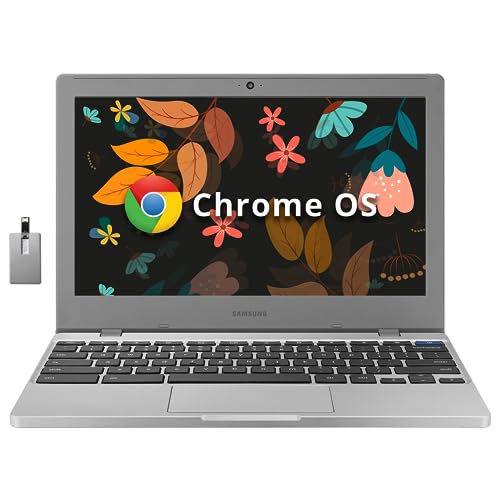 SAMSUNG Galaxy Chromebook 4 11.6” 64GB Laptop Computer4GB RAM 64GB eMMC11.33 x 7.96 x 0.66 inches2.98 poundsCheck on Amazon
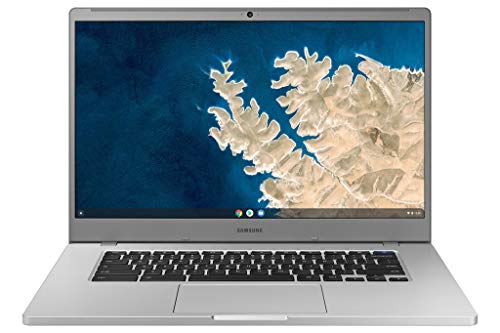 Samsung Chromebook 4 + Chrome OS 15.6" Full6GB RAM 64GB eMMC14.16 x 9.64 x 0.65 inches3.1 poundsCheck on Amazon

Let us be plain: no real gaming laptop exists at this tier. A machine with a dedicated graphics card, a high-refresh display, and the cooling to sustain a demanding game is simply not built to this budget. At this tier, the only machines that make sense for gaming are Chromebooks used for cloud gaming, where the heavy work happens on a remote server and the laptop only needs a decent screen, a stable connection, and a comfortable keyboard.
That is the approach of this guide. Every pick below is a Chromebook, framed for cloud gaming only: services such as GeForce Now, Xbox Cloud Gaming, and Amazon Luna, which stream games through the browser or an app. None of these machines will run a modern installed PC game well, and none should be bought with that expectation. What they can do is give you a big-screen setup with a keyboard and a controller for streamed play at a very small outlay.
One more thing matters more than any spec on the box: the support date. Every Chromebook carries an Auto Update Expiration date, the month Google stops sending ChromeOS updates to that model. After that date, the machine keeps working, but it no longer receives security fixes or browser updates, and some services may stop working on it. We checked the support date for every pick below and flagged the ones whose support has already ended.
As an Amazon Associate, we earn from qualifying purchases.
How to Choose
Start with the support date, because it decides how long the machine stays safe and usable. A Chromebook with updates through June 2031 gives you years of runway; one whose updates ended in June 2025 is already past its support window. If the listing does not show the model number, ask the seller for it and look the model up on Google’s Auto Update policy page.
Next, look at the screen. A 15.6-inch Full HD panel shows streamed games with far more detail than an 11.6-inch HD panel, and it gives you room for a chat window beside the game. Touch is a bonus, but a convertible hinge that folds flat is genuinely useful: it turns the machine into a stand for a controller session.
Memory and storage come third. Cloud gaming needs very little local storage, since the game lives on a server, but the machine still needs enough memory to keep the browser, the streaming service, and a few tabs running smoothly. Four gigabytes is the floor and it works, but eight gigabytes gives the browser far more breathing room.
Connectivity decides whether cloud gaming feels smooth or choppy. A stable Wi-Fi connection matters more than any chip in the machine, so look for dual-band Wi-Fi and, where possible, a wired option through a USB-C adapter. Bluetooth lets you pair a controller wirelessly.
Finally, be honest about what cloud gaming needs from you. You need a subscription to a streaming service, a controller or a keyboard and mouse you like, and a connection fast enough to carry the stream without stutter. The laptop is only one part of the setup.
1. Lenovo IdeaPad Flex 3i Chromebook 15.6-Inch
The Lenovo IdeaPad Flex 3i is the strongest pick in this roundup and the one we would buy first. It pairs the largest screen here with the most memory and the longest support runway,. The Pentium N6000 chip is a modest quad-core part, but cloud gaming does not ask much of the local processor, and the 8 gigabytes of memory keeps the browser smooth while a stream runs beside a chat window.
Specs
- Display: 15.6-inch Full HD 1920 x 1080 touchscreen
- Processor: Intel Pentium Silver N6000 quad-core
- Memory: 8GB LPDDR4X
- Storage: 128GB SSD
- System: ChromeOS with automatic updates through June 2031
- Design: 360-degree convertible hinge, Abyss Blue finish
- Model number: 82T3001NUS
The support date is the headline here. Automatic updates through June 2031 give this machine years of runway, which is rare at this tier and the main reason it leads the list. For cloud gaming at this tier, this is the most complete package, and its long support window makes it the safest buy in the roundup.
2. Acer Chromebook Spin 311 CP311-2H-C679
The Acer Chromebook Spin 311 is the smallest and lightest machine here, and it is also the one with the biggest warning attached. Its 11.6-inch touchscreen folds flat on a 360-degree hinge, and the Celeron N4020 chip with 4 gigabytes of memory is enough for a browser-based stream. As a portable cloud-gaming screen it works. As a long-term purchase it does not, because its automatic updates ended in June 2025.
Specs
- Display: 11.6-inch HD 1366 x 768 touchscreen with Corning Gorilla Glass
- Processor: Intel Celeron N4020 dual-core
- Memory: 4GB LPDDR4
- Storage: 32GB eMMC
- System: ChromeOS, automatic updates ended June 2025
- Design: 360-degree convertible hinge, compact 11.6-inch chassis
- Model number: CP311-2H-C679
We include this machine because it is widely listed and genuinely portable, but the support date makes it a weak long-term bet, and we want that stated plainly. A Chromebook past its Auto Update Expiration date no longer receives ChromeOS security fixes or browser updates, and over time some services and extensions may stop working on it. If you buy it, treat it as a short-term or secondary machine: a travel screen for streamed play, a spare for a guest room, or a starter machine for a young player whose use will be supervised and light.
3. HP Chromebook 14a-na0030nr
The HP Chromebook 14a-na0030nr sits in the middle of this group in almost every way: a 14-inch touchscreen, 4 gigabytes of memory, 32 gigabytes of storage, and a Celeron N4000 chip. That middle position is its appeal. The screen is big enough for comfortable streamed play without the bulk of a 15.6-inch machine, the touch layer works well with Android apps,. Its support window runs through June 2028, which gives it a few more years of updates than the older Samsung picks below.
Specs
- Display: 14-inch HD 1366 x 768 touchscreen
- Processor: Intel Celeron N4000 dual-core
- Memory: 4GB RAM
- Storage: 32GB eMMC
- System: ChromeOS with automatic updates through June 2028
- Design: Mineral Silver cover with ash gray base
- Model number: 14a-na0030nr, 9LL05UA#ABA
The 14-inch size is the sweet spot for many buyers: large enough that streamed games do not feel cramped, small enough to carry in a standard bag. Support through June 2028 is respectable, though not as long as the Lenovo’s runway, so plan on this being a machine for the next few years rather than the next decade. Watch the storage: 32 gigabytes fills up fast if you install Android apps or download media, so treat the cloud as your main storage.
4. Samsung Chromebook 4 XE310XBA-K02US
The Samsung Chromebook 4 is the classic small Chromebook: an 11.6-inch HD display, a Celeron N4000 chip, 4 gigabytes of memory, and a compact chassis that slips into almost any bag. This K02US configuration doubles the storage of the base model to 64 gigabytes, which is a meaningful upgrade at this tier,. Support runs through June 2027, so it has a shorter runway than the HP and Lenovo picks above.
Specs
- Display: 11.6-inch HD 1366 x 768
- Processor: Intel Celeron N4000 dual-core
- Memory: 4GB LPDDR4
- Storage: 64GB eMMC
- System: ChromeOS with automatic updates through June 2027
- Connectivity: Gigabit Wi-Fi, Bluetooth, USB-C
- Model number: XE310XBA-K02US
The doubled storage is the reason to choose this configuration over the 32-gigabyte base model. Sixty-four gigabytes leaves room for a handful of Android apps, some downloaded media, and the cache that browsers accumulate, without the constant storage warnings that plague the smallest drives. The gigabit Wi-Fi is the other highlight: on a home network with a good router, it helps keep the stream steady, which is the single biggest factor in how cloud gaming feels. The support date needs a clear flag: updates through June 2027 give this machine a limited runway, so treat it as a buy for the next couple of years.
5. Samsung Chromebook 4+ XE350XBA-K03US
The Samsung Chromebook 4+ takes the same Celeron N4000 platform as the Chromebook 4 above and stretches it into a 15.6-inch Full HD machine with 6 gigabytes of memory, the second-highest memory figure in this roundup. The larger screen makes streamed games far more enjoyable, the extra memory keeps the browser smoother with several tabs open,. Support runs through June 2027, the same date as its smaller sibling, so the same short-runway warning applies.
Specs
- Display: 15.6-inch Full HD 1920 x 1080
- Processor: Intel Celeron N4000 dual-core
- Memory: 6GB RAM
- Storage: 64GB eMMC
- System: ChromeOS with automatic updates through June 2027
- Connectivity: Gigabit Wi-Fi, Bluetooth, USB-C
- Model number: XE350XBA-K03US
The Full HD display is the main reason to pick this machine over the smaller Samsung above. Streamed games look sharper, text in menus is easier to read, and the 15.6-inch panel gives you room for a chat window beside the game. The trade-offs are the support date and the chip. Automatic updates through June 2027 mean this machine has a limited runway, so buy it for the next couple of years, not the next decade. The Celeron N4000 is a modest dual-core part, and heavy multitasking will slow it down.
Comparison Summary
| Model | Screen | Memory | Storage | Updates Through |
|---|---|---|---|---|
| Lenovo IdeaPad Flex 3i 15.6 | 15.6-inch Full HD touch | 8GB | 128GB SSD | June 2031 |
| Acer Chromebook Spin 311 | 11.6-inch HD touch | 4GB | 32GB eMMC | June 2025, ended |
| HP Chromebook 14a-na0030nr | 14-inch HD touch | 4GB | 32GB eMMC | June 2028 |
| Samsung Chromebook 4 K02US | 11.6-inch HD | 4GB | 64GB eMMC | June 2027 |
| Samsung Chromebook 4+ K03US | 15.6-inch Full HD | 6GB | 64GB eMMC | June 2027 |
The Lenovo leads on screen, memory, storage, and support date, and it is the only pick with a runway measured in years rather than months. The HP sits in the middle with a decent balance and support through June 2028. The Acer is the most portable pick, but its updates have already ended, so it ranks last unless compact size decides it.
Frequently Asked Questions
Can any of these Chromebooks run installed PC games?
No. These machines run ChromeOS and modest mobile-class chips, and they are not built to run demanding installed PC games. Their gaming use is cloud gaming only: the game runs on a remote server and streams to the laptop through the browser or an app.
What is the Auto Update Expiration date and why does it matter?
The Auto Update Expiration date is the month Google stops sending ChromeOS updates to a Chromebook model, including security fixes and browser updates. After that date the machine still works, but it becomes less safe over time and some services may stop working on it. The date is tied to the hardware platform’s release date, not the day you buy the machine.
Do I need a subscription to play games on these Chromebooks?
Yes, cloud gaming needs a streaming service, and most of them charge a subscription. The Chromebook itself is only the screen and the controls. Before buying, pick the service you want to use, confirm it runs in the Chrome browser or as an Android app on ChromeOS, and make sure your home connection is fast and stable enough to carry the stream.
Is a Chromebook past its support date still usable?
It still turns on and runs, but it is a weak long-term bet. Without security fixes and browser updates, it becomes less safe to use online, and over time some websites and services may stop working on it. The Acer Spin 311 in this roundup is past its support date, and we flagged it as a short-term or secondary machine only.
Conclusion
The honest answer at this tier is a Chromebook for cloud gaming, and the honest ranking starts with the support date. The Lenovo IdeaPad Flex 3i leads because it combines the biggest screen, the most memory, the most storage, and updates through June 2031. The Samsung Chromebook 4+ is the best big-screen alternative if the Full HD display and 6 gigabytes of memory matter most, though its updates end in June 2027. The HP Chromebook 14a is the balanced middle pick with support through June 2028. The Samsung Chromebook 4 suits buyers who want a compact, well-connected machine with usable storage, and the Acer Spin 311 is the portable option whose support has already ended, so it should only be bought as a short-term or secondary machine.
FAQ
Can any of these Chromebooks run installed PC games?
What is the Auto Update Expiration date and why does it matter?
Do I need a subscription to play games on these Chromebooks?
Is a Chromebook past its support date still usable?
More from Amazon
Programs that pair well with the guide above. Offers and eligibility are set by Amazon and may change.
Send a Prime gift membership to someone who would use free shipping and Prime Video.
Gift Amazon PrimeGive audiobooks to someone who loves to listen. Plans and prices are set by Amazon.
Gift AudibleA free business account with business pricing and bulk-buying tools for work, shop or home office.
Create a business accountFree shipping on eligible items, Prime Video and more. Eligible new members can start with a free trial.
Start a Prime free trialAs an Amazon Associate we earn from qualifying purchases.