Our Top Picks
 GameSir X4 Aileron Bluetooth Mobile Gaming Controller for7.1 x 4.7 x 3.9 inches1.2 poundsCheck on Amazon


Introduction
Cloud gaming on an iPhone lives or dies by the controller in your hands. Touch controls work for a quick session, but a long run through a racing game or a shooter calls for real sticks, real triggers, and a grip that keeps the phone steady. The catch is that iPhones come in two connector families, and a controller built for one family will not fit the other. iPhone 15, 16, and 17 models use USB-C, while iPhone 14 and older models use Lightning, so the first decision is about the port on the bottom of your phone.
This guide rounds up five controllers that cover both sides: three wired USB-C grips, one Lightning grip, and one wireless Bluetooth pad that needs a separate mount. Every section flags what works on iOS and what does not.
As an Amazon Associate, we earn from qualifying purchases.
How to Choose
Start with the port. A flat oval port means USB-C, which covers iPhone 15, 16, and 17, while a small rectangular port means Lightning, which covers iPhone 14 and earlier. USB-C grips here need iPhone 15 or newer, and the Lightning grip here is the only pick that plugs into an iPhone 14 or older. Wireless Bluetooth controllers sidestep the port question, but they need a charged battery and a phone mount you must buy separately.
Next, think about latency and feel. A wired grip connects straight through the port, so there is no pairing step and no wireless lag. That matters most in fast games streamed from the cloud, where the stream already adds delay of its own. Hall effect sticks are worth looking for: they use magnets instead of sliding contacts, so they resist stick drift and keep their centering over long use.
Then check the extras that matter on iOS. A 3.5 mm headphone jack lets you plug in wired earbuds without a separate adapter, and pass-through charging lets you top up the phone while you play. Remappable back buttons and capture features are useful, yet the software that configures them is sometimes fuller on other platforms than on iOS. Finally, measure your phone with its case on: a thick case can stop a telescopic grip from seating fully, so check the return policy before you order.
1. Backbone One PlayStation Edition Lightning 2nd Gen

The Backbone One PlayStation Edition Lightning 2nd Gen is the pick for anyone still carrying an iPhone 14 or older. It is the only grip in this roundup with a Lightning connector, and it is built around the PlayStation look, with white shells and PlayStation face button symbols. It clamps around the phone and turns the iPhone into a handheld that handles like a small console. It needs no charging or pairing.
Magnetic adapters click into place and make room for most cases. A 3.5 mm jack takes wired earbuds, and a Lightning pass-through port lets you charge the phone while you play. It works with PlayStation Remote Play, Xbox Cloud Gaming, and Apple Arcade titles that support controllers. The honest flag is the connector itself: Lightning is a dead end the moment you upgrade to a USB-C iPhone. The Backbone app pushes its Backbone+ subscription hard, and the standard analog sticks can develop drift after long heavy use.
- Specs:
- Connection: Wired Lightning, direct plug-in, no battery, no pairing
- Compatibility: iPhone 14 and older, including mini and SE models, iOS 17 or later
- Audio: 3.5 mm headphone jack
- Charging: Lightning pass-through charging while playing
- Controls: Full-size sticks, triggers, bumpers, D-pad, capture button, Backbone button
- Case fit: Magnetic adapters included for case support
- App: Backbone app launcher for games and streaming services
Backbone One PlayStation Edition Lightning 2nd Gen on Amazon
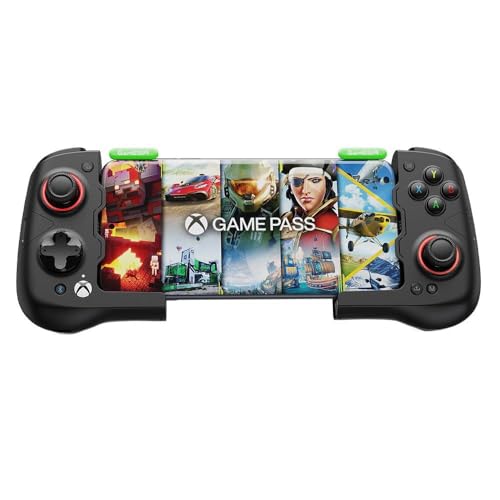
2. GameSir X4 Aileron
The GameSir X4 Aileron is the most feature-packed USB-C grip in this roundup, and it is built for iPhone 15 and newer. It stretches to hold the phone, connects through USB-C, and draws power from the phone, so there is no battery to charge and no pairing to manage. The headline hardware is Hall effect sticks and Hall effect triggers, which use magnets instead of sliding contacts and hold their centering far longer than standard analog sticks. Detachable grips let you change the shape of the controller.
A 3.5 mm headphone jack and a USB-C pass-through port let you listen on wired earbuds and charge the phone at the same time. The grip works with Xbox Cloud Gaming, GeForce Now, and Apple Arcade titles that support controllers. Two flags belong here. First, the motion controls and some of the deeper app tuning were built with other platforms in mind, so check that the feature you care about is supported on iOS before you count on it. Second, the grip is wider and heavier than the slim grips here once the detachable grips are fitted, and thick cases can stop the phone from seating on the USB-C plug.
- Specs:
- Connection: Wired USB-C, direct plug-in, no battery, no pairing
- Compatibility: iPhone 15, 16, and 17 series, plus USB-C Android phones
- Sticks and triggers: Hall effect sticks and Hall effect triggers
- Audio: 3.5 mm headphone jack
- Charging: USB-C pass-through charging while playing
- Controls: Detachable grips, motion sensor, remappable buttons, capture button
- App: GameSir app for dead zones and button mapping
3. GameSir X2s Type-C
The GameSir X2s Type-C is the slim, light USB-C grip in this roundup, and it suits players who want a controller that disappears into a pocket when the game ends. It stretches around an iPhone 15 or newer, plugs into the USB-C port, and runs off the phone, so there is no battery and no pairing step. Hall effect sticks sit at the heart of it, giving it the same drift-resistant sticks as the larger grips in this guide, and a movable USB-C connector slides to meet phones of different lengths.
The X2s keeps the essentials and drops the extras. It has a USB-C pass-through port for charging while you play, and the GameSir app covers button mapping and stick tuning. The slim body keeps the whole setup close to the size of the phone itself. The trade-offs are clear: there is no 3.5 mm headphone jack, so wired earbuds need a separate adapter, and the sticks are smaller than full-size console sticks. A thick case can still stop the phone from seating fully.
- Specs:
- Connection: Wired USB-C, direct plug-in, no battery, no pairing
- Compatibility: iPhone 15, 16, and 17 series, plus USB-C Android phones
- Sticks: Hall effect sticks with movable USB-C connector
- Audio: No 3.5 mm headphone jack
- Charging: USB-C pass-through charging while playing
- Controls: ABXY buttons, D-pad, triggers, bumpers, capture button
- App: GameSir app for button mapping and stick tuning
4. 8BitDo Ultimate 2C Wireless
The 8BitDo Ultimate 2C Wireless is the odd one out in this roundup, and that is its strength. It is a full-size wireless controller rather than a phone grip, so it feels like a console pad in your hands. It connects to an iPhone over Bluetooth, which means it works with any iPhone that supports Bluetooth controllers, without any worry about ports or connectors. Hall effect sticks keep the aim steady over long use, and the controller runs on a built-in rechargeable battery.
It also works with a tablet, a computer, or a television, so one controller can cover every screen in the house. The flags matter more here than with the grips. The controller ships with no phone mount, so you need a separate clip or a stand to hold the phone while you play, and that mount is not in the box. The 2.4 GHz wireless dongle in the box does not work with an iPhone, so Bluetooth is the only way to connect to your phone, and Bluetooth adds a little wireless delay compared with a wired grip. The controller also needs charging, so a dead battery ends the session.
- Specs:
- Connection: Bluetooth to iPhone, 2.4 GHz dongle for other devices, built-in rechargeable battery
- Compatibility: Any iPhone with Bluetooth controller support, plus tablets and computers
- Sticks: Hall effect sticks
- Audio: No 3.5 mm headphone jack on the controller
- Mount: No phone mount included, separate clip or stand needed
- Controls: Full-size layout, ABXY buttons, D-pad, triggers, bumpers
- Extras: Works as a standalone pad for tablet, computer, and television
8BitDo Ultimate 2C Wireless on Amazon
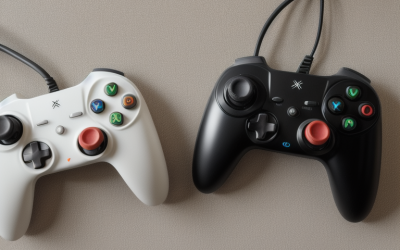
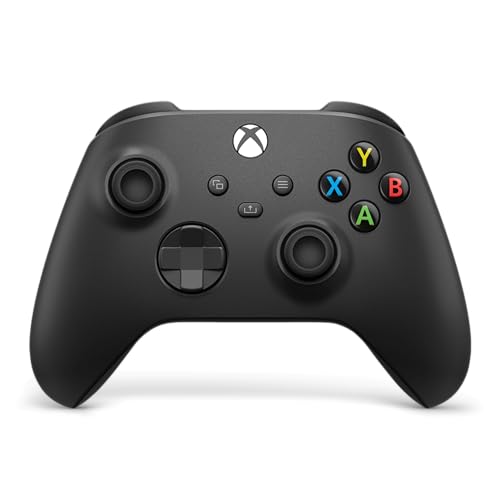
5. Xbox Wireless Controller (2025) Carbon Black
The Xbox Wireless Controller in Carbon Black is the console pad in this roundup, and it is the pick for players who already know the Xbox layout by heart. It connects to an iPhone over Bluetooth, so it works with any iPhone model, Lightning or USB-C, without any port worries. The hybrid D-pad and familiar button layout make it the easiest controller here to pick up and play with no learning curve. A 3.5 mm jack takes wired earbuds.
The controller runs on two AA cells. You can swap in fresh cells in seconds and keep playing, but you must keep spare cells on hand, and the controller has no built-in rechargeable battery. Three flags belong here. First, the box holds no phone mount, so you need a separate clip to hold the phone while you play. Second, the Xbox button and some companion app features are built for Xbox consoles and do not carry over to iOS. Third, the controller is a full-size pad, so it is the least portable pick here, and it needs a bag rather than a pocket.
- Specs:
- Connection: Bluetooth to iPhone, USB-C wired option for other devices
- Compatibility: Any iPhone with Bluetooth controller support, plus Xbox, computer, and tablet
- Power: Two AA cells, no built-in rechargeable battery
- Audio: 3.5 mm headphone jack
- Mount: No phone mount included, separate clip needed
- Controls: Hybrid D-pad, Share button, ABXY buttons, triggers, bumpers
- Extras: Pairs with computer, tablet, and television
Xbox Wireless Controller (2025) Carbon Black on Amazon
Comparison Summary
| Controller | Connection | iPhone Fit | Headphone Jack | Mount Included |
|---|---|---|---|---|
| Backbone One PlayStation Edition Lightning 2nd Gen | Wired Lightning | iPhone 14 and older | Yes | Built-in grip |
| GameSir X4 Aileron | Wired USB-C | iPhone 15 and newer | Yes | Built-in grip |
| GameSir X2s Type-C | Wired USB-C | iPhone 15 and newer | No | Built-in grip |
| 8BitDo Ultimate 2C Wireless | Bluetooth | Any iPhone | No | No |
| Xbox Wireless Controller (2025) Carbon Black | Bluetooth | Any iPhone | Yes | No |
Frequently Asked Questions
Which controller should I buy if I own an iPhone 15 or newer?
Pick a USB-C grip, either the GameSir X4 Aileron for the fullest feature set or the GameSir X2s Type-C for the slimmest carry. Both plug straight into the USB-C port and need no battery. For the couch, the 8BitDo Ultimate 2C Wireless or the Xbox Wireless Controller pair over Bluetooth, but both need a separate phone mount.
Which controller should I buy if I own an iPhone 14 or older?
Buy the Backbone One PlayStation Edition Lightning 2nd Gen, because it is the only grip here with a Lightning connector. The two Bluetooth pads also work with a Lightning iPhone, but they need a separate mount and a charged battery. Do not buy a USB-C grip for a Lightning iPhone, because it cannot plug in at all.
Do the premium features on these controllers work on iOS?
Wired grips, Hall effect sticks, pass-through charging, and headphone jacks work on iOS as expected. Motion controls and app tuning can vary, because some of that software was built for other platforms first. The Xbox button and its companion features are Xbox-only and do not carry over to iOS, and the 2.4 GHz dongle that ships with the 8BitDo pad does not work with an iPhone.
Can I use these controllers with a phone case on?
It depends on the grip and the case. The Backbone One ships with magnetic adapters that make room for most cases, and the GameSir grips fit slim cases but can struggle with thick ones or cases with a large camera lip. The Bluetooth pads have no fit problem at all, because the phone never touches the controller.
Conclusion
The right cloud gaming controller for an iPhone starts with the port on your phone. iPhone 15 and newer owners should start with a USB-C grip: the GameSir X4 Aileron for the fullest features, the GameSir X2s Type-C for the lightest carry. iPhone 14 and older owners should start with the Backbone One PlayStation Edition Lightning 2nd Gen, because it is the only wired grip here that fits a Lightning phone. For the couch, the 8BitDo Ultimate 2C Wireless brings Hall effect sticks and the Xbox Wireless Controller brings a familiar layout, if you budget for a phone mount.
FAQ
Which controller should I buy if I own an iPhone 15 or newer?
Which controller should I buy if I own an iPhone 14 or older?
Do the premium features on these controllers work on iOS?
Can I use these controllers with a phone case on?
More from Amazon
Programs that pair well with the guide above. Offers and eligibility are set by Amazon and may change.
A free business account with business pricing and bulk-buying tools for work, shop or home office.
Create a business accountFree shipping on eligible items, Prime Video and more. Eligible new members can start with a free trial.
Start a Prime free trialAudiobooks and podcasts to listen to on the go. Eligible new members can start with a free trial.
Try Audible freeAd-free music streaming. Eligible new subscribers can start with a free trial.
Try Music Unlimited freeAs an Amazon Associate we earn from qualifying purchases.