Our Top Picks


Introduction
Cloud gaming on an iPhone works best when the controller matches the phone in your hand. Xbox Cloud Gaming, GeForce NOW, Amazon Luna, and PlayStation Remote Play stream the game from a server, so the phone only shows the picture and sends your inputs back. A good controller turns that stream into something that feels like a console.
This guide covers five controllers with zero overlap with the iPhone tiers under-100 through under-1200. Two are telescopic grips that hold the phone. Three are full-size pads, with the phone on a stand or a clip.
One split matters most. iPhone 15, 16, and 17 use USB-C, so a wired USB-C grip plugs straight in. iPhone 14 and older use Lightning, so a USB-C grip cannot connect at all, and only a Bluetooth pad serves them.
As an Amazon Associate, we earn from qualifying purchases.
How to Choose
Start with the connector. A USB-C grip gives a wired, low-lag link and draws power from the phone, so there is no battery to charge and no pairing step. A Bluetooth pad works with every iPhone, including Lightning models, but it needs charging and pairing, and it adds a small amount of wireless lag.
Next, decide how you want to hold the phone. A telescopic grip turns the phone into a handheld console for travel and couch play. A full-size pad gives console-sized sticks and grips for longer sessions, but you will need a separate stand or clip.
MFi certification means Apple certified the accessory, and on iOS that usually means plug-and-play with no app needed. A pad without MFi can still work, but confirm the listing names iOS before you buy, and test it in one controller-supported game first.
Hall Effect sticks use magnets instead of sliding contacts, so they resist the drift that wears out older sticks. ALPS sticks are the full-size sticks from many console pads. Finally, check the fit: telescopic grips stretch to a stated length, and a thick case or a large camera island can break that fit, so measure your phone with its case on and confirm the colorway and model in the cart.
1. Backbone Pro

The Backbone Pro is the most complete phone grip in this guide, and the only pick here that works both docked and wireless. Slide your iPhone into the telescopic bridge and it connects over USB-C with no pairing step. Pull the phone out and it keeps working over Bluetooth with a tablet, a television, or a computer.
Backbone names iPhone 15, 16, and 17 directly, along with USB-C Android phones, and Apple sells it. Full-size ALPS sticks, a precise D-pad, tactile face buttons, and two remappable rear buttons round out the controls. A 3.5mm jack handles wired audio, and USB-C passthrough charging works in docked mode. Wireless play lasts up to 40 hours, and magnetic adapters adjust the fit for phones with or without a case.
One flag: an owner note says it does not fit an iPhone 17 Pro Max with a slim case, so confirm the fit for a Pro Max with a case on. The controller also needs a USB-C iPhone, so Lightning models are out.
- Specs:
- Connection: USB-C docked, Bluetooth wireless
- Compatibility: iPhone 15, 16, and 17, USB-C Android, iPad, Mac, Apple TV
- Sticks: Full-size ALPS analog sticks
- Buttons: Tactile face buttons, precision D-pad, 2 remappable rear buttons
- Audio: 3.5mm headset jack
- Battery: Up to 40 hours of wireless play
- Charging: USB-C passthrough in docked mode
- Fit: Magnetic adapters for cased or bare phones
- Weight: 203 g
- Model: BB-N1-B-A
- Buy on Amazon
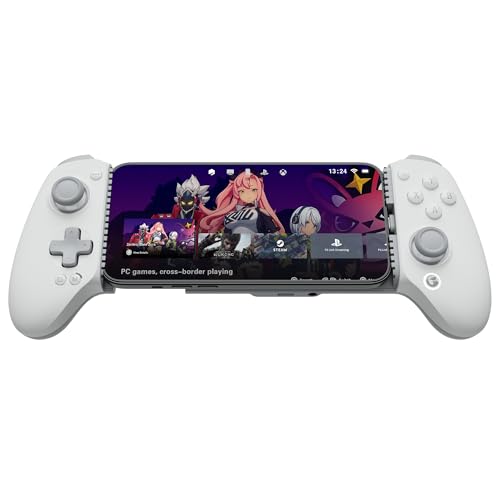
2. GameSir G8 Plus MFi
The GameSir G8 Plus MFi is the first GameSir controller to carry Apple MFi certification, and that certification is the whole point of this pick. It is a telescopic USB-C grip for iPhone 15, 16, and 17, plus iPad mini and USB-C Android phones, working with no pairing step and no app needed.
The bridge stretches 125 mm to 215 mm, covering every current iPhone and an iPad mini. Hall Effect sticks and analog triggers give drift-resistant aim and a hair-trigger mode. The D-pad is mechanical, the ABXY buttons are membrane, and two pro back buttons sit on the rear. A 3.5mm jack handles wired audio, and USB-C passthrough charging works while docked.
No battery, no Bluetooth, and no gyro, so the grip only works while the phone is docked, and Lightning iPhones cannot use it at all. One flag: a long-term test noted connection drops every few minutes on an iPhone 15 Pro and an iPhone 17 Pro until the firmware was updated, so update the firmware through the GameSir app first. Confirm the MFi listing in the cart, because GameSir sells a separate Bluetooth G8 Plus under a different code.
- Specs:
- Connection: Wired USB-C, movable USB-C port
- Compatibility: iPhone 15, 16, 17, iPad mini 6+, USB-C Android
- Certification: Officially MFi certified by Apple
- Sticks: Hall Effect thumbsticks
- Triggers: Hall Effect analog triggers with hair-trigger mode
- D-pad: Mechanical D-pad
- Buttons: Membrane ABXY, 2 pro back buttons
- Audio: 3.5mm headset jack
- Stretch range: 125 mm to 215 mm
- Gyro: None
- Battery: None, powered by the phone
- Buy on Amazon
3. Sony DualSense Wireless Controller, Midnight Black
The DualSense is the console pad in this guide, and it is here because it pairs with an iPhone over Bluetooth and feels like a full-size controller in a way no phone grip can match. It does not hold the phone, so you will need a separate stand or clip, and it works best on a couch or at a desk.
iOS has supported the DualSense over Bluetooth since iOS 14.5, so any current iPhone pairs it like any Bluetooth pad, including Lightning models. It also works with PS5, PC, and Mac as a living-room controller.
Haptic feedback and adaptive triggers do not work on iOS, so on an iPhone it behaves as a standard pad with a touch pad, a built-in mic, and a motion sensor. Buy it for the sticks, the grips, and the build, not for the PS5-only features. Confirm the Midnight Black listing in the cart, because Sony sells several colorways and a separate Edge model under different codes.
- Specs:
- Connection: Bluetooth, wired USB-C
- Compatibility: iPhone over Bluetooth, PS5, PC, Mac
- Sticks: Full-size analog sticks
- Triggers: Adaptive on PS5, standard on iOS
- Feedback: Haptics on PS5, not on iOS
- Extras: Touch pad, built-in microphone, motion sensor
- Battery: Built-in rechargeable battery, charges over USB-C
- Mount: None, needs a separate phone stand or clip
- Weight: 280 g
- Color: Midnight Black
- Buy on Amazon
4. 8BitDo Pro 3, Gray
The 8BitDo Pro 3 is the classic-style pad in this guide, and the gray colorway is the one to buy. It connects over Bluetooth, 2.4G wireless, or wired USB-C, and the listing names Apple and iOS alongside Switch, Switch 2, Windows, SteamOS, and Android.
TMR sticks read position with magnetic fields and resist drift like Hall Effect sticks. Hall Effect triggers, magnetic swappable ABXY buttons, and two pro back buttons round out the controls. A charging dock comes in the box.
It has no mount, so it needs a separate stand or clip; 8BitDo sells a mobile clip for the Pro 2 and Pro 3 under a separate code. Two flags: motion controls work on Switch and Steam, not on iOS, and the purple and yellow versions are separate listings under different codes, so confirm gray in the cart.
- Specs:
- Connection: Bluetooth, 2.4G wireless, wired USB-C
- Compatibility: Switch, Switch 2, Windows, Apple, SteamOS, Android
- Sticks: TMR joysticks
- Triggers: Hall Effect triggers
- Buttons: Swappable magnetic ABXY, 2 pro back buttons
- Motion: 6-axis on Switch and Steam, not on iOS
- Charging: Charging dock included
- Mount: None, 8BitDo mobile clip sold separately
- Release date: August 12, 2025
- Color: Gray
- Buy on Amazon
5. 8BitDo Ultimate 2C Bluetooth, Dark Blue
The 8BitDo Ultimate 2C Bluetooth in Dark Blue is the test pick in this guide, and it is here because it is a strong pad with one honest gap. It is a full-size Bluetooth pad with Hall Effect sticks, 6-axis motion, remappable L4 and R4 back buttons, and turbo, connecting over Bluetooth, 2.4G wireless, or wired USB-C. It has no mount, so the phone needs a separate stand or clip.
The gap is the listing: it names Switch, Windows, and Android, not iOS. Treat it as a test: pair it over Bluetooth, open one game with native controller support, and confirm it works before you settle in.
This is also the weakest verification in the guide. The other four picks name iPhone or iOS directly, so this one sits last with the plainest warning. Hall Effect sticks resist drift, the 1000Hz polling rate on PC keeps inputs tight, and the dark blue colorway is a distinct listing from the purple, green, and transparent black versions used in earlier Android tiers.
- Specs:
- Connection: Bluetooth, 2.4G wireless, wired USB-C
- Compatibility: Switch, Windows, Android named, iOS not named
- Sticks: Hall Effect thumbsticks
- Motion: 6-axis motion
- Buttons: Remappable L4 and R4 bumpers, turbo
- Polling rate: 1000Hz on PC
- Mount: None, needs a separate phone stand or clip
- Color: Dark Blue
- Buy on Amazon
Comparison Summary
| Pick | Holds the phone? | Names iPhone? | Connection |
|---|---|---|---|
| Backbone Pro | Yes, telescopic grip | Yes, iPhone 15, 16, 17 | USB-C docked, Bluetooth wireless |
| GameSir G8 Plus MFi | Yes, telescopic grip | Yes, MFi certified | Wired USB-C |
| Sony DualSense, Midnight Black | No, needs a stand or clip | Yes, pairs over Bluetooth | Bluetooth, wired USB-C |
| 8BitDo Pro 3, Gray | No, needs a stand or clip | Yes, Apple and iOS named | Bluetooth, 2.4G, wired USB-C |
| 8BitDo Ultimate 2C Bluetooth, Dark Blue | No, needs a stand or clip | No, test pick | Bluetooth, 2.4G, wired USB-C |
Two picks hold the phone and three do not. Four name iPhone or iOS directly, and one is a test pick. Both grips need a USB-C iPhone, while all three pads work over Bluetooth with any iPhone.
Frequently Asked Questions
Do USB-C grips work with iPhone 14 and older?
No. iPhone 14 and older use Lightning, and a USB-C grip has no way to connect to a Lightning port. If you own a Lightning iPhone, buy a Bluetooth pad instead, such as the DualSense or the 8BitDo Pro 3, with a stand or a clip. The Backbone Pro and the GameSir G8 Plus MFi both need a USB-C iPhone, meaning iPhone 15 and newer.
Do I need a mount for the full-size pads?
Yes. The DualSense, the 8BitDo Pro 3, and the 8BitDo Ultimate 2C have no mount, so the phone needs a separate stand or clip. A small desk stand works for couch play, and a clip works for travel. 8BitDo sells a mobile clip made for the Pro 2 and Pro 3 under a separate code, which is the simplest add-on for the Pro 3.
Will the DualSense haptics and adaptive triggers work on iPhone?
No. Haptic feedback and adaptive triggers are PS5 features, and they do not carry over to iOS. On an iPhone it behaves as a standard Bluetooth pad with a touch pad, a built-in mic, and a motion sensor. Buy it for the sticks, the grips, and the build, not for the PS5-only features.
Which pick is best for cloud streaming versus native games?
For cloud streaming, a grip wins, because the phone and the controller become one handheld with a wired, low-lag link. The Backbone Pro is the strongest grip here, with the GameSir G8 Plus MFi close behind for pure plug-and-play. For native games on a television or a desk, a full-size pad wins, because the larger sticks and grips suit longer sessions. The 8BitDo Pro 3 is the best pad pick here, with the DualSense close behind if you also own a PS5.
Conclusion
The right controller depends on two facts: which iPhone you own, and how you want to hold it. If you own an iPhone 15, 16, or 17 and want a handheld, the Backbone Pro is the most flexible grip here, with the GameSir G8 Plus MFi as the simpler MFi-certified choice. If you own a Lightning iPhone, or you want a console-sized pad, the DualSense and the 8BitDo Pro 3 both pair over Bluetooth and name iOS.
The 8BitDo Ultimate 2C Bluetooth in Dark Blue is the budget pad and the test pick: its listing does not name iOS, so confirm it works in one controller-supported game before you commit. Whichever pick you choose, confirm the exact listing, the colorway, and the fit with your phone and case in the cart.
FAQ
Do USB-C grips work with iPhone 14 and older?
Do I need a mount for the full-size pads?
Will the DualSense haptics and adaptive triggers work on iPhone?
Which pick is best for cloud streaming versus native games?
More from Amazon
Programs that pair well with the guide above. Offers and eligibility are set by Amazon and may change.
A free business account with business pricing and bulk-buying tools for work, shop or home office.
Create a business accountFree shipping on eligible items, Prime Video and more. Eligible new members can start with a free trial.
Start a Prime free trialAudiobooks and podcasts to listen to on the go. Eligible new members can start with a free trial.
Try Audible freeAd-free music streaming. Eligible new subscribers can start with a free trial.
Try Music Unlimited freeAs an Amazon Associate we earn from qualifying purchases.