Our Top Picks
Pros & cons
- 14 cores and 20 threads suit mixed gaming and multitasking
- Supports both DDR4 and DDR5 platforms for flexibility
- Integrated UHD 770 graphics work without a discrete GPU
- 600-series boards may need a BIOS update first
- No cooler is included with the processor
The Ryzen 7 9700X and the Core i5-14600K land close together in overall performance, and the choice comes down to power use, platform life and workload: the 9700X is the efficient, forward-looking AM5 pick for gaming, while the i5-14600K offers more threads for multitasking on a mature LGA 1700 platform. Both are desktop processors, so they apply to a build, not a laptop.
At a Glance
| Spec | Ryzen 7 9700X | Core i5-14600K |
|---|---|---|
| Architecture | Zen 5 | Raptor Lake Refresh |
| Cores / threads | 8 / 16 | 14 / 20 (6 P + 8 E) |
| Clocks | 3.8 GHz base, up to 5.5 GHz boost | P-cores 3.5 GHz base, up to 5.3 GHz; E-cores up to 4.0 GHz |
| Cache | 32 MB L3 | 24 MB Smart Cache |
| Power | 65 W TDP (88 W package power limit) | 125 W base, 181 W max turbo |
| Socket | AM5 | LGA 1700 |
| Memory | DDR5 only (5600 listed) | DDR5-5600 or DDR4-3200 |
| Integrated graphics | Basic RDNA 2 | Intel UHD Graphics 770 |
| Overclocking | Supported | Unlocked (K model) |
The 9700X figures reflect AMD’s published rating as reported by Notebookcheck and spec databases; the 14600K figures reflect Intel’s rating as listed by third-party spec sites, since Intel’s own page was not retrievable for this article.

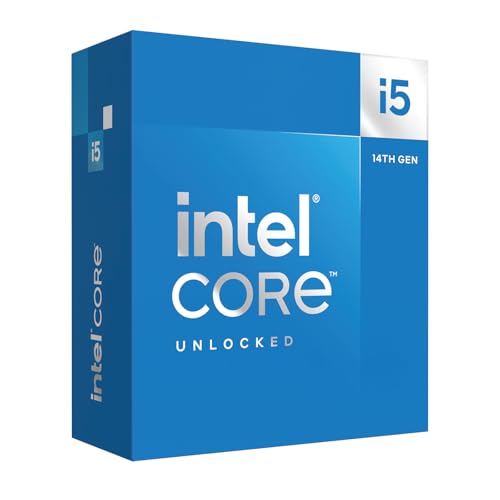
Intel® Core™ i5-14600K Desktop Processor 14 Cores (6 P-Cores + 8 E-Cores) up to 5.3 GHz
Picked as a relevant option in this category.
View on AmazonWhere They Sit on Performance
Notebookcheck reports that the 9700X’s overall processor performance is similar to the Core i5-14600K, and its review headline credits the Zen 5 chip with gaming and single-core results at the level of the Core i9-14900K. One spec site reports the 14600K as roughly 24 percent faster in certain multithreaded workloads, which fits its higher thread count. CPU Mark scoring cited in one summary placed the 14600K about 3.9 percent higher overall. Taken together: single-threaded and gaming work lean to the 9700X, and heavily threaded work leans to the 14600K. No exact frame-rate numbers are quoted here because the sources did not give a consistent game-by-game table.
The Power Story
The biggest practical difference is power. AMD rates the 9700X at 65 W, with a package power limit near 88 W per Notebookcheck, and the long-term power can be set to 65 W or 105 W. Intel rates the i5-14600K at 125 W base power with a 181 W maximum turbo. In daily use this means the AMD chip is easier to cool, quieter and gentler on a modest power supply, and the Intel chip benefits from a stronger cooler and a board with solid power delivery. Neither is likely to need exotic cooling in games, but sustained all-core work on the Intel part generates considerably more heat.
Platform Comparison
| Factor | AM5 with 9700X | LGA 1700 with 14600K |
|---|---|---|
| Future upgrades | Newer Ryzen chips can follow on the same socket | End of the line; no new generations expected |
| Memory flexibility | DDR5 only | DDR4 or DDR5, board dependent |
| Board selection | Newer boards, PCIe 5.0 slots common | Wide, mature range including budget DDR4 boards |
| Cooler mounting | AM5 bracket | LGA 1700 bracket |
Gaming Notes by Resolution
- 1080p high refresh: the processor matters most here, and the 9700X’s strong per-core speed is its selling point.
- 1440p: both are comfortably capable; the graphics card sets most of the result.
- 4K: expect near-identical results; spend the difference on graphics.
- Games that use many threads: the 14600K’s extra efficient cores help background tasks, such as chat, streaming software and browsers.
Neither processor has the stacked cache of AMD’s X3D line, so for the most processor-sensitive games, look at Ryzen 7 7800X3D or 9800X3D class parts.
Best For Matrix
| Buyer | Better match | Why |
|---|---|---|
| New gaming build, wants low power | Ryzen 7 9700X | 65 W rating, easy cooling |
| Building from scratch and wants upgrades later | Ryzen 7 9700X | AM5 has future chip support |
| Streams while gaming with software encoding | Core i5-14600K | More threads |
| Already owns DDR4 and an LGA 1700 board | Core i5-14600K | No platform change |
| Wants to tinker with overclocking | Core i5-14600K | Unlocked K model with wide board support |
| Wants a quiet small build | Ryzen 7 9700X | Lower heat output |
Common Mistakes
- Comparing the 14 cores of the 14600K to the 8 of the 9700X in games. Most games do not scale across that many cores.
- Ignoring platform cost. A DDR5-only board and memory add up if you are coming from DDR4.
- Skipping the BIOS update. New processors on older boards often need firmware support; the board maker’s page lists the version.
- Choosing the K chip without a K-class board and cooler, which wastes its tuning headroom.
- Expecting this pair to match X3D chips in cache-sensitive games.
A Note on Laptops
Both chips named here are socketed desktop processors that need a motherboard, memory and a cooler. They are not found inside laptops. Readers shopping for a portable machine should look at mobile chips from the same families instead, since mobile parts run at much lower power limits and their performance differs from the desktop figures in this article. The desktop comparison is useful for a home build, a small-form-factor PC, or deciding which platform to invest in before buying parts. When you compare a laptop later, always check the exact mobile model name and the power limit the laptop maker configures, because the same chip can behave differently from one design to the next.
Alternatives
- Ryzen 7 7800X3D or 9800X3D: the cache-equipped AMD options for gaming-first buyers.
- Core i5-14600KF: the same chip without integrated graphics.
- Ryzen 5 9600X: a lower-tier Zen 5 chip for tighter budgets.
Frequently Asked Questions
Which is better for gaming, the 9700X or the 14600K?
Notebookcheck rates the 9700X very highly for gaming and single-core work, and overall performance is described as similar between the two. At higher resolutions the graphics card dominates and the difference narrows.
Is the 14600K better for multitasking?
Generally yes, because it has 20 threads against the 9700X’s 16. One spec source reports a gap near 24 percent in certain multithreaded workloads.
Can the 9700X use DDR4 memory?
No. AM5 supports DDR5 only, while the 14600K works with DDR5 or DDR4 depending on the board.
Which is easier to cool?
The 9700X, with its 65 W rating. The 14600K reaches 181 W at maximum turbo and benefits from a stronger cooler.
Does either come with a cooler?
Typically not. The 9700X is sold without one according to the sources, and the 14600K retail packaging also omits a cooler, so plan to buy one.
Should I switch from the 14600K to the 9700X?
Probably not for gaming alone, because performance is similar and a switch means a new board and memory. It makes sense if you want lower power use or a platform with room to upgrade.
FAQ
Which is better for gaming, the 9700X or the 14600K?
Is the 14600K better for multitasking?
Can the 9700X use DDR4 memory?
Which is easier to cool?
Does either come with a cooler?
Should I switch from the 14600K to the 9700X?
More from Amazon
Programs that pair well with the guide above. Offers and eligibility are set by Amazon and may change.
A free business account with business pricing and bulk-buying tools for work, shop or home office.
Create a business accountFree shipping on eligible items, Prime Video and more. Eligible new members can start with a free trial.
Start a Prime free trialAudiobooks and podcasts to listen to on the go. Eligible new members can start with a free trial.
Try Audible freeAd-free music streaming. Eligible new subscribers can start with a free trial.
Try Music Unlimited freeAs an Amazon Associate we earn from qualifying purchases.