Our Top Picks
 HP 14a Chromebook in White Intel CPU 4GB4GB | 128GB Storage10 x 8 x 1 inches3.24 poundsCheck on Amazon
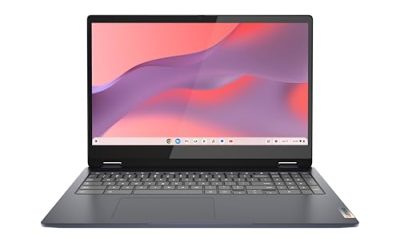
 Lenovo Chromebook 14 Laptop 14" Touchscreen4GB RAM | 192GB eMMC12.83 x 8.73 x 0.73 inches2.87 poundsCheck on Amazon


Introduction
Let us be plain from the first line: no Windows gaming laptop exists in this tier. Every pick is a Chromebook, and every one of them plays games the same way, through the cloud. GeForce NOW, Xbox Cloud Gaming, and Amazon Luna run in the browser, and Android games from the Play Store install directly, so a modest Chromebook with a good screen and steady Wi-Fi can carry an evening of play. What it cannot do is run a Windows game from a local install.
The five machines below were chosen for the screen, the memory, the real built-in storage, and the update window. Two are Renewed, two carry storage headlines that need reading twice, and one carries a chip-name mismatch, all flagged below.
Disclosure
As an Amazon Associate, we earn from qualifying purchases.
How to Choose
Start with the cloud service, not the laptop
A Chromebook in this tier is a window, not an engine. The game runs on a server, and the laptop shows you the picture. Your home connection matters more than the chip, so a 5 GHz Wi-Fi network and a wired controller will do more than any spec bump.
Check the update date before anything else
Every Chromebook has an Auto Update Expiration date, the month Google stops sending ChromeOS updates to that model. After that date the machine still turns on, but it stops getting patches. This guide gives an AUE date for every pick and flags every disagreement between sources. Check it on the device itself the day the box arrives, under Settings, About ChromeOS, Additional details.
Read the storage headline twice
This tier is full of bundle listings, and their storage headlines are the trap. A listing that shouts a big storage number may be adding a removable memory card, a docking station, or a cloud plan to a small built-in drive. Count only the built-in drive.
Memory, screen, and Wi-Fi
Four gigabytes of memory is the floor in this tier, enough for one cloud stream plus a handful of browser tabs. A Full HD screen is worth seeking out: the step from 1366 by 768 to 1920 by 1080 is the biggest visible upgrade here.
1. HP Chromebook 14, Intel Pentium Silver N6000

Buy the HP Chromebook 14 on Amazon
This pick carries the most to untangle. The listing title names an Intel N200 chip, while the specification text names an Intel Pentium Silver N6000, a quad-core chip at 1.1 GHz base and 3.3 GHz turbo, with 4 GB of LPDDR5 memory. Confirm the chip in the cart before checkout.
The screen is a 14-inch HD panel at 1366 by 768, micro-edge and anti-glare, at 250 nits. The 47 Wh battery is the strongest part, listed for up to 12 hours of play. Storage is where the headline needs a second look: the listing advertises 256 GB, but that is 128 GB of built-in UFS storage plus a 128 GB memory card.
The update date is the other conflict: the listing states June 2033, while Google’s table puts the 14a-na1 family at June 2029. Check the update schedule on the device itself.
- Specs:
- Display: 14-inch HD, 1366 by 768, micro-edge, anti-glare, 250 nits
- Processor: Intel Pentium Silver N6000, quad-core, 1.1 GHz base, 3.3 GHz turbo, 4 MB cache
- Memory: 4 GB LPDDR5
- Storage: 128 GB UFS built in, plus a 128 GB memory card
- Graphics: Intel UHD Graphics
- Battery: 2-cell, 47 Wh, up to 12 hours
- Connectivity: Wi-Fi, webcam, USB-C
- Update window: June 2033 listed; June 2029 on Google’s table
2. HP 14a Chromebook, Renewed, Sparkly White
Buy the HP 14a Chromebook on Amazon
The second pick is a Renewed HP 14a in a sparkly white finish, the most modern-feeling machine in this guide for one reason: DDR5 memory. The listing describes an Intel quad-core chip that tops out at 3.7 GHz, which matches the Intel N200, and the 128 GB built in is the full amount, with no bundled card inflating it.
Renewed means the machine was previously owned, inspected, tested, and cleaned. Check the listing for its condition grade and guarantee, test every key and port the day it arrives, and confirm the exact model number in the cart, because this listing gives only the family name HP 14a. The 14a-nf family, which this chip and memory combination points to, carries an Auto Update Expiration date of June 2033, so confirm it on the device itself.
- Specs:
- Display: 14 inches, HD, 1366 by 768
- Processor: Intel quad-core, up to 3.7 GHz, matching the Intel N200
- Memory: 4 GB DDR5
- Storage: 128 GB built in
- Condition: Renewed
- Color: Sparkly White
- Weight: about 3.24 pounds
- Update window: June 2033, for the 14a-nf family this configuration points to
3. HP Chromebook x360 14a, Renewed, Touchscreen
Buy the HP Chromebook x360 14a on Amazon
The third pick is the only convertible in the guide. The 14-inch HD touchscreen folds all the way back, so the machine becomes a tablet for Android games built for touch, a tent for watching a stream, or a normal laptop. Test the hinge the day it arrives.
Inside is an Intel Celeron N4020, a dual-core chip, with 4 GB of DDR4 memory and 64 GB of eMMC storage, the lightest specification set in this guide. A single cloud stream runs fine, but keep the tab count low, because 64 GB fills fast.
The update date needs the most care. Google’s published list puts the Chromebook x360 14a at June 2029, but an owner on HP’s support forum reported that the update schedule on their x360 14a-ca0108ca read 2026, three years earlier. If you buy this machine, open Settings, About ChromeOS, Additional details after setup, and read the date on the screen. A June 2029 date makes this a reasonable buy; a 2026 date means patches stop soon.
- Specs:
- Display: 14-inch HD touchscreen, folds back for tablet and tent use
- Processor: Intel Celeron N4020, dual-core, 1.1 GHz
- Memory: 4 GB DDR4
- Storage: 64 GB eMMC
- Connectivity: Wi-Fi, Bluetooth 4.2, webcam, stereo speakers
- Condition: Renewed
- Color: Silver
- Update window: Google’s list says June 2029; an owner reported their device showing 2026
4. HP Chromebook 14, Business and Student Bundle, 576 GB Advertised
Buy the HP Chromebook 14 on Amazon
The fourth pick is the guide’s biggest storage headline and its biggest storage trap, both at once. The listing advertises 576 GB, but the fine print says 64 GB of eMMC built in, plus a 512 GB docking station in the box. A docking station is a hub with storage attached, not built-in storage, and it only helps while plugged in. The machine itself is a 64 GB Chromebook.
The machine itself is straightforward: a 14-inch HD screen, an Intel Celeron chip with Intel UHD Graphics 600, 4 GB of LPDDR4 memory, and ChromeOS. The bundle adds earphones and a docking station, which adds useful ports, but they are not storage. The 64 GB built in is enough for the browser and a handful of Android games, so plan on streaming first and downloading second.
The weakest verification in this guide belongs to this pick. The listing gives no full model number, naming the machine only as HP 14, and it is a third-party bundle rather than a listing from HP itself. The Celeron configuration points to the 14a-na1 family, which Google lists at June 2029, but that is an inference, not a confirmation. Check the model number on the box.
- Specs:
- Display: 14 inches, HD
- Processor: Intel Celeron, Intel UHD Graphics 600
- Memory: 4 GB LPDDR4
- Storage: 64 GB eMMC built in, plus a 512 GB docking station in the box
- Extras: earphones, docking station
- Condition: new, third-party bundle listing
- Color: Gray
- Update window: no exact model named; 14a-na1 family listed at June 2029
5. Lenovo IdeaPad Slim 3 Chromebook, 14-Inch Full HD Touch
Buy the Lenovo IdeaPad Slim 3 Chromebook on Amazon
The fifth pick is the sharpest screen in the guide. The 14-inch Full HD touchscreen runs at 1920 by 1080, and the step up from the HD panels on the other four picks is visible the moment a stream opens: text is crisper and game art holds its edges.
The chip is a MediaTek Kompanio 520, an eight-core Arm chip at 2.0 GHz, with 4 GB of memory. Arm chips sip battery, and Lenovo rates this machine for up to 13 hours.
Storage follows the bundle pattern of this tier, so read it twice. The headline says 192 GB, which is 64 GB of built-in eMMC storage plus a 128 GB memory card. Count the 64 GB, treat the card as a bonus, and let the Full HD screen be the reason to buy this one. The update date carries a small conflict: Google’s list says June 2033, while some listings say June 2032.
- Specs:
- Display: 14-inch Full HD touchscreen, 1920 by 1080, anti-glare
- Processor: MediaTek Kompanio 520, eight-core, 2.0 GHz
- Memory: 4 GB
- Storage: 64 GB eMMC built in, plus a 128 GB memory card
- Extras: USB-C hub included
- Battery: up to 13 hours
- Connectivity: Wi-Fi 6, webcam
- Update window: June 2033 listed; some listings say June 2032
Comparison Summary
| Pick | Screen | Memory | Built-in storage | Update window |
|---|---|---|---|---|
| HP Chromebook 14, N6000 | 14-inch HD | 4 GB LPDDR5 | 128 GB UFS | June 2033 listed; June 2029 Google |
| HP 14a, Renewed | 14-inch HD | 4 GB DDR5 | 128 GB | June 2033 |
| HP Chromebook x360 14a, Renewed | 14-inch HD touch | 4 GB DDR4 | 64 GB eMMC | June 2029 listed; owner saw 2026 |
| HP Chromebook 14 bundle | 14-inch HD | 4 GB LPDDR4 | 64 GB eMMC | June 2029, inferred |
| Lenovo IdeaPad Slim 3 Chromebook | 14-inch Full HD touch | 4 GB | 64 GB eMMC | June 2033; some say June 2032 |
Two picks give you 128 GB of real built-in storage; three give you 64 GB and a bundled extra. One pick gives you a Full HD touchscreen, one a convertible hinge. The update windows run from June 2029 to June 2033, but three of the five carry a conflict, so the on-device check is the last step.
Frequently Asked Questions
Can a Chromebook in this tier run Windows games?
No. None of these machines runs Windows games from a local install. They play games through cloud streaming services such as GeForce NOW, Xbox Cloud Gaming, and Amazon Luna, and through Android games from the Play Store. If a game you want exists only as a Windows install, you need a Windows machine instead.
Why does the update date matter more than the processor here?
The processor decides how smoothly a stream plays today. The update date decides whether the machine is safe to use in a few years, because when Google’s update window ends, the machine stops receiving security patches. In this tier, updates through June 2033 are worth more than a slightly faster chip whose updates end in June 2029.
How much built-in storage do I really need for cloud gaming?
For streaming alone, 64 GB of built-in storage is enough, because the game lives on a server and only a small cache lives on your machine. Count only the built-in drive, and treat bundled memory cards, docking stations, and cloud plans as extras.
Do I need a controller, or can I play with the keyboard?
You can start with the keyboard, and many cloud services work well with one. A controller is worth adding for games built around a gamepad, where twin sticks and triggers feel natural. The touchscreen picks add touch controls, a third option for Android games built for fingers.
Conclusion
This tier is honest about what it is: five Chromebooks, none pretending to be a Windows gaming laptop, each with a real strength and a real limit. The HP Chromebook 14 with the N6000 gives you the biggest built-in drive and the longest battery, once you sort out the chip-name mismatch and the update-date conflict. The Renewed HP 14a gives you the newest memory and a clean 128 GB, once you confirm its model number. The convertible x360 14a gives you a touchscreen and a tablet mode, once you read the update date on the device itself. The HP bundle gives you ports and earphones, once you accept that its 576 GB headline is mostly a docking station. The Lenovo IdeaPad Slim 3 gives you the only Full HD screen, once you count its 64 GB of built-in storage for what it is.
Buy the screen and the update window first, and check the update schedule on the device the day it arrives.
FAQ
Can a Chromebook in this tier run Windows games?
Why does the update date matter more than the processor here?
How much built-in storage do I really need for cloud gaming?
Do I need a controller, or can I play with the keyboard?
More from Amazon
Programs that pair well with the guide above. Offers and eligibility are set by Amazon and may change.
Send a Prime gift membership to someone who would use free shipping and Prime Video.
Gift Amazon PrimeGive audiobooks to someone who loves to listen. Plans and prices are set by Amazon.
Gift AudibleA free business account with business pricing and bulk-buying tools for work, shop or home office.
Create a business accountFree shipping on eligible items, Prime Video and more. Eligible new members can start with a free trial.
Start a Prime free trialAs an Amazon Associate we earn from qualifying purchases.