Key takeaways
- Does the Dell laptop F16QJX1 need a watch battery? Learn what the CMOS coin-cell battery does, how to check your exact model, and the signs it needs replacing.
As an Amazon Associate, we earn from qualifying purchases. This guide answers a common question about Dell laptops and the small coin-cell battery inside them, with no products to buy and no links to follow.
The Short Answer
Yes, almost certainly. The code F16QJX1 identifies a Dell laptop configuration, and the overwhelming majority of Dell laptops ship with a small watch-style battery on the motherboard, usually a CR2032 coin cell. That little battery is called the CMOS battery or RTC battery, and its job is to keep the clock running and hold basic firmware settings while the laptop is switched off and unplugged.
There is one important exception. A small number of newer Dell models, including some recent Latitude laptops, are built without a separate CMOS battery at all. On those machines the main rechargeable battery keeps the clock alive, and the clock resets if the main battery ever drains completely while the charger is disconnected. Because F16QJX1 is a configuration code rather than a familiar retail model name, the only way to be completely certain about your own machine is to check the service manual for that exact code.
What People Mean by a Watch Battery in a Laptop
When someone asks whether a laptop needs a watch battery, they are almost always talking about the CMOS battery. It looks exactly like the coin cell in a wristwatch: a flat, silver disc about the size of a small coin. Dell calls it a coin-cell battery in its own support documentation, and the most common type in Dell machines is the CR2032, a 3-volt lithium cell that measures 20 millimetres across and 3.2 millimetres thick.
Do not confuse this part with the main laptop battery. The main battery is the large rechargeable pack that powers the whole machine when it is unplugged from the wall. The CMOS battery is tiny by comparison, it is not rechargeable in the usual sense, and it cannot run the laptop at all. It has only two jobs, and both of them happen while the machine is off.
First, it keeps the real-time clock running. That clock chip tracks the date and time even when the machine is powered down, and the coin cell supplies the tiny amount of power it needs around the clock. Second, it helps the BIOS or UEFI firmware remember hardware configuration settings, such as the boot order, storage mode, and security options. On many modern boards those settings are also stored in non-volatile memory that survives without power, so the clock is often the only thing you notice going wrong, but on older designs the settings themselves can be lost as well.
Why the Code F16QJX1 Makes This Question Tricky
Dell sells laptops under family names that most people recognise, such as Inspiron, XPS, Latitude, Vostro, and the G Series gaming line. Underneath those family names, every individual machine carries a service tag and a configuration code that identifies exactly how it was built. F16QJX1 follows the pattern of one of those configuration identifiers rather than a retail model name.
That matters because the CMOS battery is not identical across every Dell laptop. Most models use a standard CR2032 in a holder on the motherboard. Some use a thinner CR2025 or CR2016 cell, which has the same diameter and voltage but a different thickness. Others use a small battery pack wired to a two-pin connector on the board instead of a bare coin cell in a clip. And a few recent models skip the part entirely. Two machines that both carry the Dell badge can therefore have different answers to the same question, which is why a generic answer is only the starting point.
How to Check Whether Your F16QJX1 Has a CMOS Battery
There are three reliable ways to check, in order from easiest to most involved.
The first is the service manual. Find the service tag on the bottom of the laptop or in the BIOS setup screen, then enter it on the Dell support site and open the service manual for your machine. Look for the coin-cell battery section. Dell manuals describe removal and installation step by step, and they name the exact cell type. This is the only method that gives you a definitive answer without opening the machine.
The second is the diagnostic route. Dell laptops run a pre-boot diagnostic that you can start by pressing the F12 key during startup and choosing Diagnostics. If the CMOS battery is failing, the diagnostic or the startup messages may say so directly. Dell also uses blink codes and beep codes to report hardware faults. On Latitude models, a battery light blinking three amber blinks followed by one white blink is listed by Dell as a CMOS battery failure, and a five-beep pattern at startup carries the same meaning on Inspiron, XPS, Vostro, and Latitude machines. These codes do not tell you whether the battery exists, but they confirm that the machine is designed around one.
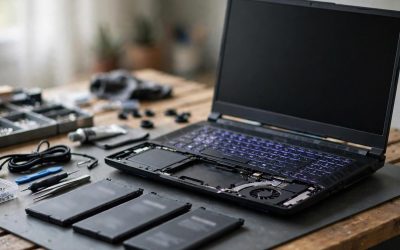
The third is a visual check, and it is the one to treat with the most care. With the laptop powered off, unplugged, and the main battery disconnected or removed if your model allows it, removing the bottom cover exposes the motherboard. The CMOS battery is a small, shiny, round cell, usually in a metal clip or a small plastic holder, often marked CMOS or RTC. In some Dell laptops it is a wired pack rather than a bare cell, in which case you will see a small battery with two thin wires running to a connector on the board. Take care with static discharge, keep track of every screw, and remember that opening the case may affect warranty coverage on newer machines. If the laptop is still under warranty, the service manual or Dell support is a better route than opening it yourself.
Signs Your CMOS Battery Is Dying
A dying CMOS battery produces a very specific pattern of symptoms, and recognising the pattern saves you from replacing the wrong part. The classic sign is the clock. If the date and time reset every time the laptop loses power, often jumping back to a date years in the past, the coin cell is the first suspect. Dell lists an incorrect or slow system date and time in the BIOS, BIOS settings lost when the computer is powered off, and a time-of-day clock stopped error message as the common symptoms of CMOS battery failure.
Other symptoms follow the same logic. You may see a message at startup telling you the CMOS battery is low, or a prompt that BIOS settings were reset, or a checksum error. Boot order, drive settings, and other firmware options may revert to defaults after a shutdown. In more severe cases the machine may take noticeably longer to start, or fail to start at all until you press a key to continue past the warning.
There is also a simple overnight test that costs nothing. Set the correct date and time in the BIOS setup, shut the laptop down, unplug the charger, and leave it overnight. If the clock has reset by morning, the coin cell is no longer holding the real-time clock.
Does the Laptop Need the Battery to Work?
Strictly speaking, no, the laptop will still start and run without a working CMOS battery. The coin cell does not power the processor, the screen, or the storage. What you lose is convenience and consistency. Every time the machine loses all power, it will forget the date and time, and possibly some firmware settings, and you will have to set them again. Secure boot and certain security features can also behave oddly if the clock is wrong, because certificates and security checks depend on the date being roughly correct.
That is why the practical answer is yes, the machine needs the battery even though it can technically boot without it. A laptop with a dead coin cell is usable but annoying, and the annoyance grows if the machine is unplugged often. If the laptop spends its life on a desk with the charger attached, you might barely notice the problem. If it travels, sleeps in a bag, or sits unused for days at a time, you will notice it constantly.
There is one more consideration. On the small number of Dell models built without a CMOS battery, there is nothing to replace, and the behaviour described above is normal for the design. If the clock resets when the main battery drains completely, that is expected on those machines, and the fix is simply to keep the main battery charged rather than to hunt for a part that was never installed.
What to Do If the Battery Needs Replacing
If your checks point to a dead or missing coin cell, the fix is straightforward in concept and fiddly in practice. The general steps are the same across most Dell laptops, but the exact procedure depends on the model, so the service manual for your machine is the authority.
Start by shutting the laptop down completely and unplugging the charger. If the main battery is removable, take it out. Ground yourself to discharge static electricity, and work on a clean, flat surface with good light. Remove the bottom cover, keeping the screws organised so each one goes back in the same hole. Locate the coin cell on the motherboard. In most Dell laptops it sits in a small holder with a metal clip; pressing the clip releases it. In some models it is a wired pack, in which case you disconnect the small two-pin connector instead of prying a cell out of a clip.
Note the orientation of the old battery before you remove it. The flat side is the positive side, and the replacement must go in the same way around. Fit the exact same type of cell, which in most Dell laptops is a CR2032. Dell advises fitting a brand-new battery rather than one taken from another device, because a used cell may already be near empty. Once the new cell is seated, reassemble the laptop, plug in the charger, and start the machine. Enter the BIOS setup, set the correct date and time, load the default settings if prompted, and re-apply any custom settings you had changed, such as the boot order. Keep coin cells away from children and pets, never try to recharge a non-rechargeable CR2032, and check the warranty terms before opening a laptop that is still covered.
Main Battery Versus Watch Battery: A Quick Comparison
Mixing up the two batteries in a laptop is the most common source of confusion around this question, so it helps to lay out the difference plainly.
The main battery is large, rechargeable, and powers the entire laptop when it is unplugged. When it fails, the symptoms are short runtime, sudden shutdowns, a battery meter that drops in large jumps, and in some cases visible swelling of the case or trackpad. Dell notes that typical users see reduced runtime after roughly eighteen to twenty-four months, and heavy users within eighteen months. Replacing it is a bigger job and a more expensive part.
The watch battery, or CMOS battery, is small, non-rechargeable, and powers only the real-time clock and part of the firmware memory. When it fails, the symptoms are a resetting clock, lost BIOS settings, and startup messages about the clock or the CMOS battery. The laptop still runs normally once it is started. Replacing it is a small, inexpensive part and a short job once you can reach the motherboard.
Knowing which battery is at fault matters because the fixes are completely different. Replacing the main battery will not fix a resetting clock, and replacing the coin cell will not fix short runtime. Match the symptom to the part, and you will only open the machine once.
How Long the Battery Lasts and When to Expect Trouble
Dell gives a typical life of around two to three years for the CMOS battery, with the exact figure depending on usage and environment. That range is consistent across the industry. The cell drains slowly and constantly, because the real-time clock runs all the time, even when the laptop is switched off. A machine that is used every day and kept charged puts very little strain on the cell, because the main battery and the charger supply the clock while the machine is on. A machine that sits in storage for months drains the cell continuously with nothing topping it up.
Heat also shortens the life of lithium coin cells, so a laptop that runs hot or is stored somewhere warm may need a replacement sooner. Conversely, a laptop that has spent most of its life plugged into a desk may still be on its original cell after several years.
Because the part is cheap and the symptoms are distinctive, there is no reason to replace it on a schedule. Wait until the symptoms appear, confirm the diagnosis with the overnight unplug test, and then replace it. Replacing a healthy battery wastes time and risks disturbing other components for no benefit.
Frequently Asked Questions
Does every Dell laptop have a watch battery?
Nearly all of them do, but not every single one. Most Dell laptops have a CMOS coin-cell battery on the motherboard, usually a CR2032. A small number of newer models, including some recent Latitude laptops, are designed without one and rely on the main battery to keep the clock running. Check the service manual for your exact model to be sure.
What type of watch battery does a Dell laptop use?
The most common type is the CR2032, a 3-volt lithium coin cell, 20 millimetres across and 3.2 millimetres thick. Some models use a CR2025 or CR2016 instead, which share the diameter and voltage but are thinner, and some use a wired battery pack on a two-pin connector. Always match the type printed on the old battery or listed in the service manual.
Will the laptop still work if the watch battery is dead?
Yes, it will still start and run. You will lose the date and time every time the machine loses all power, and some firmware settings may reset. It is an annoyance rather than a failure, but it is worth fixing because a wrong clock can interfere with security features and software that checks dates.
How do I know if the problem is the watch battery or the main battery?
Look at the symptoms. A clock that resets after the laptop is unplugged, startup messages about the time-of-day clock, and BIOS settings that revert to defaults all point at the coin cell. Short runtime, sudden shutdowns while in use, and a battery meter that drops in jumps all point at the main rechargeable battery.
Can I replace the watch battery myself?
In most Dell laptops, yes, if you are comfortable removing the bottom cover and handling small components. The service manual for your exact model gives the procedure. If the laptop is under warranty, check the terms first, and if you are not comfortable working inside the machine, a repair shop can do the job quickly.
Does the F16QJX1 code tell me the battery type?
Not by itself. F16QJX1 is a configuration identifier, not a retail model name, so it does not directly name a battery type in public listings. Enter the service tag on the Dell support site to find the service manual for your exact machine, and the coin-cell battery section will name the part.
The Bottom Line
Does the Dell laptop F16QJX1 need a watch battery? In almost every case, yes. Dell laptops of this kind ship with a small CMOS coin-cell battery, most often a CR2032, that keeps the clock running and holds firmware settings while the machine is off. The battery typically lasts around two to three years, and when it runs out the clock resets and settings are lost after every power loss. A small number of newer Dell models are built without one, so the definitive answer for any individual machine comes from its service manual, which you can find by entering the service tag on the Dell support site. If your clock keeps resetting, run the overnight unplug test, confirm the diagnosis, and replace the cell with the exact same type. It is one of the simplest repairs inside a laptop, and it restores the quiet reliability that most owners never notice until it is gone.
FAQ
Does the Laptop Need the Battery to Work?
Does every Dell laptop have a watch battery?
What type of watch battery does a Dell laptop use?
Will the laptop still work if the watch battery is dead?
How do I know if the problem is the watch battery or the main battery?
Can I replace the watch battery myself?
Does the F16QJX1 code tell me the battery type?
More from Amazon
Programs that pair well with the guide above. Offers and eligibility are set by Amazon and may change.
A free business account with business pricing and bulk-buying tools for work, shop or home office.
Create a business accountFree shipping on eligible items, Prime Video and more. Eligible new members can start with a free trial.
Start a Prime free trialAudiobooks and podcasts to listen to on the go. Eligible new members can start with a free trial.
Try Audible freeAd-free music streaming. Eligible new subscribers can start with a free trial.
Try Music Unlimited freeAs an Amazon Associate we earn from qualifying purchases.