Key takeaways
- Star Ocean: The Second Story R PC requirements and the best GPU, CPU, RAM and SSD to run it — recommended hardware by resolution plus complete 1080p, 1440p and 4K build guides.
Thinking about playing Star Ocean: The Second Story R on PC and wondering what hardware you actually need? The good news is that this one is easy to answer: the game is an HD-2D action RPG that launched on November 2, 2023, and its official requirements are modest by any modern standard — the published minimum is a GeForce GTX 750 Ti-class graphics card, and the published recommended spec is only a GTX 1650-class GPU with 8 GB of RAM. So the real question is not whether your PC can run it, but which graphics card, processor and storage make sense if you are building new or upgrading. This guide breaks down the official PC system requirements for Star Ocean: The Second Story R, the best GPU for each resolution, and complete build recommendations.
🛒 Best Price Today on Amazon
Check today’s deals on the products above before you buy. Prices change often, so compare the live price on Amazon.
How Demanding Is Star Ocean: The Second Story R?
Not very. Star Ocean: The Second Story R is a 2D HD-2D action RPG that runs on DirectX 11, and it asks for hardware that was mid-range a decade ago: the official minimum is an AMD A8-7600 or Intel Core i3-3210 processor with a Radeon RX 460, Arc A380 or GeForce GTX 750 Ti, targeting 30 FPS at 1280×720 with default graphics options. The official recommended spec — Ryzen 3 1200 or Core i5-3330 with a Radeon RX 470, Arc A750 or GTX 1650 — targets 60 FPS at 1920×1080 on the same default settings. In other words, almost any discrete GPU released in the last several years clears the bar, and pushing to 1440p or 4K is mostly a question of output resolution rather than raw horsepower. It is also not a CPU-heavy game: there is no large-scale simulation, strategy layer or big multiplayer lobby to feed, so a modest dual- or quad-core processor is entirely sufficient.
Star Ocean: The Second Story R Official PC System Requirements
| Component | Minimum (official) | Recommended (official) |
|---|---|---|
| OS | Windows® 10 / 11 64-bit | Windows® 10 / 11 64-bit |
| Processor | AMD A8-7600 / Intel® Core™ i3-3210 | AMD Ryzen™ 3 1200 / Intel® Core™ i5-3330 |
| Memory | 8 GB RAM | 8 GB RAM |
| Graphics | AMD Radeon™ RX 460 / Intel® Arc™ A380 / NVIDIA® GeForce® GTX 750 Ti | AMD Radeon™ RX 470 / Intel® Arc™ A750 / NVIDIA® GeForce® GTX 1650 |
| DirectX | Version 11 | Version 11 |
| Storage | 20 GB available space | 20 GB available space |
Source: the official STAR OCEAN THE SECOND STORY R Steam store listing (app 2238900), checked October 2026. Publishers can update these specs after patches.
Best GPU for Star Ocean: The Second Story R by Resolution
1080p
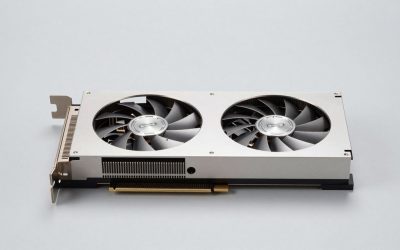
The official recommended spec already targets 60 FPS at 1920×1080 with default graphics using a GTX 1650, Radeon RX 470 or Arc A750, so 1080p is comfortably within reach of older and budget cards. If you are building new, the AMD Radeon RX 7600 is far more than this game will ever ask for, and a current budget option such as the GeForce RTX 5060, Radeon RX 9060 XT or Arc B580 is well beyond the requirement too. Anything at or above the recommended tier — including a GTX 1650, RX 580 or Arc A380 — is enough here.
1440p
At 2560×1440 the picture barely changes, because the baseline is so low. A modern mid-range card like the AMD Radeon RX 7600 has plenty of headroom, as do the RTX 5060 and RX 9060 XT, and even older cards above the official recommended spec such as the GTX 1660 Super or RX 580 remain perfectly usable. You are choosing how much headroom you want for other, heavier games — not whether Star Ocean: The Second Story R will run.
4K
4K is the one resolution where the GPU starts to matter at all, and even there a mainstream card is enough: the NVIDIA GeForce RTX 4060 is a sensible fit, and newer options such as the RTX 5060, RTX 5070 or RX 9070 are more than this title can use. If you already own a card from the recommended tier or above, try 4K before spending anything — and if the frame rate dips, a resolution scale or upscaling option (where the game or your GPU driver provides one) is the cheapest fix.
CPU, RAM and Storage for Star Ocean: The Second Story R
Because the official recommended processor is only a Ryzen 3 1200 or Core i5-3330, the CPU is the least of your concerns. A modern budget chip is already far past what this game needs, so buy a processor for the other games you play rather than for this one. If you are assembling a new system, the AMD Ryzen 5 7600 is a well-rounded mid-range pick, while the AMD Ryzen 7 7800X3D and Intel’s Intel Core i5-14600K are considerably more than Star Ocean: The Second Story R will ever use — worth it only if you also play demanding titles. On memory, 8 GB is the official figure for both minimum and recommended, and it is genuinely enough for this game; 16 GB is a comfortable general-purpose baseline if you multitask or play larger games, and a 32 GB DDR5 kit such as the Corsair Vengeance DDR5 32GB is well beyond what is required here. Storage is similarly undemanding: the game needs 20 GB of available space. An SSD shortens load times and a fast NVMe drive like the Samsung 990 Pro 2TB NVMe SSD is a great general-purpose choice, but a SATA SSD or even a hard drive will run the game.
Recommended PC Builds for Star Ocean: The Second Story R
1080p build: AMD Radeon RX 7600 + AMD Ryzen 5 7600 + 16 GB DDR5 — far above the official recommended spec for 1080p, and a solid all-round starter build if you also play heavier games.
1440p build: AMD Radeon RX 7600 + AMD Ryzen 7 7800X3D + 32 GB DDR5 + 2TB NVMe SSD — comfortable at 1440p in this game, with plenty of headroom for far more demanding titles.
4K build: NVIDIA GeForce RTX 4060 + AMD Ryzen 7 7800X3D + 32 GB DDR5 + fast NVMe SSD — more than enough for 4K in Star Ocean: The Second Story R; you would only need a stronger GPU if you also play modern 3D games at 4K.
Is It Worth Upgrading Your PC for Star Ocean: The Second Story R?
Honestly, probably not for this game alone. The official requirements are low enough that most systems built in the last several years already exceed them, and if your PC meets the recommended spec there is nothing here to chase. If you are upgrading anyway, the graphics card still delivers the biggest jump in gaming performance, so spend there first. A processor from the last few years will not hold you back in this title, and 8 GB of RAM meets the official figure — going to 16 GB is a sensible general-purpose move rather than a requirement. Moving the game to an SSD is a cheap quality-of-life improvement, but with only 20 GB of install size it is about load times, not performance. Rather than replacing everything at once, target the weakest link in your build, and only if it is actually below the published minimum.
Can You Play Star Ocean: The Second Story R on a Laptop or Handheld?
Very easily. Because the official minimum targets 30 FPS at 720p with cards as old as the GTX 750 Ti and RX 460, gaming laptops with a modest discrete GPU — a GTX 1650-class part or better — handle the game at 1080p without trouble, though you should still expect shorter battery life and more heat than a desktop. Handhelds like the Steam Deck and ROG Ally sit comfortably above the minimum spec and are a natural fit for a 2D HD-2D RPG, making this a good portable pick. Recent laptops relying on modern integrated graphics can generally run it at reduced resolution and default settings, but a dedicated GPU remains the safer choice. With a 20 GB install size, storage is rarely a constraint either.
How to Boost FPS in Star Ocean: The Second Story R
If frame rates are lower than you would like, start with resolution: dropping from 1440p or 4K to 1080p is the single biggest gain in a game this light, and if your GPU driver or the game itself offers an upscaling or resolution-scale option, use it. Next, check the in-game graphics options and reduce the effects that cost the most, such as shadows and post-processing, before touching anything else. Make sure your GPU drivers are current, close background applications, and confirm the game is installed on an SSD to keep load times short. On a game like this, running at 1080p with sensible settings will almost always feel better than chasing a higher resolution with stutter.
Frequently Asked Questions
Can my PC run Star Ocean: The Second Story R?
If your PC meets the official minimum — an AMD A8-7600 or Intel Core i3-3210 processor, a Radeon RX 460, Arc A380 or GeForce GTX 750 Ti, 8 GB of RAM and 20 GB of free space — it will run at 30 FPS at 1280×720 with default graphics options. To hit the official recommended 60 FPS at 1920×1080, aim for a Ryzen 3 1200 or Core i5-3330 with a Radeon RX 470, Arc A750 or GeForce GTX 1650.
Is Star Ocean: The Second Story R demanding on PC?
No. It is a DirectX 11 HD-2D RPG with an official minimum GPU from the GTX 750 Ti era and an official recommended GPU no higher than a GTX 1650, so even older budget hardware handles it comfortably.
What GPU do I need for Star Ocean: The Second Story R at 1440p 60fps?
The official recommended spec already targets 60 FPS at 1080p with a GTX 1650-class card, so 1440p is well within reach of anything above that tier. A AMD Radeon RX 7600-class card is more than enough, as are current options like the RTX 5060 or RX 9060 XT, and older cards such as the GTX 1660 Super or RX 580 remain fine for this title.
How much RAM does Star Ocean: The Second Story R need?
8 GB of RAM is the official figure for both the minimum and the recommended specification, and that is enough for this game. If you are building a PC for general use or for heavier titles, 16 GB is a comfortable modern baseline, but Star Ocean: The Second Story R itself does not need more than 8 GB.
Do I need an SSD for Star Ocean: The Second Story R?
No — the official requirement is simply 20 GB of available space, and the game will run from a hard drive. An SSD is still worthwhile for faster load times, and a fast NVMe drive like the Samsung 990 Pro is a good general-purpose choice.