
Key takeaways
- Graphics reality check: Most laptops in this bracket use integrated graphics like Radeon RX Vega 8 rather than a discrete GPU. Expect smooth performance in Valorant, CS2, League of Legends, Rocket League, and older AAA titles at medium settings — not maxed-out Cyberpunk.
- Prioritize RAM over clock speed: 16GB is the practical minimum for gaming plus a browser and Discord running alongside. If you can find 24GB of DDR5 within budget, that’s a meaningful upgrade for multitasking and integrated-GPU systems, which borrow system memory for graphics.
- Insist on NVMe storage: A 512GB NVMe SSD dramatically cuts load times versus older SATA drives. Given that a single modern game can consume 100GB, check whether the chassis allows a second drive or storage upgrade later.
- Display quality beats display size: A 15.6″ or 16″ FHD (1920×1080) IPS panel is the sweet spot. IPS gives you far better viewing angles and color than budget TN panels, and 1080p keeps the frame rate demands reasonable for integrated graphics.
- Don’t overlook the extras: WiFi 6, Bluetooth 5.0+, a backlit keyboard, and adequate cooling separate a laptop you’ll enjoy using from one you’ll tolerate. Sustained thermal performance matters more than a high boost clock you’ll rarely hit.
What's inside
Shopping for a gaming laptop under $800 in 2026 means navigating a market flooded with listings that use the word “gaming” loosely. Many budget machines pair a capable CPU with integrated graphics, which is fine for esports titles and creative work but won’t push modern AAA games at high settings. The challenge is separating genuinely good value from spec-sheet marketing.
This guide breaks down what actually matters at this price point, then reviews the strongest options available right now. Every pick below is chosen with realistic expectations in mind: solid 1080p performance in lighter titles, enough RAM and storage for everyday multitasking, and build quality that justifies the spend. We’ve prioritized machines that deliver measurable value rather than the biggest number on the box.
As an Amazon Associate we earn from qualifying purchases at no extra cost to you. Product prices and availability are accurate as of the date shown and are subject to change.







⚡ Save on Your Next PC — Amazon Prime
Prime members get fast free shipping on the systems above, plus early access to Prime Day & Black Friday PC deals. New members get a 30-day free trial.
Watch: Best Gaming Laptop Under $800 — Video Review
How to Choose Gaming Laptop Under $800
- Graphics reality check: Most laptops in this bracket use integrated graphics like Radeon RX Vega 8 rather than a discrete GPU. Expect smooth performance in Valorant, CS2, League of Legends, Rocket League, and older AAA titles at medium settings — not maxed-out Cyberpunk.
- Prioritize RAM over clock speed: 16GB is the practical minimum for gaming plus a browser and Discord running alongside. If you can find 24GB of DDR5 within budget, that’s a meaningful upgrade for multitasking and integrated-GPU systems, which borrow system memory for graphics.
- Insist on NVMe storage: A 512GB NVMe SSD dramatically cuts load times versus older SATA drives. Given that a single modern game can consume 100GB, check whether the chassis allows a second drive or storage upgrade later.
- Display quality beats display size: A 15.6″ or 16″ FHD (1920×1080) IPS panel is the sweet spot. IPS gives you far better viewing angles and color than budget TN panels, and 1080p keeps the frame rate demands reasonable for integrated graphics.
- Don’t overlook the extras: WiFi 6, Bluetooth 5.0+, a backlit keyboard, and adequate cooling separate a laptop you’ll enjoy using from one you’ll tolerate. Sustained thermal performance matters more than a high boost clock you’ll rarely hit.
The Best Picks Reviewed
KAIGERR 2026 Gaming Laptop (Ryzen 7 H255, 24GB DDR5)
This is the standout of the group: an 8-core/16-thread Ryzen 7 H255 boosting to 4.9GHz, paired with 24GB of DDR5 and Radeon RX Vega 8 graphics on a 16-inch panel. The extra memory genuinely helps here, since integrated graphics draw from system RAM, and the WiFi 6 plus backlit keyboard round out a package that punches well above its price.
Ryzen 7 H255 Gaming Laptop (24GB DDR5, 512GB NVMe)
Effectively the same high-value formula — Ryzen 7 H255 at up to 4.9GHz with 24GB of DDR5 and a 512GB NVMe SSD — in an alternative chassis. Worth comparing side by side with the KAIGERR on price and warranty, as the core hardware is closely matched and either represents strong value at this tier.
NIMO 15.6″ IPS FHD Light Gaming Laptop (Ryzen 5 6600H)
The Ryzen 5 6600H is a proper H-series mobile chip with meaningfully better sustained performance than the U-series parts common at this price, and the IPS FHD panel is a genuine upgrade in daily use. This is the pick if you want the most consistent frame rates rather than the highest headline specs.
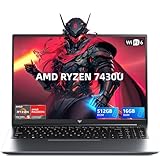
Light Gaming Laptop (Ryzen 7 7430U, 16GB RAM)
The Ryzen 7 7430U is an eight-core low-power chip that runs cool and quiet, making this a sensible choice for students who want light gaming alongside all-day battery life. Just temper expectations on demanding titles — this is an esports-and-productivity machine first.
Tunhail 15.6″ Laptop (16GB RAM, 512GB, Win 11 Pro)
A straightforward budget entry with 16GB of RAM, a 512GB drive, an FHD display, and Windows 11 Pro included, which is a nice touch if you need BitLocker or Remote Desktop. Performance suits casual and older titles rather than current-gen releases, but the value proposition is clear.
Frequently Asked Questions
Can you really game on a laptop under $800?
Yes, within limits. Esports titles like Valorant, CS2, Fortnite, and League of Legends run comfortably at 1080p, as do most indie and older AAA games at medium settings. Current-generation AAA releases will require significant setting reductions or simply won’t be playable at acceptable frame rates on integrated graphics.
Is 16GB of RAM enough, or should I get 24GB?
16GB is workable, but 24GB is the better buy if the price difference is small. Integrated graphics allocate system RAM as video memory, so more RAM directly benefits gaming performance in a way it wouldn’t on a machine with a discrete GPU.
Should I wait and save for a laptop with a discrete GPU?
If AAA gaming at high settings is your priority, yes — stretching to the $1,000-$1,200 range for an entry-level discrete GPU is a genuine step change. If you mainly play esports titles or need a versatile all-rounder for school and work, these machines serve you well today.
Can I upgrade RAM or storage later?
It varies by model. Many budget chassis include an accessible M.2 slot and SODIMM slots, but some solder the RAM. Check the manufacturer’s specifications or the product listing before buying if upgradeability matters to you.
Final Thoughts
For most buyers, the KAIGERR 2026 Gaming Laptop is the best overall value here — its Ryzen 7 H255, 24GB of DDR5, and 16-inch display make it the most complete package under $800. If you’d rather have proven H-series performance in a more compact frame, the NIMO 15.6″ with the Ryzen 5 6600H is an excellent alternative, while the Light Gaming Laptop with the Ryzen 7 7430U suits students who need portability and battery life alongside casual gaming.





