Key takeaways
- Every Ethernet port is 2.5G, a rare and genuinely useful layout
- Wi-Fi 7 support including MLO for compatible devices
- Tidy internal-antenna tower design that hides well on a shelf
- EasyMesh expansion lets you add nodes for larger coverage later
The TP-Link Archer BE550 is a tri-band BE9300 Wi-Fi 7 router built to bring next-generation wireless to a mainstream home without the flagship price tag. Its headline features are a full complement of 2.5G Ethernet ports, six internal antennas, and support for Wi-Fi 7 essentials like MLO, wrapped in an upright tower design that TP-Link rates for coverage up to roughly 2,000 square feet.
This router is for the household that has outgrown an older Wi-Fi 6 unit and wants real multi-gig wired ports plus future-proof wireless for phones, laptops, and consoles that are starting to ship with Wi-Fi 7. It is a strong fit for small-to-medium homes and apartments; if you have a very large multi-floor house or dozens of simultaneous devices, note the coverage and band limitations discussed below.
Our top picks





As an Amazon Associate we earn from qualifying purchases at no extra cost to you. Ratings are shown as listed on Amazon.
⚡ Save on Your Next PC — Amazon Prime
Prime members get fast free shipping on the systems above, plus early access to Prime Day & Black Friday PC deals. New members get a 30-day free trial.
Watch: TP-Link Archer BE550 Review — Video Review
Design & Build
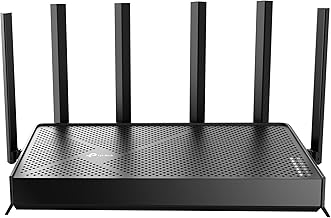
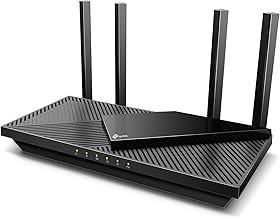
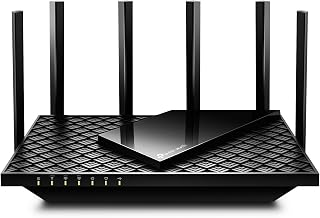
The BE550 uses a vertical tower with the antennas hidden inside, which looks far tidier on a shelf than the spider-like external-antenna routers of a few years ago. The all-2.5G port layout is the standout practical touch — every wired port is multi-gig, so you are not stuck with a single fast port and a cluster of old gigabit jacks. Build quality is reasonable for the class, though the plastic chassis and internal antennas mean it prioritizes aesthetics and placement flexibility over the raw range of a big external-antenna unit. Ventilation is adequate, and it runs warm but not alarmingly hot under load.
Performance
On close and mid-range connections the BE550 is quick and stable, and the 2.5G ports let a NAS, a wired PC, and a multi-gig internet plan actually stretch their legs — a genuine upgrade over gigabit-limited routers. Wi-Fi 7 features like MLO help capable client devices stay responsive, and TP-Link’s EasyMesh support means you can add a second node later if coverage falls short.
The honest caveats concern range and capacity. As a BE9300-class tri-band unit its 6GHz band is fast but short-range, so the further you get from the router the more you fall back to the 5GHz and 2.4GHz bands, and thick walls will trim that 2,000 sq. ft. figure in practice. Very device-dense homes will also find higher-tier models like the BE550 Pro or BE600 more comfortable. For a typical home, though, it hits a strong balance of speed, wired flexibility, and price.
Pros & Cons
- Every Ethernet port is 2.5G, a rare and genuinely useful layout
- Wi-Fi 7 support including MLO for compatible devices
- Tidy internal-antenna tower design that hides well on a shelf
- EasyMesh expansion lets you add nodes for larger coverage later
- 6GHz band is fast but short-range, limiting far-room speeds
- Real-world coverage falls short of the 2,000 sq. ft. rating through walls
- Not ideal for very device-dense or large multi-floor homes
Alternatives to Consider
If you want more headroom, the TP-Link Tri-Band BE9700 WiFi 7 Router Archer BE550 Pro adds a 10G port and higher throughput for multi-gig internet, while the TP-Link Tri-Band BE9700 WiFi 7 Router (Archer BE600) pushes coverage to around 2,600 sq. ft. and higher device counts. Budget-minded buyers who do not need the fastest tier should look at the TP-Link BE6500 Dual-Band WiFi 7 Router (BE400), which brings Wi-Fi 7 basics at a lower price, or the well-proven Wi-Fi 6 Archer AX55 if Wi-Fi 7 is not yet a must-have.
Frequently Asked Questions
Do I need Wi-Fi 7 devices to benefit from the BE550?
No. It is fully backward compatible, so older Wi-Fi 6 and 5 devices work fine and still benefit from the fast 2.5G wired ports. Wi-Fi 7 perks like MLO only kick in with compatible client devices.
How large a home will it cover?
TP-Link rates it up to about 2,000 sq. ft., which is realistic for an open apartment or small home. Thick walls and multiple floors reduce that, and you can add an EasyMesh node to extend coverage.
What makes the all-2.5G ports a big deal?
Most routers give you one fast port and several old gigabit ports. Here every wired port is 2.5G, so a NAS, gaming PC, and multi-gig internet connection can all run faster than gigabit at the same time.
How is the BE550 different from the BE550 Pro?
The Pro version steps up to a higher BE9700 class with a 10G port and USB 3.0, aimed at faster internet plans and heavier use. The standard BE550 sticks to 2.5G ports at a lower price.
Verdict
The TP-Link Archer BE550 is one of the more sensible ways to step into Wi-Fi 7, largely because its all-2.5G port layout is genuinely useful today rather than years from now. Just set expectations around 6GHz range and coverage through walls. For a typical home that wants fast wired ports and future-ready wireless without paying flagship money, it is an easy recommendation.