
Key takeaways
- One compact machine does the job. A laptop eliminates the need for a separate tower, monitor, keyboard, and webcam for a basic setup. This is especially useful in apartments, dorm rooms, shared homes, or multipurpose rooms where a permanent desk is not practical.
- Easy to move. You can stream from a different room, bring the computer to a friend’s house, take it to an event, or use it for work and school during the day. Most 15.6-inch gaming laptops fit in a standard backpack, although their power bricks add bulk.
- Lower upfront complexity. There is no parts list to assemble, no separate operating-system installation, and fewer compatibility decisions. A first-time streamer can focus on software settings, audio, lighting, and content rather than PC building.
- Built-in screen and keyboard. Even if you later add a monitor, mouse, and external keyboard, the laptop remains usable on its own. A 15.6-inch 1920 x 1080 display is a practical baseline for managing a game window, chat, and streaming controls.
- Useful ports and USB-C charging on some models. A USB-C port with 100W charging support, such as the one listed on the NIMO model, can simplify travel and desk use. Still, confirm whether USB-C can charge the laptop under full load; many performance laptops require their included charger for gaming.
- Hardware encoders can reduce CPU strain. On appropriately equipped systems, using the GPU’s supported hardware encoder can leave more CPU capacity for the game, alerts, and background tasks. This can make a one-laptop setup far more practical than trying to encode entirely on a modest CPU.
🛒 Best Price Today on Amazon
Check today’s deals on the products above before you buy. Prices change often, so compare the live price on Amazon.
The Short Answer
It depends: a gaming laptop is a good choice for streaming only if it has enough CPU and graphics-encoding headroom for the games and platforms you plan to stream. For casual Twitch, YouTube, or Discord streams, a properly configured midrange gaming laptop can handle gaming, webcam video, alerts, and chat in one portable package. For demanding new games at high settings, long 1080p60 streams, or professional-looking multi-camera broadcasts, it can become expensive, noisy, and less flexible than a desktop setup.
That distinction matters more than the “gaming” label. Some affordable laptops can play lighter games but are not well equipped to run the game, OBS or Streamlabs, browser alerts, webcam processing, and an encoder simultaneously. In 2026, buyers should prioritize a modern processor, 16GB of RAM at minimum, a fast SSD, reliable cooling, and dedicated hardware video encoding over decorative RGB lighting or a high refresh-rate screen alone.
Our top picks
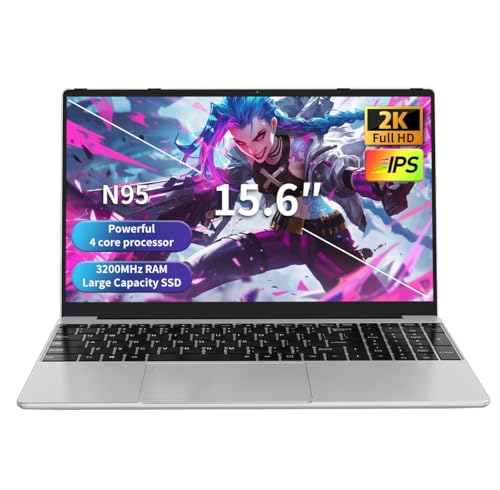 NEOBIHIER Gaming Laptop
- Smooth Performance in an Entry-Level Gaming Laptop: This…
- Lightweight and Flexible Design: With a 3.5-pound body…
- Enhanced User Experience Features: This laptop gaming setup…
 NIMO 15.6" IPS FHD-Light Gaming-Laptop
- [High-Performance Processing] Powered by the AMD Ryzen 5…
- [Future-Proof Expandability] Designed for longevity, the N153 allows…
- [Enhanced Privacy & Security] Protect your sensitive data…
As an Amazon Associate we earn from qualifying purchases at no extra cost to you.
What You Actually Get
A gaming laptop for streaming combines a display, keyboard, trackpad, battery, webcam, speakers, processor, graphics hardware, and ports in one device. That is the appeal: connect a USB microphone, webcam, headset, and external storage drive, install streaming software, and you have a workable station without building a PC.
For a comfortable single-PC streaming setup, look for a 6-core processor or better, 16GB of RAM, and at least 512GB of SSD storage. A 256GB drive can fill quickly once Windows, games, video clips, editing software, and stream recordings are installed. Modern games commonly occupy 50GB to 150GB each, while local recordings can consume several GB per hour depending on resolution, frame rate, codec, and bitrate.
Graphics hardware is equally important. A laptop with a dedicated GPU usually has a better chance of maintaining playable frame rates while encoding a stream. Integrated graphics can be adequate for indie games, older titles, browser-based games, and less demanding esports titles, but buyers should set realistic expectations. A laptop with an AMD Radeon 660M integrated GPU, for example, is better viewed as an entry-level all-purpose machine than a high-settings streaming gaming rig.
Budget listings deserve particularly close reading. The $305.99 NEOBIHIER Gaming Laptop with an Intel N95 processor may suit web browsing, schoolwork, media playback, and very light games, but its processor class is not a strong foundation for serious gaming-and-streaming at the same time. The $479.95 NIMO 15.6-inch model with a Ryzen 5 6600H, 16GB DDR5 memory, 256GB SSD, and Radeon 660M graphics is the more credible starting point of the two for light streaming, though its limited storage and integrated graphics remain meaningful compromises.
Pros
- One compact machine does the job. A laptop eliminates the need for a separate tower, monitor, keyboard, and webcam for a basic setup. This is especially useful in apartments, dorm rooms, shared homes, or multipurpose rooms where a permanent desk is not practical.
- Easy to move. You can stream from a different room, bring the computer to a friend’s house, take it to an event, or use it for work and school during the day. Most 15.6-inch gaming laptops fit in a standard backpack, although their power bricks add bulk.
- Lower upfront complexity. There is no parts list to assemble, no separate operating-system installation, and fewer compatibility decisions. A first-time streamer can focus on software settings, audio, lighting, and content rather than PC building.
- Built-in screen and keyboard. Even if you later add a monitor, mouse, and external keyboard, the laptop remains usable on its own. A 15.6-inch 1920 x 1080 display is a practical baseline for managing a game window, chat, and streaming controls.
- Useful ports and USB-C charging on some models. A USB-C port with 100W charging support, such as the one listed on the NIMO model, can simplify travel and desk use. Still, confirm whether USB-C can charge the laptop under full load; many performance laptops require their included charger for gaming.
- Hardware encoders can reduce CPU strain. On appropriately equipped systems, using the GPU’s supported hardware encoder can leave more CPU capacity for the game, alerts, and background tasks. This can make a one-laptop setup far more practical than trying to encode entirely on a modest CPU.
Cons
- Heat and fan noise are unavoidable. Gaming and streaming together are sustained, high-load tasks. Thin laptops often raise fan speed noticeably, which can be distracting in a quiet room and may be picked up by a nearby microphone. A headset microphone or a USB mic placed away from the exhaust helps.
- Performance is constrained by the laptop’s power limits. Two laptops with similarly named processors or GPUs can perform differently because of cooling design and wattage limits. A desktop generally has more room to sustain performance during a 2-hour or 4-hour stream.
- Battery power is not for streaming sessions. Expect to plug in. Gaming while streaming on battery can reduce performance sharply and drain power quickly. Plan on a grounded wall outlet and use the manufacturer-supplied charger rather than relying on a low-wattage phone-style USB-C adapter.
- Upgrades are limited. Some laptops allow RAM and SSD upgrades; others do not. CPUs and GPUs are effectively fixed. Before buying, confirm whether memory is soldered, how many storage slots exist, and whether opening the chassis affects warranty coverage.
- Small storage becomes a recurring problem. A 256GB SSD is manageable only if you keep few games installed and move recordings to an external drive. A 1TB external SSD is a more practical companion for creators who save VODs, clips, and edited videos.
- Budget “gaming” branding can be misleading. An N95-class processor or integrated graphics may run lightweight games, but that does not mean it will deliver smooth gameplay and clean 1080p60 streaming together. Lowering in-game settings, output resolution, or stream frame rate may be necessary.
- External accessories add cost. A decent microphone, webcam, wired Ethernet adapter, mouse, cooling stand, and external monitor can add $100 to $500 or more. The laptop may be portable, but a polished stream rarely remains a laptop-only purchase.
Who Should Buy It
Buy a gaming laptop for streaming if portability is a real requirement, not just a nice idea. It is a sensible choice for students, renters, frequent travelers, creators who split time between homes, and beginners who want one machine for gaming, work, and broadcasting.
It also works well for streamers focused on lighter games: indie titles, retro games, card games, visual novels, many esports games at sensible settings, and desktop-based creative streams. A midrange laptop with 16GB RAM, a 512GB SSD or larger, and a capable modern CPU can be a straightforward starting point.
The NIMO Ryzen 5 6600H configuration is the more reasonable low-cost direction among the referenced options for a beginner whose content is light gaming, chatting, or screen sharing. Budget for storage expansion or an external drive, and do not buy it expecting dedicated-GPU performance.
Who Should Skip It
Skip a gaming laptop if your priority is maximum performance per dollar, quiet operation, easy upgrades, or long, demanding streams. A desktop is usually the better value for creators playing graphically intensive games while streaming at 1080p60, recording locally, running multiple browser sources, and editing video afterward.
Also skip the lowest-priced “gaming” laptops if your plan involves current AAA games, heavy mods, virtual reality, or professional production tools. The $305.99 N95-based option is not the right purchase for that workload. Spending less upfront can lead to frustration, dropped frames, reduced game settings, and an earlier replacement.
Cheaper Alternatives
| Option | Cost | Trade-off |
|---|---|---|
| Use an existing laptop for webcam, chat, and simple screen-share streams | $0 to $100 for a basic mic or webcam | Best for non-gaming content; not suitable for demanding games and high-quality encoding. |
| NEOBIHIER N95 laptop | About $305.99 | Low entry price, but limited headroom for gaming and streaming simultaneously. |
| Refurbished desktop with monitor | About $350 to $650 | Often more upgradeable, but takes more space and may need a separate graphics card. |
| NIMO Ryzen 5 6600H, 16GB RAM laptop | About $479.95 | Better for light streaming, but 256GB storage and integrated graphics limit long-term flexibility. |
FAQ
Can a gaming laptop stream on Twitch or YouTube?
Yes, provided the hardware matches the game and stream settings. A laptop can stream gameplay, webcam video, chat, alerts, and microphone audio through OBS or similar software. The more demanding the game, the more important a strong CPU, adequate RAM, cooling, and a capable hardware encoder become.
Is 16GB of RAM enough for streaming?
For most beginner and intermediate single-PC streams, 16GB is the practical minimum. It is usually enough for the game, streaming software, a few browser tabs, chat, and background apps. Creators who edit large video files, use extensive mods, or keep many applications open may benefit from 32GB.
Do I need a dedicated GPU to stream?
No, but it is strongly recommended for demanding games. Integrated graphics can handle light games and basic streams, especially at reduced settings. A dedicated GPU gives more performance headroom and generally makes it easier to keep game frame rates stable while encoding.
What internet speed do I need for laptop streaming?
Upload speed matters more than download speed. For a reliable 1080p stream, many creators aim for at least 10 Mbps of stable upload capacity, with extra headroom for other household devices. A wired Ethernet connection is preferable to Wi-Fi whenever possible, especially for live broadcasts.









