Key takeaways
- Combo jack headsets need a single TRRS plug, not a double-plug splitter cable designed for desktop front panels. Check the connector type before buying — this is the single most common return reason for laptop headset buyers.
- USB/dongle headsets bypass the laptop’s onboard audio entirely, which matters because budget and mid-range laptop audio chips often have audible hiss or weak amplification. A USB DAC in the headset or dongle fixes this regardless of which laptop you own.
- Bluetooth headsets add latency (typically 40-150ms depending on codec) that’s noticeable in competitive shooters, fine for single-player or strategy games.
The best gaming headset for a laptop is one that works off a single 3.5mm combo jack or a single USB-A/USB-C connection without needing a separate mic port, stays under roughly 280g with light clamp force for sessions past two hours, and has a mic that can be gain-tuned to cut through fan noise rather than amplify it. That rules out a surprising number of “best gaming headset” lists built around desktop PCs with dedicated sound cards and multiple rear-panel jacks.
Why laptop audio is a different problem than desktop audio
Most gaming laptops have one combo audio jack (shared mic + headphone) and sometimes a USB-C port that also handles charging and display output. Desktop towers typically have separate front-panel mic and headphone jacks, plus a dedicated sound card or onboard DAC with more clean power. That difference changes what actually works well:

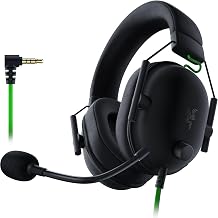
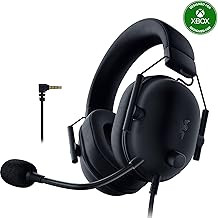
Razer BlackShark V2 X Gaming Headset: 7.1 Surround Sound - 50mm Drivers - Memory Foam Cushion - For PC, PS4, PS5, Switch - 3.5mm Audio Jack - Black
Included for 'Best Gaming Headsets for Laptops: Wired, Wireless and USB-C Picks' because the listing specifies 50mm Drivers and Memory Foam Cushion, details this guide uses to compare options.
View on Amazon
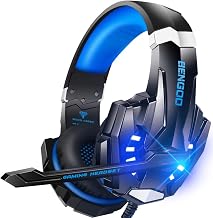
BENGOO G9000 Stereo Gaming Headset for PS4 PC Xbox One PS5 Controller, Noise Cancelling Over Ear Headphones with Mic, LED Light, 7.1 Surround Sound, Soft Memory Earmuffs for Nintendo Xbox Series X|S
Included for 'Best Gaming Headsets for Laptops: Wired, Wireless and USB-C Picks' because the listing specifies Noise Cancelling Over Ear Headphones with Mic and LED Light, details this guide uses to compare options.
View on Amazon
JBL Quantum 100M2 Wired Gaming Headset, Detachable Mic - Black
Included for 'Best Gaming Headsets for Laptops: Wired, Wireless and USB-C Picks' because the listing specifies Detachable Mic and Black, details this guide uses to compare options.
View on Amazon
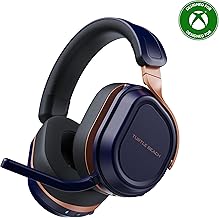
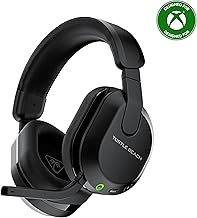
Turtle Beach Stealth 600 Wireless Gaming Headset for Xbox, PS5, PC, Mobile
Included for 'Best Gaming Headsets for Laptops: Wired, Wireless and USB-C Picks' because the listing specifies PS5 and Mobile, details this guide uses to compare options.
View on Amazon
AOC 2.4GHz Wireless Gaming Headset for PS5, PS4, PC, Switch, 45Hr, White
Included for 'Best Gaming Headsets for Laptops: Wired, Wireless and USB-C Picks' because the listing specifies PS4 and Switch, details this guide uses to compare options.
View on AmazonRazer BlackShark V2 X Gaming Headset: 7.1 Surround Sound - 50mm Drivers - Memory Foam Cushion - For PC, PS4, PS5, Switch - 3.5mm Audio Jack - Black
Included for 'Best Gaming Headsets for Laptops: Wired, Wireless and USB-C Picks' because the listing specifies 50mm Drivers and Memory Foam Cushion, details this guide uses to compare options.
View on Amazon
Logitech G432 Wired Gaming Headset - Black
Included for 'Best Gaming Headsets for Laptops: Wired, Wireless and USB-C Picks' because the listing specifies Black, details this guide uses to compare options.
View on Amazon
HyperX Cloud III – Wired Gaming Headset, PC, PS5, Xbox Series X|S, Angled 53mm Drivers, Spatial Audio, Memory Foam, Durable Frame, Ultra-Clear 10mm Mic, USB-C, USB-A, 3.5mm – Black/Red
Included for 'Best Gaming Headsets for Laptops: Wired, Wireless and USB-C Picks' because the listing specifies Wired Gaming Headset and PS5, details this guide uses to compare options.
View on Amazon
SteelSeries Arctis Nova Pro Omni Gaming Headset - Midnight Blue
Included for 'Best Gaming Headsets for Laptops: Wired, Wireless and USB-C Picks' because the listing specifies Midnight Blue, details this guide uses to compare options.
View on Amazon- Combo jack headsets need a single TRRS plug, not a double-plug splitter cable designed for desktop front panels. Check the connector type before buying — this is the single most common return reason for laptop headset buyers.
- USB/dongle headsets bypass the laptop’s onboard audio entirely, which matters because budget and mid-range laptop audio chips often have audible hiss or weak amplification. A USB DAC in the headset or dongle fixes this regardless of which laptop you own.
- Bluetooth headsets add latency (typically 40-150ms depending on codec) that’s noticeable in competitive shooters, fine for single-player or strategy games.
Decision matrix: match your laptop setup to a headset type
| Your situation | Best connection type | Why |
|---|---|---|
| Laptop has only one 3.5mm combo jack | Wired, single TRRS plug | Avoids needing a splitter; works instantly, zero drivers |
| Laptop has USB-A port to spare, want better mic clarity | USB-A dongle (2.4GHz wireless or wired USB) | Headset’s own DAC/amp replaces weak onboard audio chip |
| Thin-and-light laptop, USB-C only, no spare ports | USB-C wired or Bluetooth | No dongle to lose; Bluetooth avoids using your only port |
| Travel frequently, need carry case | Wired or Bluetooth, foldable | No dongle to misplace; folding hinge reduces bag footprint |
| Competitive FPS/fighting games | Wired or 2.4GHz dongle (not Bluetooth) | Sub-10ms latency vs 40-150ms on Bluetooth |
Weight and clamp force: the numbers that predict comfort
Spec sheets rarely list clamp force, but it’s the main driver of fatigue in sessions over 90 minutes. As a rough guide, anything under 4.5N (Newtons) of clamp force feels light; 4.5-6N is average; above 6N starts to press on glasses arms and temples. Manufacturers rarely publish this number, so weight is the usable proxy: lighter headsets generally use softer headbands and less clamping to stay stable.
| Weight class | Typical comfort for 2+ hour sessions | Common build |
|---|---|---|
| Under 250g | Very good, minimal pressure buildup | Open-back or small on-ear/closed-back, plastic yoke |
| 250-320g | Good, may need breaks after 3+ hours | Standard closed-back over-ear, memory foam pads |
| 320-400g | Noticeable pressure after 1.5-2 hours | Metal-reinforced headband, large 50mm+ drivers |
| Over 400g | Fatigue sets in within an hour for most users | Audiophile-style or RGB-heavy gaming headsets |
If you wear glasses, subtract roughly one weight class from this table’s comfort rating — clamp pressure concentrates on the arms of your frames and the effect compounds over time.
Mic quality versus fan noise: what actually helps
Laptop fans sit inches from your mic, and gaming laptops run fans harder than desktops because there’s less case volume to dissipate heat. Two mic design choices matter more than the “noise cancelling” marketing label:
- Cardioid pickup pattern (rejects sound from the sides/rear) outperforms omnidirectional mics for fan noise specifically, because the fan exhaust is usually below or beside the mic boom, not directly in front of it.
- Software-side noise suppression (via the headset’s companion app, or Windows’ built-in “Voice Focus” / NVIDIA Broadcast-style filters) does more for fan noise than any physical mic design, since it filters the steady-state hum algorithmically rather than relying on mic geometry.
Practical fix if your current headset picks up fan noise: open your laptop’s audio settings, find microphone enhancements, enable noise suppression, and set mic gain/boost to around 60-70% rather than 100%. Full gain amplifies the noise floor along with your voice; a moderate setting plus software suppression gives a cleaner result than maxing out input volume.
Battery life: do the math before you buy wireless
Wireless headset battery claims are measured under ideal conditions (moderate volume, no RGB lighting active, no companion app overlay running). Here’s how to budget realistically for travel or long sessions:
Worked example: A headset rated for 30 hours at 50% volume with no RGB typically delivers closer to 20-22 hours in real use once you factor in higher volume (gaming audio averages louder than that test condition) and any lighting effects. If you game for 3 hours a day while traveling for a 5-day trip (15 hours total), a 20-hour real-world battery covers the trip with one charge to spare — but a headset rated at only 15-18 hours on the spec sheet will likely need a mid-trip charge once real-world losses are factored in. Always subtract roughly 25-30% from the advertised number when planning around a charger-free trip.
Travel-friendliness: folding design and carry cases
For a laptop-focused buyer, portability matters more than it does for a desktop setup that never leaves the desk. Look for:
- Folding or swiveling ear cups that let the headset lie flat, reducing bag footprint by roughly 30-40% compared to rigid cups.
- A hard or semi-rigid carry case, which protects the headband hinge — the single most common failure point on folding headsets after a year of travel.
- A detachable mic boom, which lets the headset double as a travel listening device (flights, trains) without a mic sticking out, and removes one more thing that can snap in a bag.
What to actually buy, by connection type
Rather than naming specific SKUs that go in and out of stock, here’s what spec class to shop for in each category, with typical market pricing for 2026:
| Category | Target specs | Typical price range |
|---|---|---|
| Budget wired (combo jack) | Under 280g, single TRRS plug, 32-40 ohm impedance (drives fine from laptop headphone amp) | usually $30-$60 |
| Mid-range USB/dongle wireless | 2.4GHz low-latency dongle, 20+ hour battery, cardioid mic with app-based noise suppression | usually $80-$150 |
| Premium wireless multi-mode | Supports Bluetooth + 2.4GHz dongle simultaneously, under 300g, 30+ hour battery, folding design | usually $150-$250 |
| Travel/portable focus | Under 250g, foldable, detachable mic, hard case included | usually $50-$120 |
Avoid impedance above 60 ohms for laptop use unless the headset includes its own USB DAC/amp — most laptop headphone jacks can’t drive high-impedance headsets to proper volume, resulting in audio that sounds flat even at max volume.
Quick checklist before buying
- Confirm your laptop’s exact port: single combo jack, USB-A, USB-C, or a mix — don’t assume from the laptop’s price tier.
- If wired, check the plug is a single TRRS connector, not a dual-plug desktop splitter.
- If wireless, subtract ~25-30% from the advertised battery life for real-world planning.
- Favor cardioid mics plus software noise suppression over marketing claims of “AI noise cancelling” alone.
- If you wear glasses or play 2+ hour sessions, prioritize sub-300g weight over driver size or RGB features.