Key takeaways
- Skip the Acer Nitro V 15 if you want a premium build and a great speaker system.
- Skip the Lenovo LOQ 15 if you want the thinnest possible design.
- Skip the ASUS TUF A15 if weight is a serious concern for daily carrying.
- Skip the HP Victus 15 if you want the best cooling in its class.
- Skip the MSI Thin 15 if you plan to play demanding new releases at higher settings.
- Skip the Gigabyte G5 if you value a polished software experience and a bright screen.
Black Friday 2026 falls on Friday, November 27, with Cyber Monday on November 30, 2026. Gaming laptops are a Black Friday staple, and Amazon deals may start earlier. For budget buyers, the GPU, RAM and cooling matter more than flashy marketing, so read the exact configuration before you buy.
What to Check in a Budget Gaming Laptop
Look at the GPU model and wattage, not just the name. Aim for at least 16GB of RAM and a fast SSD. A 144Hz display helps smoothness, and a decent cooling system keeps performance steady. Watch for configurations with older GPUs or low storage.
Quick Comparison
| Pick | Best for | Key feature |
|---|---|---|
| Acer Nitro V 15 | Entry-level value | Budget GPU options, 144Hz screens |
| Lenovo LOQ 15 | Balanced everyday gaming | Solid keyboard and cooling for the class |
| ASUS TUF Gaming A15 | Durable build | Military-style durability claims, AMD options |
| HP Victus 15 | Clean design | Understated look, mainstream GPUs |
| MSI Thin 15 | Lightweight for a gaming laptop | Slim build, entry GPUs |
| Gigabyte G5 | Budget RTX option | Value-focused hardware |
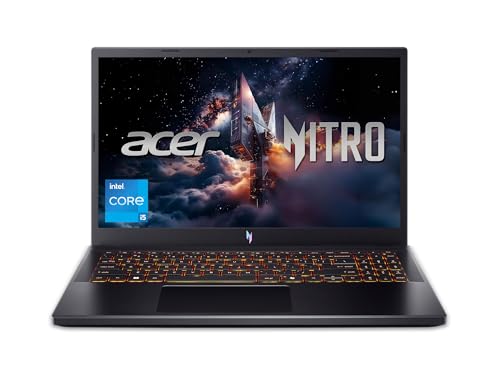
1. Acer Nitro V 15 (Acer Nitro V line)
The Nitro V 15 is a typical entry gaming laptop with several GPU and display options. It is a solid choice for esports and many modern games at medium settings. The downsides are plastic build, average speakers and thermals that can get loud under load. Compare configurations carefully, because the same name covers different hardware. See the current price on Acer Nitro V 15.
2. Lenovo LOQ 15 (Lenovo LOQ line)
Lenovo’s LOQ series aims at budget buyers who want reasonable cooling and a good keyboard. It is a well-rounded pick for students who also game. The battery life is limited, as with most gaming laptops, and some versions have modest screens. Check display specs before buying Lenovo LOQ 15.
3. ASUS TUF Gaming A15 (ASUS TUF A15 line)
TUF Gaming is known for a sturdy feel and long-running popularity. The A15 uses AMD processors in many versions, which can be efficient. It is a good option if you want a laptop that feels solid. It is heavier than some slim models, and configurations vary widely. Look at the current price of ASUS TUF Gaming A15 and verify the GPU.
4. HP Victus 15 (HP Victus 15 line)
The Victus 15 has a more subtle design than many gaming laptops, which suits school or office use. Performance depends on the GPU, and cooling is average. It is a reasonable pick for players who want a laptop that does not look like a gaming rig. Compare configurations of HP Victus 15 and check the display type.
5. MSI Thin 15 (MSI Thin 15 line)
MSI Thin is a lightweight gaming laptop aimed at entry-level players. It is easy to carry, which is a plus for students. The compromise is modest cooling and entry-class graphics. It is best for lighter titles and esports. See the details of MSI Thin 15 and confirm what is inside.
6. Gigabyte G5 (Gigabyte G5 line)
The Gigabyte G5 is often seen as a value-oriented gaming laptop with RTX graphics in certain versions. It can be a bargain when discounted, though build quality and display may not match pricier brands. Check recent reviews for fan noise and software experience. Compare Gigabyte G5 specs with the Acer and Lenovo.
Common Budget Laptop Traps
Beware of listings that show a premium GPU name but ship a lower-power variant, or models with a single stick of RAM. Check storage size, since 512GB fills quickly with games. Also check the display: a dim, low-color screen is a hidden cost. If a listing lacks specific details, look elsewhere.
Who Should Skip Which Pick
- Skip the Acer Nitro V 15 if you want a premium build and a great speaker system.
- Skip the Lenovo LOQ 15 if you want the thinnest possible design.
- Skip the ASUS TUF A15 if weight is a serious concern for daily carrying.
- Skip the HP Victus 15 if you want the best cooling in its class.
- Skip the MSI Thin 15 if you plan to play demanding new releases at higher settings.
- Skip the Gigabyte G5 if you value a polished software experience and a bright screen.
Reading a Configuration Like a Pro
The model name is only half the story. Look at the GPU name, then its power rating in watts, because the same GPU can perform differently in different laptops. Check the processor generation, the RAM configuration, ideally two sticks for dual-channel and an SSD size that suits your library. The screen deserves attention as well: a 144Hz panel with decent brightness feels much nicer than a dim 60Hz one.
Also check ports and upgrade paths. You will want HDMI or USB-C video output if you plan to connect a monitor, and a spare M.2 slot makes storage expansion easy. Battery life will be short whatever you buy, so a good charger matters. If you plan to play on a desk, a cooling pad or a simple stand can improve temperatures and noise. Keep your expectations in line with the budget: at this level, medium or high settings at 1080p are normal, and that is perfectly enjoyable for most players.
How to Spot a Real Black Friday Deal
- Check price history. Gaming laptops are discounted often, so compare against recent lows.
- Match the exact configuration. Model names cover many versions.
- Buy from reliable sellers. Prefer new units with manufacturer warranty.
- Check return policy. Test thermals and screen quality early.
- Look at upgrade options. Extra RAM or SSD slots add long-term value.
What to Buy Now vs Wait
Buy now if you need a laptop for school or work and a configuration with a solid GPU is marked down. Wait if you want the latest GPU generation, because early deals on new hardware are modest. If a laptop is far above your budget, a sale may not change that.
Quick Checklist Before You Click Buy
- What GPU, and at what power rating, is in this configuration?
- Is there 16GB of RAM in dual-channel, and room to upgrade?
- Is the SSD large enough for several modern games?
- Is the screen at least 144Hz with acceptable brightness?
- Does the charger and warranty come from a reliable seller?
- Are there recent reviews that mention fan noise or thermals?
Budget gaming laptops vary a lot between configurations, so reading the fine print is the smartest way to save.
Frequently Asked Questions
How much RAM do I need?
16GB is a sensible target for modern games.
Is 144Hz worth it?
For fast games, yes. It makes motion smoother.
Do budget laptops last?
With care and cooling maintenance, they can serve for years.
Should I buy a desktop instead?
If portability is not needed, a desktop offers more value.
Final Word
Focus on GPU, RAM and cooling. Check the current price on Amazon and use the return window to test your laptop.
As an Amazon Associate we earn from qualifying purchases.
FAQ
How much RAM do I need?
Is 144Hz worth it?
Do budget laptops last?
Should I buy a desktop instead?
More from Amazon
Programs that pair well with the guide above. Offers and eligibility are set by Amazon and may change.
Send a Prime gift membership to someone who would use free shipping and Prime Video.
Gift Amazon PrimeGive audiobooks to someone who loves to listen. Plans and prices are set by Amazon.
Gift AudibleA free business account with business pricing and bulk-buying tools for work, shop or home office.
Create a business accountFree shipping on eligible items, Prime Video and more. Eligible new members can start with a free trial.
Start a Prime free trialAs an Amazon Associate we earn from qualifying purchases.