Our Top Picks
The best 240Hz gaming laptop for FPS games in this set is the MSI Crosshair 18 HX AI if you want an RTX 5070, 32GB of memory and a 2TB drive behind a large 240Hz screen, with the ASUS ROG Strix G18 as the nearest rival and the cheaper MSI Crosshair A16 HX as the entry route. The two RTX 5090 machines only make sense if you also plan to run demanding titles at high settings, because shooters rarely need that much graphics power. Seven listings are compared below on the parts that decide whether 240 frames per second is realistic: GPU class, processor, memory, panel resolution and chassis size.
One note on price before you scroll: every laptop in this group sits above the budget bracket this site normally covers, so the tier column below is relative within the set. Nobody should treat a 240Hz label as a promise of 240 fps; the section on frame time explains why.
Top picks at a glance

msi Crosshair A16 HX 16” QHD+ 240Hz Gaming Laptop – AMD Ryzen 9 8940HX, NVIDIA GeForce RTX 5060, 16GB DDR5, 1TB NVMe SSD, Wi-Fi 6E, USB-C, Windows 11 D8WFKG-090US
One of the home product options compared in this guide.
View on Amazon
msi Crosshair 18 HX AI 18" 2560x1600 240Hz Display Gaming Laptop, Intel Core Ultra 9 275HX, NVIDIA RTX 5070 8GB GDDR7, 32GB RAM, 2TB NVMe SSD, Windows 11 Home, w/ZYN HDMI Cable
One of the home product options compared in this guide.
View on Amazon
msi Crosshair A16 HX 16” 2.5K QHD+ 240Hz Gaming Laptop – AMD Ryzen 9 8940HX, NVIDIA GeForce RTX 5070, 32GB DDR5, 1TB NVMe SSD, Wi-Fi 6E, USB-C, Windows 11 Home: Gunmetal Grey E8WGK-009US
One of the home product options compared in this guide.
View on Amazon
ASUS ROG Strix G16 (2025) Gaming Laptop, 16” FHD+ 16:10 165Hz/3ms, NVIDIA® GeForce RTX™ 5060, Intel® Core™ i7 Processor 14650HX, 16GB DDR5, 1TB Gen 4 SSD, Wi-Fi 7, Windows 11 Home, G615JMR-AS74
One of the home product options compared in this guide.
View on Amazon
ASUS ROG Strix SCAR 18 (2025) Gaming Laptop, 18” ROG Nebula HDR 16:10 2.5K 240Hz/3ms, NVIDIA GeForce RTX 5090, Intel Core Ultra 9 275HX, 32GB DDR5, 2TB PCIe Gen 4 SSD, Wi-Fi 7, Win 11 Pro, G835LX-XS97
One of the home product options compared in this guide.
View on Amazon
GIGABYTE - AORUS Master 16 GEN 2 Gaming Laptop - 240Hz 2560x1600 WQXGA - NVIDIA® GeForce RTX™ 5090 Laptop GPU - AMD Ryzen 9 9955HX3D - 2TB SSD - 32GB DDR5 RAM - Win11 Home AD - 5-Degree Black
One of the home product options compared in this guide.
View on Amazon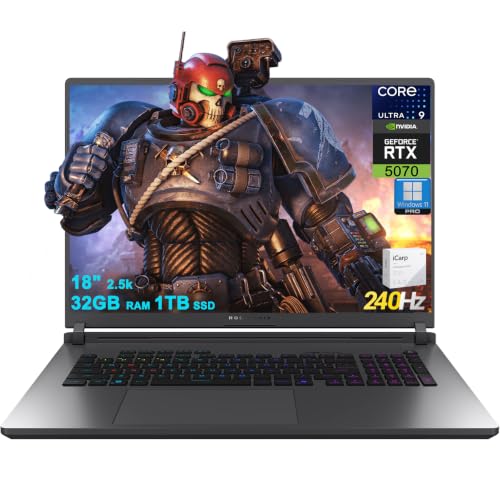
ASUS ROG Strix G18 G815 Gaming AI Laptop 18" 2560x1600 240Hz (100% DCI-P3) Intel 24-core Ultra 9 275HX 32GB RAM 1TB SSD GeForce RTX 5070 (Up to 798 AI Tops) RGB Backlit Win11Pro ICP Acc/
One of the home product options compared in this guide.
View on Amazon| Model | Key point from the title | Price tier (relative) | Best for |
|---|---|---|---|
| MSI Crosshair 18 HX AI | 18-inch 2560×1600 240Hz, Core Ultra 9 275HX, RTX 5070 8GB GDDR7, 32GB, 2TB | Upper-middle | Large screen, balanced GPU and storage |
| ASUS ROG Strix G18 G815 | 18-inch 2560×1600 240Hz, Core Ultra 9 275HX, RTX 5070, 32GB, 1TB | Upper-middle | Same class with a Pro operating system |
| MSI Crosshair A16 HX (RTX 5070) | 16-inch 2.5K QHD+ 240Hz, Ryzen 9 8940HX, RTX 5070, 32GB, 1TB | Premium | Compact chassis, 5070 and 32GB |
| MSI Crosshair A16 HX (RTX 5060) | 16-inch QHD+ 240Hz, Ryzen 9 8940HX, RTX 5060, 16GB, 1TB | Lowest in this set | Cheapest way into a 240Hz panel |
| ASUS ROG Strix G16 | 16-inch FHD+ 165Hz, RTX 5060, Core i7 14650HX, 16GB, 1TB | Lower-middle | Players who accept 165Hz (not a 240Hz panel) |
| ASUS ROG Strix SCAR 18 | 18-inch 2.5K 240Hz, RTX 5090, Core Ultra 9 275HX, 32GB, 2TB | Flagship | Maximum graphics headroom |
| GIGABYTE AORUS Master 16 Gen 2 | 16-inch 2560×1600 240Hz, RTX 5090 laptop GPU, Ryzen 9 9955HX3D, 32GB, 2TB | Flagship | Top-end GPU in a 16-inch frame |
What a 240Hz panel really asks of the laptop
A 240Hz display refreshes every 4.17 milliseconds (1000 divided by 240). To make use of that, the CPU has to prepare a frame, the GPU has to draw it and the system has to hand it over inside that window, again and again, without the occasional slow frame that shows up as a stutter. Averages hide this. A game reporting 260 fps on average can still feel uneven if one frame in a hundred takes three times as long as the rest.
For shooters, the processor often limits frame rate before the graphics card does, because the games are lightweight and the GPU finishes early. That is why the high-core-count mobile chips in this list (Core Ultra 9 275HX, Ryzen 9 8940HX, Ryzen 9 9955HX3D, Core i7 14650HX) matter as much as the RTX label. The GPU becomes the limit once you raise resolution or settings, which is where the 5060 versus 5070 versus 5090 decision lives. General guidance, not a measurement: older and lighter competitive titles tend to reach very high frame rates on mid-range laptop GPUs at reduced settings, while recent engine-heavy shooters can fall well under 240 fps even on strong hardware at native resolution.
Resolution is the second lever. Most of the 240Hz panels here are listed at 2560×1600 or the QHD+ equivalent, which is about 1.9 times the pixel count of 1920×1080. Players who chase frame time usually render below native, lower shadows and effects, and keep the sharper panel for everything else. The ASUS ROG Strix G16 is listed at 165Hz instead, and its refresh rate sits one tier below the rest of the group.
| Spec concept | What to look for | Why it matters at 240Hz |
|---|---|---|
| Refresh rate and response | 240Hz listed, plus a response figure where given | Sets the ceiling on smoothness; a 165Hz panel caps what you see regardless of GPU |
| Panel resolution | 2560×1600 or QHD+ versus FHD+ | Higher resolution pulls frame rate down unless you render below native |
| GPU class | RTX 5060, 5070 or 5090 laptop part; check watt limit on the listing | Decides frame rate once settings or resolution rise |
| CPU | HX-series mobile processor | Often the limit in lightweight shooters at low settings |
| Memory | 16GB versus 32GB DDR5 | Background apps, voice chat and capture compete for RAM |
| Chassis size | 16-inch versus 18-inch | Larger bodies usually give cooling more room but cost portability |
How these listings were picked
The selection started from every listing that names a 240Hz panel and a recent RTX laptop GPU, then added one 165Hz model so the effect of the refresh tier is visible. Each entry is judged on what its own title says: panel size and rate, processor, GPU, memory, storage and operating system. Seller-added wording such as bundled cables, AI TOPS figures or core counts is treated as a claim to verify on the listing, not as a fact. The basis is published specifications, manufacturer documentation and buyer reviews. Nobody on the team used or measured these units, so no frame rates or temperatures are quoted as results.
The seven listings, one by one
MSI Crosshair 18 HX AI
This is the pick for a bigger display without jumping to the flagship GPUs. The title names an 18-inch 2560×1600 panel at 240Hz, a Core Ultra 9 275HX, an RTX 5070 with 8GB of GDDR7, 32GB of RAM and a 2TB NVMe drive. The storage and memory are the generous part: shooters, a launcher library and capture clips fit without an immediate upgrade. A seller-added HDMI cable is mentioned, which is a bonus rather than a reason to buy.
The trade-off is the GPU memory pool of 8GB, which is fine for esports titles but can become a limit in newer games at native resolution with high texture settings. It suits a player who wants a desk-bound machine with room for the cooling system to work.
Pros
- 32GB RAM and a 2TB drive in the title
- Large 240Hz panel with a high pixel count
- RTX 5070 gives more headroom than the 5060 models
Cons
- 18-inch body is heavy to carry
- 8GB of video memory can limit demanding settings
Check the listing for the GPU power limit and the port layout. Ask yourself whether you would rather spend the premium on this or on the cheaper 16-inch option with the same GPU tier.
ASUS ROG Strix G18 G815
The listing reads as a close sibling of the MSI above: 18 inches, 2560×1600, 240Hz with 100% DCI-P3 mentioned, the same Core Ultra 9 275HX and an RTX 5070. It carries 32GB of RAM but only 1TB of storage, and Windows 11 Pro instead of Home. The title describes the processor as 24-core and cites up to 798 AI TOPS; both are seller or vendor claims, so confirm them against the manufacturer page. The trailing accessory text suggests a bundled extra whose details are not clear from the title.
It fits a buyer who cares about color coverage for non-gaming work alongside shooters, since the DCI-P3 mention hints at a wider gamut panel. Anyone planning many installed games should expect to add a second drive sooner than with the 2TB MSI.
Pros
- 240Hz 2560×1600 panel with a stated 100% DCI-P3
- 32GB RAM and RTX 5070
- Windows 11 Pro
Cons
- Only 1TB of storage in the title
- Marketing-heavy title with an unclear accessory bundle
Check the listing for the SSD slot count and what the extra accessory actually is.
A practical scenario: a player who streams or records clips while competing needs spare processor threads and memory, and the 32GB plus a 24-core claim point that way, though the claim itself needs checking on the manufacturer page. Compared with the MSI 18-inch listing, the main difference to weigh is storage versus operating system edition.
MSI Crosshair A16 HX with RTX 5070
Here the 5070 and 32GB of DDR5 arrive in a 16-inch frame. The title lists a 2.5K QHD+ 240Hz panel, a Ryzen 9 8940HX, a 1TB NVMe drive, Wi-Fi 6E, USB-C and Windows 11 Home in a Gunmetal Grey finish. Compared with the 18-inch machines it is easier to move between rooms or into a bag, and compared with its 5060 sibling it adds both GPU headroom and double the memory.
It sits at the premium end for what it offers, and the 18-inch MSI with the same GPU class carries twice the storage in its title. That makes the question simple: pay for portability, or pay for storage and screen area. Players who travel to LAN events fall into the first group.
Pros
- RTX 5070 with 32GB DDR5 in a smaller body
- Ryzen 9 8940HX is a high-end mobile chip
- Wi-Fi 6E and USB-C stated
Cons
- Highest price tier of the 16-inch MSI pair
- 1TB drive fills quickly with large games
Check the listing for the second M.2 slot and the memory configuration.
A practical scenario: a player who splits time between a dorm desk and weekend tournaments gets 32GB for background apps without paying for the 5090 tier. If you rarely leave the house, the 18-inch MSI above is the stronger match for the same GPU class.
MSI Crosshair A16 HX with RTX 5060
The cheapest 240Hz entry here pairs the same Ryzen 9 8940HX with an RTX 5060, 16GB of DDR5 and a 1TB NVMe drive on a 16-inch QHD+ panel. For competitive play with reduced settings this is the configuration most buyers will compare against everything else. It is also where the resolution question bites hardest: a 5060 class GPU pushing QHD+ at 240 frames is a demanding task in anything beyond lighter esports titles, so expect to lower render resolution or settings.
The 16GB of memory is adequate for a shooter with a browser and chat running, but it leaves less margin for capture software. It suits a student or first-time gaming laptop buyer who wants the 240Hz label without paying for a 5070.
Pros
- Lowest entry point to a 240Hz panel in this group
- Same strong processor as the pricier A16
- Includes Wi-Fi 6E and USB-C
Cons
- 16GB RAM is thinner for multitasking
- RTX 5060 can limit frame rate at native QHD+
Check the listing for upgrade options on memory and storage.
A practical scenario: someone who plays competitive shooters at lowered settings and everything else at 60 fps will use this panel well, while someone planning to play new open-world games at native resolution will feel the GPU limit first. It is the fair starting point if the budget stops here.
ASUS ROG Strix G16
Plainly off the keyword: this model is listed as a 16-inch FHD+ 16:10 panel at 165Hz with 3ms response, not 240Hz. It pairs an RTX 5060 with a Core i7 14650HX, 16GB of DDR5, a 1TB Gen 4 SSD and Wi-Fi 7. It earns a place as a reference point. At FHD+ a 5060 does not have to push as many pixels as the QHD+ MSI, so a 165Hz target can be more realistic than chasing 240 on a heavier panel.
Buy it only if you accept the refresh ceiling. A competitive player who wants every available frame displayed should look at the 240Hz listings instead.
Pros
- Lower pixel count suits the RTX 5060
- Wi-Fi 7 and a 1TB Gen 4 SSD
- Lower-middle price tier in this set
Cons
- Not a 240Hz panel
- 16GB RAM again leaves little spare capacity
Check the listing for the panel details and for adaptive sync support.
A practical scenario: a player who values a sharp 1920×1200-class image at high frame rates, rather than the very highest refresh figure, can get a smoother result here than from a QHD+ panel driven by the same GPU class. The title does not state color coverage, so do not assume it.
ASUS ROG Strix SCAR 18
The title reads like a statement of intent: an 18-inch ROG Nebula HDR 2.5K panel at 240Hz and 3ms, an RTX 5090, a Core Ultra 9 275HX, 32GB of DDR5, a 2TB PCIe Gen 4 SSD, Wi-Fi 7 and Windows 11 Pro. For shooters this is more graphics power than the games ask for. The sensible reason to buy it is a mixed workload: high-resolution single-player games, video editing or AI work alongside esports.
The cost is not only the purchase price. A laptop with this class of GPU draws a lot of power and heat, so it needs a desk, ventilation and the large power brick on the listing. Portability is limited.
Pros
- RTX 5090 with 32GB DDR5 and 2TB storage
- HDR-capable 240Hz panel named in the title
- Windows 11 Pro
Cons
- Highest cost tier
- Heavy and power-hungry for pure esports use
Check the listing for exact dimensions and the power adapter rating.
A practical scenario: a streamer who plays, encodes and edits on one machine can justify the headroom, while a player who only runs competitive shooters will leave most of it idle. The Pro edition of Windows also helps people who need business features, though that is secondary here.
GIGABYTE AORUS Master 16 Gen 2
A 16-inch frame with the same flagship GPU class: 2560×1600 WQXGA at 240Hz, an RTX 5090 laptop GPU, a Ryzen 9 9955HX3D, 32GB of DDR5 and a 2TB SSD. The 3D V-Cache branding on that processor generally targets game performance, and the title confirms the pairing, though the actual gain varies by title. Compared with the 18-inch SCAR it trades screen area for a smaller footprint.
It appeals to a player who wants top-tier hardware without an 18-inch slab. The title lists Windows 11 Home and does not mention Wi-Fi generation or port types, so confirm those before buying.
Pros
- Flagship GPU in a 16-inch body
- Ryzen 9 9955HX3D for gaming-focused workloads
- 2TB SSD and 32GB DDR5
Cons
- Top price tier
- Title omits Wi-Fi and port details
Check the listing for thermal design notes and the power adapter.
A practical scenario: a player who competes in titles that lean on processor cache will find the pairing interesting, but the benefit differs by game and should be confirmed in buyer discussions. For pure frame rate in lighter shooters, the cheaper listings above may already hit the panel ceiling.
Frame pacing at 240Hz
Smooth play at 240Hz depends on consistency more than peak numbers. A few constraints repeat across every laptop in the set.
Power and thermals come first. Mobile GPUs and CPUs boost aggressively for a short time, then settle to a lower sustained level as the chassis heats up. Larger bodies give the fans and heat pipes more surface, which is why the 18-inch machines usually hold their numbers longer. A cooling pad, covered in our guide to a quiet cooling pad for a gaming laptop, can help at the margins but does not change the silicon.
Next is the power state. Laptops usually reduce performance on battery, so competitive play belongs on wall power with the performance profile enabled. Variable refresh rate can smooth tearing when frame rate dips below the panel rate, but whether a given laptop supports it, and through which graphics path, is a listing and driver question.
Finally, background load. Overlays, capture software and browser tabs consume CPU time that a shooter wants. With 16GB of RAM that pressure arrives sooner than with 32GB.
Diagnostic table: where 240Hz goes wrong
| Symptom | Likely cause | What to check first |
|---|---|---|
| Average fps well under 240 at native resolution | GPU limit from pixel count | Lower render resolution or enable upscaling and compare |
| Average fps high but game feels uneven | Frame-time spikes, often CPU, thermal or background load | Close overlays, use wall power, check sustained clocks |
| Frame rate falls after 15-20 minutes | Heat soak and power throttling | Raise the laptop for airflow, clean vents, review fan profile |
| Fine on wall power, poor on battery | Battery power limit | Plug in and select the performance mode |
| Stutter during voice chat or recording | Not enough RAM or CPU headroom | Look at memory use; consider 32GB |
| Screen tearing despite high fps | Variable refresh not active | Check graphics settings and display path |
Worked example: the frame-time budget
The numbers below are assumptions for illustration, not results from any laptop in this guide. Suppose a shooter runs at a 4.17 millisecond budget for 240Hz and you want the laptop to stay inside it most of the time.
| Scenario (hypothetical) | Average fps | 1% low fps | What the 240Hz panel shows |
|---|---|---|---|
| A: reduced settings, lower render resolution | 300 | 220 | Almost every frame fits the 4.17 ms budget |
| B: medium settings, native 2560×1600 | 190 | 130 | Panel is rarely saturated; 165Hz would look similar |
| C: high settings, native resolution | 110 | 75 | Panel advantage is mostly lost |
The decision rule that follows: buy a 240Hz panel when you expect to live in scenario A, accept B as a compromise, and treat C as a reason to choose a more powerful GPU or a lower-resolution panel. Apply it to your own favorite game by checking what your preferred settings look like before you commit to a screen.
Which listing for which player
| Player | Priority | Listing to start with |
|---|---|---|
| Student on a budget | 240Hz label, lower cost | MSI Crosshair A16 HX (RTX 5060) |
| LAN traveler | Smaller body, strong GPU | MSI Crosshair A16 HX (RTX 5070) |
| Desk-bound competitive player | Big screen and cooling | MSI Crosshair 18 HX AI or ASUS ROG Strix G18 |
| Mixed gaming and creative work | Maximum GPU | ASUS ROG Strix SCAR 18 or AORUS Master 16 Gen 2 |
| Accepts 165Hz | Lower pixel count | ASUS ROG Strix G16 |
Buyers still weighing a laptop against a tower can read the gaming laptop versus gaming desktop comparison, and the GPU tier explainer for the RTX 5050, 5060 and 5070 helps decide how much graphics power a 240Hz plan really needs. If the 5060 is the target, the RTX 5060 laptop guide covers more models.
Verification checklist before checkout
- Confirm the refresh rate is 240Hz on the exact variant, not a sibling.
- Read the GPU name and look for the watt limit in the manufacturer specification.
- Check whether RAM is upgradeable and how many M.2 slots exist.
- Note the weight and the power adapter size, especially on the 18-inch and 5090 models.
- Read the return window and warranty terms, since panel quality varies between units.
- Scan buyer reviews for fan noise, coil whine and thermal complaints on that exact model number.
Mistakes buyers make with 240Hz laptops
| Mistake | Why it hurts | Fix |
|---|---|---|
| Buying a flagship GPU for shooters only | Esports titles rarely need it; the money is better spent on RAM or storage | Choose a 5070 class machine unless you also run heavy games |
| Ignoring RAM capacity | 16GB crowds out chat, capture and launchers | Prefer 32GB or confirm upgrade slots |
| Assuming 240Hz means 240 fps | The panel only displays frames the system produces | Lower resolution or settings to approach the budget |
| Skipping the cooling check | Sustained clocks drop in thin bodies | Read thermal complaints in buyer reviews |
| Trusting title marketing | Core counts and AI TOPS are seller wording | Verify on the manufacturer page |
Frequently asked questions
Do I need a 240Hz laptop for competitive FPS games?
No, but it helps if your hardware can actually deliver the frames. A 240Hz panel only shows its advantage when the game renders close to 240 frames per second with stable frame times. If your favorite shooter runs at 150 fps on the laptop you pick, a 165Hz or 144Hz screen would look almost the same. Match the panel to the GPU and the game, not the other way around.
Is an RTX 5060 enough to feed a 240Hz screen?
It depends on the game and the render resolution. Lightweight esports shooters at reduced settings are the realistic target for a 5060 class laptop GPU, while demanding single-player titles at native resolution will sit well below 240 fps. Treat the 240Hz number as a ceiling for lighter games, and check the wattage and cooling of the specific model on the listing.
Does a higher-resolution 240Hz panel hurt FPS?
Rendering at 2560×1600 asks the GPU to draw more pixels than 1920×1080, so frame rates fall if you leave the game at native resolution. Many competitive players lower the in-game resolution or use upscaling to protect frame time, accepting a softer image for smoother motion. The sharper panel still pays off for everything that is not a twitch shooter.
Is 16GB of RAM enough for a gaming laptop built around FPS games?
For most competitive shooters 16GB is workable, but it leaves little room for a browser, voice chat, recording software and launchers running in the background. 32GB gives breathing space and is a sensible default if the price gap is small. Check whether the memory is upgradeable, because some laptop designs solder part or all of it.
Should I buy an 18-inch or a 16-inch laptop for 240Hz play?
The 18-inch chassis in this set generally gives the cooling system more room, which can help sustain performance, but it is heavier and harder to carry or place on a small desk. A 16-inch machine is easier to live with every day. Compare thickness, weight and any dimensions on the listing before deciding.
Can I carry these laptops to school or a LAN event?
The 16-inch models are the practical choice, and a padded bag helps for any of them. The 18-inch and RTX 5090 machines are better thought of as transportable desktops because of their weight and power adapters. A purpose-built gaming laptop backpack is worth considering for regular travel, and its listing should state the maximum laptop size it fits.