Key takeaways
- Capacity: A large Steam library needs room; 2TB is the sweet spot in 2026, holding many AAA titles at once, while 1TB fills quickly if you keep several big games installed.
- Form factor: Desktops and most laptops use full-length M.2 2280 drives, but handhelds like the Steam Deck and ROG Ally require the shorter 2230 size, so confirm the length before buying.
- Sequential speed and PCIe generation: Gen4 NVMe drives load levels fast; while games rarely saturate the fastest drives, a solid Gen4 SSD ensures quick installs and snappy load times.
- Random performance: Game loading leans on random reads as much as sequential speed, so a drive with strong real-world 4K random performance feels faster in practice than one chasing peak headline numbers.
- Portable vs internal: For consoles and laptops you cannot open, a fast external USB SSD is a flexible way to carry a library, though internal NVMe remains fastest for your primary install.
Modern games are enormous. A single AAA title can swallow 100 to 150GB, and a serious Steam library fills a small drive in a weekend. The fix is a large, fast SSD that loads levels quickly and holds dozens of games at once, and for handhelds like the Steam Deck and ROG Ally, the right compact 2230-size drive can transform your storage without breaking the bank.
We evaluated SSDs for gaming libraries on capacity, sequential and random speed, form factor compatibility, and value per terabyte. Below are our picks for both desktop and handheld setups, a buying guide for choosing the right drive, and answers to the questions gamers ask before expanding their storage.
Our top picks
![SABRENT Rocket Q4 2230 NVMe SSD 2TB – PCIe Gen4 M.2 Internal SSD for Steam Deck, ROG Ally, Surface Pro, Mini PCs – DRAM-Less QLC, Up to 5GB/s, Single-Sided, Compact Form Factor [SB-213Q-2TB]](https://m.media-amazon.com/images/I/41QldUwQDlL._SL500_.jpg)


As an Amazon Associate we earn from qualifying purchases at no extra cost to you. Ratings are shown as listed on Amazon.
⚡ Save on Your Next PC — Amazon Prime
Prime members get fast free shipping on the systems above, plus early access to Prime Day & Black Friday PC deals. New members get a 30-day free trial.
Watch: Best SSD for a Large Steam Library — Video Review
How to Choose
- Capacity: A large Steam library needs room; 2TB is the sweet spot in 2026, holding many AAA titles at once, while 1TB fills quickly if you keep several big games installed.
- Form factor: Desktops and most laptops use full-length M.2 2280 drives, but handhelds like the Steam Deck and ROG Ally require the shorter 2230 size, so confirm the length before buying.
- Sequential speed and PCIe generation: Gen4 NVMe drives load levels fast; while games rarely saturate the fastest drives, a solid Gen4 SSD ensures quick installs and snappy load times.
- Random performance: Game loading leans on random reads as much as sequential speed, so a drive with strong real-world 4K random performance feels faster in practice than one chasing peak headline numbers.
- Portable vs internal: For consoles and laptops you cannot open, a fast external USB SSD is a flexible way to carry a library, though internal NVMe remains fastest for your primary install.
The Best Picks Reviewed
SABRENT Rocket Q4 2230 NVMe SSD 2TB
Our top pick for handheld gamers. This 2TB Gen4 drive in the compact 2230 form factor is a perfect Steam Deck and ROG Ally upgrade, offering huge capacity and fast load times in a tiny package. It transforms a cramped handheld into a machine that holds your whole rotation of games.
Silicon Power UD90 2230 NVMe 2TB SSD
A superb value alternative for handhelds and mini PCs. The UD90 delivers 2TB of Gen4 storage with read speeds up to 5,000MB/s in the 2230 size, making it a cost-effective way to double or quadruple your Steam Deck’s library without sacrificing speed.
WD SN740 512GB M.2 2230 NVMe SSD
The budget handheld option. This OEM 2230 drive offers dependable Gen4 speed and single-sided 30mm compatibility for Steam Deck and ROG Ally at 512GB. If you want a proven, affordable capacity bump rather than a massive library, it is a smart, reliable choice.
Transcend ESD420 1TB Magnetic External SSD
For console and laptop gamers who cannot open their device, this portable 1TB SSD reaches up to 2,000MB/s and even magnetically attaches to compatible devices. It is a flexible way to carry a chunk of your library between systems without cracking open a case.
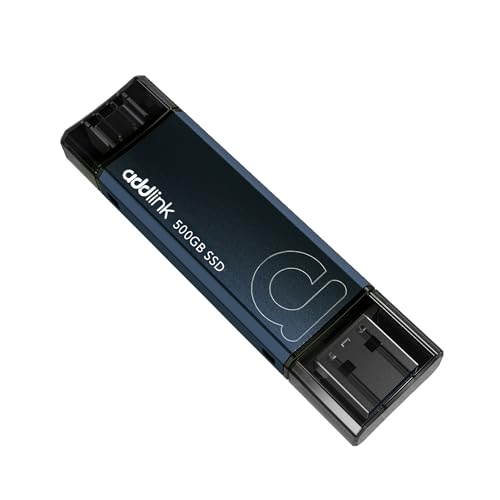
Addlink P50 500GB Portable SSD Stick
The pocket-friendly pick. This thumb-drive-sized USB 3.2 Gen 2 SSD hits around 1,050MB/s with both Type-C and Type-A connectors, making it a convenient way to move games and installs between machines. Great for overflow storage or transferring a title to a friend’s PC.
Frequently Asked Questions
How big should my SSD be for a Steam library?
2TB is the sweet spot in 2026. With modern AAA games often exceeding 100GB each, 2TB comfortably holds a rotation of large titles, while 1TB fills quickly if you keep several big games installed at once.
What size SSD does the Steam Deck use?
The Steam Deck and many handhelds use the compact M.2 2230 form factor, which is shorter than the standard 2280 drives in desktops. Always confirm you are buying a 2230 drive, like the SABRENT Rocket Q4, for a handheld upgrade.
Does a faster SSD really improve game load times?
Somewhat. Moving from a hard drive to any NVMe SSD is a dramatic improvement, but differences between fast Gen4 drives are smaller in games. Strong random performance often matters more for loading than peak sequential speed.
Can I use an external SSD for my game library?
Yes, especially for consoles and laptops you cannot open. Portable drives like the Transcend ESD420 let you carry a library between systems. Internal NVMe remains fastest for your primary install, but external SSDs are great for overflow and portability.
Final Thoughts
For handheld gamers the SABRENT Rocket Q4 2230 2TB is our top choice, delivering huge capacity in the compact size the Steam Deck and ROG Ally need, with the Silicon Power UD90 close behind on value. Console and laptop owners should consider the portable Transcend ESD420. Match the form factor to your device, aim for 2TB where you can, and you will never uninstall a game just to make room again.