Key takeaways
- Smart plugs and bulbs: 10–25 devices (all 2.4 GHz)
- Cameras and doorbells: 2–8 devices (mostly 2.4 GHz, some 5 GHz)
- Speakers and displays: 2–5 devices
- Thermostats, locks, sensors: 3–10 devices
- Phones, tablets, laptops, consoles, TVs: 6–15 devices
Best Wi-Fi 6E Routers for Smart Homes: Coverage, Capacity, and Setup Compared
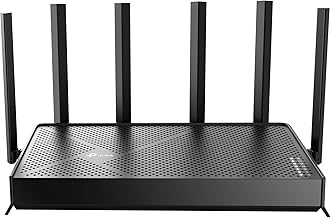
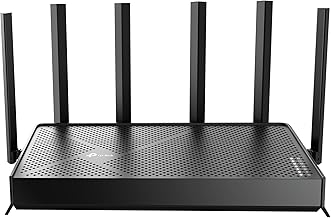
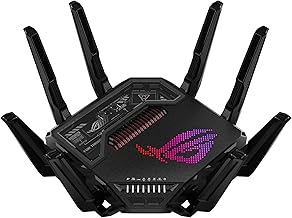
For most smart homes in 2026, the best Wi-Fi 6E router is a tri-band model with a dedicated 6 GHz radio, at least 4×4 MU-MIMO on the 5 GHz band, and support for 60–100 concurrent clients — because the 6 GHz band is nearly empty of legacy interference, and tri-band design offloads your growing pile of smart plugs, cameras, and speakers away from the bands your laptops and consoles need. If your home is under 1,800 sq ft with heavy 2.4 GHz smart device density, a compact 6E router around $150–$220 handles it; if you’re covering 3,000+ sq ft or running 80+ devices, budget $300–$600 for a higher-capacity model or a mesh pair.
Below is a practical comparison built around the three things that actually determine whether a Wi-Fi 6E router suits a smart home: coverage per node, realistic device capacity, and how much setup work (IoT network separation, band steering, scheduling) you’re willing to do.
Quick Comparison of the Picks
| Pick | Best for | Key specs | Price range |
|---|---|---|---|
| Best overall (tri-band 6E, e.g. Asus RT-AXE7800 class) | 2,000–2,800 sq ft, 40–80 devices | Tri-band 6E, 4×4 on 5 GHz, 2.5 GbE WAN, USB 3.0, guest/IoT SSID | usually $200–$300 |
| Best budget (dual-band 6E, e.g. TP-Link Archer AXE75 class) | Apartments and homes under 1,800 sq ft | Tri-band 6E, 3×3/4×4 5 GHz, Gigabit WAN, basic IoT SSID | usually $130–$200 |
| Best for large homes (mesh pair, e.g. Asus ZenWiFi ET8 class) | 3,000–5,000 sq ft, 100+ devices | 2-pack tri-band 6E mesh, dedicated backhaul option, 2.5 GbE port | usually $350–$550 |
| Best for power users (e.g. Netgear Nighthawk RAXE300 class) | Gaming, NAS, 2.5 Gb fiber | Tri-band 6E, 2.5 GbE WAN + LAN, 6 GHz 160 MHz channels | usually $300–$450 |
| Best for ISP-supplied replacement | Homes stuck with a rented gateway | Any tri-band 6E with bridge/AP mode + own router | usually $150–$350 |
Best Overall: Tri-Band Wi-Fi 6E With 4×4 on 5 GHz
This class — represented by models like the Asus RT-AXE7800 — is the sweet spot because it gives you three separate radios: 2.4 GHz for smart devices, 5 GHz for phones and laptops, and 6 GHz for anything that supports it. A 4×4 5 GHz radio matters in a smart home because MU-MIMO lets the router service four client streams simultaneously rather than time-slicing, which reduces the lag you notice when a video doorbell uploads a clip while someone is on a video call.
Who it suits: households with 40–80 connected devices, a mix of old 2.4 GHz-only plugs and newer 6E-capable phones. Main trade-off: you pay for a radio many of your devices can’t use yet, and 6 GHz range is shorter than 5 GHz — walls cut it noticeably. According to manufacturer spec sheets for this class, you typically get one 2.5 GbE WAN port, three or four Gigabit LAN ports, and USB 3.0 for a shared drive.
Best Budget: Compact Tri-Band 6E Under $200
Models in the TP-Link Archer AXE75 class bring 6E down to entry pricing. You still get the clean 6 GHz band, but the 5 GHz radio is often 2×2 or 3×3 with fewer spatial streams, and the WAN port is usually Gigabit rather than 2.5 GbE.
Who it suits: apartments, condos, and homes under 1,800 sq ft with fewer than 40 devices. Main trade-off: limited throughput headroom once multiple 4K streams and cloud camera uploads run at the same time, and weaker range through dense walls.
Best for Large Homes: Wi-Fi 6E Mesh Pair
A two-pack mesh such as the Asus ZenWiFi ET8 class covers 3,000–5,000 sq ft by placing a second node where the signal sags. The key spec is whether the mesh can use a dedicated backhaul — ideally on 6 GHz — so node-to-node traffic doesn’t consume the same airtime your devices use.
Who it suits: multi-floor homes, detached garages with cameras, or yards with smart lighting. Main trade-off: cost roughly doubles versus a single router, and if the backhaul shares a band with clients, throughput at the far node drops. Per the manufacturer’s spec sheet, 2.5 GbE ports on the nodes let you wire the backhaul if you can run cable — always the better option.
Best for Power Users: 2.5 GbE WAN With 160 MHz Support
If you have multi-gig fiber, a NAS, or you game competitively, look for a tri-band 6E router with a 2.5 GbE WAN port and support for 160 MHz channels on 5 GHz and 6 GHz. The Netgear Nighthawk RAXE300 class fits here. Wider channels mean higher peak throughput but fewer non-overlapping channels available — in a dense neighborhood, 160 MHz on 5 GHz can be a liability.
Who it suits: gigabit-plus internet, local file transfers, competitive gaming. Main trade-off: premium price, larger physical footprint, and settings most people never touch.
Replacing an ISP Gateway: Bridge Mode or Access Point
If you’re stuck renting a gateway, you have two options: put the ISP box in bridge mode and let your 6E router handle routing, or keep the gateway as a router and run your 6E unit in access point mode. Bridge mode is cleaner (no double NAT), but some ISPs restrict it — check your provider’s documentation. Access point mode works universally but leaves the ISP device managing DHCP.
How to Choose: Matching the Router to Your Home’s Numbers
Rather than guessing, work through the arithmetic. Two calculations cover most decisions.
1. Device capacity: count radios, not gadgets
A single smart plug uses one connection; a smart TV might use one; a robot vacuum one. A typical 2026 smart home stacks up like this:
- Smart plugs and bulbs: 10–25 devices (all 2.4 GHz)
- Cameras and doorbells: 2–8 devices (mostly 2.4 GHz, some 5 GHz)
- Speakers and displays: 2–5 devices
- Thermostats, locks, sensors: 3–10 devices
- Phones, tablets, laptops, consoles, TVs: 6–15 devices
That’s realistically 25–60 connections before guests arrive. A budget 6E router with a 2×2 5 GHz radio can technically hold many clients but will start queuing airtime past roughly 30–40 active devices. If your count lands above 40, prioritize a 4×4 5 GHz model or a mesh system.
2. Bandwidth budget: what your streams actually need
Per published streaming service guidance, a 4K HDR stream pulls roughly 15–25 Mbps. Add a camera uploading 1080p continuously at about 2–4 Mbps each, plus general browsing and updates. A household with three 4K streams, four cameras, and background traffic lands around 80–110 Mbps sustained — well within any 6E router’s capacity, which is why device count and interference, not raw bandwidth, are what you’re really solving for. A 200 Mbps plan is plenty for most smart homes; the router matters more than the tier above that.
3. Coverage: plan on one node per 1,500–2,000 sq ft
6 GHz signals attenuate faster than 5 GHz, so don’t expect 6 GHz to reach across a large home from one node. Plan coverage on your 5 GHz expectations and treat 6 GHz as a bonus in the same room or one wall away.
4. Settings to change on day one
- Create a separate 2.4 GHz-only IoT SSID. Reason: many smart plugs and bulbs fail to join or drop off when a router steers them between bands. Pinning them to 2.4 GHz ends the flapping.
- Set 6 GHz to WPA3-only. Reason: Wi-Fi 6E requires WPA3 on 6 GHz, and WPA2-only legacy devices simply can’t see the band — which is exactly why it’s quieter.
- Turn on band steering only for your main SSID. Reason: it moves capable phones to 5/6 GHz, but keep it off the IoT SSID so those devices stay put.
- Set the 5 GHz channel width to 80 MHz, not 160 MHz, in dense areas. Reason: 160 MHz doubles peak speed but overlaps more neighbors’ networks, causing retries that hurt real-world latency.
- Enable scheduled reboots and auto-updates. Reason: smart home fleets stay connected for weeks; firmware bugs and memory leaks are the leading cause of “my devices randomly went offline.”
FAQ: Wi-Fi 6E Routers and Smart Homes
Do smart home devices actually use Wi-Fi 6E?
Most don’t. The vast majority of smart plugs, bulbs, sensors, and cameras are 2.4 GHz-only, and only a growing minority of newer cameras and hubs support 5 GHz. Wi-Fi 6E’s value in a smart home is indirect: it moves your phones, laptops, and TVs to the clean 6 GHz band, freeing 2.4 GHz and 5 GHz airtime for the IoT gear that’s stuck there.
Is Wi-Fi 6E worth it over Wi-Fi 6 for a smart home?
If you live in a dense area with many neighboring networks, yes — the 6 GHz band is far less congested, and that reduces interference. If you’re in a detached home with few nearby networks and your devices are mostly 2.4 GHz, a good Wi-Fi 6 router may serve you just as well for less money. Buy 6E for the clean spectrum and future-proofing, not for smart-device compatibility.
How many smart home devices can one Wi-Fi 6E router handle?
Spec sheets often advertise 100+ concurrent clients, but real-world comfort depends on the radio layout. As a working rule: a 2×2 5 GHz budget model handles roughly 30–40 active devices before latency climbs; a 4×4 model with a dedicated IoT SSID comfortably covers 60–80. Above that, move to a mesh system so devices spread across multiple access points.
Should I put smart devices on a separate network?
Yes, whenever the router supports it. A separate 2.4 GHz IoT SSID improves reliability because those devices stop being steered between bands, and it improves security by isolating cheap connected gadgets from your laptops and NAS. Most tri-band 6E routers include guest network features you can repurpose for this; look for one that lets you disable band steering on that SSID specifically.
Will a Wi-Fi 6E router improve my smart home camera reliability?
Often, yes — but usually because of congestion relief rather than the 6 GHz band itself. Cameras that drop offline are typically fighting for 2.4 GHz airtime alongside dozens of other devices. Giving cameras their own 2.4 GHz SSID, or moving your other gear to 5/6 GHz, frees that airtime and stabilizes uploads. A router with stronger 2.4 GHz antennas and reliable firmware often matters more than the 6E badge.
Do I need a mesh system or a single router?
Count your square footage and walls. One tri-band 6E router generally covers 1,800–2,500 sq ft in an open layout, less through masonry or multiple floors. If any important device — a doorbell, a garage camera, a bedroom TV — sits more than two walls from the router, a two-node mesh will serve you better. Remember that 6 GHz range is shorter than 5 GHz, so verify 5 GHz coverage first and treat 6 GHz as a same-room bonus.