Key takeaways
- Performance: NVMe delivers 3,500 to 7,000+ MB/s sequential speeds, roughly 6 to 12 times faster than SATA’s ~550 MB/s ceiling.
- Price: SATA drives cost noticeably less per terabyte, so they win on pure value and bulk storage.
- Random access: NVMe handles far more simultaneous requests, which helps multitasking, heavy app loads, and asset streaming.
- Connection: NVMe plugs into an M.2 PCIe slot with no cables; SATA uses a data and power cable to a 2.5-inch drive.
- Everyday feel: Windows boot and app launches feel similar on both; the gap shows up in demanding transfers and large-game loads.
- Compatibility: Almost any PC accepts SATA, while NVMe needs a modern board with PCIe-enabled M.2 support.
NVMe and SATA are the two protocols that define how fast a solid-state drive can talk to your PC in 2026. Both crush any spinning hard drive, but the speed gap between them is enormous, and understanding it keeps you from either overpaying or leaving performance on the table.
SATA III is the mature standard, reliable and capped at about 550 MB/s. NVMe runs over PCIe lanes and reaches many times that, from around 3,500 MB/s on Gen3 to well over 7,000 MB/s on Gen4. This comparison is really about whether raw throughput changes what you do day to day, or whether a value SATA drive like the Samsung 870 EVO already covers your needs.
Our top picks
 TEAMGROUP T-Force Vulcan Z 1TB SLC Cache
- [Gaming & PC Upgrade] Boost your PC with…
- [High-Speed SLC Cache] Features a built-in SLC Cache…
- [Universal Compatibility] Standard 2.5-inch 7mm slim design fits…
 fanxiang S101 1TB SSD SATA SSD 1TB
- The fanxiang 1TB SSD 2.5 Inch SATA SSD…
- Compared to HDDs, the 1TB SATA SSD boots…
- The 2.5 SATA SSD 1TB incorporates 3D NAND…
 Gigastone 【NAS Certified】 1TB High Endurance SSD
- [High Endurance Grade] : No.1 NAS SSD choice…
- [For Heavy Workloads] : Superior durability designed for…
- [Wide Compatibility] : Rugged secure data consolidation for…
| Product | Key specs | |
|---|---|---|
| TEAMGROUP T-Force Vulcan Z 1TB SLC Cache | [Gaming & PC Upgrade] Boost your PC with… [High-Speed SLC Cache] Features a built-in SLC Cache… [Universal Compatibility] Standard 2.5-inch 7mm slim design fits… | Check price |
| fanxiang S101 1TB SSD SATA SSD 1TB | The fanxiang 1TB SSD 2.5 Inch SATA SSD… Compared to HDDs, the 1TB SATA SSD boots… The 2.5 SATA SSD 1TB incorporates 3D NAND… | Check price |
| Gigastone 【NAS Certified】 1TB High Endurance SSD | [High Endurance Grade] : No.1 NAS SSD choice… [For Heavy Workloads] : Superior durability designed for… [Wide Compatibility] : Rugged secure data consolidation for… | Check price |
 Gigastone 【NAS Certified】 1TB High Endurance SSD Gigastone 【NAS Certified】 1TB High Endurance SSD | [High Endurance Grade] : No.1 NAS SSD choice… [For Heavy Workloads] : Superior durability designed for… [Wide Compatibility] : Rugged secure data consolidation for… | Check price |
 Gigastone 1TB SATA SSD 2.5 inch SSD Gigastone 1TB SATA SSD 2.5 inch SSD | [Gaming Grade] : No.1 Gaming PC & PS4… [Game Professionals] : Powerful Storage with Fastest Game… [Advanced Technology] : 3D NAND with SLC Cache… | Check price |
 Gigastone 1TB Game Turbo SSD Gigastone 1TB Game Turbo SSD | [Time-saving] : Read speed up to 550 MB/s [Advanced Technology] : 3D NAND with SLC Cache… [Compatibility] : 2.5" SSD 7mm design fits PS4… | Check price |
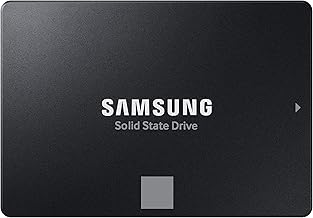
 Samsung SSD 870 EVO SATA III 2.5” Samsung SSD 870 EVO SATA III 2.5” | The latest 870 EVO has indisputable performance, reliability… Enjoy professional level SSD performance which maximizes the… Meet the demands of every task | Check price |
As an Amazon Associate we earn from qualifying purchases at no extra cost to you.
⚡ Save on Your Next PC — Amazon Prime
Prime members get fast free shipping on the systems above, plus early access to Prime Day & Black Friday PC deals. New members get a 30-day free trial.
Watch: NVMe vs SATA SSD: 2026 Speed Comparison — Video Review
Quick Verdict
Choose NVMe if your board has an M.2 PCIe slot and you want top load speeds, big file transfers, and future-proofing. Choose SATA, such as a TEAMGROUP T-Force Vulcan Z or a Gigastone high-endurance SSD, when you want dependable, affordable capacity and your workload is mostly booting, browsing, and launching games where the interface rarely becomes the bottleneck.
Key Differences
- Performance: NVMe delivers 3,500 to 7,000+ MB/s sequential speeds, roughly 6 to 12 times faster than SATA’s ~550 MB/s ceiling.
- Price: SATA drives cost noticeably less per terabyte, so they win on pure value and bulk storage.
- Random access: NVMe handles far more simultaneous requests, which helps multitasking, heavy app loads, and asset streaming.
- Connection: NVMe plugs into an M.2 PCIe slot with no cables; SATA uses a data and power cable to a 2.5-inch drive.
- Everyday feel: Windows boot and app launches feel similar on both; the gap shows up in demanding transfers and large-game loads.
- Compatibility: Almost any PC accepts SATA, while NVMe needs a modern board with PCIe-enabled M.2 support.
NVMe SSDs
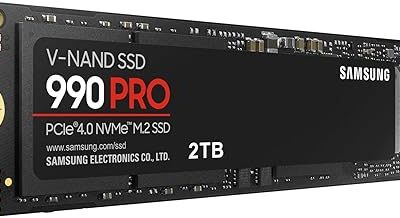
NVMe is the performance tier. By using multiple PCIe lanes and a protocol built for flash, it moves data at speeds SATA physically cannot reach. That translates into shorter load screens, snappier asset streaming in open-world games, and dramatically faster copies when you move a big folder or install library.
For creators and power users the case is even stronger; editing high-bitrate footage or shuffling multi-gigabyte projects is where NVMe saves real minutes. The tradeoff is cost and the need for a compatible M.2 slot, but on any 2026 gaming build that supports it, NVMe is the obvious pick.
SATA SSDs
SATA SSDs prove that solid state does not have to be expensive. Drives like the fanxiang S101, Gigastone Game Turbo, or Samsung 870 EVO deliver instant-feeling responsiveness compared with a hard drive, and for most people the difference between 550 MB/s and 7,000 MB/s simply does not surface in normal use.
Their strength is value and universal fit. You can add one to nearly any laptop or desktop, stack up terabytes cheaply, and never worry about PCIe support. For a big secondary game library or a budget build, SATA remains the sensible, cost-effective backbone.
Which Should You Buy?
- For a modern gaming rig: pick NVMe because your board supports it and load-heavy titles benefit from the speed.
- For a tight budget: pick SATA because you get solid-state responsiveness at the lowest cost per terabyte.
- For content creation: pick NVMe because sustained high throughput slashes render-cache and file-transfer waits.
- For a big game library: pick a large SATA drive because capacity matters more than shaving seconds off loads.
- For older or budget systems: pick SATA because it fits virtually anything and still transforms the machine.
Frequently Asked Questions
How much faster is NVMe in real use?
On paper it is many times faster, but for boot and app launches the felt difference is small. It becomes obvious during large file copies, game installs, and titles that stream assets aggressively, where NVMe clearly pulls ahead.
Does NVMe improve gaming frame rates?
No. Frame rates depend on your GPU and CPU. What NVMe improves is load times and asset streaming, so you spend less time on loading screens, not more frames per second.
Is SATA obsolete in 2026?
Far from it. SATA remains excellent value for bulk storage and older systems. It is slower, but for everyday tasks and large game libraries it still does the job well and cheaply.
Can NVMe and SATA coexist?
Absolutely. A common setup pairs a fast NVMe boot drive with a spacious SATA drive for storage, giving you speed where it matters and cheap capacity everywhere else.
Final Verdict
For 2026, put NVMe in any system that supports it to get the fastest loads and transfers, and lean on SATA SSDs when budget, capacity, or compatibility lead the decision; pairing an NVMe boot drive with a roomy SATA library drive gives most gamers the best balance of speed and value.