Key takeaways
- Power off and unplug the PC completely, then open the side panel.
- Hold each fan blade still with a finger before blowing air; spinning a fan with compressed air can generate voltage that harms the fan bearing or motherboard.
- Blast short bursts of air through the fan from the back so dust blows out of the case, not deeper into it.
- Wipe stubborn grime off the blades and frame with a lightly dampened microfiber cloth, then let it dry fully.
Dust is the silent killer of gaming PC performance. Over months of running, fans and filters accumulate a thick felt of dust that chokes airflow, drives up temperatures, forces fans to spin louder, and eventually causes thermal throttling that steals your frame rate. A twenty-minute cleaning every few months keeps your system running cool and quiet, and it costs almost nothing beyond a can of compressed air.
This guide covers how to safely clean your PC fans, heatsinks, and dust filters without damaging anything, plus how to prevent the buildup from coming back so fast. We will cover the right tools, the crucial trick of holding fan blades still, and how add-on dust filters like the ThreeBulls 120mm mesh covers or MoKo magnetic filter sheets can cut future cleaning in half. Do this regularly and your components will run cooler and last longer.
Our top picks


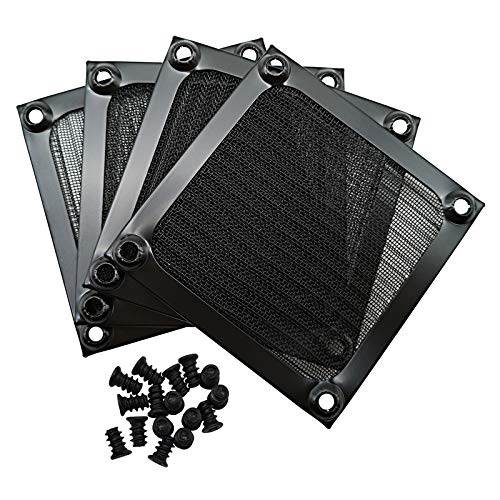
![MoKo 400x300mm DIY PC Case Dust Mesh Filter, [4 Pack] PVC Dustproof Magnetic Dust Filter Cover, PC Mesh Grill with Magnetic Frame Strip Computer Cooler Fan Dust Filter for Computer PC Case, Black](https://m.media-amazon.com/images/I/51YgJYNN2-L._SL500_.jpg)

As an Amazon Associate we earn from qualifying purchases at no extra cost to you. Ratings are shown as listed on Amazon.
⚡ Save on Your Next PC — Amazon Prime
Prime members get fast free shipping on the systems above, plus early access to Prime Day & Black Friday PC deals. New members get a 30-day free trial.
Watch: How to Clean Your PC Fans and Filters — Video Review
Gather the Right Tools
You do not need much: a can of compressed air (or an electric air duster, which is reusable and more powerful), a soft microfiber cloth, and a few cotton swabs for tight spots. Avoid a household vacuum directly on components, it can generate static electricity that damages parts, though you can hold one nearby to catch dust you blow loose. Work in a well-ventilated area or outdoors, because you are about to release a surprising amount of dust into the air.
Cleaning the Fans Safely
- Power off and unplug the PC completely, then open the side panel.
- Hold each fan blade still with a finger before blowing air; spinning a fan with compressed air can generate voltage that harms the fan bearing or motherboard.
- Blast short bursts of air through the fan from the back so dust blows out of the case, not deeper into it.
- Wipe stubborn grime off the blades and frame with a lightly dampened microfiber cloth, then let it dry fully.
Don’t Forget Heatsinks and Filters
The CPU cooler fins and the GPU heatsink trap the most dust and cause the biggest temperature gains when cleaned. Blow compressed air through the fin stacks until no more dust puffs out. Then remove every dust filter, front, top, and bottom, and rinse the washable ones under water or vacuum the mesh, letting them dry completely before reinstalling. Power supply intake fans collect dust too, but never open a PSU; just blow air through its vents from the outside.
Preventing Future Buildup
The best cleaning is the one you rarely have to do. Ensuring your case runs slightly positive pressure, more intake fans than exhaust, means air enters mostly through filtered intakes rather than being sucked through every unfiltered gap. Add mesh dust filters to any unfiltered fan openings; magnetic sheets like the MoKo filters or snap-on ThreeBulls covers install in seconds and are trivial to pop off and rinse. Keeping the PC off the floor, where dust and pet hair are thickest, helps enormously too.
Tips
- Always immobilize fan blades before spraying air; letting them freewheel is the most common way people damage fans while cleaning.
- Clean every three to six months, more often if you have pets or the PC sits on carpet.
- Use short bursts of compressed air held upright, so no liquid propellant sprays onto your components.
- Add washable magnetic dust filters to intakes so future cleaning is a two-minute rinse instead of a full teardown.
Frequently Asked Questions
How often should I clean my PC?
Every three to six months suits most setups. Homes with pets, smokers, or PCs on carpeted floors need cleaning more often, while a filtered case on a desk in a clean room can stretch longer between cleanings.
Can I use a vacuum to clean my PC?
Avoid touching components directly with a vacuum, as it can build static that damages sensitive parts. It is fine to hold the nozzle nearby to catch dust you blow loose with compressed air, but the air duster should do the actual dislodging.
Why do I need to hold the fans still?
Blowing air spins the fan faster than its rated speed, and a spinning fan motor acts as a small generator that can send a voltage spike back into the system. Holding the blades still prevents any risk of damaging the fan or the board.
Do dust filters reduce airflow?
Slightly, but the trade is worth it. A fine mesh filter costs a tiny bit of airflow while dramatically reducing the dust reaching your components, which keeps the interior cleaner and your temperatures more stable over time.
Conclusion
Cleaning your PC fans and filters is cheap, quick, and one of the most effective ways to keep temperatures and noise down. Power off, hold the blades still, blow the dust out with short bursts, and rinse your filters. Then prevent the next round of buildup with positive pressure and washable dust filters. A clean PC is a cool, quiet, long-lived PC.