Key takeaways
- Feed the bulk of every cable through the nearest rubber grommet so only the connector shows on the front side.
- Use the pre-drilled tie-down anchor points on the back of the tray; a strap kit like the 80-piece hook-and-loop set clips straight onto them.
- Keep the fat 24-pin cable flat against the tray rather than bunched, so the side panel closes without bulging.
- Leave a small service loop of slack at each connector so you can unplug things later without a fight.
Clean cable management is not just about bragging rights on the other side of a tempered glass panel. Tidy wiring improves airflow, makes future upgrades painless, cuts down on dust traps, and turns a chaotic build into something you actually enjoy looking at. The good news is that cable management is a skill, not a talent, and a first-timer can get a genuinely clean result in an afternoon with a handful of cheap accessories.
This guide walks through the whole process: planning routes before you plug anything in, using the space behind the motherboard tray, bundling cables with reusable straps, and finishing the front with PSU comb clips for that custom look. A well-stocked kit like the N NOROCME 192-piece Cable Management Kit or a larger 494-piece set gives you the ties, clips, and sleeves you need, while an under-desk tray keeps the mess outside the case tidy too.
Our top picks
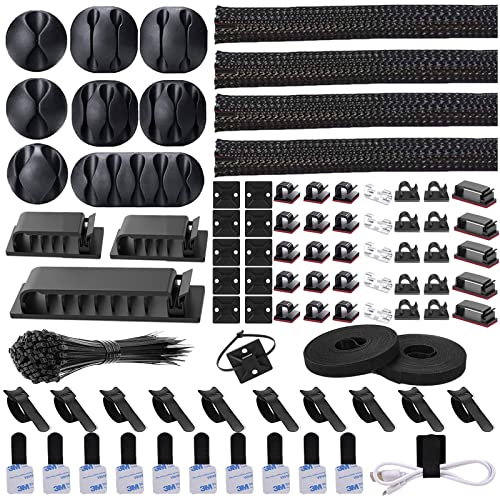 N NOROCME 192 PCS Cable Management Kit
- Cable Management Kit: 4pcs Cable Sleeves( 20 in…
- 6 kinds of Cable Clips:46pcs wire Clips is…
- Premium Material: Made of highly sturdy and quality…
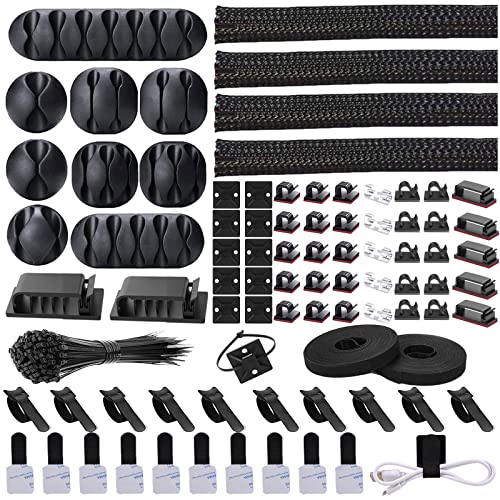 Cord Management Organizer Kit 4 Cable Sleeve
- Cable Management Organizer Kit: This comprehensive kit includes…
- Safety Material: Made of highly sturdy and quality…
- 3 kinds of Black Cable Clips:36pcs wire Clips…
 311Pcs Cable Management Organizer Kit 4 Cable
- Cable Management Kit:4pcs Cable Sleeves( 20 in L…
- 6 kinds of Cable Clips:65pcs wire Clips is…
- Premium Material:The sleeve is made from PET material,…
| Product | Key specs | |
|---|---|---|
| N NOROCME 192 PCS Cable Management Kit | Cable Management Kit: 4pcs Cable Sleeves( 20 in… 6 kinds of Cable Clips:46pcs wire Clips is… Premium Material: Made of highly sturdy and quality… | Check price |
| Cord Management Organizer Kit 4 Cable Sleeve | Cable Management Organizer Kit: This comprehensive kit includes… Safety Material: Made of highly sturdy and quality… 3 kinds of Black Cable Clips:36pcs wire Clips… | Check price |
| 311Pcs Cable Management Organizer Kit 4 Cable | Cable Management Kit:4pcs Cable Sleeves( 20 in L… 6 kinds of Cable Clips:65pcs wire Clips is… Premium Material:The sleeve is made from PET material,… | Check price |
 Alex Tech 10ft | Size: Diameter: 1/2"| Length: 10 Feet | Color:… Operating temp (degree F.):-103 to 257|Melt temp: 446 Our cord protector keeps cat from chewing cables | Check price |
 Sirlyr Black 24-PCS PSU Cable Combs Kit | 【Premium Cable Management Kit】✔️ Includes 24 PCS of… 【Durable & Flexible PP Material】✔️ Made of reinforced… 【Clean PC Builds, Better Airflow】✔️ Eliminates tangled cables,… | Check price |
 80PCS Hook and Loop Cable Ties | Flexible Cord Management: With more and more appliances… Strong Back-Glue: Hook and loop cable clips is… Easy Adjustment: The hook and loop cable clips… | Check price |
 Cable Management Under Desk | 【NO DRILL & INSTANT CLAMP INSTALLATION】 Say goodbye… 【LARGE CAPACITY CABLE MANAGEMENT TRAY】 The 25.3-inch wire… 【PREMIUM METAL WIRE ORGANIZER】 Constructed from high-quality metal,… | Check price |
As an Amazon Associate we earn from qualifying purchases at no extra cost to you.
⚡ Save on Your Next PC — Amazon Prime
Prime members get fast free shipping on the systems above, plus early access to Prime Day & Black Friday PC deals. New members get a 30-day free trial.
Watch: How to Cable Manage Your Gaming PC — Video Review
Plan Your Routes Before You Plug In
The single biggest mistake is connecting cables in the order you happen to grab them. Instead, mentally map each run first: the 24-pin motherboard cable, the 8-pin CPU cable up top, PCIe power to the GPU, and SATA or fan leads. The golden rule is that every cable should enter the main chamber as close as possible to where it plugs in, then disappear behind the tray for the rest of its length. Route the long cables first and the short ones last.
Use the Space Behind the Motherboard Tray
- Feed the bulk of every cable through the nearest rubber grommet so only the connector shows on the front side.
- Use the pre-drilled tie-down anchor points on the back of the tray; a strap kit like the 80-piece hook-and-loop set clips straight onto them.
- Keep the fat 24-pin cable flat against the tray rather than bunched, so the side panel closes without bulging.
- Leave a small service loop of slack at each connector so you can unplug things later without a fight.
Bundle and Secure Everything
Group cables that travel the same direction and bind them with reusable hook-and-loop straps rather than zip ties, so you can adjust later without cutting. Split-loom sleeving like the Alex Tech cord protector tubing is perfect for combining several thin fan and RGB leads into one clean channel. Work in sections and pull each bundle taut before securing it; a cable that looks messy loose will look clean once tensioned.
Finishing Touches for a Custom Look
If your build has a glass side panel, PSU cable combs like the Sirlyr 24-piece kit hold the individual wires of the 24-pin and PCIe cables perfectly parallel, which is the trick behind those magazine-perfect builds. On the desk itself, an under-desk cable tray or a no-drill management tray corrals the monitor, keyboard, and charger cables so your whole setup, not just the case interior, looks intentional.
Tips
- Buy a modular or semi-modular power supply if you can; only connecting the cables you actually need is the fastest cable-management win of all.
- Do the back side last and do not rush it; nobody sees it, but a jammed back panel prevents the case from closing properly.
- Label SATA and fan cables with a small tag or piece of tape so future troubleshooting does not turn into a guessing game.
- Keep a few spare straps and clips on hand; you will always want to redo one or two runs after the first boot.
Frequently Asked Questions
Does cable management actually improve temperatures?
Yes, modestly. Cables blocking the path between intake and exhaust fans disrupt airflow, so clearing the main chamber can lower component temps by a few degrees. The bigger benefit is reduced dust buildup and far easier cleaning.
Zip ties or hook-and-loop straps?
Reusable hook-and-loop straps are better for almost everyone because you can adjust and redo runs without snipping. Zip ties give a slightly cleaner permanent finish but must be cut every time you change a component, so use them only for runs you know are final.
What do I do with extra unused cable length?
Coil the slack neatly and tuck it into an empty drive bay, the PSU shroud, or the space at the bottom of the case. Never leave loose loops floating in the airflow path where they collect dust.
Do I need cable combs?
No, they are purely cosmetic. Combs make the individual wires of a cable sit perfectly parallel, which looks great behind glass, but they have zero effect on performance. Skip them if your case has a solid side panel.
Conclusion
Good cable management comes down to planning routes, hiding cable length behind the motherboard tray, and bundling everything with reusable straps. Add split-loom sleeving and PSU combs if you want a show-quality finish, and tidy the desk with an under-desk tray while you are at it. With a decent kit and a bit of patience, even a first build can end up looking like it came from a boutique shop.
FAQ
Does cable management actually improve temperatures?
Zip ties or hook-and-loop straps?
What do I do with extra unused cable length?
Do I need cable combs?
More from Amazon
Programs that pair well with the guide above. Offers and eligibility are set by Amazon and may change.
A free business account with business pricing and bulk-buying tools for work, shop or home office.
Create a business accountFree shipping on eligible items, Prime Video and more. Eligible new members can start with a free trial.
Start a Prime free trialAudiobooks and podcasts to listen to on the go. Eligible new members can start with a free trial.
Try Audible freeAd-free music streaming. Eligible new subscribers can start with a free trial.
Try Music Unlimited freeAs an Amazon Associate we earn from qualifying purchases.