Our Top Picks
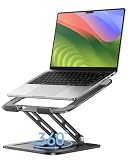
 Satechi Lightweight Aluminum Portable Laptop Stand for MacBookstd9.06 x 8.87 x 0.16 inches1.1 poundsCheck on Amazon


Introduction
Let us be plain: no stand is built only for 30-inch laptops. No mainstream gaming laptop has a 30-inch screen, and no stand maker publishes a fit range that reaches 30 inches. The widest published ranges top out at 17 inches, with a few picks reaching 17.3 inches and one cooling pad in this guide reaching 19 inches.
So what do you do when your machine is far wider than anything on a stand maker’s fit chart? You buy width, not a screen-size label. The five stands below are the widest, sturdiest platforms we could confirm on Amazon. Before you order anything, measure your laptop: width across the front edge, depth from front to back, and thickness at the front lip. A stand narrower than your laptop leaves the corners hanging, and a laptop that hangs off the sides will flex, wobble, and slide when you type.
As an Amazon Associate, we earn from qualifying purchases.
How to Choose a Laptop Stand for an Oversized Gaming Laptop
Measure width, depth, and thickness first
Screen size tells you almost nothing about fit: two laptops with the same screen can differ by an inch or more in width because of bezels, hinge placement, and chassis design. Measure the width across the front edge, the depth from the front edge to the hinge, and the thickness at the front lip. Compare the width to the stand’s deck or support width, the depth to the platform depth, and the thickness to the front lip height. If any one number is larger than the stand’s limit, the fit is wrong, no matter what the screen-size label says.
Check the front lip
The front lip is the small raised edge that stops your laptop sliding forward. Check that it is tall enough to catch the front edge of your machine and wide enough to meet the chassis on both sides, since a short lip in the middle of a wide deck will hold the center and let the corners drift.
Make sure the support arms land on solid chassis
Many stands hold the laptop on two arms or two rails instead of a full deck. That works well only when the arms sit under solid parts of the chassis. Feel along the bottom of your laptop to find the vent grilles, fan intakes, and soft panels. An arm on a vent grille blocks airflow and can press the grille inward, and an arm on a thin panel can flex the laptop. The best setup is arms under the solid frame near the left and right edges, with the vents and fans left open to the air.
Decide between a riser and a cooling pad
A riser lifts the screen to eye level and leaves the whole underside open to the air. A cooling pad adds fans and a mesh or aluminum deck that helps a gaming laptop shed heat during long sessions, but the fans need a USB connection and the pad is usually fixed at one low angle. If your main problem is neck strain, a tall riser is the better buy. If your main problem is heat and fan noise during long games, a cooling pad is the better buy.
Weigh fixed height against adjustability
Fixed stands are usually the most stable choice for a heavy machine, because there are no hinges or notches to slip. Adjustable stands let you change the height and angle, but every hinge is a point that can wobble under a wide, heavy laptop, so favor a fixed stand or an adjustable stand with a locking mechanism.
1. Cooler Master NotePal U3 PLUS

The NotePal U3 PLUS is the widest pick in this guide, and that is why it leads the list. Its aluminum deck fits laptops up to 19 inches, further than any other stand we could confirm, and its three fans slide along rails so you can aim them at the hot spots on your own machine. For a big gaming laptop that runs hot, that combination of width and movable cooling is hard to beat.
There are limits. The 80mm fans move a modest amount of air and will not turn a hot laptop into a cool one; they help, they do not transform. The pad is also fixed at one low angle, so it will not raise your screen to eye level. Check your front-edge thickness against the lip before you order.
- Specs:
- Model: R9-NBC-U3PK-GP
- Fit: laptops up to 19 inches
- Deck: aluminum with mesh center
- Fans: three movable 80mm fans with speed dial
- Power: USB powered from the laptop
- Front lip: raised edge with rubber grip pads
- View on Amazon
2. Griffin Elevator
The Griffin Elevator is a simple fixed riser, and its simplicity is the point. Two brushed aluminum arms hold the laptop about six inches off the desk, joined by a clear plastic brace across the front. There are no hinges, no notches, and nothing to slip, so a heavy laptop sits at one steady height. The open design leaves the entire underside exposed to the air, aiding cooling without any fans.
Be aware of two things before you buy. First, the height is fixed at about six inches, so if that is too high or too low for your chair and desk, there is no way to change it. Second, later versions ship with small plastic clips on the ends of the arms to stop the laptop sliding off; they work, but they can scratch the aluminum and sit low, so a very heavy laptop can still creep forward if you type hard.
- Specs:
- Material: brushed aluminum arms with clear plastic front brace
- Lift: raises the laptop about 6 inches off the desk
- Fit: laptops 10 inches wide and wider
- Design: two separate arms, spacing adjusts to the chassis
- Extras: rubber grip bands, breaks down into three pieces
- View on Amazon
3. Rain Design mStand360
The mStand360 is the swivel version of Rain Design’s classic single-piece aluminum stand, and the swivel base earns it a place here. The base turns a full 360 degrees, so you can spin a wide laptop toward a teammate, a client, or a second screen without lifting the machine.
The trade-off is that the height and angle are fixed, so the mStand360 either suits your desk and chair or it does not; measure your eye level against the 5.9-inch lift before you order. It is also a single solid piece, so it does not fold for travel. Confirm model number 10036 on the listing, since the plain mStand without the swivel base is a different model.
- Specs:
- Model: 10036, silver finish
- Material: single-piece sand-blasted aluminum
- Base: 360-degree swivel
- Lift: raises the screen about 5.9 inches
- Extras: cable hole at the back for tidy wiring
- View on Amazon
4. Satechi Lightweight Aluminum Portable Laptop Stand
The Satechi stand is the travel pick in this guide. It folds flat to a slim slab, weighs very little, and opens into a stable aluminum riser with six angle settings, so you can set the screen low for typing or high for watching. That fold-flat design is the main reason to choose it for cafes, hotels, or a friend’s desk.
The honest limit is size. This compact foldable stand is listed for laptops up to 15.6 inches, so a very wide gaming laptop will overhang the sides, leaving the outer corners with no support, and hard typing can make the machine rock. Use it only if your laptop’s width is close to the stand’s open width, and place the support arms under solid chassis, clear of the vent grilles.
- Specs:
- Model: ST-ALTSS
- Material: aluminum with rubber grips
- Angles: six adjustable angle settings
- Fit: listed for laptops up to 15.6 inches
- Design: folds flat for travel and storage
- View on Amazon
5. MOFT Invisible Laptop Stand
The MOFT stand is the most unusual pick here, because it is not a stand you place on a desk at all. It is a thin foldable panel that sticks to the bottom of your laptop with adhesive and folds open into a small wedge with two angles whenever you need it. When you are done, it folds flat again and stays on the laptop, adding almost no bulk and nothing to carry.
Two warnings matter. First, the adhesive panel sits on the bottom of the laptop, so place it where it does not cover an intake vent or a fan grille, or you will choke the airflow it is meant to help. Second, this is a small wedge, not a full riser: it lifts the back of the laptop by a few inches at most and will not raise the screen to eye level. Check model number MS006-M-GRY-EN01 on the listing to confirm the adhesive version in Starry Grey.
- Specs:
- Model: MS006-M-GRY-EN01, Starry Grey
- Type: adhesive fold-out panel, sticks to the laptop base
- Angles: two adjustable viewing angles
- Thickness: about 1/9 inch, weight about 3 ounces
- Support: laptops up to 11 pounds and up to 16 inches
- Adhesive: residue-free and reusable
- View on Amazon
Comparison Summary
| Stand | Widest Fit | Type | Best For |
|---|---|---|---|
| Cooler Master NotePal U3 PLUS | Up to 19 inches | Cooling pad with three movable fans | Hot gaming laptops that need width and airflow |
| Griffin Elevator | 10 inches wide and wider | Fixed aluminum riser, about 6-inch lift | A steady desk setup with an external keyboard |
| Rain Design mStand360 | Most laptops | Fixed aluminum riser with swivel base | Spinning a wide laptop toward someone else |
| Satechi Portable Stand | Up to 15.6 inches | Foldable aluminum stand, six angles | Travel and hot-desking with a slim laptop |
| MOFT Invisible Stand | Up to 16 inches | Adhesive fold-out wedge, two angles | A slight lift on the go with nothing to carry |
Frequently Asked Questions
Does any laptop stand fit a 30-inch laptop?
No. No stand maker publishes a fit range that reaches 30 inches, and no mainstream gaming laptop has a 30-inch screen. The widest published ranges top out at 17 inches, with a few picks reaching 17.3 or 19 inches. Measure your laptop’s width, depth, and thickness, then buy the widest stand whose deck or support arms cover those numbers. If your laptop is wider than every stand you can find, use the desk-riser fallback in the last question.
How do I measure my laptop for a stand?
Use a tape measure across the front edge for width, from the front edge to the hinge for depth, and at the front lip for thickness. Compare each number to the stand’s deck or arm spacing, platform depth, and front lip height. Also feel along the bottom for the vent grilles and fan intakes, so you can place the stand’s arms on solid chassis, keeping the vents open.
Will a cooling pad help a gaming laptop?
A cooling pad pushes air across the underside of the laptop and lifts it off the desk so heat can escape, which can keep fan noise down during long sessions. It will not turn a hot laptop into a cool one, and the fans need a USB port for power. Line the fans up with the hot spots on your machine, as the NotePal U3 PLUS lets you do, and keep the intake vents clear.
What should I do if my laptop is wider than every stand on this list?
Use a fixed desk riser or a wide monitor shelf instead. A desk riser is a solid platform that holds the laptop at a fixed height, and a monitor shelf is a wide board on short legs that can span a much wider machine than any laptop stand. Choose one whose top surface is wider and deeper than the laptop in every direction, with a front lip that catches the leading edge, and make sure it leaves the vents open and does not wobble.
Conclusion
A 30-inch laptop stand does not exist, and any guide that pretends otherwise is selling you a label instead of a fit. The honest move is to measure your machine, buy width instead of a screen-size claim, and check the front lip and support arms against your own chassis before you order. The Cooler Master NotePal U3 PLUS gives you the widest deck and movable cooling. The Griffin Elevator and the Rain Design mStand360 give you fixed, wobble-free height for a desk setup, with the mStand360 adding a swivel base. The Satechi stand and the MOFT wedge cover travel and light use, as long as your laptop is close to their published fit ranges. If your machine is wider than all five, a fixed desk riser or a wide monitor shelf is the right answer.
FAQ
Does any laptop stand fit a 30-inch laptop?
How do I measure my laptop for a stand?
Will a cooling pad help a gaming laptop?
What should I do if my laptop is wider than every stand on this list?
More from Amazon
Programs that pair well with the guide above. Offers and eligibility are set by Amazon and may change.
A free business account with business pricing and bulk-buying tools for work, shop or home office.
Create a business accountFree shipping on eligible items, Prime Video and more. Eligible new members can start with a free trial.
Start a Prime free trialAudiobooks and podcasts to listen to on the go. Eligible new members can start with a free trial.
Try Audible freeAd-free music streaming. Eligible new subscribers can start with a free trial.
Try Music Unlimited freeAs an Amazon Associate we earn from qualifying purchases.