Our Top Picks
 Dell 2027 Portable 11'' IPS Touchscreen Convertible Laptop14.17 x 9.2 x 0.7 inches4 PoundsCheck on Amazon
 Tylvx 15.6" 2-in-1 Laptop/Tablet16GB+512SSD Laptop14.14 x 9.8 x 0.89 inches3.59 PoundsCheck on Amazon
 Lenovo ThinkPad X13 Yoga Gen 2 2-in-1 Business32GB RAM / 512GB SSD12 x 8.42 x 0.61 inches3 PoundsCheck on Amazon
The best Windows 2-in-1 is the one whose hinge and screen match how you will really hold it: a 360-degree convertible for typing and note-taking, or a detachable tablet for reading and travel. The ten listings here range from a 10.1-inch tablet with a magnetic keyboard to a 14-inch Ryzen 7 convertible and two renewed business Latitudes and ThinkPads. Specifications are the sellers’ title claims, and several titles contain oddities worth knowing about before you buy, including a ‘FHD’ label on an 800 x 1280 panel. Read the quick picks, scan the table, then use the day-one hinge check.
Quick picks
Dell 2027 Portable 11'' IPS Touchscreen Convertible Laptop, Intel Pentium Processor Up to 3.3GHz, 8GB RAM, 128GB SSD, Ultra-Fast 6th Gen WiFi, Windows 11 OS, Dale Gray, Renewed
One of the home product options compared in this guide.
View on AmazonTylvx 15.6" 2-in-1 Laptop/Tablet, 360° Flip FHD Touchscreen, Intel Core m3-8100Y up to 3.4GHz, 16GB RAM 512GB SSD, Win11, Deep Purple for Student Note-Taking, Design, Entertainment
One of the home product options compared in this guide.
View on Amazon
Dell 14 2-in-1 Laptop, FHD+, AMD Ryzen 7 8840HS, 16GB RAM, Windows 11 Home | Touchscreen Display, AMD Radeon Graphics, DDR5, 1TB SSD, Wi‑Fi 6E, Indigo, Productivity Ready, INSPIRON-14-2
One of the home product options compared in this guide.
View on Amazon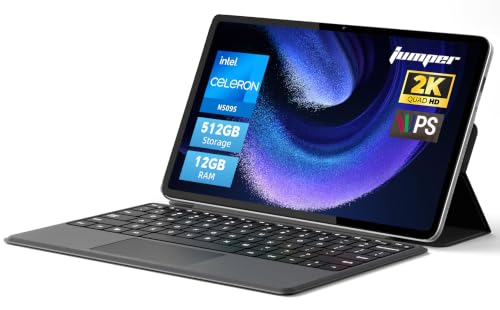
2-in-1 Laptop Tablet,12" 2K Touchscreen, N5095 Processor,12GB RAM 512GB SSD
One of the home product options compared in this guide.
View on Amazon
2 in 1 Laptop, 2026 15.6” Laptop Computer with Ryzen 3-3200U Processor 16GB RAM DDR4 512GB SSD, Radeon Graphics, Notebook 360° Yoga Touchscreen FHD 1920*1080, Backlit Keyboard, BT 5.1, Win 11 Pro
One of the home product options compared in this guide.
View on AmazonLenovo ThinkPad X13 Yoga Gen 2 2-in-1 Business Laptop (13.3" Touchscreen, Intel Core i7-1185G7, 32GB RAM, 512GB SSD), Backlit Keyboard, Fingerprint, Windows 11 Pro, Black (Renewed)
One of the home product options compared in this guide.
View on Amazon
Tunhail 10.1 2 in 1 inch Laptop 12GB RAM 256GB SSD, 360°Flip Touchscreen Laptop with m3-8100Y(Up to 3.40 GH) 800 * 1280 IPS FHD, Backlit Keyboard Laptop Computer for Students/Commuters/Business
One of the home product options compared in this guide.
View on Amazon
QAZIPO 2-in-1 Laptop/Tablet, 10.1" FHD IPS Touchscreen, 8GB RAM 256GB SSD | Windows 11 Tablet with Magnetic Keyboard, 6500Y CPU, USB-C, 2 Stereo Speakers, for Home Office Students Business
One of the home product options compared in this guide.
View on Amazon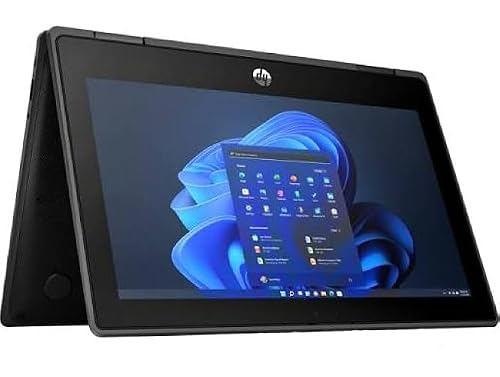
HP Pro x360 Fortis 11 G11 (9V2G7UC) - 11.6" Touchscreen 2-in-1 Convertible Laptop - Intel N-Series N100, 8GB RAM, 256GB SSD, Windows 11 Pro (Renewed)
One of the home product options compared in this guide.
View on Amazon- Dell 14 2-in-1 (Ryzen 7 8840HS, 16GB, 1TB) – strongest new all-rounder
- ThinkPad X13 Yoga Gen 2 (renewed, i7, 32GB) – compact business convertible
- Dell Latitude 7420 2-in-1 (renewed, i7, 16GB) – Thunderbolt 4 and 14-inch
- DUNHOO 15.6-inch (Ryzen 3, 16GB, 512GB) – big-screen yoga on a budget
- Tylvx 15.6-inch (Core m3, 16GB, 512GB) – roomy and light on power
- jumper 12-inch (N5095, 12GB, 512GB) – 2K tablet-style screen
- HP Pro x360 Fortis 11 (renewed, N100) – compact, classroom-style
- Dell 11-inch convertible (renewed, 8GB) – small and inexpensive
- QAZIPO 10.1-inch (8GB, 256GB) – detachable keyboard
- Tunhail 10.1-inch (12GB, 256GB) – pocketable, with a spec caution
Comparison table
| Model | Form | Key specs (title) | Best for |
|---|---|---|---|
| Dell 14 2-in-1 | Convertible, 14-inch | Ryzen 7 8840HS, 16GB DDR5, 1TB | Daily driver |
| ThinkPad X13 Yoga Gen 2 | Convertible, 13.3-inch, renewed | i7-1185G7, 32GB, 512GB | Mobile work |
| Dell Latitude 7420 | Convertible, 14-inch, renewed | i7-1185G7, 16GB, 512GB | Office and docking |
| DUNHOO | Convertible, 15.6-inch | Ryzen 3-3200U, 16GB, 512GB | Budget big screen |
| Tylvx | Convertible, 15.6-inch | Core m3-8100Y, 16GB, 512GB | Note-taking |
| jumper | Laptop-tablet, 12-inch | N5095, 12GB, 512GB | Media and notes |
| HP Pro x360 Fortis 11 | Convertible, 11.6-inch, renewed | N100, 8GB, 256GB | Light school use |
| Dell 11-inch | Convertible, 11-inch, renewed | Pentium, 8GB, 128GB | Travel spare |
| QAZIPO | Tablet with keyboard, 10.1-inch | 6500Y, 8GB, 256GB | Reading, commutes |
| Tunhail | Convertible, 10.1-inch | m3-8100Y, 12GB, 256GB | Pocket use |
All ten listings, one by one
Dell 14 2-in-1 (Ryzen 7 8840HS, 16GB DDR5, 1TB SSD)
This is the strongest new configuration in the group: a Ryzen 7 8840HS, a high-performance H-series class chip, with 16GB of DDR5, a 1TB SSD, Radeon integrated graphics and a 14-inch FHD+ touchscreen. Wi-Fi 6E and Windows 11 Home complete the title.
It is the only listing here with enough processor for photo editing or heavier multitasking, but the title does not mention battery size, weight or stylus support, so check those. DDR5 on thin 2-in-1s is often soldered, so confirm whether the RAM can be upgraded. Integrated Radeon graphics handle everyday video and light photo work, not demanding games, and the ‘Productivity Ready’ wording in the title points the same way.
Pros
- Highest-class processor in the group
- 1TB SSD and 16GB DDR5
- Wi-Fi 6E and FHD+ touch panel
Cons
- Battery and weight not stated
- RAM upgradability unclear
Who it’s for: Buyers who want one capable machine for work, study and sketching.
Who should skip it: Anyone who needs a lightweight tablet-like device for commuting.
Lenovo ThinkPad X13 Yoga Gen 2 (renewed, Core i7-1185G7, 32GB)
A renewed 13.3-inch business convertible with an 11th-generation Core i7-1185G7, 32GB of RAM, a 512GB SSD, a backlit keyboard, a fingerprint reader and Windows 11 Pro. That is the most memory here, and the compact size suits a bag. The ThinkPad name signals a business line, but the title does not state weight or battery hours.
Because it is renewed, battery wear, cosmetic grade and warranty depend on the refurbisher. 32GB suggests a configuration worth confirming, since not all ThinkPad memory is upgradable. Ask whether a pen is included, as the title does not say. Its 13.3-inch screen fits tight spaces such as train tables, and the fingerprint reader speeds sign-in. The title says nothing about ports, webcam quality or weight, so check those on the product page.
Pros
- 32GB of RAM
- Fingerprint reader and backlit keyboard
- Windows 11 Pro
Cons
- Renewed: battery condition unknown
- Pen support is not stated
Who it’s for: Professionals who want a compact, memory-rich convertible.
Who should skip it: People who want a factory-new battery and manufacturer warranty.
Dell Latitude 7420 2-in-1 (renewed, Core i7-1185G7, 16GB, 512GB)
The listing names a 14-inch FHD touchscreen, the same i7-1185G7 as the ThinkPad, 16GB of RAM, a 512GB SSD, Thunderbolt 4, HDMI and Windows 11 Pro. Thunderbolt 4 means one cable can drive a dock with monitors and charging, a real advantage in an office.
It is renewed, so battery wear and screen condition vary. At 14 inches it is larger than the X13, and the title gives no weight. Choose between the two on screen size and memory: this one has 16GB against 32GB, with a larger display. The 11th-generation i7 is on Microsoft’s supported list, so Windows 11 Pro is a proper fit. Look at the listing photos for corner wear and hinge condition, which matter more on a convertible than on a clamshell.
Pros
- Thunderbolt 4 and HDMI
- 14-inch FHD touch display
- Windows 11 Pro
Cons
- Renewed: condition varies
- Weight not stated
- 16GB is half the ThinkPad’s memory
Who it’s for: Office users who dock at a desk and fold the screen for meetings.
Who should skip it: Anyone wanting the lightest possible 2-in-1.
DUNHOO 15.6-inch 2-in-1 (Ryzen 3-3200U, 16GB, 512GB)
A large 360-degree yoga with a Full HD touchscreen, 16GB of DDR4, a 512GB SSD, a backlit keyboard, Bluetooth 5.1 and Windows 11 Pro. The processor is a Ryzen 3-3200U, an older-generation entry Ryzen U-series part, so expect modest speed even with generous memory.
The title’s ‘2026’ is marketing wording. A 15.6-inch convertible is heavy for tablet use, so it works better in laptop and tent modes. Check the Windows 11 Pro licensing, because an older processor may sit outside Microsoft’s supported list, and read the seller’s return terms. Radeon graphics are integrated, so creative work stays light. The title states a 1920 x 1080 resolution, a good sign of a clear spec sheet, but treat the yoga hinge as a day-one test point.
Pros
- 16GB RAM and 512GB SSD
- Backlit keyboard
- Large Full HD touch screen
Cons
- Older-generation processor
- Bulky as a tablet
Who it’s for: Students and home users who want a big touch screen for documents.
Who should skip it: Buyers who need current-generation performance or portability.
Tylvx 15.6-inch 2-in-1 (Core m3-8100Y, 16GB, 512GB)
Tylvx pairs a 15.6-inch 360-degree flip touchscreen with 16GB of RAM and a 512GB SSD, powered by a Core m3-8100Y, a low-power Y-series chip designed for thin, quiet designs. ‘Up to 3.4GHz’ is a burst peak.
That processor is fine for note-taking, browsing and video, but it will struggle with sustained workloads such as large spreadsheets or editing. The lesser-known brand means you should check warranty and return terms, and the title does not state ports or weight. Sixteen gigabytes on a low-power chip is a lopsided pairing: memory helps with many tabs, but the processor still sets the speed. A 15.6-inch convertible suits tent mode on a desk better than reading in bed. Check whether the touchscreen supports a pen, since the title is silent.
Pros
- 16GB RAM and 512GB SSD
- Large flip-style touchscreen
- Windows 11 stated
Cons
- Low-power chip limits heavy tasks
- Small-brand support
Who it’s for: Note-takers who want a roomy screen and plenty of storage.
Who should skip it: Anyone running demanding creative or data software.
jumper 12-inch 2-in-1 Laptop Tablet (N5095, 12GB, 512GB)
jumper offers a 12-inch 2K touchscreen, an N5095 entry-level Intel processor, 12GB of RAM and a 512GB SSD. The 2K panel is sharper than the Full HD screens on bigger listings, a plus for reading. The title says ‘Laptop Tablet’ without describing the hinge, so confirm whether a keyboard is attached, detachable or sold separately.
With only the model name and four specifications in the title, details such as ports, weight, battery and stylus support are unknown. It is a promising spec for the money, but the vague listing needs a closer look before ordering. The N5095 is a quad-core part from Intel’s entry range, so it handles documents and video but not demanding workloads. A 2K image on a 12-inch panel packs pixels densely, which keeps small text crisp.
Pros
- 2K touchscreen
- 12GB RAM and 512GB SSD
- Compact 12-inch size
Cons
- Keyboard arrangement unclear
- Few details in the title
Who it’s for: Readers and note-takers who prize screen sharpness and storage.
Who should skip it: Buyers who need a guaranteed keyboard and port list from the title.
HP Pro x360 Fortis 11 G11 (renewed, N100, 8GB, 256GB)
The Fortis is a convertible with an 11.6-inch touchscreen, Intel N100, 8GB of RAM, a 256GB SSD and Windows 11 Pro, renewed. The model name suggests a classroom and field-work design, but the title does not describe ruggedness, so do not assume it.
The N100 is an entry-level chip, good for web apps, documents and video, but not for heavy multitasking. Being renewed, battery wear and warranty vary. The 11.6-inch size is easy to carry and cramped for long typing sessions. The seller’s description should state the grade of the renewed unit; if it does not, ask before buying. Confirm that a charger is included, as many renewed listings sell the laptop alone.
Pros
- Compact 11.6-inch size
- Windows 11 Pro with a 256GB SSD
- Entry-level but modern N100
Cons
- Small screen for long sessions
- Renewed: battery condition varies
Who it’s for: Light school and field-work use where a small convertible is handy.
Who should skip it: Anyone who types for long hours or needs a bigger display.
Dell 11-inch Touchscreen Convertible (renewed, Pentium, 8GB, 128GB)
A renewed 11-inch IPS touchscreen convertible with a Pentium up to 3.3GHz, 8GB of RAM, a 128GB SSD, Wi-Fi 6 and Windows 11. The title says ‘2027’, which is marketing wording, and the Pentium model is unnamed, so its generation and Windows 11 support need checking.
It is a small, inexpensive spare for web tasks and video. Renewed units vary in battery and cosmetic grade. The 128GB drive is modest, so lean on cloud storage. Because this listing is renewed and the brand field says Dell, the actual seller may be a third-party refurbisher, so ask who handles returns. Eight gigabytes is enough for Windows 11 and a browser with several tabs, but Office work on an 11-inch screen feels cramped. If the Pentium turns out to be an older generation, Windows 11 support may be unofficial.
Pros
- Compact and portable
- IPS touch display
- Wi-Fi 6 stated
Cons
- Processor model not stated
- Small 128GB drive
Who it’s for: Travellers wanting a cheap backup convertible.
Who should skip it: Anyone who needs a clear processor or long-term updates.
QAZIPO 10.1-inch 2-in-1 Tablet (8GB, 256GB, magnetic keyboard)
This is a Windows 11 tablet with a magnetic keyboard, a 10.1-inch FHD IPS touchscreen, 8GB of RAM and 256GB of SSD storage, with USB-C and two stereo speakers. A ‘6500Y’ CPU is named, presumably a Pentium Gold 6500Y low-power part, but the title does not say.
As a detachable, it works better for reading, video and browsing than for typing on a lap. Check that the keyboard is included and which tilt angles the stand allows. Windows 11 on a 10.1-inch screen also means scaling settings need adjusting to keep text legible. Small tablets with Windows can be fiddly for desktop software. Magnetic keyboards on tablets usually need a flat surface or a stand to type comfortably, and the title describes neither. USB-C is useful for charging and accessories, though video output is not stated.
Pros
- Detachable keyboard in the title
- FHD IPS screen
- USB-C and stereo speakers
Cons
- Small keyboard for long typing
- Processor is only partly named
Who it’s for: Commuters who read, browse and watch video.
Who should skip it: Heavy typists and anyone running full desktop software all day.
Tunhail 10.1-inch 2-in-1 (m3-8100Y, 12GB, 256GB)
Tunhail offers a 10.1-inch 360-degree touchscreen, Core m3-8100Y, 12GB of RAM, a 256GB SSD and a backlit keyboard. The title calls the panel ‘FHD’ but gives a resolution of 800 x 1280, which is not Full HD; text will look softer than on a true 1920 x 1080 screen.
That inconsistency is the main reason to be careful. The 12GB memory figure is generous for the size. Windows 11 will run better on it than on an 8GB tablet. The keyboard is small, so treat it as a pocketable note-taking and media device. The ‘Students/Commuters/Business’ tagline is marketing, not a specification. With a Y-series chip it suits notes and streaming, and 12GB helps with several tabs. Battery, weight and ports are missing from the title, and the brand is little known, so check returns.
Pros
- 12GB RAM
- Backlit keyboard
- Very compact
Cons
- Resolution contradicts the ‘FHD’ label
- Cramped keyboard
Who it’s for: Buyers wanting a tiny Windows convertible for notes and media.
Who should skip it: Anyone who wants a sharp display or comfortable typing.
How we picked
The ten listings supplied for this keyword are the starting set. Each is a Windows machine whose title describes a touchscreen or a convertible or detachable design. We arranged them by processor class, memory, storage and whether the form factor is clear. Dollar prices and star ratings are left out. Information comes from published specifications, manufacturer documentation and buyer reviews. Nobody on the team used or measured these units. Hinge feel, brightness and battery life are therefore unknown unless a listing states them. Marketing wording and inconsistent specifications are flagged.
Choosing a Windows 2-in-1
Convertible or detachable?
| Form | How it works | Best for | Trade-off |
|---|---|---|---|
| 360-degree convertible | Hinge flips the keyboard behind the screen | Typing plus tent and stand modes | Heavier, keyboard sits behind screen in tablet mode |
| Detachable with keyboard | Screen separates from the keyboard | Reading and carrying | Weaker lap typing, more parts to lose |
Folding a convertible into tablet mode puts the keys under your hand; Windows machines normally disable them automatically, but the full weight still sits in one grip. A detachable is lighter in one hand but needs a stand or kickstand on a desk and is unsteady on a lap.
Processor class
Y-series chips such as the m3-8100Y and 6500Y are built for thin, low-power devices and suit notes, web and video. N-series chips (N100, N5095) are entry-level quad-core parts that cope with similar work. Core i7 U-series and Ryzen H-series chips provide real headroom. The title often hides the generation, so ask. Extra memory cannot rescue a slow chip, so 16GB on a Y-series part is not equivalent to 16GB on a Ryzen 7.
Match the machine to the job
| Job | Chip class | RAM / storage |
|---|---|---|
| Notes, web, video | Y-series or N-series | 8GB / 128-256GB |
| Office, calls, many tabs | N-series or Core i5/i7 U-series | 8-16GB / 256-512GB |
| Photo editing, light creative work | Core i7 or Ryzen H-series | 16GB or more / 512GB+ |
Screen, touch and pen
Touch is a given here, but panel resolution and brightness vary. Check true resolution against the label: Full HD means 1920 x 1080. No title mentions a pen, so if you plan to sketch, confirm that the display supports an active stylus and whether one is included. Brightness matters if you read near a window, yet titles rarely give nits, and glossy touch panels reflect room light. Treat brightness as unknown and read buyer reviews for comments on glare.
Storage, memory and expansion
Small convertibles often have soldered RAM and a single M.2 or soldered drive. If 128GB or 256GB feels tight, a USB drive or one of the external SSDs we cover for laptops offers extra space without opening the case. Buy at least 8GB for Windows 11. Windows 11 officially requires 4GB, but 8GB is the practical start for a browser and Office.
Renewed, third-party and warranty notes
Renewed listings (the Latitude, ThinkPad, Fortis and 11-inch Dell) are refurbished by sellers and the warranty is the seller’s. Hinges and batteries age, so read the grade description. Windows 11 officially needs an 8th-generation Intel processor or newer; check older chips. Where a title names only a Pentium or an N-series part, ask for the exact model before assuming it qualifies.
Battery, charging and ports
Titles seldom state battery hours, so none can be compared here. USB-C charging allows travel with a single adapter or power bank, and the Latitude lists Thunderbolt 4 for docking. On renewed listings, confirm that a charger is included and that it matches the laptop.
Day-one hinge check
- Open and fold the hinge ten times and listen for creaks.
- Test touch across all four corners of the screen.
- Rotate into tent and tablet modes and confirm the keyboard disables.
- Check the stylus or pen claim if you bought one.
- Run Windows Update and confirm the screen resolution matches the title.
Seven mistakes buyers make
- Buying a big convertible and expecting tablet comfort. A 15.6-inch body is heavy to hold for long. Use tent or laptop mode instead.
- Trusting ‘FHD’ wording without the resolution. One title here pairs ‘FHD’ with 800 x 1280.
- Ignoring the keyboard arrangement on laptop-tablet listings. Ask whether it is attached, detachable or sold separately. The wording ‘Laptop Tablet’ alone does not tell you.
- Treating a renewed battery as new. Wear is unknown unless the seller grades it. Photos and grade notes help.
- Paying for 16GB RAM on a very low-power processor and expecting fast results.
- Assuming a pen is included. No title in this guide mentions one.
- Skipping the processor generation on older-sounding chips, which can affect Windows 11 updates.
Verdict
The Dell 14 2-in-1 is the best all-rounder because of its processor, memory and storage. For business mobility, the renewed ThinkPad X13 Yoga and Latitude 7420 both look strong on paper. On a tight budget, the DUNHOO and Tylvx offer large screens and plenty of storage, with weaker chips. Confirm the details in the listing first. The Fortis and the small Dell suit light use, while the 10.1-inch tablets suit reading. Before ordering any of them, confirm the keyboard, charger, pen and warranty on the product page.
Related guides
- Black Friday And Cyber Monday Laptop Deals
- Monitors For Macbook Pro Air
- Pc Laptop For Small Business
Frequently asked questions
What is the difference between a 2-in-1 laptop and a tablet?
A 2-in-1 can be used as both, either by flipping the screen on a 360-degree hinge or by detaching it from a keyboard. A pure tablet has no keyboard. Windows 2-in-1s run full desktop software, which tablets with a mobile operating system cannot. That makes a 2-in-1 the better choice for work files, while a tablet is simpler for casual use.
Is a 360-degree hinge or a detachable design better?
A 360-degree hinge is better for typing and lap use, because the keyboard is always attached. A detachable design is lighter as a tablet, but the keyboard is a separate piece and the lap setup is less steady. Pick the hinge for work and the detachable for reading. Try to handle one in a shop first if possible.
Do these 2-in-1 laptops come with a stylus?
None of the titles mention a pen. Some touchscreens work with an active stylus sold separately, and some do not. Check the manufacturer’s page for the supported pen type before you rely on drawing or handwriting. Some styluses need a specific panel technology, so a generic pen may not work.
Are renewed 2-in-1 laptops worth considering?
They can be, especially the business models such as Latitude and ThinkPad. Check the grade, battery condition, warranty length and the processor generation. A renewed machine with an 11th-generation chip is a sounder buy than an older one. Business models also tend to have better ports, so compare them with new budget listings before you decide.
How much RAM does a Windows 2-in-1 need?
8GB is a sensible minimum for Windows 11 with a browser and Office apps. 16GB gives more room for many tabs and light creative work. Small devices often have soldered memory, so buy the amount you will need. Remember that a small drive and small memory can both limit a 10-inch tablet, so match them to your tasks.