Our Top Picks
 KYY Portable Monitor 15.6" 1080P Computer Monitor Screen15.6-inch8.85 x 14.48 x 0.35 inches1.7 PoundsCheck on Amazon
 InnoView 16" TravelPortable Monitor USB-C 144Hz16 Inch0.6 x 14.06 x 9.55 inches1.73 poundsCheck on Amazon
For a gaming laptop owner who wants the sharpest and smoothest second screen, the cocopar 16-inch 2.5K portable monitor is the best overall pick here: it combines a 2.5K QHD panel, a 144Hz refresh rate over USB-C, 120Hz over HDMI, a stated 110% sRGB gamut and built-in speakers. A portable monitor is a slim external display that connects by USB-C or HDMI and travels in a bag, giving you room for chat, guides or a stream next to your game. The ARZOPA and InnoView 16-inch models are the choices if you want high refresh at 1080p, while the 15.6-inch models cover basic, cheaper needs.
Quick List
- ARZOPA 16.1″ 144Hz Z1FC – best for fast 1080p gaming on a second screen with HDR support
- KYY 15.6″ 1080P – best for a simple, cover-included screen extender for work and light play
- InnoView 15.6″ FHD – best for connecting a laptop, console or phone to a basic 1080p screen
- InnoView 16″ 144Hz Travel Monitor – best for a lightweight 144Hz screen with a protective sleeve
- VisionOwl 16″ 2.5K QHD 144Hz – best for a tall 16:10 workspace with HDR and a VESA mount option
- cocopar 16″ 2.5K 144Hz – best overall for sharp visuals, high refresh and built-in speakers
Which One Is Right for You?
| If you… | Choose |
|---|---|
| Want the sharpest picture and high refresh together | cocopar 16″ 2.5K 144Hz |
| Want a 16:10 screen that doubles as a VESA-mount desk monitor | VisionOwl 16″ 2.5K QHD 144Hz |
| Play fast games and prefer 1080p to keep the load light | ARZOPA 16.1″ 144Hz Z1FC |
| Want 144Hz in a light travel package with a sleeve | InnoView 16″ 144Hz Travel Monitor |
| Need a basic screen for spreadsheets, chat and streams | KYY 15.6″ 1080P |
| Plan to share it between a laptop and a console | InnoView 15.6″ FHD |
Start by checking your laptop’s USB-C port, because it decides which of these monitors can reach their top refresh rates. A port that supports video output over USB-C, typically through DisplayPort Alt Mode or Thunderbolt, is what lets a single cable carry both video and power. Without one, you will need the HDMI connection, and several listings here state a lower refresh rate for HDMI than for USB-C. After that, choose resolution and size by how you plan to use the screen: gameplay on a second screen, or reference material beside your main game.

ARZOPA 16.1'' 144Hz Portable Gaming Monitor 106% sRGB - Z1FC | 1080P FHD Kickstand Portable Monitor with HDR, Ultra Slim, Eye Care, External Second Screen for Laptop, PC, PS5, Mac, Xbox
Chosen because it specifies Z1FC and 1080P FHD Kickstand Portable Monitor with HDR.
View on AmazonKYY Portable Monitor 15.6" 1080P Computer Monitor Screen Extender w/Cover | Portable Monitor for Laptop 1080P FHD IPS with USB-C and HDMI, Laptop Screen Extender for Travel HDR Gaming Monitor w/Speaker
Picked as a relevant option in this category.
View on Amazon
InnoView Portable Monitor, 15.6 Inch FHD 1080P HDMI USB C Second External Monitor for Laptop, Desktop, MacBook, Phones, Tablet, PS5/4, Xbox, Switch, Built-in Speaker with Protective Case
Chosen because it specifies Desktop and MacBook.
View on AmazonInnoView 16" TravelPortable Monitor USB-C 144Hz, HDMI Only 120Hz | with Protective Sleeve, Lightweight, Travel for Laptop, Gaming PS5, Mac, Xbox (Not Includes Adapter)
Chosen because it specifies HDMI Only 120Hz and with Protective Sleeve.
View on Amazon
VisionOwl Portable Monitor 16 Inch 2.5K QHD 144Hz 16:10 Second Screen, USB-C HDMI HDR Travel Monitor for Laptop PC MacBook PS5 Xbox, VESA Mountable, with Speakers, Built-in Kickstand
Chosen because it specifies USB-C HDMI HDR Travel Monitor for Laptop PC MacBook PS5 Xbox and VESA Mountable.
View on Amazon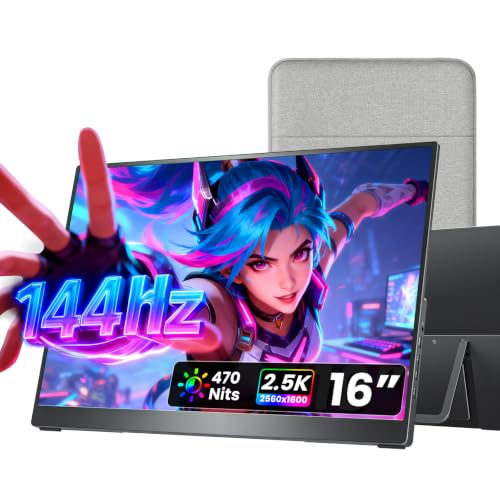
cocopar Portable Monitor 16 Inch 2.5K QHD 110% sRGB 144Hz USB-C, 120Hz HDMI, Travel Monitor with Speaker Second Screen for Laptop MacBook Surface PC Xbox PS4/5, VESA Mountable, with Kickstand
Chosen because it specifies 120Hz HDMI and VESA Mountable.
View on AmazonAll 6 Picks in Detail
1. ARZOPA 16.1″ 144Hz Z1FC – Best for Fast 1080p Second-Screen Play
As an Amazon Associate we earn from qualifying purchases at no extra cost to you.

The ARZOPA Z1FC is a 16.1-inch portable gaming monitor with a 1080p full HD panel and a 144Hz refresh rate. The listing mentions 106% sRGB color, HDR support, an ultra-slim body, a kickstand and an eye care feature. The 1080p resolution keeps pixel counts modest, which matters if you want to run a game on the monitor, since your laptop’s graphics processor has fewer pixels to draw than at 2.5K.
Who it suits: players who want a high-refresh display for competitive games and who value frame rate over pixel density. The kickstand lets you set it on a desk or table without a separate stand. Details such as brightness, port count and whether HDMI also reaches 144Hz are not in the title, so confirm them on the product page.
Setup tip: use the USB-C cable that supports video, set the refresh rate to 144Hz in your operating system’s display settings, and switch the laptop’s power plan to plugged-in mode, since a portable monitor draws power from the laptop and can strain a small battery. If the refresh rate stays at 60Hz, the cable or the laptop port is the first thing to check.
- Screen: 16.1-inch, 1080p full HD
- Refresh rate: 144Hz
- Color: 106% sRGB, per the listing
- HDR support and eye care mode listed
- Built-in kickstand
- Brightness and port layout: confirm on listing
Pros:
- High refresh rate at an easy-to-drive resolution
- Kickstand included for desk use
Cons:
- 1080p on a 16.1-inch panel is less sharp than the 2.5K models
- HDR on portable panels is usually modest, so keep expectations realistic
It is the lower-resolution answer to the cocopar, with the same 144Hz target at a lighter graphics load.
2. KYY 15.6″ 1080P – Best for Simple Work and Light Play

The KYY is a 15.6-inch portable monitor with a 1080p IPS panel, USB-C and HDMI connections, and a cover included. The listing frames it as a screen extender for a laptop. IPS panels generally offer wider viewing angles and better color than cheaper panel types, which helps when you view the screen from the side on a crowded desk or in a shared space.
Who it suits: students and remote workers who want more screen area for chat, documents and reference pages, and who play only occasionally. The refresh rate is not stated in the listing name; 1080p portable monitors in this class are commonly 60Hz, so confirm before choosing it for fast games.
Setup tip: use the cover as a stand by folding it into a triangle, and keep the brightness moderate to protect battery life when powered from a laptop. For shared desks, an IPS panel’s wide viewing angle helps colleagues see the screen, though glossy finishes can reflect lights, so confirm whether the surface is matte or glossy on the product page.
- Screen: 15.6-inch, 1080p IPS
- Connections: USB-C and HDMI
- Protective cover included, per the listing
- Refresh rate: confirm on listing, likely 60Hz
- Speakers, weight and brightness: confirm on listing
Pros:
- Includes both USB-C and HDMI for flexible connection
- Cover doubles as a basic stand and protects the screen in a bag
Cons:
- Not aimed at high-refresh gaming
- Few details in the listing name
It is the plain, work-first alternative to the ARZOPA, which targets a smoother gaming experience.
3. InnoView 15.6″ FHD – Best for Sharing Between Laptop and Console

The InnoView 15.6-inch monitor is marketed as a second external monitor for laptops, desktops, MacBooks, phones, tablets, and consoles such as the PS5, PS4 and Xbox. It has a 1080p full HD panel with HDMI and USB-C inputs. That wide compatibility list makes it a flexible choice if you want a small screen for a console in a dorm room as well as a laptop extension.
Who it suits: anyone who wants one screen to share among several devices at 1080p. Console use needs an HDMI input and a power source; the monitor may need its own power adapter if the console cannot supply power over USB. The listing does not name the refresh rate, so confirm it before expecting 120Hz or 144Hz.
Setup tip: when connecting a console, use the HDMI input and a separate USB power adapter, and set the console output to 1080p to match the panel. For a laptop, try the USB-C connection first, since one cable may carry both video and power, and fall back to HDMI if your laptop’s port does not support video output.
- Screen: 15.6-inch, 1080p full HD
- Inputs: HDMI and USB-C
- Compatible device types: laptops, desktops, MacBooks, phones, tablets, consoles
- Refresh rate: confirm on listing
- Power adapter and cable inclusion: confirm on listing
Pros:
- Works with many device types
- Basic 1080p resolution is easy on a laptop’s graphics
Cons:
- Refresh rate and brightness are not stated
- Speakers are usually basic on this type of monitor
Next to the KYY, it offers a similar spec sheet with a stronger focus on console compatibility.
4. InnoView 16″ 144Hz Travel Monitor – Best for Lightweight 144Hz

The second InnoView is a 16-inch travel monitor with a stated 144Hz refresh rate over USB-C and 120Hz over HDMI. The listing mentions a protective sleeve, a lightweight body and compatibility with laptops, the PS5 and Macs. The distinction between USB-C and HDMI refresh rates is worth noticing: it means you should use USB-C for the highest smoothness, which requires a laptop that supports video over USB-C.
Who it suits: gamers who travel and want a high-refresh second screen without much bulk. The panel resolution is not stated in the title, so confirm whether it is 1080p or higher on the product page.
Setup tip: keep the sleeve with the monitor in your bag so the screen is protected from keys and chargers, and check your operating system’s display settings after connecting to make sure the 144Hz option is selected. Because the refresh rate differs between connections, test both cables if you are unsure which your laptop supports.
- Screen: 16-inch, resolution: confirm on listing
- Refresh rate: 144Hz over USB-C, 120Hz over HDMI
- Protective sleeve included
- Lightweight travel design
- Compatible with laptops, PS5 and Mac, per the listing
Pros:
- High refresh rate with the USB-C connection
- Sleeve helps protect the screen when traveling
Cons:
- Maximum refresh requires a capable USB-C port
- Resolution is not clear from the title
Compared with the ARZOPA, it also reaches 144Hz but is positioned more strongly as a travel companion.
5. VisionOwl 16″ 2.5K QHD 144Hz – Best for a Tall 16:10 Workspace

The VisionOwl is a 16-inch portable monitor with a 2.5K QHD resolution, 144Hz refresh rate, 16:10 aspect ratio and HDR. The listing says it works with USB-C and HDMI, and it mentions compatibility with laptops, PCs, MacBooks, the PS5 and Xbox, plus a VESA mount option. A 16:10 panel at 2.5K is typically 2560 by 1600 pixels, which gives more vertical space than a 16:9 panel; confirm the exact resolution on the product page.
Who it suits: players who want a high-resolution second screen for guides, chat, streaming software or even gameplay, and who may mount the monitor on an arm at a desk. The VESA mount means you are not limited to a kickstand, which can be useful for stable desk setups.
Setup tip: if you use a VESA arm, check the hole pattern and the weight limit before ordering, and adjust the monitor’s scaling in Windows so text is not tiny at 2.5K. Place it beside the laptop at the same height to avoid neck strain, and keep the cable strain-relieved so it does not tug on the port.
- Screen: 16-inch, 2.5K QHD, 16:10
- Refresh rate: 144Hz
- HDR listed
- Inputs: USB-C and HDMI
- VESA mount support, per the listing
- HDMI refresh rate and speakers: confirm on listing
Pros:
- High-resolution and high-refresh combination
- VESA support adds mounting flexibility
Cons:
- Demands more bandwidth and graphics power at its top settings
- Higher resolution can cut battery life when powered from the laptop
It is the closest rival to the cocopar, and the choice comes down to the VESA mount versus the cocopar’s stated sRGB figure and speakers.
6. cocopar 16″ 2.5K 144Hz – Best Overall for Sharp, Smooth Visuals

The cocopar is a 16-inch portable monitor with a 2.5K QHD panel, 110% sRGB, 144Hz over USB-C and 120Hz over HDMI. The listing also mentions a travel design, built-in speakers and compatibility with laptops and MacBooks. The sRGB figure indicates a wide color range, which helps with creative work and makes games look richer, though a percentage above 100 does not guarantee accurate color.
Who it suits: gamers who stream, edit or want an eye-catching second display that can also show a game. The built-in speakers are handy for travel, although speakers on slim monitors are generally basic, so use headphones for serious play. As with the other 144Hz models, you need a laptop whose USB-C port can output video at the required bandwidth.
Setup tip: turn on the monitor’s speakers only if you are not wearing headphones, and set the color mode to a standard sRGB setting if one is offered, because an oversaturated mode can make skin tones and interface colors look off. Use the USB-C port for 144Hz and keep HDMI as the fallback at the lower stated rate.
- Screen: 16-inch, 2.5K QHD
- Refresh rate: 144Hz over USB-C, 120Hz over HDMI
- Color: 110% sRGB, per the listing
- Built-in speakers
- Travel design
- Aspect ratio, brightness and mount options: confirm on listing
Pros:
- Strong combination of resolution, color and refresh rate
- Speakers make it self-contained for casual use
Cons:
- Needs a compatible USB-C port to reach 144Hz
- 2.5K resolution makes running games on it harder for modest GPUs
Compared with the VisionOwl, it states its color gamut and speakers, while the VisionOwl highlights a 16:10 shape and VESA mounting.
Specs Compared
| Product | Size | Resolution | Refresh rate | Inputs | Extras |
|---|---|---|---|---|---|
| ARZOPA 16.1″ 144Hz Z1FC | 16.1-inch | 1080p FHD | 144Hz | Confirm on listing | 106% sRGB, HDR, kickstand |
| KYY 15.6″ 1080P | 15.6-inch | 1080p IPS | Confirm on listing | USB-C, HDMI | Cover included |
| InnoView 15.6″ FHD | 15.6-inch | 1080p FHD | Confirm on listing | HDMI, USB-C | Works with consoles, phones, tablets |
| InnoView 16″ 144Hz Travel Monitor | 16-inch | Confirm on listing | 144Hz USB-C, 120Hz HDMI | USB-C, HDMI | Protective sleeve |
| VisionOwl 16″ 2.5K QHD 144Hz | 16-inch, 16:10 | 2.5K QHD | 144Hz | USB-C, HDMI | HDR, VESA mount |
| cocopar 16″ 2.5K 144Hz | 16-inch | 2.5K QHD | 144Hz USB-C, 120Hz HDMI | USB-C, HDMI (confirm) | 110% sRGB, speakers |
How We Chose These
This guide rests on desk research rather than lab work. The six portable monitors were set in advance, so our task was to describe them clearly and help you choose by use case. We read the retailer listing titles and specification fields, compared screen size, resolution, refresh rate, connection types, color wording and extras such as covers, sleeves and mounts, and noted wherever a listing leaves out a figure. We did not use sales rank or customer scores, and we did not make claims about brightness, response time or color accuracy that the listings do not state. Treat every number as the seller’s description and confirm it on the product page before you buy.
What to Look For
USB-C video support and bandwidth
Not every USB-C port carries video. The port must support DisplayPort Alt Mode, or be a Thunderbolt or USB4 port, to drive a monitor with a single cable. Check your laptop’s specifications for a USB-C or Thunderbolt port with a DisplayPort symbol. Bandwidth matters at high refresh rates: the raw pixel data for 1920 by 1080 at 144Hz and 24-bit color is roughly 7 gigabits per second, while 2560 by 1600 at 144Hz is roughly 14 gigabits per second before blanking overhead. A plain USB 3 data connection at 5 gigabits cannot carry that, but a DisplayPort connection can, which is why the video-capable port matters.
If your laptop lacks a video-capable USB-C port, use the HDMI connection and a separate power source for the monitor. Several of these listings state a lower refresh rate over HDMI.
Resolution, size and the load on your graphics card
A 2.5K panel has about twice as many pixels as a 1080p panel, so a game running on it asks more of your laptop’s graphics processor. On a second screen you can keep the game on the laptop’s built-in display and use the monitor for chat, guides or streaming tools, which costs little performance. If you plan to play on the portable monitor, 1080p at 144Hz is the easier target for modest graphics hardware, and 2.5K is better for powerful laptops. A 16-inch screen at 2.5K also looks sharper than a 15.6-inch 1080p panel for reading text.
Power, battery and portability
A portable monitor powered through USB-C draws energy from the laptop, shortening battery life, sometimes noticeably at high brightness. When you are at a desk, plug the monitor into a separate charger or use a laptop that passes power through. Check how the monitor is powered, whether it supplies a cable, and whether the cable is long enough for your desk. Thin monitors often weigh under two pounds, but a case or sleeve adds some bulk, so check the weight on the product page if you carry it daily.
Panel quality, stands and mounting
IPS panels are the common choice for wide viewing angles. Color figures like 106% or 110% sRGB describe gamut size, not accuracy, and HDR on a portable monitor with modest brightness is limited. A kickstand or smart cover is convenient for travel, but it can be tippy on soft surfaces, so a VESA mount offers more stability for a fixed desk. A worked example: if you want the monitor to sit above your laptop on an arm, a VESA mount lets you do that, while a kickstand-only screen will need a separate stand.
Questions
Do I need a special cable for a portable monitor?
If your laptop has a video-capable USB-C port, a good quality USB-C cable that supports video and power is usually all you need. Otherwise use an HDMI cable and a separate power source. Use the cable included with the monitor if possible.
Can a portable monitor run at 144Hz over HDMI?
Some can, but several in this group state 120Hz over HDMI and 144Hz over USB-C. Check the listing for the stated refresh rate on each connection. Your laptop’s output must also support the rate.
Is 2.5K worth it on a 16-inch screen?
For text and detail, yes, because it looks sharper than 1080p at the same size. For gaming, it asks more from your graphics hardware, so many players use 2.5K for the second screen and keep gameplay on the laptop’s main display.
Will a portable monitor drain my laptop battery?
Yes, if it is powered through the laptop’s USB-C port. Lowering brightness helps, and plugging the monitor into its own charger avoids the drain entirely.
Can I use these monitors with a console?
Several listings mention the PS5 and Xbox, which connect through HDMI. A console needs its own power adapter, and some monitors need a separate power supply, so check what the box includes.
Are the built-in speakers good enough for gaming?
They are usually adequate for video calls and casual use but thin on bass and volume. For competitive games or music, use headphones or a headset.
Update History
- October 20, 2026 – Initial publication; product set drawn from current catalog listings.
- Check the product page for current specifications and availability before buying.
Sources
- Retailer listing titles and specification fields for all six monitors
- Product names, resolution, refresh rate and connection wording exactly as shown in each listing title