Key takeaways
- Windows and drivers: Budget roughly 60 to 80GB before you install a single game.
- Modern AAA titles: Commonly 80 to 150GB each, with the biggest open-world games topping 200GB after updates.
- Competitive multiplayer: Often 30 to 60GB, but they update constantly, so leave headroom.
- Recordings and mods: Gameplay capture and heavy mod folders can add hundreds of gigabytes over time.
Modern games are enormous. A single flagship title can swallow 100 to 200 gigabytes, and that number keeps climbing as textures get sharper and worlds get bigger. Install three or four of them alongside your operating system and a 500GB drive is full before you have really started. Storage is one of the easiest specs to underbuy and one of the most annoying to run out of, because the fix always seems to come right when you want to play something new.
This guide explains how much storage a gaming PC actually needs in 2026, why the type of drive matters as much as the capacity, and how to plan a setup that stays fast and roomy without overspending. You will learn the difference between the SSD generations, how much a game library really costs in gigabytes, and when a second drive makes sense. Here are the drives we recommend for a modern build.
Our top picks
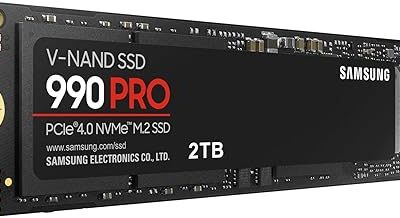
 Samsung SSD 990 PRO 2TB
- Product Group: Personal Computer
- Binding: Personal Computers


As an Amazon Associate we earn from qualifying purchases at no extra cost to you. Ratings are shown as listed on Amazon.
⚡ Save on Your Next PC — Amazon Prime
Prime members get fast free shipping on the systems above, plus early access to Prime Day & Black Friday PC deals. New members get a 30-day free trial.
Watch: How Much Storage for a Gaming PC in 2026? — Video Review
The Real Answer: 1TB Minimum, 2TB Comfortable
For a gaming PC in 2026, treat 1TB as the practical floor and 2TB as the comfortable target. After Windows, drivers, and a few large titles, a 1TB drive fills quickly, leaving you constantly uninstalling games to make room. A 2TB NVMe SSD like the Samsung SSD 990 PRO 2TB or the WD_Black SN7100 2TB holds a healthy rotation of big games plus your everyday apps without the shuffle. If you keep a large library or record gameplay, 4TB is worth considering. The days of a 256GB or 500GB gaming drive being enough are firmly behind us.
Why SSD Type Matters More Than You Think
Capacity gets the attention, but the drive type decides how fast games load. An NVMe SSD is dramatically faster than an old SATA drive, and a mechanical hard drive is not worth using as your main game disk anymore. Within NVMe there are generations: a Gen3 drive like the Silicon Power 2TB reads around 3,200 MB/s, a Gen4 drive like the Crucial P310 2TB pushes past 7,000 MB/s, and a Gen5 drive like the Samsung SSD 9100 PRO 2TB can exceed 14,000 MB/s. For most gamers Gen4 hits the sweet spot of speed and price.
How Much Space Games Actually Take
- Windows and drivers: Budget roughly 60 to 80GB before you install a single game.
- Modern AAA titles: Commonly 80 to 150GB each, with the biggest open-world games topping 200GB after updates.
- Competitive multiplayer: Often 30 to 60GB, but they update constantly, so leave headroom.
- Recordings and mods: Gameplay capture and heavy mod folders can add hundreds of gigabytes over time.
Add it up and it becomes clear why 2TB is the comfortable target rather than a luxury.
Do Gen5 Speeds Actually Help Gaming?
Gen5 drives post jaw-dropping benchmark numbers, but in real games the difference over a solid Gen4 drive is small today. Load times improve by a second or two at most, because games are rarely bottlenecked purely by raw sequential speed. Where Gen5 shines is future technologies that stream assets directly from the drive, plus heavy content creation and large file transfers. If you want the fastest possible drive and have the budget, a Gen5 model like the Samsung 9100 PRO is excellent, but a Gen4 drive delivers the vast majority of the benefit for less money.
One Big Drive or Two Smaller Ones?
You can run a single large NVMe drive or split storage across two. A single 2TB drive keeps things simple and every game runs at full speed. A two-drive approach, a fast NVMe for your active games and a larger secondary SSD for your library, lets you store more without paying flagship prices for every terabyte. A drive like the WD Green SN350 2TB works well as an affordable secondary. Just avoid putting games you actually play on a slow mechanical drive, where load times and texture pop-in return.
Tips
- Buy more capacity than you think you need, game sizes only grow and drives rarely feel too big.
- Prioritize a Gen4 NVMe as your main drive, it is the best balance of speed and price in 2026.
- Keep about 10 to 15 percent of your SSD free, drives slow down when packed completely full.
- Check your motherboard’s M.2 slots before buying, confirm it supports the Gen4 or Gen5 drive you want.
Frequently Asked Questions
Is 1TB enough for a gaming PC in 2026?
It works, but it fills fast. After Windows and a few big titles you will be managing space constantly. If you can stretch the budget, 2TB is far more comfortable and saves you the repeated uninstall shuffle.
Do I need a Gen5 SSD for gaming?
No. A good Gen4 NVMe drive delivers nearly all the real-world gaming benefit for less money. Gen5 helps most with content creation and future streaming tech, not with today’s load times.
Can I use a hard drive for games?
You can store games there, but do not run games you actively play from a mechanical drive. Load times and texture pop-in suffer badly. Use an SSD for anything you play regularly and reserve HDDs for archives.
Should I get one large SSD or two smaller ones?
Either works. A single 2TB drive is simplest and keeps everything fast. Two drives, a fast NVMe for active games plus a cheaper secondary SSD for the library, can store more for less. Just keep played games on the fast drive.
Conclusion
Storage is the spec people regret skimping on, because running out always happens at the worst time. Treat 1TB as the minimum and 2TB as the comfortable choice, and put your money into a fast Gen4 NVMe drive rather than chasing Gen5 numbers you will barely notice. Plan for the games you will install over the next couple of years, not just today’s library, and you will build a system that stays fast and roomy long after you finish it.