
Key takeaways
- One USB-C host connection to the laptop
- One HDMI or DisplayPort video output
- Two USB-A ports for a mouse, keyboard, or controller
- One USB-C data or charging port
- One USB-C Power Delivery input
Choosing a gaming laptop dock is less about counting every connector and more about matching the dock to your laptop, monitor, peripherals, and desk. For most gaming setups, a dock needs at least six useful connections: one host connection to the laptop, one video output, two USB-A ports, one USB-C port, and power input. A more flexible setup usually needs 8 to 10 ports, especially if you use an external monitor, wired internet, headset, keyboard, mouse, controller, webcam, or external storage.
The right dock also needs enough physical room for your cables. A compact 7-in-1 hub may have adequate port count but poor spacing for bulky HDMI, Ethernet, or USB plugs. Before buying, consider both the dock’s connection list and its footprint on your desk.
Our top picks
 UGREEN Steam Deck Dock 9-in-1 USB C
- Adjustable Stand for Tailor-Made Comfort: The docking station…
- 10Gbps Fast Transmission: This USB C Dock has…
- Ultra-clear Screen Projection: The Steam deck dock supports…
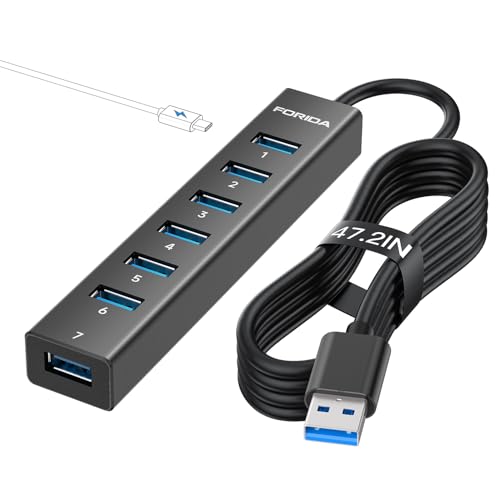 FORIDA Aluminum Alloy 8 Port USB Hub
- 【Portable USB hub long cable】With 7 port usb…
- 【5Gbps Data Transfer Speed】This usb splitter 3.0 syncs…
- 【Smart Powered Port】This usb extender comes with an…
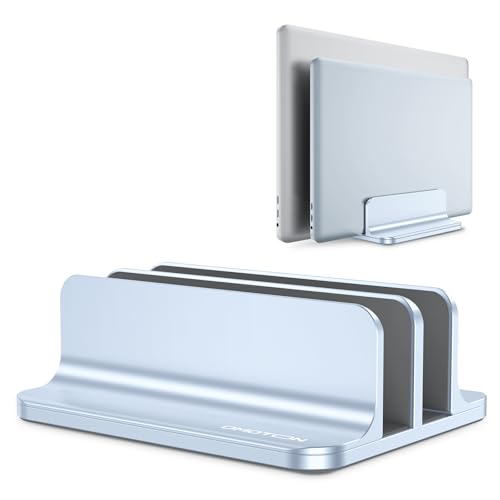 OMOTON Dual Vertical Desk Laptop Stand Holder
- Updated Dock Version: Double dock stand capable of…
- Adjustable Size: Adjustable width compatible with various laptops…
- Protective Mat: Non-toxic and non-slip silicone mats cover…
As an Amazon Associate we earn from qualifying purchases at no extra cost to you.
🛒 Best Price Today on Amazon
Check today’s deals on the products above before you buy. Prices change often, so compare the live price on Amazon.
The Short Answer
For a basic gaming laptop setup, choose a dock with 6 to 7 ports. This typically covers:
- One USB-C host connection to the laptop
- One HDMI or DisplayPort video output
- Two USB-A ports for a mouse, keyboard, or controller
- One USB-C data or charging port
- One USB-C Power Delivery input
Choose 8 to 10 ports if you want wired Ethernet, a second display, an SD card reader, a webcam, or external storage. A typical expanded layout includes HDMI, DisplayPort, Gigabit Ethernet, two USB-A ports, one or two USB-C ports, an SD or microSD slot, audio, and charging input.
Do not confuse the dock’s total port count with its useful port count. A product advertised as an “8-port hub” might include seven USB 3.0 data ports and one USB-C power port, like the FORIDA hub. That can be useful for accessories but may not provide video output, Ethernet, or laptop charging. Conversely, a Thunderbolt dock may have fewer visible ports but support faster displays, storage, and networking.
Standard Sizes
Gaming laptop docks generally fall into three size categories. The measurements below are practical buying ranges for the dock body, excluding cable length. Actual dimensions vary by brand and port layout.
| Dock type | Typical ports | Typical dimensions | Approximate weight | Best for |
|---|---|---|---|---|
| Compact USB-C hub | 6–8 | 4.7–6.3 × 1.6–2.6 × 0.5–0.9 in (12–16 × 4–6.6 × 1.3–2.3 cm) |
3–8 oz (85–227 g) |
Travel, small desks, one monitor |
| Foldable laptop or handheld dock | 7–9 | 5.8–8.0 × 2.5–3.5 × 0.8–1.4 in (14.7–20.3 × 6.4–8.9 × 2–3.6 cm) |
8–16 oz (227–454 g) |
Gaming laptops, Steam Deck-style devices, adjustable stands |
| Desktop USB-C dock | 9–13 | 6.0–8.7 × 3.0–4.5 × 1.0–1.8 in (15.2–22.1 × 7.6–11.4 × 2.5–4.6 cm) |
1.5–3.5 lb (0.7–1.6 kg) |
Permanent desk setups and multiple peripherals |
| Thunderbolt dock | 9–12 | 7.0–9.5 × 3.0–4.8 × 1.0–2.0 in (17.8–24.1 × 7.6–12.2 × 2.5–5.1 cm) |
1.5–3.0 lb (0.7–1.4 kg) |
High-resolution displays, fast storage, wired networking |
A compact dock often costs about $20 to $50. A full desktop USB-C dock generally runs $60 to $160, while Thunderbolt models commonly cost $100 to $300 or more. For example, a compact UGREEN Steam Deck Dock 9-in-1-style product may sit near the lower-cost range, while a Belkin Thunderbolt 3 docking station is positioned closer to the premium range. Treat these as price categories rather than guarantees, since sales and bundled power supplies can change the final cost.
Port speed matters as much as port quantity. USB 3.0 or USB 3.2 ports are suitable for keyboards, mice, controllers, and many external drives. For high-speed storage, look for USB-C ports rated at 10Gbps or higher. For gaming displays, check whether the dock supports your required resolution and refresh rate; a dock that handles 4K at 60Hz may not support 1440p at 240Hz.
How to Measure Your Space
- Measure the available width. Use a tape measure to find the horizontal space beside or behind the laptop. Leave at least 1 inch (2.5 cm) of clearance on each side so plugs and cables do not press against nearby objects.
- Measure the depth. Include the space from the desk edge to the monitor stand, wall, or rear cable channel. A dock measuring 4 inches (10.2 cm) deep may need 6 to 8 inches (15.2 to 20.3 cm) of usable depth once cables are attached.
- Check vertical clearance. If the dock sits below a monitor shelf or laptop stand, measure the opening. Allow at least 0.5 inch (1.3 cm) above the dock for ventilation and cable angles.
- Map cable directions. Side-facing USB ports need more lateral room, while rear-facing video and Ethernet ports need space behind the dock. Add 2 to 4 inches (5 to 10.2 cm) for cable bends.
- Measure the laptop’s USB-C location. A short attached host cable may not reach a port on the far side of a large gaming laptop. A detachable or longer cable can be more convenient, but avoid sharply bending it.
- Check power-brick placement. A dock’s AC adapter may be larger than the dock itself. Reserve a separate area for the brick, and confirm that your laptop can receive the wattage it needs through USB-C.
By Room or Use Case
Small bedroom or dorm desk
Choose a 6- to 8-port dock measuring roughly 5 to 7 inches wide and no more than 3 inches deep. Prioritize HDMI or DisplayPort, two USB-A ports, USB-C charging, and Ethernet if Wi-Fi is unreliable. A compact stand-style dock can reduce clutter, but leave room for airflow around a gaming laptop’s exhaust vents.
Permanent gaming desk
A 9- to 12-port desktop dock is usually the better choice. Look for Gigabit Ethernet, at least three USB-A or USB-C data ports, dual-display support if needed, and a separate charging input. A metal dock weighing 1.5 to 3 pounds is less likely to slide when several cables are connected. Budget approximately $80 to $250 depending on video standards and Thunderbolt support.
Dual-monitor workstation
Start with the displays, not the port count. Confirm whether the dock supports two independent monitors at the desired resolution and refresh rate. Some USB-C docks mirror displays on certain laptops, while others require DisplayLink software. For a 4K monitor paired with a high-refresh gaming monitor, Thunderbolt or a direct connection from the laptop may provide a more dependable arrangement.
Travel and shared spaces
A 6- to 9-port dock under 1 pound is easier to pack. Prioritize HDMI, two USB ports, USB-C Power Delivery, and a short storage footprint. Foldable products such as a UGREEN Steam Deck Dock-style design can be useful when you alternate between a laptop and handheld gaming device. A travel dock commonly costs $25 to $90.
Vertical laptop storage
If you plan to close the laptop and use an external display, keyboard, and mouse, pair the dock with a stand that fits the laptop’s thickness. A dual vertical stand such as the OMOTON-style design saves desk width, but measure the slot before buying. Many gaming laptops are 0.8 to 1.2 inches (2 to 3 cm) thick, while some performance models are thicker.
Common Sizing Mistakes
- Counting the host cable as a usable port. The cable connecting the dock to the laptop does not add an accessory connection.
- Ignoring charging wattage. A dock may accept USB-C power but deliver only 60W or 100W. Many high-performance gaming laptops need more power under load and may still require their original charger.
- Buying by port count alone. Seven low-speed USB ports may be less useful than a seven-port dock with video, Ethernet, and charging.
- Forgetting connector clearance. HDMI and Ethernet plugs can stick out 2 to 3 inches (5 to 7.6 cm), making a dock feel much larger than its listed dimensions.
- Assuming every USB-C port supports video. Check for DisplayPort Alt Mode, Thunderbolt, or the dock’s stated display standard.
- Underestimating heat and weight. Keep ventilation openings clear, and use a heavier dock if frequent plugging and unplugging causes a lightweight hub to move.
FAQ
Is a 7-port dock enough for a gaming laptop?
Yes, if you need one monitor, keyboard, mouse, charging, and perhaps one extra USB device. For Ethernet, a second display, an SD card reader, or external storage, an 8- to 10-port dock gives you more practical flexibility.
How many USB ports should a gaming laptop dock have?
Plan on at least two USB-A ports and one USB-C data port. Add another two ports if you use a webcam, controller, microphone, external drive, or wireless headset receiver at the same time.
Can a dock replace a gaming laptop charger?
Sometimes, but not always. Check the dock’s maximum Power Delivery output and your laptop’s required wattage. A 100W dock may charge a lightweight gaming laptop, while a more powerful model may need its manufacturer charger during gaming.
What is the best dock size for a small desk?
Choose a dock approximately 5 to 7 inches wide, 2 to 3 inches deep, and under 1 pound. Leave additional cable space behind it, and select only the ports you will actually use rather than maximizing the advertised count.









