
Key takeaways
- Buying 8GB because the game’s minimum requirement says 8GB. Minimum requirements do not account for Windows, voice chat, browser tabs, or recording software. For a new gaming purchase, 16GB is safer.
- Choosing one 16GB module instead of a matched 2 x 8GB kit. One module may limit memory bandwidth. Verify the motherboard manual for the recommended paired slots.
- Mixing kits without checking compatibility. Different brands or timings may work, but they may also force all modules to run at a lower speed or require troubleshooting.
- Confusing DDR4 and DDR5. The notch position and electrical design differ. A DDR4 kit cannot be installed in a DDR5 slot.
- Ignoring module height. Tall heat spreaders can collide with a CPU cooler fan even when the RAM’s length is standard.
- Paying for speed before capacity. A dependable 16GB kit is generally a better esports upgrade than a flashy, faster 8GB kit.
🛒 Best Price Today on Amazon
Check today’s deals on the products above before you buy. Prices change often, so compare the live price on Amazon.
The Short Answer
For most esports gaming, 16GB of RAM is the practical starting point. A 16GB kit, usually arranged as two 8GB modules, gives games such as Counter-Strike 2, Valorant, League of Legends, Dota 2, Rocket League, and Overwatch 2 enough memory while leaving room for Windows, voice chat, a browser, and a game launcher.
Choose 32GB if you stream, record gameplay, keep many browser tabs open, edit clips, or play newer AAA games between esports sessions. It is also the more comfortable choice for a gaming PC you plan to keep for several years. For a dedicated esports machine with one game open at a time, 16GB is normally sufficient; 8GB works only for a very basic or older setup and leaves little headroom.
Our top picks
 CORSAIR Vengeance RGB PRO DDR4 RAM 16GB
- High performance DDR4 memory illuminates your system with…
- Take control with CORSAIR iCUE software and synchronize…
- Customize lighting profiles with millions of different patterns…
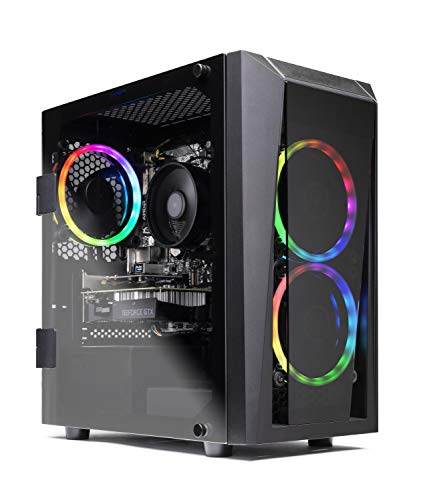 SkyTech Blaze II Gaming Computer PC Desktop
- Ryzen 5 2600 6-Core 3.4GHz (3.9 GHz Max…
- NVIDIA GeForce GTX 1660 Super 6GB GDDR6 Video…
- PCIe AC Wi-Fi with Antenna, No bloatware, 1…
As an Amazon Associate we earn from qualifying purchases at no extra cost to you.
The best configuration is two matching modules rather than one larger module. For example, 2 x 8GB can enable dual-channel operation on a compatible desktop motherboard. Current 16GB DDR4 gaming kits commonly cost about $45 to $135, depending on speed, lighting, brand, and availability. A 32GB kit generally costs about $70 to $180. The RAM capacity is more important than RGB lighting, but speed and motherboard compatibility also matter.
Standard Sizes
RAM has two kinds of “size”: capacity, measured in gigabytes, and the physical dimensions of the module. Capacity affects how many programs and game assets your computer can hold in active memory. Physical size matters when the memory must fit a motherboard, laptop slot, or a large CPU cooler.
| RAM option | Typical configuration | Approximate physical dimensions | Best use |
|---|---|---|---|
| 8GB | 1 x 8GB or 2 x 4GB | Desktop DIMM: 5.25 x 1.23 x 0.13 in (13.3 x 3.1 x 0.3 cm) | Entry-level esports gaming and older PCs |
| 16GB | 2 x 8GB | Each standard DIMM is about 5.25 x 1.23 x 0.13 in (13.3 x 3.1 x 0.3 cm) | Recommended mainstream esports gaming |
| 32GB | 2 x 16GB | Each standard DIMM is about 5.25 x 1.23 x 0.13 in (13.3 x 3.1 x 0.3 cm) | Streaming, multitasking, and long-term upgrades |
| 64GB | 2 x 32GB or 4 x 16GB | Each standard DIMM is about 5.25 x 1.23 x 0.13 in (13.3 x 3.1 x 0.3 cm) | Heavy editing, virtual machines, and workstation use |
| Laptop SO-DIMM | 8GB, 16GB, or 32GB modules | About 2.66 x 1.18 x 0.12 in (6.8 x 3.0 x 0.3 cm) | Laptops and compact computers |
Standard desktop RAM is called a DIMM. Most gaming desktop modules measure close to 5.25 inches long, but decorative heat spreaders can increase the height from roughly 1.23 inches to 1.5 or even 2 inches. That extra height can interfere with a large air cooler, so measure clearance above the motherboard’s memory slots before buying tall RGB modules.
A 16GB dual-channel kit is a sensible match for a budget or midrange esports system. The Silicon Power Gaming DDR4 16GB Kit, with two 8GB modules rated at 3600MHz, is an example of this format and was listed at $124.97. The CORSAIR Vengeance RGB PRO 16GB kit, also two 8GB DDR4 modules, was listed at $135.05. Prices change considerably, so treat those figures as shopping references rather than fixed expectations.
How to Measure Your Space
- Confirm the computer type. Check whether you have a desktop tower, laptop, mini PC, or all-in-one. Desktop motherboards generally use full-size DIMMs, while laptops use shorter SO-DIMMs. These formats are not interchangeable.
- Measure the slot area. With the computer powered off and unplugged, measure the available height above the RAM slots. Allow at least 0.25 inch (0.6 cm) of extra space beyond the module’s stated height for installation and airflow.
- Check CPU-cooler clearance. Front-mounted air coolers may overlap the nearest memory slot. Measure from the motherboard surface to the cooler fan or fin stack. If clearance is tight, choose low-profile RAM rather than a tall RGB design.
- Count the motherboard slots. Two-slot boards may need a final capacity decision at purchase. Four-slot boards provide more flexibility, but filling every slot can make memory tuning more complicated on some systems.
- Read the motherboard specifications. Confirm the supported DDR generation, maximum capacity, and rated speeds. DDR4 and DDR5 use different slots and cannot be substituted for one another.
- Leave room for installation. The module is about 5.25 inches long, but you also need space to open the retaining clips and route cables. Avoid placing a drive cage or cable bundle directly beside the memory area.
- Measure the desk and case together. RAM itself is small, but a tower with a large graphics card, multiple fans, and a tall CPU cooler needs adequate surrounding space. Leave about 3 inches (7.6 cm) around case ventilation areas whenever possible.
By Room or Use Case
Dedicated esports desk
For a desktop used mainly for competitive games, 16GB is the sweet spot. A 2 x 8GB kit is enough for the game, Windows, Discord, and a modest number of browser tabs. It also keeps the purchase focused on the graphics card, processor, monitor, and reliable internet connection. A 3000MHz to 3600MHz DDR4 kit is common in this category, provided the motherboard and processor support the setting.
Shared family or bedroom computer
Choose 16GB if the PC will switch between schoolwork, streaming video, photo storage, and gaming. Shared computers accumulate background applications, cloud-sync tools, browser tabs, and updates. Those programs can consume memory even when they are not visible. A compact tower with low-profile 16GB RAM can be easier to fit beneath a desk or in a small bedroom setup.
Streaming and content creation station
Move to 32GB for live streaming, local recording, video editing, or simultaneous use of a game, browser, chat, and streaming software. A 2 x 16GB kit is usually preferable to four smaller modules because it leaves two slots open on many four-slot motherboards. Capacity will not replace a strong CPU or graphics card, but insufficient RAM can make multitasking less comfortable.
Small-form-factor gaming PC
Small cases make physical dimensions especially important. Select low-profile DIMMs if the case uses a short CPU cooler, and verify the maximum cooler height listed by the case maker. A 16GB kit is appropriate for focused esports gaming; 32GB makes sense if the compact PC will also serve as a work computer. Check whether the system uses desktop DIMMs or SO-DIMMs before ordering.
Prebuilt gaming computer
A prebuilt such as the SkyTech Blaze II configuration with a Ryzen 5 2600, GTX 1660 Super, and 16GB of DDR4 illustrates a typical esports-ready memory level. Before upgrading, identify the existing module layout. Replacing 2 x 8GB with 2 x 16GB is often cleaner than mixing different speeds, capacities, or timings. Also check the power supply; RAM uses relatively little power, commonly around 3 to 6 watts per module, but the whole system still needs adequate wattage for its graphics card.
Common Sizing Mistakes
- Buying 8GB because the game’s minimum requirement says 8GB. Minimum requirements do not account for Windows, voice chat, browser tabs, or recording software. For a new gaming purchase, 16GB is safer.
- Choosing one 16GB module instead of a matched 2 x 8GB kit. One module may limit memory bandwidth. Verify the motherboard manual for the recommended paired slots.
- Mixing kits without checking compatibility. Different brands or timings may work, but they may also force all modules to run at a lower speed or require troubleshooting.
- Confusing DDR4 and DDR5. The notch position and electrical design differ. A DDR4 kit cannot be installed in a DDR5 slot.
- Ignoring module height. Tall heat spreaders can collide with a CPU cooler fan even when the RAM’s length is standard.
- Paying for speed before capacity. A dependable 16GB kit is generally a better esports upgrade than a flashy, faster 8GB kit.
FAQ
Is 16GB enough for esports gaming?
Yes. For most esports titles, 16GB is enough for the game plus ordinary background applications. Use two 8GB modules when possible, and check that the kit matches your motherboard’s DDR type.
Is 32GB overkill for competitive gaming?
It can be more than you need for a dedicated esports setup, but it is not wasteful if you stream, edit clips, multitask heavily, or want additional headroom. A 2 x 16GB kit is a sensible long-term choice.
Does RAM speed affect esports performance?
RAM speed can influence performance, particularly with processors that rely heavily on system memory, but capacity and dual-channel operation come first. Stay within the motherboard and processor’s supported specifications instead of choosing speed alone.
How much RAM should a gaming laptop have?
Choose 16GB for regular esports gaming and 32GB for streaming, editing, or heavy multitasking. Gaming laptops use SO-DIMM modules when upgrades are possible, but some newer models have memory soldered to the motherboard, so check the specifications before purchase.









