
Key takeaways
- Lower cost: If your computer already has 8GB installed, you may be able to keep using it instead of replacing the entire system.
- Enough for lighter esports games: Competitive titles designed to run on modest hardware can work well with 8GB when settings are sensible.
- Lower power use: An 8GB configuration generally consumes slightly less power than a larger set of memory modules, although the difference is small in a typical desktop.
- Simple upgrade path: If your motherboard has an unused slot and supports higher-capacity modules, you may be able to add another stick later.
- Good for basic PCs: An 8GB machine can handle gaming, web browsing, and ordinary school or office work when those activities are not all happening heavily at once.
🛒 Best Price Today on Amazon
Check today’s deals on the products above before you buy. Prices change often, so compare the live price on Amazon.
The Short Answer
Yes, 8GB of RAM is enough for esports gaming if you play one competitive game at a time, use modest settings, and keep background applications under control. That is the one important condition. In 2026, 8GB can still run games such as Valorant, League of Legends, Rocket League, and Counter-Strike 2, but it leaves little room for Discord, a browser, recording software, or Windows processes.
For a new gaming PC, 16GB is the better minimum. It provides more breathing room, reduces the chance of stuttering when several programs are open, and is usually a more sensible long-term purchase. Moving from 8GB to 16GB will not automatically double your frame rate, though. Your graphics card, processor, storage drive, and in-game settings usually matter more for average FPS.
Our top picks

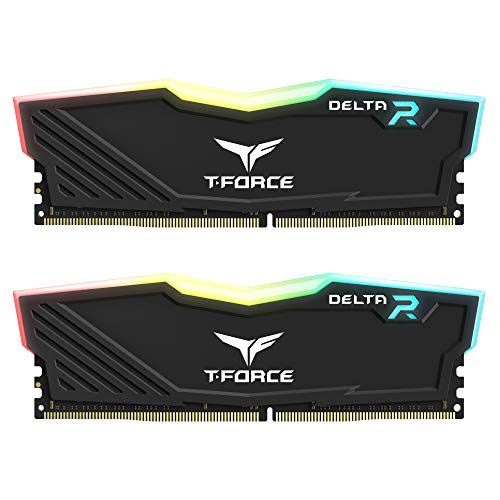 TEAMGROUP T-Force Delta RGB DDR4 16GB
- TeamGroup Delta RGB 16GB (2 x 8GB) 3200…
- Full-frame 120 ultra wide-angle illumination with built-in force…
- Aluminum alloy heat sink with asymmetrical minimalist design.
As an Amazon Associate we earn from qualifying purchases at no extra cost to you.
What You Actually Get
System memory, or RAM, temporarily holds the game data and programs your computer is actively using. It is different from storage: RAM works quickly while the computer is running, while an SSD or hard drive stores files permanently.
With 8GB installed, Windows may use roughly 2GB to 4GB before a game is opened, depending on startup programs and system configuration. That can leave approximately 4GB to 6GB for the game and everything else. A lightweight esports title may fit comfortably within that limit. A game with larger maps, high-resolution textures, or an extensive launcher may not.
The arrangement of the memory also matters. An 8GB kit made from two 4GB sticks usually runs in dual-channel mode, which can provide better memory bandwidth than a single 8GB stick. The exact improvement varies by processor and game, but two matching modules are generally preferable when buying from scratch.
Memory speed matters, too, although capacity comes first when the system is running out of RAM. A common DDR4 desktop kit might run at 3200MHz with CL16 timings. For example, the CORSAIR Vengeance LPX DDR4 16GB kit uses two 8GB modules rated up to 3200MHz and lists at $139.99. The TEAMGROUP T-Force Delta RGB DDR4 16GB kit also uses two 8GB, 3200MHz modules and lists at $163. These kits are examples of the 16GB dual-channel configuration that gives a gaming PC more usable headroom.
Check compatibility before buying. DDR4 and DDR5 are not interchangeable, and desktop DIMMs are different from laptop SO-DIMMs. Your motherboard also determines supported memory type, maximum capacity, and whether a particular speed is available through a memory profile such as XMP or EXPO.
Pros
- Lower cost: If your computer already has 8GB installed, you may be able to keep using it instead of replacing the entire system.
- Enough for lighter esports games: Competitive titles designed to run on modest hardware can work well with 8GB when settings are sensible.
- Lower power use: An 8GB configuration generally consumes slightly less power than a larger set of memory modules, although the difference is small in a typical desktop.
- Simple upgrade path: If your motherboard has an unused slot and supports higher-capacity modules, you may be able to add another stick later.
- Good for basic PCs: An 8GB machine can handle gaming, web browsing, and ordinary school or office work when those activities are not all happening heavily at once.
Cons
- Very little multitasking headroom: Discord, several browser tabs, game launchers, music, and screen recording can push total memory use close to the limit.
- Greater risk of stutter: When RAM fills, Windows relies more heavily on the storage drive. Even with a fast SSD, that can produce hitching, delayed asset loading, or slower switching between applications.
- Less flexibility for newer games: Esports games are not all equally lightweight. Some competitive shooters and battle royale games can use substantially more memory than older arena-style titles.
- Potentially weaker performance from mismatched parts: A single 8GB stick may leave performance on the table compared with two matched modules, particularly on systems that use integrated graphics.
- Limited longevity: A new 8GB gaming build may require an upgrade sooner, especially if you want to stream, record, use mods, or play demanding non-esports games.
Who Should Buy It
Choose 8GB if you are building an inexpensive PC specifically for one or two lighter esports games. It is also reasonable for a hand-me-down computer or an existing system that already performs well and has no memory-related hitching.
This configuration makes the most sense when you play at 1080p, close unnecessary applications before launching the game, and do not stream or record simultaneously. Aim for a dual-channel setup—two matching 4GB sticks—rather than a single module when possible. If you are buying a used computer, confirm the RAM layout and leave room for a future upgrade.
Keep expectations realistic. Eight gigabytes does not guarantee a particular frame rate. A weak CPU or entry-level graphics solution can still limit performance even when memory use is fine. Conversely, adding RAM will not fix low FPS caused by an underpowered graphics card.
Who Should Skip It
Skip 8GB if you are buying a new gaming desktop and the price difference to 16GB is manageable. The larger capacity is especially worthwhile if you keep a browser open, chat in Discord, stream gameplay, record clips, run overlays, or switch between games and other applications.
You should also choose 16GB if you play demanding shooters, battle royale games, open-world titles, or modded games alongside esports releases. Laptop buyers should be cautious as well: some laptops have soldered memory or only one accessible slot, making a later upgrade difficult or impossible.
For serious streaming, heavy modding, content creation, or frequent multitasking, 32GB can be justified. It is not required for ordinary esports gaming, but it offers useful capacity for workloads beyond the game itself.
Cheaper Alternatives
| Option | Cost | Trade-off |
|---|---|---|
| Keep an existing 8GB dual-channel kit | $0 | Lowest cost, but limited multitasking and upgrade headroom |
| Basic used or open-box 16GB DDR4 kit | About $35-$75 | More capacity for less money, but shorter warranty and greater compatibility risk |
| Basic new 16GB DDR4 kit, 2x8GB | About $45-$90 | Usually the best value, but less styling or overclocking-focused support |
| CORSAIR Vengeance LPX DDR4 16GB, 2x8GB, 3200MHz | $139.99 listed price | Reliable dual-channel capacity, but the listed price is high compared with basic kits |
| TEAMGROUP T-Force Delta RGB DDR4 16GB, 2x8GB, 3200MHz | $163 listed price | RGB appearance and dual-channel capacity, but you pay more for the lighting and design |
Before choosing the least expensive option, verify the memory generation, desktop or laptop format, rated voltage, and motherboard support. Mixing different kits can work, but it may force all modules to operate at the speed and timings of the slowest set. A matched 2x8GB kit is usually the safest 16GB purchase.
FAQ
Will 8GB RAM increase my FPS?
Not by itself. If your game already fits comfortably within available memory, adding RAM may produce little change in average FPS. The upgrade can help when the system is running out of memory and causing stutters or severe frame-time spikes. Graphics settings, the GPU, and the CPU are usually more important for raw frame rate.
Is one 8GB stick enough for esports gaming?
It can run many esports games, but two matching 4GB sticks are generally preferable because they enable dual-channel operation. This is particularly relevant when using integrated graphics, which share system memory with the processor. If you plan to upgrade soon, a single 8GB stick may be a temporary solution, but check that your motherboard has a suitable free slot.
Is 16GB noticeably better than 8GB?
It is noticeably better for multitasking and consistency rather than necessarily for peak FPS. With 16GB, you have more room for Discord, browser tabs, launchers, recording tools, and background services. Games are also less likely to compete with Windows for memory, which can reduce hitching during play.
Should I buy 32GB for esports games?
Usually not. For competitive gaming at 1080p, 16GB is the practical target and 8GB can work under controlled conditions. Choose 32GB if you stream, record, use large mods, run virtual machines, edit video, or want substantial headroom for demanding games and other applications. Spend extra money on 32GB only after the CPU and graphics card meet your performance goals.









