Key takeaways
- Headset resolution: More pixels increase GPU load and VRAM usage.
- Refresh rate: 120Hz needs substantially more consistent performance than 72Hz or 80Hz.
- Connection type: DisplayPort headsets render directly, while wireless and USB headsets also require real-time video encoding.
- Game type: Flight simulators, racing games, Microsoft Flight Simulator, heavily modded games, and VRChat worlds can be far more demanding than room-scale games.
- Upscaling support: NVIDIA DLSS and AMD FSR can improve performance, but native rendering still matters for image clarity and headset comfort.
The best graphics cards GPUs for virtual reality are the NVIDIA GeForce RTX 5070 Ti or AMD Radeon RX 9070 for most PC VR users, while the RTX 5080 and RTX 5090 are better choices for high-resolution headsets, demanding simulators, and long-term performance headroom.
Quick Picks: The Best VR GPUs in 2026
| GPU | VRAM | Best for | Recommended headset class | Typical market range |
|---|---|---|---|---|
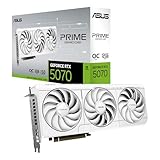
| GeForce RTX 5070 | 12GB GDDR7 | Value-focused PC VR | 2,000 × 2,000 per eye at 90Hz | Usually $500–$650 |
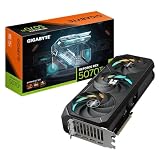
| GeForce RTX 5070 Ti | 16GB GDDR7 | Best overall balance | High-resolution headsets at 90–120Hz | Usually $700–$850 |
| Radeon RX 9070 | 16GB GDDR6 | Strong raster performance and VRAM | High-resolution wired PC VR | Usually $550–$700 |
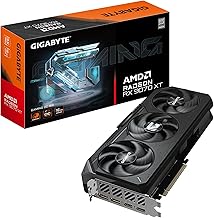
| Radeon RX 9070 XT | 16GB GDDR6 | High-end value | High-resolution VR and simulators | Usually $650–$800 |
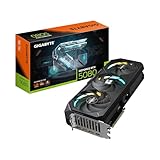
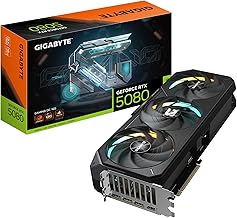
| GeForce RTX 5080 | 16GB GDDR7 | Premium high-refresh VR | 2,448 × 2,448 per eye and above | Usually $1,000–$1,300 |
| GeForce RTX 5090 | 32GB GDDR7 | Maximum settings and simulation | Ultra-high-resolution headsets and heavy mods | Usually $2,000–$2,500 |
How to Match a GPU to Your VR Headset
VR performance depends on more than the headset’s panel resolution. The graphics card must render an image for each eye, apply lens distortion, maintain a stable refresh rate, and often encode video for a wireless or USB streaming connection. A headset running at 90Hz requires a new frame every 11.1 milliseconds; at 120Hz, that falls to 8.3 milliseconds.
Use these priorities when choosing:
- Headset resolution: More pixels increase GPU load and VRAM usage.
- Refresh rate: 120Hz needs substantially more consistent performance than 72Hz or 80Hz.
- Connection type: DisplayPort headsets render directly, while wireless and USB headsets also require real-time video encoding.
- Game type: Flight simulators, racing games, Microsoft Flight Simulator, heavily modded games, and VRChat worlds can be far more demanding than room-scale games.
- Upscaling support: NVIDIA DLSS and AMD FSR can improve performance, but native rendering still matters for image clarity and headset comfort.
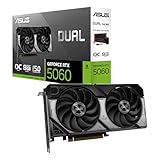
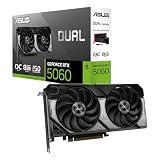
Entry-Level VR: RTX 4060, RTX 5060-Class, and RX 7600-Class
A modern entry-level card can run less demanding PC VR games at moderate headset resolutions, especially with an 80Hz or 90Hz target and reduced render scaling. These cards are suitable for games such as Beat Saber, Superhot VR, Moss, and many older SteamVR titles.
The limitation is consistency. A card with 8GB of VRAM may work well at 1,800 × 1,920 per eye but struggle when increasing supersampling, texture quality, or wireless-streaming resolution. Choose this class only when the budget is tight and the headset is not among the highest-resolution models.
Best Overall: RTX 5070 Ti or Radeon RX 9070
The RTX 5070 Ti is the safest all-around recommendation because its 16GB of VRAM, strong ray-tracing performance, modern video encoding, and broad support for NVIDIA rendering technologies suit both wired and wireless VR. It is especially attractive for headsets that operate around 2,000–2,500 pixels per eye at 90Hz or 120Hz.
The Radeon RX 9070 offers a compelling alternative when the game is primarily rasterized and the headset connects directly through DisplayPort. Its 16GB memory capacity provides useful room for high-resolution textures and supersampling. NVIDIA is generally the less risky choice for wireless PC VR, CUDA-dependent applications, and games that rely heavily on ray tracing or DLSS.
High-End VR: RX 9070 XT and RTX 5080
Move to the RX 9070 XT or RTX 5080 for demanding racing and flight simulators, high refresh rates, or headsets with roughly 2,448 × 2,448 pixels per eye. These GPUs provide more performance headroom for maintaining frame-time consistency instead of merely reaching a high average frame rate.
The RTX 5080 is the stronger premium choice for ray-traced VR games, wireless streaming, and applications that benefit from NVIDIA’s encoder and reconstruction features. The RX 9070 XT can be the better value when the priority is traditional raster performance and the headset uses a direct wired connection.
Extreme VR: RTX 5090
The RTX 5090 is appropriate for enthusiasts using ultra-high-resolution headsets, extensive simulator mods, demanding VRChat environments, or large supersampling values. Its 32GB of VRAM is particularly valuable when a game loads large texture packs or when several demanding applications run alongside VR.
It is not automatically the best purchase for every headset. If the headset runs at a modest resolution and the games are lightweight, the RTX 5090’s additional performance will not improve the experience enough to justify its power use and price.
VRAM Requirements by Resolution
| Approximate render target | Practical VRAM target | Suitable GPU class | Typical settings approach |
|---|---|---|---|
| 1,800 × 1,920 per eye | 8GB minimum, 12GB preferred | RTX 4060-class or better | Medium to high textures, 72–90Hz |
| 2,000 × 2,000 per eye | 12GB minimum, 16GB preferred | RTX 5070 or RX 9070-class | High textures, 90Hz |
| 2,448 × 2,448 per eye | 16GB | RTX 5070 Ti, RX 9070 XT, or better | High settings, 90–120Hz with upscaling as needed |
| Beyond 3,000 × 3,000 per eye | 16GB minimum, 24–32GB ideal | RTX 5080 or RTX 5090 | Careful render scaling and optimized textures |
These are planning targets rather than hard limits. VRAM consumption varies by game engine, texture pack, render scale, and whether the headset is being driven through a wireless streaming application.
A Worked VR Performance Calculation
Suppose a headset displays 2,448 × 2,448 pixels per eye at 90Hz. Two eyes require:
2,448 × 2,448 × 2 × 90 = approximately 1.08 billion displayed pixels per second.
The GPU actually renders more than this because it must account for lens distortion, compositor overhead, motion-vector data, shadows, effects, and any supersampling. At a 1.3 render scale, the pixel workload rises by approximately 69 percent because both dimensions increase:
1.3 × 1.3 = 1.69 times the base pixel count.
This explains why a card that handles a conventional 4K game at 90 frames per second may not deliver the same result in a high-resolution VR headset. VR requires two views and has a much stricter frame-time target. For this headset class, an RTX 5070 Ti or RX 9070 XT is a sensible starting point, while an RTX 5080 offers more room for native rendering and higher settings.
Power Supply and PC Compatibility
Do not select the GPU in isolation. A high-end VR graphics card also needs an adequate power supply, sufficient case clearance, and a processor that can deliver consistent frame times.
| GPU class | Typical board power | Recommended PSU range | CPU pairing |
|---|---|---|---|
| Entry level | 115–180W | 550–650W | Modern six-core processor |
| RTX 5070 / RX 9070 | 220–300W | 650–750W | Recent six- or eight-core processor |
| RTX 5070 Ti / RX 9070 XT | 285–350W | 750–850W | Recent eight-core processor preferred |
| RTX 5080 | Approximately 360W | 850W or higher | Fast modern eight-core processor |
| RTX 5090 | Approximately 575W | 1,000–1,200W | Top-tier current processor |
For example, a system with a 120W CPU, 360W RTX 5080, 70W motherboard and drives, and 50W of fans and accessories has a calculated peak near 600W. Adding a 30 percent margin gives 780W, so a high-quality 850W power supply is a more sensible target than a barely adequate 750W unit. Check the specific card manufacturer’s connector and PSU guidance before buying.
Headset Compatibility Checklist
- DisplayPort headsets: Confirm the GPU has the required DisplayPort version and enough ports for your monitor setup.
- USB or wireless headsets: Prioritize a card with a capable hardware video encoder and a strong wireless network path. The GPU still renders the scene, but it must also compress frames with low latency.
- Standalone headsets with PC modes: USB streaming can be more forgiving than native DisplayPort, but compression quality depends on cable, USB controller, network, and encoder settings.
- Variable refresh rate: Confirm that the headset and runtime support the desired refresh modes. A GPU’s maximum monitor refresh specification does not guarantee identical VR support.
- Laptop VR: Check whether the headset port is connected directly to the discrete GPU rather than routed through integrated graphics. A powerful mobile GPU can perform poorly if the laptop’s display wiring creates a bottleneck.
Recommended Settings for a Smooth VR Experience
Start with the headset’s native refresh rate, then adjust render resolution to keep frame times stable. For a 90Hz target, aim for a frame time below 11.1ms; for 120Hz, aim below 8.3ms. If performance is inconsistent, reduce settings in this order:
- Lower supersampling or render scale to 90–100 percent.
- Reduce shadows, volumetric effects, and reflections before lowering texture quality.
- Use a quality-oriented upscaling mode rather than an aggressive performance mode.
- Lower the headset refresh rate from 120Hz to 90Hz if the game cannot maintain the higher target.
- Reduce wireless bitrate only after confirming that the GPU is not the rendering bottleneck.
Textures often have less effect on frame rate than shadows and reflections, but they consume VRAM. If the image begins stuttering after entering new areas, lower texture quality or disable high-resolution texture packs rather than immediately replacing the GPU.
Final Buying Recommendation
Choose the RTX 5070 for affordable mainstream VR, the RTX 5070 Ti for the best balance of performance, VRAM, and compatibility, or the RX 9070 when wired raster performance and memory capacity matter most. Step up to the RX 9070 XT or RTX 5080 for high-resolution simulators and 120Hz headsets. Buy the RTX 5090 only when your headset, games, and settings can use its exceptional performance and 32GB of VRAM.