Key takeaways
- HDMI 2.1 for 4K 120Hz: To use the Series X’s full 4K 120Hz output you need HDMI 2.1; if a monitor only has HDMI 2.0, you are capped at 4K 60Hz or 1440p 120Hz, so match the port to your goal.
- Refresh rate: The Series X targets up to 120 FPS in supported games, so a 120Hz or 144Hz panel captures everything it outputs; higher refresh rates mainly benefit PC players.
- Input lag and VRR: Low input lag makes controls feel immediate, and the Series X supports variable refresh rate, so a monitor with VRR and FreeSync smooths out frame-rate dips.
- Resolution and panel type: 1440p is a great Series X sweet spot for high refresh, while 4K panels maximize sharpness; OLED and quality IPS panels deliver the best contrast and color for HDR games.
- HDR quality: The Series X supports HDR, so a monitor with genuine HDR capability, ideally OLED or a strong IPS panel, makes games look far richer than a basic HDR badge suggests.
The Xbox Series X was built for high-frame-rate gaming, capable of 120 FPS and 4K output, yet plenty of owners still plug it into an aging TV that squanders that power. The right monitor unlocks what the console can really do, delivering low input lag, high refresh rates, and, on the best panels, 4K 120Hz over HDMI 2.1 for the sharpest, most responsive experience.
We compared displays with the Series X specifically in mind, weighing HDMI 2.1 support, refresh rate, input lag, and picture quality against price. Below are our picks across budgets, a buying guide for matching a monitor to the Series X, and the questions Xbox owners ask before upgrading their display.
Our top picks


As an Amazon Associate we earn from qualifying purchases at no extra cost to you. Ratings are shown as listed on Amazon.
⚡ Save on Your Next PC — Amazon Prime
Prime members get fast free shipping on the systems above, plus early access to Prime Day & Black Friday PC deals. New members get a 30-day free trial.
Watch: Best Gaming Monitor for Xbox Series X — Video Review
How to Choose
- HDMI 2.1 for 4K 120Hz: To use the Series X’s full 4K 120Hz output you need HDMI 2.1; if a monitor only has HDMI 2.0, you are capped at 4K 60Hz or 1440p 120Hz, so match the port to your goal.
- Refresh rate: The Series X targets up to 120 FPS in supported games, so a 120Hz or 144Hz panel captures everything it outputs; higher refresh rates mainly benefit PC players.
- Input lag and VRR: Low input lag makes controls feel immediate, and the Series X supports variable refresh rate, so a monitor with VRR and FreeSync smooths out frame-rate dips.
- Resolution and panel type: 1440p is a great Series X sweet spot for high refresh, while 4K panels maximize sharpness; OLED and quality IPS panels deliver the best contrast and color for HDR games.
- HDR quality: The Series X supports HDR, so a monitor with genuine HDR capability, ideally OLED or a strong IPS panel, makes games look far richer than a basic HDR badge suggests.
The Best Picks Reviewed
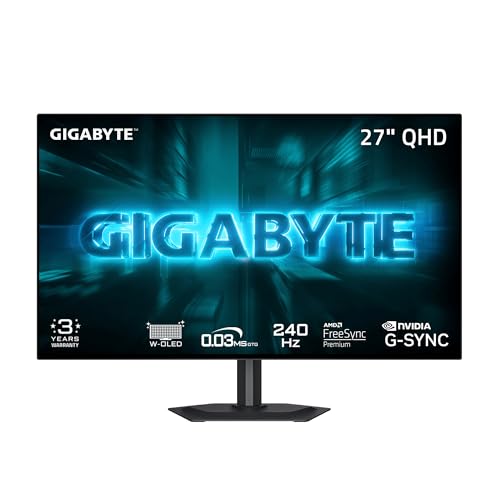
GIGABYTE GO27Q24G 27-inch W-OLED 240Hz QHD Monitor
Our top pick for Xbox owners who want the best picture. This 27-inch W-OLED panel delivers stunning contrast, perfect blacks, and vivid HDR, with a 1440p resolution the Series X drives beautifully at high refresh. It is the display to buy if image quality is your priority.
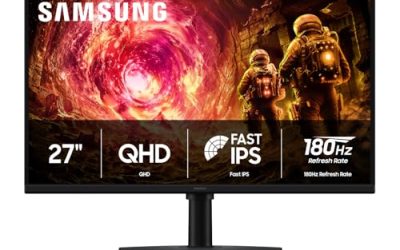
Samsung Odyssey G5 27-inch QHD Gaming Monitor
A superb all-round value pick. The 27-inch Odyssey G5 offers 1440p at high refresh with strong contrast and a curved design that suits immersive Series X gaming. It hits the resolution-and-refresh sweet spot for the console without the premium price of an OLED panel.
Sceptre Curved 24.5-inch 240Hz Gaming Monitor
The immersive budget choice. This curved 24.5-inch 1080p panel runs up to 240Hz with dual DisplayPort and HDMI inputs, giving Series X owners smooth, responsive motion and a wraparound feel for very little money. Ideal for fast-paced games where responsiveness matters most.
SANSUI 32-inch Curved 240Hz FHD Monitor
For gamers who want a big, immersive screen at their desk, this 32-inch curved 1080p display delivers scale and high refresh at a low price. The generous size and curve make the Series X feel cinematic, a great fit for players who prioritize immersion over pixel density.
Sceptre 27-inch Prime 100Hz Gaming Monitor
The straightforward entry point. This 27-inch 1080p panel offers 100Hz, low 1ms response, 100% sRGB color, and built-in speakers for a bargain price. It will not use the Series X’s full 120Hz ceiling, but for a first Xbox monitor on a tight budget it covers the essentials well.
Frequently Asked Questions
Do I need HDMI 2.1 for the Xbox Series X?
Only if you want 4K at 120Hz. HDMI 2.1 unlocks the Series X’s full 4K 120Hz output, while HDMI 2.0 monitors cap you at 4K 60Hz or 1440p 120Hz. For many gamers a high-refresh 1440p panel over HDMI 2.0 offers great value.
Is 1440p or 4K better for the Series X?
1440p is a fantastic sweet spot, letting the Series X hit high refresh rates with excellent sharpness at a lower cost. 4K maximizes detail but is harder to drive at 120Hz and requires HDMI 2.1. Choose based on your budget and whether you prioritize refresh or resolution.
Does the Series X support variable refresh rate on monitors?
Yes. The Series X supports VRR, so a monitor with VRR or FreeSync will smooth out frame-rate fluctuations for tear-free, judder-free gameplay. It is a worthwhile feature to look for when choosing an Xbox monitor.
Is an OLED monitor worth it for the Xbox Series X?
If picture quality is your priority, yes. OLED panels like the GIGABYTE W-OLED deliver perfect blacks, vivid HDR, and superb contrast that make Series X games look their best. They cost more, but the visual upgrade over a basic panel is dramatic.
Final Thoughts
The GIGABYTE GO27Q24G W-OLED is our top pick for Xbox Series X owners who want the finest picture, while the Samsung Odyssey G5 delivers the ideal 1440p sweet spot for less. Budget-focused and immersion-seeking gamers are well served by the curved Sceptre and SANSUI options. Match HDMI 2.1 and refresh rate to how you play, prioritize low input lag and VRR, and your Series X will finally show what it is truly capable of.