Key takeaways
- Capacity first: For 4K editing, 32GB is the practical minimum and 64GB is ideal for heavy compositing; capacity prevents the disk-swapping stutter that plagues editors more than any speed number.
- DDR4 vs DDR5: Match the memory to your platform; newer builds use DDR5 for higher bandwidth, while capable DDR4 systems still edit well and cost less, so buy the type your motherboard supports.
- Speed and timings: Faster kits with tight timings help, especially on AMD platforms with EXPO or Intel with XMP, but capacity outweighs a few hundred megahertz for editing workloads.
- Dual-channel configuration: Always run two matched sticks to enable dual-channel bandwidth; a single large stick leaves performance on the table, so buy kits in pairs.
- Cooling for stability: Sustained editing loads keep RAM busy; a kit with a heatspreader, or an add-on cooler for overclocked memory, helps maintain stability during long renders.
RAM is the unsung hero of a smooth editing rig. Every 4K clip, effect layer, and preview cache lives in memory, and the moment you run short the application spills to disk and your timeline stutters. For video editing in 2026, capacity is king, but speed and stable timings matter too, and choosing the right kit means matching capacity, generation, and clocks to your platform.
We looked at memory kits and, where relevant, editing-capable systems, judging capacity, real-world speed, and value. Below are our picks for editors, a buying guide that explains how much RAM you actually need and why, and the questions creators ask before upgrading their memory.
Our top picks




As an Amazon Associate we earn from qualifying purchases at no extra cost to you. Ratings are shown as listed on Amazon.
⚡ Save on Your Next PC — Amazon Prime
Prime members get fast free shipping on the systems above, plus early access to Prime Day & Black Friday PC deals. New members get a 30-day free trial.
Watch: Best RAM for Video Editing — Video Review
How to Choose
- Capacity first: For 4K editing, 32GB is the practical minimum and 64GB is ideal for heavy compositing; capacity prevents the disk-swapping stutter that plagues editors more than any speed number.
- DDR4 vs DDR5: Match the memory to your platform; newer builds use DDR5 for higher bandwidth, while capable DDR4 systems still edit well and cost less, so buy the type your motherboard supports.
- Speed and timings: Faster kits with tight timings help, especially on AMD platforms with EXPO or Intel with XMP, but capacity outweighs a few hundred megahertz for editing workloads.
- Dual-channel configuration: Always run two matched sticks to enable dual-channel bandwidth; a single large stick leaves performance on the table, so buy kits in pairs.
- Cooling for stability: Sustained editing loads keep RAM busy; a kit with a heatspreader, or an add-on cooler for overclocked memory, helps maintain stability during long renders.
The Best Picks Reviewed
CORSAIR Vengeance DDR5 32GB (2x16GB) 6000MHz Kit
Our top pick for modern editing builds. This 32GB DDR5 kit runs at up to 6000MHz with AMD EXPO and Intel XMP profiles, giving editors ample capacity and high bandwidth for 4K timelines. On a current-generation platform, it is the balanced, reliable choice that keeps previews smooth.
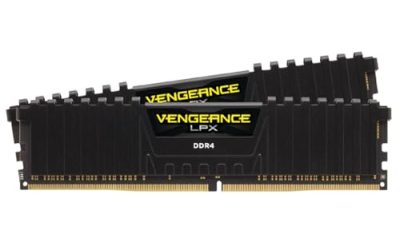
CORSAIR Vengeance LPX DDR4 32GB (2x16GB) 3200MHz Kit
The value champion for DDR4 systems. With 32GB across two low-profile sticks at 3200MHz and XMP support, it delivers the capacity editors need at a very reasonable price. If your motherboard uses DDR4, this kit removes the memory bottleneck without overspending.
TEAMGROUP T-Force Delta RGB DDR4 16GB (2x8GB) 3200MHz
A stylish, affordable entry point for lighter editing and dual-purpose builds. The 16GB Delta RGB kit runs at 3200MHz with striking lighting, and while 16GB is the floor for editing, it is a solid starting kit you can pair with a second set later to reach 32GB.
Acclamator DDR4 32GB (2x16GB) 3200MHz Kit
Another strong DDR4 value option, this 32GB kit at 3200MHz with heatspreaders gives editors capacity and stability for less. It is a no-frills, capacity-first choice for anyone building or upgrading a DDR4 editing machine on a tight budget.
Thermalright MC-2 ARGB RAM Cooler
Not memory itself, but a smart companion for editors who overclock. This active RAM cooler with dual silent fans and an RGB strip helps keep high-speed kits stable during marathon renders. If you push your memory hard, it is cheap insurance against thermal instability.
Frequently Asked Questions
How much RAM do I need for video editing?
32GB is the practical minimum for smooth 4K editing, and 64GB is ideal if you do heavy compositing or run many effects. Below 32GB, the application swaps to disk and your timeline stutters, so treat 32GB as your baseline.
Is DDR5 worth it over DDR4 for editing?
Only if your platform supports it. DDR5 offers higher bandwidth that benefits some editing tasks, but capable DDR4 systems still edit 4K well and cost less. Buy the memory type your motherboard uses rather than switching platforms just for RAM.
Do RAM speed and timings matter for editing?
They help, particularly on AMD platforms with EXPO, but capacity matters far more. Going from 16GB to 32GB transforms your editing experience, while a few hundred extra megahertz makes only a modest difference. Prioritize capacity, then speed.
Should I buy one large stick or two smaller ones?
Always buy a matched pair to enable dual-channel operation, which roughly doubles memory bandwidth versus a single stick. Two 16GB sticks for 32GB total will outperform a single 32GB module in editing workloads.
Final Thoughts
For modern editing builds the Corsair Vengeance DDR5 32GB 6000MHz kit is our top pick, while the Vengeance LPX DDR4 32GB kit is the best value for DDR4 systems. Editors on a tighter budget can start with a 16GB kit and expand later. Whatever you choose, make 32GB your target, run it in dual channel, and match the generation to your platform, and your timeline will stay smooth from first cut to final export.