Our Top Picks
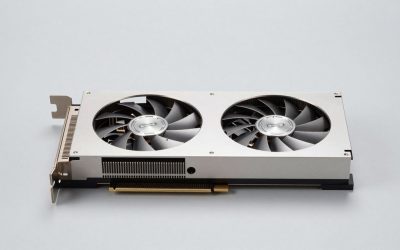
 ASUS Dual GeForce RTX 5060 Ti 16GB GDDR7RTX5060Ti|OC|16GB9 x 4.7 x 2 Inches1.4 PoundsCheck on Amazon
 ASUS Dual GeForce RTX 4070 White OC EditionRTX4070|OC|GDDR6X10.5 x 5.3 x 2 Inches2.13 poundsCheck on Amazon
Thinking about playing Granblue Fantasy: Relink on PC and wondering what hardware you actually need? The action RPG launched on PC on January 31, 2024, and it is a bright, effects-heavy co-op adventure rather than a punishing system hog. Its published requirements are modest: an NVIDIA GeForce GTX 1060 6GB or AMD Radeon RX 580 8GB is enough for 1080p at 30fps with graphics set to Standard, and an RTX 2080 or RX 6700 XT is the recommended card for 1080p at 60fps on Ultra. This guide walks through those official specs, the best GPU for each resolution, and build recommendations that match them.
🛒 Best Price Today on Amazon
Check today’s deals on the products above before you buy. Prices change often, so compare the live price on Amazon.
How Demanding Is Granblue Fantasy: Relink?
Not very — at least by 2024 standards. Granblue Fantasy: Relink is a stylised action RPG, and its official minimum targets 1080p at 30fps on the Standard preset using a GTX 1060 6GB or RX 580 8GB, both 2016-era cards. The recommended tier asks for an RTX 2080 or RX 6700 XT to reach 1080p at 60fps on Ultra, so the gap between the two tiers is really about frame rate and preset rather than raw GPU muscle. Memory is fixed at 16 GB for both tiers, and the game needs 90 GB of space with an SSD recommended. Combat throws plenty of effects and four party members around, and co-op adds other players to the mix, but this is not a simulation or strategy title that leans hard on the processor.

ASUS Prime GeForce RTX 5070 12GB GDDR7 OC Edition Gaming Graphics Card | SFF-Ready, PCIe 5.0, HDMI/DP 2.1, 2.5-slot, Axial-tech Fans, Dual BIOS
Picked as a relevant option in this category.
View on Amazon
ASUS Prime GeForce RTX 5070 12GB GDDR7 White OC Edition Gaming Graphics Card
Picked as a relevant option in this category.
View on AmazonASUS Dual GeForce RTX 5060 Ti 16GB GDDR7 OC Edition Gaming Graphics Card | PCIe 5.0, HDMI 2.1b, DisplayPort 2.1b, 2.5-slot, Axial-tech Fans, 0dB Technology, Dual BIOS
Picked as a relevant option in this category.
View on AmazonASUS Dual GeForce RTX 4070 White OC Edition 12GB GDDR6X (PCIe 4.0, 12GB GDDR6X, DLSS 3, HDMI 2.1, DisplayPort 1.4a, 2.56-Slot Design, Axial-tech Fan Design, 0dB Technology), 3 Year Warranty
Chosen because it specifies 12GB GDDR6X and DLSS 3.
View on AmazonGranblue Fantasy: Relink Official PC System Requirements
| Component | Minimum (official) | Recommended (official) |
|---|---|---|
| OS | Windows® 11 (64-bit Required) | Windows® 11 (64-bit Required) |
| Processor | Intel® Core™ i3-9100 / AMD Ryzen™ 3 3200G | Intel® Core™ i7-8700 / AMD Ryzen™ 5 3600 |
| Memory | 16 GB RAM | 16 GB RAM |
| Graphics | NVIDIA® GeForce GTX™ 1060 6GB / AMD Radeon™ RX 580 8GB | NVIDIA® GeForce RTX™ 2080 8GB / AMD Radeon™ RX 6700 XT 8GB |
| DirectX | Version 11 | Version 11 |
| Storage | 90 GB available space | 90 GB available space |
Source: the official Granblue Fantasy: Relink Steam store listing (app 881020), checked October 2026. Publishers can update these specs after patches.
Both tiers call for 64-bit Windows 11, DirectX 11, 16 GB of RAM and 90 GB of storage, with an SSD recommended in the developer’s notes. The difference between them is purely about hitting 30fps at the Standard preset versus 60fps at Ultra, both at 1080p.
Best GPU for Granblue Fantasy: Relink by Resolution
1080p
At 1080p the official bar is refreshingly low. The minimum cards — GTX 1060 6GB or RX 580 8GB — get you 30fps at the Standard preset, while the recommended RTX 2080 or RX 6700 XT is what the developer names for 60fps at Ultra. Anything at or above that class handles 1080p comfortably: an RTX 3060 12GB, RX 6600 XT or RX 7600 all clear the recommended bar, and current-generation options such as the RTX 5060 or RX 9060 XT go further still. The NVIDIA GeForce RTX 4060 sits in exactly that bracket and is a sensible pick for 1080p on Ultra, with upscaling available as extra headroom.
1440p
1440p is not one of the official targets — the published specs stop at 1080p — but it is well within reach of the recommended tier. An RTX 2080 / RX 6700 XT-class card is the entry point here, and stepping up to the NVIDIA GeForce RTX 4070 SUPER, or a current-generation RTX 5070 or RX 9070, gives you plenty of room for high or ultra settings at a high refresh rate.
4K
4K goes beyond what the developer specifies, so treat it as a brute-force exercise: a strong card plus upscaling. The NVIDIA GeForce RTX 4070 Ti SUPER is a realistic entry point, and if you want more headroom at 3840×2160, the RTX 5070 Ti, RTX 5080 or RX 9070 XT class is where to look. Even then, enabling the game’s upscaling options is the sensible way to keep frame rates consistent, since native 4K ultra is a much heavier load than anything in the official requirements.
CPU, RAM and Storage for Granblue Fantasy: Relink
The official CPU requirements are just as gentle. Minimum is an Intel Core i3-9100 or AMD Ryzen 3 3200G — a four-core part — and recommended is an Intel Core i7-8700 or AMD Ryzen 5 3600. Any modern six-core clears both easily. The AMD Ryzen 5 7600 is far more than this game needs and puts you on a current platform, while the AMD Ryzen 7 7800X3D is the fastest mainstream gaming CPU if you also play heavier titles. Intel fans can opt for the Intel Core i5-14600K. None of these are necessary for Granblue Fantasy: Relink alone; they are about the rest of your library.
Memory is simple: 16 GB is the official figure for both minimum and recommended. That is the target, and a 16 GB kit is all this game asks for. A Corsair Vengeance DDR5 32GB kit is more than required, though the extra capacity is useful if you keep a browser and other apps open while playing.
Storage is the one place the game asks for a little patience: 90 GB, with an SSD recommended in the official notes. An NVMe drive such as the Samsung 990 Pro 2TB NVMe SSD cuts load times and helps with texture streaming during quests.
Recommended PC Builds for Granblue Fantasy: Relink
1080p budget build: NVIDIA GeForce RTX 4060 + AMD Ryzen 5 7600 + 16 GB DDR5 — comfortably above the official recommended tier for 1080p on Ultra.
1440p sweet-spot build: NVIDIA GeForce RTX 4070 SUPER + AMD Ryzen 7 7800X3D + 32 GB DDR5 + 2TB NVMe SSD — well beyond the published specs and aimed at high-refresh 1440p.
4K high-end build: NVIDIA GeForce RTX 4070 Ti SUPER + AMD Ryzen 7 7800X3D + 32 GB DDR5 + fast NVMe SSD — for 4K with upscaling, which is further than the game’s official 1080p targets go.
Is It Worth Upgrading Your PC for Granblue Fantasy: Relink?
Because the official bar sits at a GTX 1060 6GB or RX 580 8GB for 1080p and 30fps, most people with a discrete GPU from the last several years do not need to upgrade for this game at all. If you are on integrated graphics or a card older than the minimum, a modest modern GPU is enough to clear the recommended tier — there is no need to buy at the top of the stack. The graphics card is still the component that moves gaming performance most, so if you do upgrade, start there. A CPU from the last several generations will not hold back a modern GPU in an action RPG like this. The two things that genuinely matter here are making sure you have 16 GB of RAM and installing the game on an SSD, given the 90 GB footprint.
Can You Play Granblue Fantasy: Relink on a Laptop or Handheld?
Because the official minimum is a GTX 1060 6GB, laptops are in good shape: a gaming laptop with an RTX 4060 mobile GPU or better comfortably exceeds the recommended tier for 1080p, and even older GTX 1060-class machines meet the minimum. Expect the usual caveats — more heat, more fan noise and shorter battery life than a desktop. On handhelds, this is a lighter lift than its flashy effects suggest; Steam Deck and ROG Ally-class devices can run it with settings lowered and upscaling enabled, where 30fps is a realistic target. If portability matters, prioritise a device with a capable GPU and pair it with fast storage, since the install is 90 GB.
How to Boost FPS in Granblue Fantasy: Relink
If frame rates are low, start with upscaling — DLSS on NVIDIA hardware or FSR on AMD is the single biggest gain available, and it is the easiest way to lift a card that falls just short of the recommended tier. After that, drop the expensive effects first: shadows, volumetric lighting and post-processing are the usual suspects before you touch overall resolution. Keep your GPU drivers current, close background applications, and make sure the game sits on an SSD rather than a mechanical drive. And because the official targets only go as far as 1080p at 60fps on Ultra, do not feel obliged to chase maximum settings — a stable frame rate feels better than a stuttering one.
Frequently Asked Questions
Can my PC run Granblue Fantasy: Relink?
If your PC meets the official minimum — a GTX 1060 6GB or RX 580 8GB, an Intel Core i3-9100 or AMD Ryzen 3 3200G, 16 GB of RAM and 90 GB of storage — it can run Granblue Fantasy: Relink at 1080p and 30fps on the Standard preset. For 1080p at 60fps on Ultra, the developer recommends an RTX 2080 or RX 6700 XT paired with an Intel Core i7-8700 or AMD Ryzen 5 3600.
Is Granblue Fantasy: Relink demanding on PC?
No — not by modern standards. The official minimum uses 2016-era graphics cards and targets 1080p at 30fps, while the recommended tier asks for an RTX 2080 or RX 6700 XT for 1080p at 60fps on Ultra. Mid-range hardware from the last few years handles it easily, and the fixed asks are 16 GB of RAM, 90 GB of storage and a 64-bit Windows 11 install.
What GPU do I need for Granblue Fantasy: Relink at 1440p 60fps?
1440p is not an official target — the published specs cover 1080p — but it is comfortably within reach of the recommended class. A NVIDIA GeForce RTX 4070 SUPER or an equivalent current-generation card such as an RTX 5070 or RX 9070 gives you plenty of headroom above the official 1080p at 60fps on Ultra recommendation, with upscaling available if you want more.
How much RAM does Granblue Fantasy: Relink need?
16 GB of RAM is the official figure for both the minimum and recommended tiers, so that is the practical target, and 8 GB falls short of the published spec. Faster memory helps in CPU-limited moments, but capacity is what matters most here.
Do I need an SSD for Granblue Fantasy: Relink?
Yes — an SSD is recommended in the official requirements, alongside 90 GB of free space. A mechanical drive will still work, but load times suffer noticeably. An NVMe drive like the Samsung 990 Pro is a good fit for modern games.