Our Top Picks
Pros & cons
- Up to 18 hours of battery life suits full-day use
- 12MP Center Stage camera aids video calls automatically
- Thin 0.44-inch profile keeps it easy to carry
- 512GB SSD and 16GB memory are fixed, non-upgradeable
- Integrated graphics are not built for serious gaming
 acer Nitro V 15.6" FHD IPS 165Hz Gaming16GB | 512GB SSD12.2 x 19.6 x 2.5 Inches3.9 poundsCheck on Amazon
The Mac versus PC debate is as old as personal computing, but for gaming specifically the answer has always leaned one way. Apple Silicon has made huge strides in efficiency and graphics, yet the vast library, upgradeability, and raw price-to-performance of a Windows gaming PC keep it firmly at the center of the hobby. Understanding the real trade-offs helps you spend wisely.
This comparison focuses on what actually matters when you sit down to play: game availability, performance per dollar, and long-term flexibility. We frame the discussion around the Windows gaming laptops a shopper would realistically weigh against a MacBook.
Updated October 2026
Quick answer: In the Mac vs PC gaming debate, a Windows PC wins for anyone who plays regularly: it runs nearly every game, all major competitive shooters and VR, and gives more frame rate per dollar. A Mac is the better buy only if you mainly work, study or create and game casually, sticking to native Mac games and cloud streaming.
The three machines this comparison keeps coming back to are the Apple MacBook Air 13-inch with M5 (the Mac most shoppers weigh against a gaming laptop), the Acer Nitro V 15 with GeForce RTX 5050 (an entry gaming laptop at about the same price tier) and the Lenovo LOQ with Ryzen 7 250 and RTX 5060 (a step up for 1080p at high settings).
| Measure | Windows PC | Mac |
|---|---|---|
| Share of Steam users (Steam Hardware & Software Survey, September 2026) | About 95% | About 1.9% |
| Top competitive shooters (Valorant, Call of Duty, Fortnite) | All run natively | None run natively |
| Graphics in this comparison | GeForce RTX 5050 or RTX 5060 laptop GPU | 8-core integrated GPU (MacBook Air M5) |
| Top laptop graphics option | GeForce RTX 5090 laptop GPU | M5 Max with up to 40 GPU cores |
| Laptop screen refresh rate | 144-240Hz common | 60Hz (Air), up to 120Hz (Pro) |
| Upgrade RAM or storage later | Yes on most desktops and many laptops | No |
Watch: Mac vs PC Gaming Comparison (Video)
Quick Verdict
For dedicated gaming, a Windows PC wins decisively on game library, price-to-performance, and upgradeability. A Mac is a superb machine for creative work, everyday computing, and the growing but still limited slice of Mac-native games, but it is not the platform to build a gaming life around. If gaming is your priority, a prebuilt Windows desktop is the clear choice.
Mac vs PC Gaming at a Glance
The table below sums up how the two platforms compare on the points that matter most to gamers in 2026. The sections that follow explain each one in more detail.
| Category | Windows gaming PC | Mac |
|---|---|---|
| Game library | Virtually every PC release, usually on day one | Growing list of native ports; many major titles missing or late |
| Share of Steam players | Well over 90% | Around 2% |
| Competitive games with anti-cheat | Fully supported | Most kernel-level anti-cheat shooters unavailable |
| Graphics hardware | Dedicated GeForce or Radeon GPU | Integrated Apple GPU sharing unified memory |
| Upscaling and frame generation | DLSS 4 on RTX cards, FSR, XeSS | MetalFX in supported games |
| Ray tracing | Hardware ray tracing on RTX and recent Radeon cards | Hardware ray tracing on M3 and later chips |
| Display refresh rates | 144Hz to 240Hz common on laptops, 360Hz and above on desktop monitors | Up to 120Hz on MacBook Pro, 60Hz on MacBook Air |
| Upgrades after purchase | GPU, RAM and storage on desktops; RAM and SSD on many laptops | None; memory and storage are fixed |
| Running Windows games | Native | Translation layers, virtual machines or cloud streaming |
| Mods | Full support for mod managers and tools | Limited; many tools are Windows-only |
| PC VR | SteamVR and Quest Link supported | No PC VR support |
| Battery life and noise (laptops) | Short battery while gaming, louder fans | Long battery life, quiet operation |
| Gaming performance per dollar | Higher | Lower |
| Everyday and creative work | Strong | Excellent, very efficient |
| Resale value | Depreciates faster | Typically holds value well |
The Case for PC Gaming
Windows gaming PCs enjoy an enormous advantage in sheer game availability. Nearly every major release, indie title, and competitive esport ships on Windows first, often with day-one support, mod communities, and storefronts like Steam and the Epic Games Store competing on price. That breadth alone settles the question for most serious gamers.
Price-to-performance is the other decisive factor. Windows gaming laptops with a dedicated GeForce RTX GPU, fast DDR5 or DDR4 memory, and NVMe storage are tuned specifically for gaming, and entry models with an RTX 5050 show how accessible the entry point can be. Many of them also let you add RAM or a second SSD later, and gaming desktops go further by letting you swap the GPU years down the road rather than replacing the whole machine.
The Case for Mac Gaming
Apple Silicon Macs are genuinely impressive computers. Their efficiency, silent operation, and excellent displays make them a joy for daily use, and the unified memory architecture handles many creative workloads beautifully. Apple has also invested in a game porting toolkit and native Metal support, and a growing number of AAA titles now run natively on Mac hardware.
Still, the gaming reality is limited. Many big releases never come to macOS, and those that do often arrive late. Macs are also not user-upgradeable, so the GPU and memory you buy are the ones you keep for the machine’s life. For players who value a quiet, all-purpose computer and only game occasionally, a Mac can suffice, but it cannot match the flexibility or breadth of a Windows gaming desktop.
How Mac Gaming Actually Works in 2026
“Can a Mac play games?” has a more nuanced answer than it used to. There are now four separate routes to playing on a Mac, and each one works well for some games and not at all for others.
1. Native Apple Silicon games
The best experience comes from games built or ported for macOS and Apple’s Metal graphics API. The list of native titles has grown steadily and now includes big releases such as Baldur’s Gate 3, Cyberpunk 2077, Resident Evil Village, the Resident Evil 4 remake, Death Stranding Director’s Cut, Assassin’s Creed Shadows, Lies of P, No Man’s Sky and World of Warcraft. These run efficiently, often with MetalFX upscaling, and they are the reason Mac gaming is taken more seriously than it was a few years ago.
The catch is that native ports are still the exception. Most new releases ship on Windows and consoles only, ports often arrive months or years later, and some never come. Valve even dropped macOS support when Counter-Strike 2 replaced CS:GO.
2. Translation layers: Game Porting Toolkit and CrossOver
Apple’s Game Porting Toolkit translates Windows DirectX calls to Metal. It is designed for developers to evaluate how a Windows game would run on a Mac, but enthusiasts use it to play too. CrossOver, a paid app from CodeWeavers, packages similar Wine-based translation into a much friendlier tool and incorporates Apple’s D3DMetal technology. Many single-player DirectX 11 and DirectX 12 games run this way, sometimes surprisingly well, but compatibility varies title by title, performance is lower than native, and game updates can break things without warning.
3. Running Windows in a virtual machine
Apple Silicon Macs cannot run Boot Camp, so the only way to run full Windows is a virtual machine such as Parallels Desktop, which runs the ARM version of Windows 11. It is excellent for productivity apps and fine for older or lighter games, but graphics support has long lagged behind a real PC, with DirectX 12 a well-known weak spot, so most modern AAA games either struggle or will not launch.
4. Cloud gaming
Streaming services such as NVIDIA GeForce Now and Xbox Cloud Gaming run games on remote PCs and send the video to your Mac. GeForce Now has a native Mac app, and Xbox Cloud Gaming runs in a web browser. This is the simplest way to play Windows-only titles, including some competitive games, on a Mac. The trade-offs are a monthly subscription, a dependence on a fast and stable connection, a little added input delay and image compression that is visible in fast scenes.
What will not run: anti-cheat multiplayer
The biggest hard limit is competitive multiplayer. Games such as Valorant, Call of Duty and Apex Legends have no macOS versions, and their anti-cheat systems generally refuse to run through translation layers or virtual machines. If your main games are popular online shooters, cloud streaming is the only Mac route, and only where the service supports that title. For many players, this point alone decides the Mac vs PC question.
Popular Multiplayer Games That Do Not Run on a Mac
| Game | Native macOS version | Via CrossOver or a VM | Realistic Mac option |
|---|---|---|---|
| Valorant | No | Blocked by Riot Vanguard anti-cheat | None; needs Windows |
| Call of Duty (Black Ops, Warzone) | No | Blocked by Ricochet anti-cheat | Cloud streaming where supported |
| Fortnite | No (removed from macOS in 2020) | Blocked by Easy Anti-Cheat | Cloud streaming |
| Apex Legends | No | Blocked | Cloud streaming where supported |
| Counter-Strike 2 | No (Mac support ended with CS:GO) | Not supported for matchmaking | Cloud streaming where supported |
| World of Warcraft | Yes, native Apple Silicon | Not needed | Plays natively |
Cloud catalogs change often, so check GeForce Now or Xbox Cloud Gaming for a specific title before you rely on streaming.
Apple M5 Generation: What Changed for Mac Gaming in 2026
Apple’s M5 family is the biggest graphics step for Mac gaming in several years. The base M5 arrived in the 14-inch MacBook Pro in October 2025 and in the MacBook Air in March 2026, with the M5 Pro and M5 Max MacBook Pro models following the same month. The key gaming-related changes, per Apple:
- GPU core counts: 8 or 10 cores on the M5, 16 or 20 on the M5 Pro, and 32 or 40 on the M5 Max.
- Graphics speed: Apple rates the M5 GPU up to 30% faster than the M4, with up to 45% more performance in ray-traced apps, thanks to a third-generation ray-tracing engine.
- Memory bandwidth: 153GB/s on the M5, up to 307GB/s on the M5 Pro and up to 614GB/s on the 40-core M5 Max.
- Pro and Max design: the M5 Pro and M5 Max combine two dies in one chip and offer CPUs of up to 18 cores.
What this means for Mac vs PC gaming: native Mac games run noticeably better on M5 machines, and an M5 Max MacBook Pro is a genuinely strong gaming laptop in titles built for Metal. It does not change the two hard limits. The game library is still a fraction of Windows, and anti-cheat shooters still do not run. An M5 Max MacBook Pro also sits in the premium price tier, where a Windows laptop with an RTX 5080 or RTX 5090 laptop GPU is faster in most games and runs all of them.
Steam’s own numbers show why developers still treat Windows first: in the September 2026 Steam Hardware & Software Survey, Windows accounted for about 95% of users, Linux about 3% and macOS under 2%.
Performance, Graphics and Upscaling
Apple’s M-series chips are among the most efficient processors ever put in a consumer computer, and the higher-end Pro and Max versions have capable GPUs. The difference is focus. Apple’s GPU shares memory with the CPU and is designed to balance performance with battery life and silence, while a gaming PC dedicates a separate graphics card, with its own fast memory and a large power budget, entirely to rendering frames.
That shows up in a few practical ways:
- Raw frame rates: at a given price, a Windows desktop or laptop with a current GeForce RTX or Radeon GPU delivers far more gaming performance than a Mac. Matching a mid-range gaming PC in games usually means buying one of Apple’s most expensive configurations.
- Upscaling and frame generation: NVIDIA’s DLSS 4, including multi frame generation on RTX 50-series cards, is supported in hundreds of games and can multiply frame rates. AMD’s FSR and Intel’s XeSS add more options. Apple’s MetalFX upscaling is good, but it appears only in the smaller set of native Mac games.
- Ray tracing: M3 and later chips support hardware ray tracing, but few Mac games use it heavily, while ray tracing is widespread in PC releases.
- Sustained performance: the fanless MacBook Air slows down under long gaming sessions as it heats up. MacBook Pro models hold performance far better thanks to their fans, and gaming laptops are designed for sustained load but get loud doing it.
- Refresh rate: the MacBook Air’s 60Hz screen limits how smooth games can feel. MacBook Pro models reach 120Hz, while most gaming laptops ship with 144Hz to 240Hz panels that suit fast shooters.
Where Macs shine is efficiency. An Apple Silicon MacBook keeps most of its performance on battery and stays quiet, whereas gaming laptops typically cut GPU power sharply when unplugged and last only an hour or two while gaming.
Gaming Laptop vs MacBook: What Your Money Buys
For many shoppers the real decision is between a MacBook and a gaming laptop at a similar price. Apple’s entry MacBook Air costs about the same as a gaming laptop with an RTX 5050 or RTX 5060, a fast-refresh 1080p or 1440p display and room to add storage. In games, the gaming laptop wins by a wide margin and runs almost the entire PC library.
The MacBook wins on everything else a laptop does: a lighter and thinner build, a better speaker system, all-day battery life for work, near-silent operation and very strong resale value. If you mostly write, study, browse and edit photos, and only play a few native or cloud games, the MacBook is the more pleasant machine.
A good rule of thumb: buy for the activity that takes most of your hours. A computer used for gaming every evening should be a gaming PC; a computer used for work all day with occasional casual play can comfortably be a Mac.
MacBook Air M5 vs Gaming Laptops Around $1,000: Side by Side
| Spec | Apple MacBook Air 13-inch (M5) | Acer Nitro V 15 (RTX 5050) | Lenovo LOQ 15 (RTX 5060) |
|---|---|---|---|
| Processor | Apple M5, 10-core CPU | Intel Core i5-13420H | AMD Ryzen 7 250 |
| Graphics | 8-core integrated GPU | GeForce RTX 5050 laptop GPU, 8GB GDDR7 | GeForce RTX 5060 laptop GPU, 8GB GDDR7 |
| Memory / storage | 16GB unified / 512GB | 16GB / 512GB SSD | 16GB / 512GB SSD |
| Display | 13.6-inch Liquid Retina, 60Hz | 15.6-inch FHD IPS, 165Hz | 15.6-inch FHD IPS, 144Hz |
| Cooling | Fanless | Fans | Fans |
| Games you can run | Native Mac titles, translated single-player games, cloud | Nearly the full PC library at 1080p | Nearly the full PC library at 1080p high |
| Upgrades later | None | RAM and SSD (check model) | RAM and SSD (check model) |
| Price tier | Check price (Apple’s 13-inch M5 starts higher than the two gaming laptops) | Varies | Varies |
Apple MacBook Air 13-inch (M5, 2026) — Best for Work First, Casual Games Second

Apple 2026 MacBook Air 13-inch Laptop with M5 chip: Built for AI, 13.6-inch Liquid Retina Display, 16GB Unified Memory, 512GB SSD, 12MP Center Stage Camera, Touch ID, Wi-Fi 7; Midnight
One of the home product options compared in this guide.
View on AmazonApple M5 · 10-core CPU · 8-core GPU · 16GB unified memory · 512GB SSD · 13.6-inch 60Hz display
The MacBook Air with M5 is the best laptop here for writing, studying and photo editing, with silent fanless operation and all-day battery life. For games, it handles native Mac releases and cloud streaming well, but the 60Hz display and fanless design limit long, demanding sessions. Skip it if competitive shooters or new Windows releases are on your list.
Acer Nitro V 15 (Core i5-13420H, RTX 5050) — Best Value Gaming Laptop in This Comparison
acer Nitro V 15.6" FHD IPS 165Hz Gaming Notebook Intel Core i5-13420H 16GB RAM 512GB SSD NVIDIA GeForce RTX 5050 Obsidian Black
One of the home product options compared in this guide.
View on AmazonIntel Core i5-13420H · GeForce RTX 5050 8GB · 16GB RAM · 512GB SSD · 15.6-inch FHD 165Hz IPS
The Acer Nitro V 15 with RTX 5050 is the direct counterweight to the MacBook Air. It runs Valorant, Fortnite, Call of Duty and nearly every Steam game, supports DLSS 4 with frame generation in games that offer it, and its 165Hz screen suits fast shooters. Expect a heavier chassis, louder fans and short battery life while gaming. Skip it if portability and battery life matter more than games.
Lenovo LOQ 15 (Ryzen 7 250, RTX 5060) — Best Step Up for 1080p High Settings
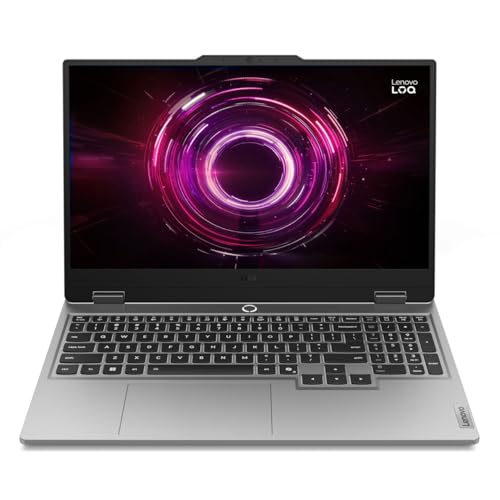
Lenovo LOQ 15.6" IPS FHD 144Hz AMD Ryzen 7 250 NVIDIA GeForce RTX 5060 AI Gaming Laptop 16GB RAM 512GB Luna Grey
One of the home product options compared in this guide.
View on AmazonAMD Ryzen 7 250 · GeForce RTX 5060 8GB · 16GB RAM · 512GB SSD · 15.6-inch FHD 144Hz IPS
The Lenovo LOQ 15 with RTX 5060 moves up a GPU tier from the RTX 5050, which helps in newer AAA games at 1080p. The 512GB SSD fills quickly with modern game sizes, so plan to add a second drive or a larger one.
Controllers, Accessories and VR
Both platforms handle the basics well. macOS supports Xbox and PlayStation controllers over Bluetooth, and most gaming mice, keyboards and headsets work as standard devices. The difference is software: companion apps for RGB lighting, mouse macros and headset spatial audio are often Windows-only or have limited Mac versions, so some features may be missing.
Virtual reality is a clearer split. Valve ended SteamVR support for macOS in 2020, and Meta’s Quest Link for PC VR runs on Windows, so PC VR gaming is effectively Windows-only. Apple Vision Pro is its own platform rather than a way to play PC VR games. If VR is part of your plans, a Windows PC with a capable GPU is the requirement.
Longevity, Upgrades and Resale Value
Macs are known for long software support and strong resale value, and a well-chosen Mac can serve as an everyday computer for many years. For gaming, though, the fixed hardware is a limit: the GPU, memory and storage you buy on day one are what you keep, so a Mac that is fine for today’s games cannot be upgraded when new games demand more. Choosing extra memory and storage at purchase is expensive, and external SSDs are the usual workaround for large game libraries.
A gaming desktop takes the opposite approach. You can replace the graphics card after a few years, add memory, or install another SSD, extending the machine’s gaming life at a fraction of the cost of a new system. Many gaming laptops also let you upgrade RAM and add a second SSD, although the GPU is fixed. PCs lose value faster on the resale market, but the ability to upgrade usually more than makes up for it for players who game regularly.
Storefronts, Subscriptions and Game Pass
Where you buy games matters too. Steam, the Epic Games Store, GOG and Battle.net all have Mac apps, but they only let you play the Mac versions of games, which are a fraction of each store’s catalog. A Steam library built up over years on Windows may have just a handful of titles that run natively on a Mac.
Subscriptions show the gap clearly. PC Game Pass, which adds new releases on day one, runs through the Xbox app on Windows, while on a Mac the closest equivalent is streaming selected titles through Xbox Cloud Gaming. Apple Arcade offers a curated collection of games across iPhone, iPad and Mac, but it focuses on smaller and family-friendly titles rather than big PC releases.
Sales and price competition also favor Windows. With more stores competing for the same PC games, discounts are frequent and deep, which over the life of a gaming PC can save a meaningful amount compared with buying a smaller selection of Mac versions.
What Each Budget Buys on Each Platform
Prices change often, so use these tiers as a guide to what each platform delivers for gaming at similar spending levels.
| Budget | Windows gaming PC | Mac |
|---|---|---|
| Budget tier | RTX 5050 or RTX 5060 gaming laptop, or an entry RTX desktop: 1080p gaming at high settings in most games | Base Mac mini or MacBook Air: casual, indie and native games at modest settings, plus cloud gaming |
| Mid-range tier | RTX 5070-class desktop or laptop: 1440p at high settings with DLSS | MacBook Pro with a Pro chip: native ports at medium to high settings |
| Premium tier | RTX 5070 Ti, 5080 or higher: 1440p ultra and 4K gaming | Max-chip MacBook Pro or Mac Studio: the strongest Mac gaming, still limited by the library |
At every tier, the PC buys more frames and a much larger library, while the Mac buys better battery life, build quality and everyday polish.
Mac vs PC by Type of Game
How much the platform matters depends heavily on what you play. Here is how the two compare across the most popular genres.
| Game type | Windows PC | Mac | Verdict |
|---|---|---|---|
| Competitive shooters | Every major title, high refresh rates | Most unavailable because of anti-cheat; cloud only | PC by a wide margin |
| AAA single-player | Full library on release day | Selected native ports, often later | PC, unless your favorites are ported |
| MMOs | All major MMOs | Some, such as World of Warcraft and Final Fantasy XIV, have Mac versions | Check your game; PC is safer |
| Strategy | Full catalog | Many big strategy series, including several Civilization and Total War titles, have Mac versions | Mac is a reasonable option |
| Indie games | Full catalog | A large share have Mac versions | Both work well |
| Racing and flight sims | Full support for wheels, pedals and HOTAS hardware | Few titles and limited peripheral software | PC |
| VR games | SteamVR and Quest Link | Not supported | PC only |
| Modded games | Full mod tool support | Limited | PC |
If your gaming lives mostly in strategy, indie and a few big native ports, a Mac can genuinely work. If it includes shooters, sims, VR or mods, a Windows PC is the only platform that covers everything.
Mac vs PC Gaming: Which One Fits Your Situation?
Choose a Windows gaming PC if you play new releases or competitive shooters, and choose a Mac only if gaming is a side activity next to work or study. The three machines used throughout this comparison cover most situations: the Apple MacBook Air 13-inch (M5), the Acer Nitro V 15 (Core i5-13420H, RTX 5050) and the Lenovo LOQ 15 (Ryzen 7 250, RTX 5060).
- Student or office worker who games on weekends: Apple MacBook Air 13-inch (M5) · fanless and quiet · all-day battery · native Mac games and cloud streaming
- Gamer on a tight budget: Acer Nitro V 15 (Core i5-13420H, RTX 5050) · 165Hz 1080p screen · nearly the full PC library · DLSS 4 support
- Gamer who wants the longest runway at 1080p: Lenovo LOQ 15 (Ryzen 7 250, RTX 5060) · RTX 5060 with 8GB · 144Hz screen · RAM and SSD can be expanded
- Competitive shooter player (Valorant, Call of Duty, Fortnite, Apex Legends): any Windows gaming PC · anti-cheat support · high refresh rates
- Streamer or video creator who also games: either platform works, with the Mac stronger for editing efficiency and the PC stronger for running a game and a stream encoder at once
- Modder, sim racer or VR player: Windows gaming PC only · mod tools, wheel and HOTAS software, SteamVR and Quest Link
What if you already own a Mac?
If you already own a Mac, you do not need to replace it to start gaming; add a console, a budget gaming PC or a cloud gaming subscription instead, as described in the hybrid setups below. A second machine usually costs less than upgrading to a top Mac configuration in the hope that it will cover gaming too.
If you only remember three points, remember these: the Windows library is far larger, anti-cheat shooters do not run on a Mac, and a gaming PC can be upgraded while a Mac cannot. Everything else in this guide is detail around those three facts.
Head-to-Head: Which Should You Buy?
- For the widest game library: A Windows PC, which runs virtually every major and indie release.
- For price-to-performance: A Windows gaming laptop or desktop delivers far more gaming power per dollar.
- For upgradeability: A Windows tower, since you can swap the GPU, RAM, and storage over time.
- For creative work plus light gaming: A Mac, which excels at everyday and professional tasks with silent efficiency.
- For competitive and high-refresh gaming: A PC, thanks to broad support for high-frame-rate play and adaptive sync.
Frequently Asked Questions
Can you game at all on a Mac?
Yes, a growing set of titles run natively on Apple Silicon, and cloud gaming expands the options. But the library is far smaller than on Windows, and many blockbusters are missing.
Is a gaming PC more expensive than a Mac?
For equivalent gaming performance, a Windows PC is usually cheaper. Prebuilt desktops offer dedicated GPUs at prices Macs cannot match for pure gaming.
Can I upgrade a Mac’s graphics later?
No. Apple Silicon Macs are not user-upgradeable, so the GPU and memory are fixed. Windows towers let you upgrade components over time.
Which is better for streaming and content creation?
Both are capable. Macs excel at video editing and audio, while a PC with a strong GPU handles game streaming and encoding while you play.
Can I install Windows on an Apple Silicon Mac to play games?
Not natively. Boot Camp only exists on older Intel Macs, so on M-series Macs the option is a virtual machine such as Parallels Desktop running the ARM version of Windows 11. It works for productivity apps and older or lighter games, but most modern AAA games and anything with kernel-level anti-cheat will not run well, if at all.
Does Steam work on a Mac?
Yes. Steam has a native macOS app, and games with Mac versions download and run normally. Many titles in a typical Steam library are Windows-only, though, so check each store page’s system requirements for macOS support before buying.
Can you play Valorant or Call of Duty on a Mac?
Not natively. Neither game has a macOS version, and their anti-cheat systems block translation layers and virtual machines. Cloud gaming services are the only practical route, and only for titles those services support.
Which Mac is best if gaming matters to me?
Choose a MacBook Pro, Mac mini or Mac Studio with a Pro or Max chip and as much memory as your budget allows, since the GPU grows with the chip tier and nothing can be upgraded later. The fans on these models let them sustain performance far better than the fanless MacBook Air. Even so, a gaming PC at the same price will be faster in games.
Is a MacBook Air good for gaming?
It is fine for casual, indie and older games, native ports at modest settings, and cloud gaming. Its fanless design slows down during long sessions and its 60Hz display limits smoothness, so it is not a good choice for demanding new releases or competitive shooters.
Will Mac gaming keep getting better?
Very likely. Apple keeps improving its Metal graphics API, MetalFX and the Game Porting Toolkit, and more publishers now release Mac versions of major games. However, with only around 2% of Steam players on macOS, most developers will continue to treat Windows and consoles as their main platforms, so a PC will remain the safer gaming choice for the foreseeable future.
Can You Have Both? Hybrid Setups That Work
Plenty of people do not have to choose. If you already own a Mac for work or school, these combinations give you a full gaming setup without giving it up:
- Mac plus a budget gaming PC: keep the Mac for work and add an entry-level gaming desktop for play. Even a modest RTX-powered tower runs the full PC library, and you can share one monitor between them.
- Mac plus a console: a PS5 or Xbox Series X|S covers the big multiplayer and blockbuster releases, while the Mac handles everything else.
- Mac plus cloud gaming: GeForce Now or Xbox Cloud Gaming adds Windows titles to a Mac for a monthly fee. It works best on a fast wired or Wi-Fi 6 connection close to the router.
- Mac plus a handheld gaming PC: a Windows handheld or a Steam Deck plays much of the PC library on the go and can connect to a monitor at your desk.
The hybrid approach often costs less than buying a top-tier Mac in the hope it will cover gaming too, and it gives you the strengths of each platform where they matter.
How to Get the Best Gaming Performance From a Mac
If you already own a Mac and want to play on it, a few settings make a noticeable difference:
- Play in full screen. Recent versions of macOS switch on Game Mode automatically for full-screen games, giving the game priority for CPU and GPU time and reducing Bluetooth latency for controllers and AirPods.
- Stay plugged in. Turn off Low Power Mode, and on MacBook Pro models that offer it, choose High Power mode for long sessions.
- Use MetalFX upscaling when available. Rendering at a lower resolution and upscaling usually gives a smoother result than running at native resolution with lower settings.
- Prefer native versions. When a game has a Mac version, use it instead of a translated Windows version; it will almost always run better.
- Keep games on fast storage. A fast external SSD over Thunderbolt or USB is a good way to hold a large library without paying for a bigger internal drive.
- Keep the Mac cool. Use it on a hard surface, and consider a stand for laptops so heat can escape.
- Use a wired connection for cloud gaming. Ethernet, or Wi-Fi close to the router, keeps streaming sharp and responsive.
What About Linux and SteamOS?
There is now a third option that sits between Mac and Windows. Valve’s SteamOS, which powers the Steam Deck and some other handhelds, is based on Linux and uses Valve’s Proton compatibility layer to run Windows games. A large share of the Steam library runs well this way, often with no setup at all. Like the Mac, though, many games with kernel-level anti-cheat do not work, and some storefronts and launchers need extra effort. For most desktop gamers, Windows remains the simplest choice, but SteamOS has made Linux gaming far more practical than macOS gaming for players with an existing Steam library.
Final Verdict
If gaming is your goal, a Windows PC is the definitive choice thanks to its unmatched library, superior price-to-performance, and upgradeability. A gaming laptop such as the Acer Nitro V 15 or Lenovo LOQ 15 delivers real value, while a Mac remains a fantastic all-purpose and creative machine. For a gaming-first setup, the PC wins hands down.