Key takeaways
- Linear switches move straight down smoothly with no bump, giving a fast, quiet keypress that many gamers prefer. The Redragon Mechanical Gaming Keyboard uses red linear switches for exactly this feel.
- Tactile switches add a noticeable bump partway down so you feel each keypress register, which typists often love for accuracy without much noise.
- Clicky switches combine that bump with an audible click for satisfying feedback, though they are the loudest and can bother others nearby.
The switch under each key is what makes a mechanical keyboard feel and sound the way it does, and it is the one spec that most changes your typing and gaming experience. Yet switch descriptions read like a foreign language: linear, tactile, clicky, actuation force, hot-swappable, pre-lubed. Buy the wrong type and a keyboard you were excited about can feel mushy, sound annoying, or fight you in fast-paced games. Understand switches, and you can pick a board that feels tailor-made for how you play and type.
This guide translates the jargon into plain language. You will learn the three main switch families and who each suits, what actuation force and travel really mean, why hot-swap sockets are a game-changer, and how pre-lubed switches and sound level factor into the feel. By the end you will know exactly which switch belongs under your fingers.
Our top picks
 Redragon Mechanical Gaming Keyboard Wired
- Brilliant Color Illumination- With 11 unique backlights, choose…
- Support Macro Editing: The K671 Mechanical Gaming Keyboard…
- Hot-swappable Linear Red Switch- Our K671 gaming keyboard…
 Razer BlackWidow V4 X Mechanical Gaming Keyboard
- With zero distance between actuation and reset points…
- Expand the arsenal of commands with a set…
- FUNCTION ROLLER and SECONDARY MEDIA KEYS: Pause, play,…
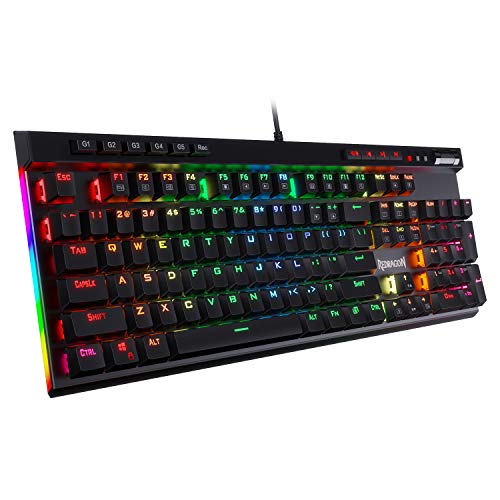 Redragon K580 Wired RGB Mechanical Gaming Keyboard
- Record Combos On the Fly, No Software Required…
- Swap Switches Without Soldering, Hype Clicky Feedback -…
- Built to Outlast Daily Gaming - Rated for…
| Product | Key specs | |
|---|---|---|
| Redragon Mechanical Gaming Keyboard Wired | Brilliant Color Illumination- With 11 unique backlights, choose… Support Macro Editing: The K671 Mechanical Gaming Keyboard… Hot-swappable Linear Red Switch- Our K671 gaming keyboard… | Check price |
| Razer BlackWidow V4 X Mechanical Gaming Keyboard | With zero distance between actuation and reset points… Expand the arsenal of commands with a set… FUNCTION ROLLER and SECONDARY MEDIA KEYS: Pause, play,… | Check price |
| Redragon K580 Wired RGB Mechanical Gaming Keyboard | Record Combos On the Fly, No Software Required… Swap Switches Without Soldering, Hype Clicky Feedback -… Built to Outlast Daily Gaming - Rated for… | Check price |
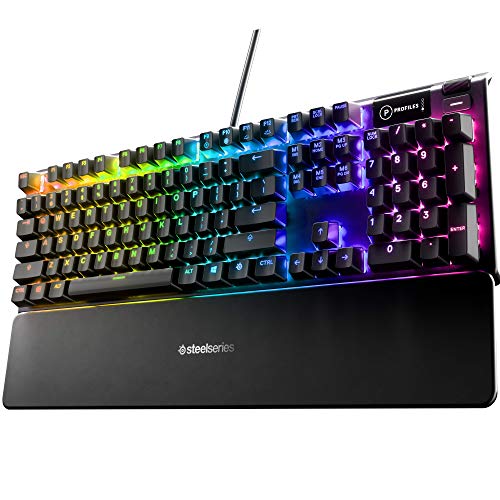 SteelSeries USB Apex 5 Hybrid Mechanical Gaming | Hybrid blue mechanical gaming switches OLED smart display Aircraft-grade aluminum alloy frame | Check price |
 Logitech G213 Prodigy Wired RGB Gaming Keyboard | Personalize the RGB keyboard's 5 customizable lighting zones… Customize lighting, game mode, and macro programming on… G213 wired gaming keyboard features dedicated media controls… | Check price |
 AULA F75 Pro Wireless Mechanical Keyboard | Tri-mode Connection Keyboard: AULA F75 Pro wireless mechanical… Hot-swap Custom Keyboard: This custom mechanical keyboard with… Advanced Structure and PCB Single Key Slotting: This… | Check price |
 Logitech G413 SE Full-Size Mechanical Gaming Keyboard | Take your gaming skills to the next level:… Tenkeyless option: Compact, TKL layout PC gaming keyboards… 6-Key rollover anti-ghosting performance: Experience reliable key input… | Check price |
 SteelSeries Apex 3 RGB Gaming Keyboard | Ip32 water resistant 10-zone RGB illumination Whisper quiet gaming switches | Check price |
As an Amazon Associate we earn from qualifying purchases at no extra cost to you.
⚡ Save on Your Next PC — Amazon Prime
Prime members get fast free shipping on the systems above, plus early access to Prime Day & Black Friday PC deals. New members get a 30-day free trial.
Watch: Mechanical Keyboard Switches Explained — Video Review
The Three Main Switch Types
- Linear switches move straight down smoothly with no bump, giving a fast, quiet keypress that many gamers prefer. The Redragon Mechanical Gaming Keyboard uses red linear switches for exactly this feel.
- Tactile switches add a noticeable bump partway down so you feel each keypress register, which typists often love for accuracy without much noise.
- Clicky switches combine that bump with an audible click for satisfying feedback, though they are the loudest and can bother others nearby.
There is no best type, only the best for you. Fast competitive gamers lean linear, heavy typists lean tactile, and people who love feedback and game alone lean clicky.
Actuation Force and Travel Distance
Two numbers define how a switch behaves. Actuation force, measured in grams, is how hard you press before the key registers; lighter switches feel effortless and fast but can cause accidental presses, while heavier ones feel deliberate and reduce typos. Travel distance is how far the key moves. Standard switches actuate around the halfway point of roughly 4mm of travel, but gaming-focused boards like the Razer BlackWidow V4 X with fast yellow switches shorten this for quicker response. Neither number has a universal ideal; match them to whether you value speed or deliberate control.
Why Hot-Swappable Switches Matter
Traditionally, switches were soldered in place, so the feel you bought was the feel you kept forever. Hot-swappable boards changed that by letting you pull out switches by hand and drop in different ones without any soldering. Keyboards like the Redragon Mechanical Gaming Keyboard and the AULA F75 Pro offer this, meaning you can start with linear switches, try tactiles later, or replace a single failed switch in seconds. If you are new to mechanical keyboards and unsure what you like, a hot-swap board is the smartest first purchase because it lets you experiment without buying a whole new keyboard.
Pre-Lubed Switches and Sound
Two finer details separate a good typing feel from a great one. Lubrication smooths the switch’s movement and deepens its sound; factory pre-lubed switches, like the Reaper switches in the AULA F75 Pro, deliver that premium glide out of the box without you doing anything. Sound profile varies widely too: hybrid designs like the SteelSeries Apex 5 hybrid blue switch aim for a tactile-and-clicky middle ground, while boards such as the SteelSeries Apex 3 use whisper-quiet switches for shared spaces. If noise is a concern, prioritize switches described as quiet or silent over loud clicky ones.
Matching Switches to How You Use Your Keyboard
Pull it all together by thinking about your main activity. For fast-paced competitive gaming, light linear switches like the reds in the Redragon board or the fast yellows in the Razer BlackWidow V4 X give speed and quiet rapid presses. For heavy writing and coding, tactile switches help accuracy. For a versatile all-rounder, a hybrid switch like the one in the SteelSeries Apex 5 covers both worlds. And if you share a room or office, a quiet board like the Logitech G413 SE or SteelSeries Apex 3 keeps the peace while still feeling mechanical.
Tips
- If you are unsure what you like, buy a hot-swappable board so you can try different switch types without replacing the whole keyboard.
- Choose linear switches for competitive gaming speed and tactile switches for typing accuracy; pick based on your main activity.
- Consider your environment: quiet or silent switches keep the peace in shared spaces, while clicky switches are best reserved for private rooms.
- Look for pre-lubed switches like the Reaper switches in the AULA F75 Pro if you want a smooth, premium feel without modifying the board yourself.
Frequently Asked Questions
Which switch type is best for gaming?
Most competitive gamers prefer linear switches, like the reds in the Redragon board, because they press smoothly and quickly with no bump to slow rapid taps. Fast switches like the Razer yellows are also popular for their short, quick response.
What does hot-swappable mean and do I need it?
Hot-swappable means you can remove and replace switches by hand without soldering. You do not strictly need it, but it is ideal for beginners since it lets you experiment with different switch feels and easily replace any switch that fails.
Are clicky switches too loud for an office?
Often, yes. Clicky switches produce an audible click that can disturb others. For shared spaces, choose a board with quiet switches like the SteelSeries Apex 3 or Logitech G413 SE, which stay far more discreet while still feeling mechanical.
What are pre-lubed switches?
Pre-lubed switches come from the factory with lubricant applied inside, giving a smoother press and a deeper, more pleasant sound without any work from you. The Reaper switches in the AULA F75 Pro are a good example of this ready-to-go feel.
Conclusion
Switches are the heart of any mechanical keyboard, and choosing well starts with knowing your priority: speed, accuracy, feedback, or quiet. Learn the three families, weigh actuation force and travel against how you play, and strongly consider a hot-swappable board so you can adjust the feel over time. Factor in pre-lubed smoothness and sound level for your environment, and you will land on a keyboard that feels exactly right, whether you are fragging opponents or writing all day.
FAQ
Which switch type is best for gaming?
What does hot-swappable mean and do I need it?
Are clicky switches too loud for an office?
What are pre-lubed switches?
More from Amazon
Programs that pair well with the guide above. Offers and eligibility are set by Amazon and may change.
A free business account with business pricing and bulk-buying tools for work, shop or home office.
Create a business accountFree shipping on eligible items, Prime Video and more. Eligible new members can start with a free trial.
Start a Prime free trialAudiobooks and podcasts to listen to on the go. Eligible new members can start with a free trial.
Try Audible freeAd-free music streaming. Eligible new subscribers can start with a free trial.
Try Music Unlimited freeAs an Amazon Associate we earn from qualifying purchases.