Key takeaways
- Smoothness: 240Hz reduces motion blur further than 144Hz, but the jump feels smaller than the leap from 60Hz to 144Hz.
- GPU demand: Hitting 240 frames per second requires a stronger graphics card and often lower settings than 144Hz.
- Input lag: 240Hz shaves a few milliseconds of latency, a real edge in twitch shooters but subtle elsewhere.
- Price: 144Hz-class monitors cost less and are easier to feed, offering better value for most gamers.
- Best use: 240Hz rewards competitive esports play; 144Hz already covers immersive and mixed gaming beautifully.
- Diminishing returns: The visual and latency gains from 144 to 240 are noticeable to trained eyes but minor for casual players.
Refresh rate is one of the most hyped monitor specs, and in 2026 the common upgrade question is whether jumping from 144Hz to 240Hz is worth it. Both make games look smooth, but the leap from 144 to 240 frames per second is smaller and more situational than the marketing suggests.
A 144Hz panel refreshes the screen 144 times per second, already a huge step up from 60Hz. A 240Hz display goes further for even lower motion blur and input lag, but the gains diminish and you also need a GPU capable of pushing those extra frames. The right choice depends on your games, your hardware, and how competitive you are.
Our top picks
 Dell 27 240Hz Gaming Monitor
- Smooth motion: 240Hz refresh rate and fast 0.5ms…
- Seamless gaming: FreeSync Premium and HDMI VRR eliminate…
- Fast IPS: Faster 0.5ms response with excellent color…
Dell 24 240Hz Gaming Monitor- Smooth motion: 240Hz refresh rate and fast 0.5ms…
- Seamless gaming: FreeSync Premium and HDMI VRR eliminate…
- Fast IPS: Faster 0.5ms response with excellent color…
 Sceptre Curved 24.5-inch Prime Gaming Monitor up
- 240Hz Refresh Rate: Stay above the pack with…
- 1ms Response Time: Colors fade and illuminate instantly…
- 1500R Curvature: The 1500R degree curved design immerses…
| Product | Key specs | |
|---|---|---|
| Dell 27 240Hz Gaming Monitor | Smooth motion: 240Hz refresh rate and fast 0.5ms… Seamless gaming: FreeSync Premium and HDMI VRR eliminate… Fast IPS: Faster 0.5ms response with excellent color… | Check price |
| Dell 24 240Hz Gaming Monitor | Smooth motion: 240Hz refresh rate and fast 0.5ms… Seamless gaming: FreeSync Premium and HDMI VRR eliminate… Fast IPS: Faster 0.5ms response with excellent color… | Check price |
| Sceptre Curved 24.5-inch Prime Gaming Monitor up | 240Hz Refresh Rate: Stay above the pack with… 1ms Response Time: Colors fade and illuminate instantly… 1500R Curvature: The 1500R degree curved design immerses… | Check price |
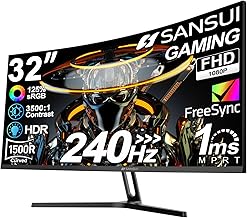
 SANSUI 32 Inch Curved 240Hz Gaming Monitor SANSUI 32 Inch Curved 240Hz Gaming Monitor | 32 Inch curved 1500R gaming monitor, 240Hz high… Performance: 240Hz refresh rate, Full HD 1920*1080P resolution,… Interfaces: HDMI up to 240Hz, DP 1.4 up… | Check price |
 SANSUI 27 Inch Curved 240Hz Gaming Monitor SANSUI 27 Inch Curved 240Hz Gaming Monitor | 27” 240Hz 1500R Curved FHD 1080P Gaming Monitor… Prioritizes Gaming Performance: Up to 240Hz high refresh… Cinematic Color Accuracy: 130% sRGB & DCI-P3 95%… | Check price |
 Samsung 27" Odyssey OLED G6 Samsung 27" Odyssey OLED G6 | Samsung’s 27” Odyssey OLED G6 Gaming Monitor is… OLED Safeguard technology supports performance by actively helping… Glare Free Technology keeps screen clear of reflection… | Check price |
 ASUS TUF Gaming 27”1080P Monitor ASUS TUF Gaming 27”1080P Monitor | 27-inch Full HD Fast IPS Display: Features a… Ultra-Fast Response Time: ASUS Fast IPS technology enables… Adaptive Sync Technology: FreeSync Premium and G-Sync compatible… | Check price |
As an Amazon Associate we earn from qualifying purchases at no extra cost to you.
⚡ Save on Your Next PC — Amazon Prime
Prime members get fast free shipping on the systems above, plus early access to Prime Day & Black Friday PC deals. New members get a 30-day free trial.
Watch: 144Hz vs 240Hz Monitor: Worth It in 2026? — Video Review
Quick Verdict
Pick 144Hz-class panels, such as a solid FHD gaming monitor, if you want smooth motion at a great price and play a mix of titles. Step up to 240Hz, like the Dell SE2726HG or ASUS TUF Gaming VG279QM5A, if you play fast competitive shooters, own a GPU that can sustain high frame rates, and want the lowest possible input lag.
Key Differences
- Smoothness: 240Hz reduces motion blur further than 144Hz, but the jump feels smaller than the leap from 60Hz to 144Hz.
- GPU demand: Hitting 240 frames per second requires a stronger graphics card and often lower settings than 144Hz.
- Input lag: 240Hz shaves a few milliseconds of latency, a real edge in twitch shooters but subtle elsewhere.
- Price: 144Hz-class monitors cost less and are easier to feed, offering better value for most gamers.
- Best use: 240Hz rewards competitive esports play; 144Hz already covers immersive and mixed gaming beautifully.
- Diminishing returns: The visual and latency gains from 144 to 240 are noticeable to trained eyes but minor for casual players.
144Hz Monitors
144Hz remains the smart baseline for high-refresh gaming. It transforms motion clarity over a standard 60Hz screen, keeps fast action fluid, and is easy for a mid-range GPU to drive, which means you enjoy the smoothness without constantly dropping settings to chase frames.
For the vast majority of players, 144Hz hits the value sweet spot. You get responsive, blur-reduced gameplay across shooters, RPGs, and everything in between, at a price that leaves budget for a better GPU or a nicer panel. Unless you are a dedicated competitive player, it is often all the refresh you truly need.
240Hz Monitors
240Hz is built for the competitive edge. Panels like the Dell SE2426HG, Sceptre 240Hz, or ASUS TUF VG279QM5A push motion clarity and input responsiveness to a level that fast-twitch shooters reward, letting you track flick shots and fast movement with a little extra precision.
The requirement is a GPU that can actually sustain high frame rates, since a 240Hz panel fed only 120 frames wastes its potential. If you play esports titles at high frame rates and want every latency advantage, 240Hz delivers; for slower or graphically heavy games, the benefit shrinks considerably.
Which Should You Buy?
- For competitive esports: pick 240Hz because the lower input lag and cleaner motion give a genuine edge.
- For a mid-range GPU: pick 144Hz because it is far easier to sustain without lowering settings.
- For best value: pick 144Hz because you get most of the smoothness for less money.
- For pure fast shooters with a strong GPU: pick 240Hz because your hardware can feed it and the games benefit.
- For mixed or single-player gaming: pick 144Hz because the extra frames of 240Hz matter little in those titles.
Frequently Asked Questions
Can you really see the difference between 144Hz and 240Hz?
Trained competitive players notice cleaner motion and lower lag, especially in fast shooters. Casual gamers often struggle to tell them apart, since the leap is far smaller than going from 60Hz to 144Hz.
Do I need a powerful GPU for 240Hz?
Yes. To benefit, your graphics card must sustain frame rates near 240 in your games. If it only reaches 120 to 150 frames, a 144Hz panel makes more sense and costs less.
Is 144Hz still good in 2026?
Very much so. 144Hz delivers smooth, responsive motion for nearly all games and remains the value sweet spot. Most players are better served putting saved money toward a stronger GPU or better panel.
Does higher refresh rate improve aim?
It can help slightly by reducing blur and latency, making fast targets easier to track. Skill still dominates, but in competitive shooters a higher refresh rate offers a small, real advantage.
Final Verdict
In 2026, 144Hz is the right call for most gamers thanks to its smoothness, value, and easy GPU demands, while 240Hz makes sense for competitive players with the hardware to sustain those frame rates; match the refresh rate to your games and graphics card and you will get the most from your money.