
Key takeaways
- GPU Power Limit: The RTX 4060 performs differently depending on its Total Graphics Power (TGP) envelope. Look for laptops that run the GPU at or near its full 140W maximum, as lower-power variants can cost you 10-15% of your frame rate in demanding titles.
- Display Quality: A 1080p panel is ideal for this GPU class, but pay attention to refresh rate and response time. A 144Hz or higher IPS display with a response time of 7ms or below will keep fast-paced games feeling smooth and competitive.
- CPU Pairing: Avoid bottlenecking the RTX 4060 with a weak processor. Current-generation Intel Core i5/i7 H-series or AMD Ryzen 5/7 7000-series chips provide the right balance of single-core speed and thermal efficiency for 1080p gaming.
- Thermal Design: Budget gaming laptops often cut corners on cooling. Prioritize models with dual-fan setups, multiple heat pipes, and well-placed exhaust vents, as sustained performance depends heavily on thermal throttling behavior.
- RAM and Storage: 16GB of DDR5 RAM is the practical minimum for modern gaming at Ultra settings, and a 512GB or 1TB NVMe SSD gives you room for a healthy game library. Confirm that both the RAM and SSD are upgradeable, as soldered components limit longevity.
Finding a gaming laptop that delivers consistent 1080p Ultra performance without draining your wallet is harder than it should be. The GPU market is crowded with inflated price tags, last-generation hardware repackaged as new, and confusing marketing that makes it difficult to separate genuine value from overpriced mediocrity. The NVIDIA RTX 4060 has emerged as the sweet spot for budget-conscious gamers, offering modern Ada Lovelace architecture, DLSS 3 frame generation, and enough rasterization headroom to push high settings at 1080p without compromise.
This guide cuts through the noise and focuses on laptops that pair the RTX 4060 with capable processors, fast displays, and thermal designs that actually hold up during extended sessions. Whether you are looking at established gaming lines like the MSI Katana 15, ASUS ROG Strix SCAR, Acer Predator, or Lenovo Legion, the goal here is straightforward: identify machines that deliver real-world frame rates, reliable build quality, and a price-to-performance ratio that respects your budget.
Our top picks




As an Amazon Associate we earn from qualifying purchases at no extra cost to you. Ratings are shown as listed on Amazon.
🛒 Best Price Today on Amazon
Prime members get fast, free shipping on everything above, plus member-only deals. New members get a 30-day free trial — cancel anytime.
Watch: Best RTX 4060 Gaming Laptops for 1080p Ultra Gameplay on a Budget — Video Review
How to Choose an RTX 4060 Gaming Laptop for 1080p Ultra Gameplay on a Budget
- GPU Power Limit: The RTX 4060 performs differently depending on its Total Graphics Power (TGP) envelope. Look for laptops that run the GPU at or near its full 140W maximum, as lower-power variants can cost you 10-15% of your frame rate in demanding titles.
- Display Quality: A 1080p panel is ideal for this GPU class, but pay attention to refresh rate and response time. A 144Hz or higher IPS display with a response time of 7ms or below will keep fast-paced games feeling smooth and competitive.
- CPU Pairing: Avoid bottlenecking the RTX 4060 with a weak processor. Current-generation Intel Core i5/i7 H-series or AMD Ryzen 5/7 7000-series chips provide the right balance of single-core speed and thermal efficiency for 1080p gaming.
- Thermal Design: Budget gaming laptops often cut corners on cooling. Prioritize models with dual-fan setups, multiple heat pipes, and well-placed exhaust vents, as sustained performance depends heavily on thermal throttling behavior.
- RAM and Storage: 16GB of DDR5 RAM is the practical minimum for modern gaming at Ultra settings, and a 512GB or 1TB NVMe SSD gives you room for a healthy game library. Confirm that both the RAM and SSD are upgradeable, as soldered components limit longevity.
The Best RTX 4060 Gaming Laptops for 1080p Ultra Gameplay on a Budget Reviewed
MSI Katana 15
The MSI Katana 15 pairs the RTX 4060 with a 13th-gen Intel Core i7 and a 144Hz 1080p display, delivering dependable Ultra-settings performance at a price that consistently undercuts its competitors. Its thermals can run warm under extended load, but the value proposition is difficult to beat for budget-focused buyers.
ASUS ROG Strix SCAR
The ASUS ROG Strix SCAR brings a premium 240Hz panel and robust cooling to the RTX 4060 category, making it a strong choice for competitive gamers who want both high frame rates and headroom. It sits at the upper end of the budget spectrum, but the build quality and display justify the premium for serious players.
Acer Predator
Acer’s Predator lineup offers aggressive styling and solid GPU power delivery, typically running the RTX 4060 near its maximum TGP for strong 1080p Ultra results. The keyboard and audio quality are adequate rather than standout, but the raw gaming performance per dollar is highly competitive.
Lenovo Legion
The Lenovo Legion stands out for its understated design, excellent keyboard feel, and surprisingly quiet cooling system that keeps the RTX 4060 running at full tilt without excessive noise. It is the well-rounded pick for buyers who want a machine that doubles as a work laptop without sacrificing gaming chops.
Dell 15.6 Touchscreen
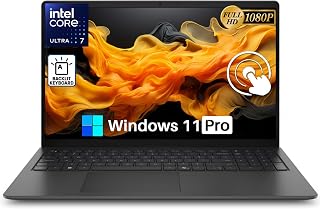
While not a dedicated gaming laptop, the Dell 15.6 Touchscreen with its Intel Ultra 7 255U and 32GB of DDR5 RAM can handle lighter or older 1080p titles respectably. It is not a substitute for a true RTX 4060 machine, but it earns a mention for buyers who want versatile performance across productivity and casual gaming.
Frequently Asked Questions
Is the RTX 4060 enough for 1080p Ultra gaming?
Yes. The RTX 4060 is purpose-built for 1080p gaming and handles most modern titles on Ultra settings at 60 FPS or higher, especially when DLSS 3 frame generation is enabled in supported games.
How much RAM do I need with an RTX 4060 laptop?
16GB of DDR5 RAM is the recommended baseline for 1080p Ultra gaming. 32GB offers headroom for multitasking, streaming, and future-proofing, but it is not strictly necessary for gaming alone.
Does the CPU matter much at 1080p?
At 1080p, the CPU has a measurable impact because the GPU reaches its limits less quickly than at higher resolutions. A modern 6-core or 8-core processor will prevent bottlenecks and keep frame times consistent.
Are budget RTX 4060 laptops upgradable?
Most models allow RAM and SSD upgrades, but the GPU and CPU are soldered and cannot be replaced. Focus on models with accessible M.2 slots and SODIMM slots to extend the laptop’s useful life.
Final Thoughts
For buyers prioritizing raw value, the MSI Katana 15 delivers the most performance per dollar in this category. The Lenovo Legion is the strongest all-rounder for users who want quiet thermals and a quality keyboard alongside their gaming power, while the ASUS ROG Strix SCAR is the pick for competitive players who need a high-refresh display and premium build to match the RTX 4060’s capabilities.



