Our Top Picks
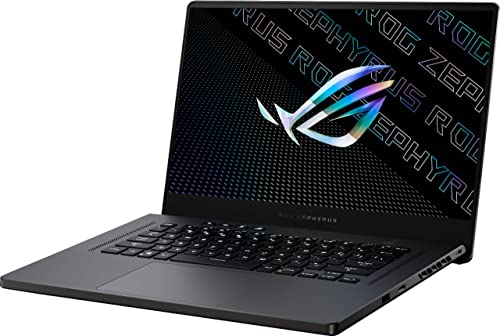 ASUS ROG Zephyrus G15 GA503QR-211.ZG15 Eclipse Gray Laptop16GB RAM | 1TB SSD4.2 poundsCheck on Amazon
 HP Victus 15.6 inch FHD 144Hz Gaming Laptop16 GB RAM | 512 GB SSD | 13420H11.6 x 9.4 x 0.83 inches5.1 poundsCheck on Amazon
Pros & cons
- DLSS 3.5 support on the RTX 4050 boosts image quality
- 165Hz FHD display suits fast-paced gameplay
- Killer Ethernet option adds a stable wired connection
- 8GB DDR5 RAM is modest for heavier multitasking
- RTX 4050 trails newer 50-series mobile GPUs
The ASUS ROG Strix G15 and Zephyrus G15 review verdict: the Strix G15 is the thicker, cheaper, more upgrade-friendly gaming laptop with more fans, while the Zephyrus G15 is the thinner, lighter, more portable one with stronger configurations and a higher cost. Neither is a cool-running laptop under heavy load, so pick the Strix for value and the Zephyrus for portability.
These two 15-inch ASUS ROG lines get compared constantly because they share a screen size and AMD Ryzen-based versions. This guide covers what separates them, what reviewers found about heat and noise, and who should buy which. It is research-based: we did not use either laptop ourselves. Specs and findings come from maker listings and editorial reviews by Notebookcheck, Tom’s Hardware, Laptop Mag and NanoReview, and anything unconfirmed is marked “check the maker”.
Quick Verdict
- Strix G15 best for: gamers who want a solid 15-inch laptop near the 1000 dollar budget line, with more cooling hardware and a simpler chassis.
- Zephyrus G15 best for: players who carry their laptop daily and want a slimmer body, a QHD display option and a more powerful configuration.
- Strix weak points: bulky, heavier, and reviewers saw hot temperatures under stress.
- Zephyrus weak points: higher cost, a thinner chassis, and heat that varies a lot by generation.
- Skip if: you need a laptop that stays cool and silent under full load, or you want a current 2025 or 2026 graphics generation.
Specs at a Glance
| Spec | ROG Strix G15 (listing shown) | ROG Zephyrus G15 (listing shown) |
|---|---|---|
| Model in listing | Strix G15 (2022), G513RC | Zephyrus G15 GA503QR |
| CPU | AMD Ryzen 7 6800H/HS | AMD Ryzen 9 5900HS |
| GPU | GeForce RTX 3050 | GeForce RTX 3070 |
| Memory | 16GB DDR5 | 16GB |
| Storage | 512GB PCIe SSD | 1TB PCIe SSD |
| Display | 15-inch 16:10 FHD 144Hz | 15.6-inch flat QHD (2560 x 1440) |
| Wireless | Wi-Fi 6E | Check the maker |
| Fans (NanoReview, 2022 compare) | 4 | 2 |
| Max-load noise (NanoReview) | About 48 dB | About 57.4 dB |
| Cooling note | Liquid metal, no vapor chamber | Liquid metal, no vapor chamber |
These are two representative listings, not the only configurations. Both lines were sold in many CPU and GPU combinations across several years, so always match the full model code before comparing.
ASUS ROG Strix G15: The Value Pick

ASUS ROG Strix G15 (2022) Gaming Laptop, 15†16:10 FHD 144Hz, GeForce RTX 3050, AMD Ryzen™ 7 6800H/HS, 16GB DDR5, 512GB PCIe SSD, Wi-Fi 6E, Windows 11, G513RC-ES73, Eclipse Gray
Chosen because it specifies 15†16:10 FHD 144Hz and GeForce RTX 3050.
View on AmazonThe listing describes the ROG Strix G15 (2022) with a 15-inch 16:10 FHD 144Hz display, GeForce RTX 3050, AMD Ryzen 7 6800H/HS, 16GB DDR5, a 512GB PCIe SSD and Wi-Fi 6E, running Windows 11 in an Eclipse Gray finish, model G513RC-ES73.
What it offers
- A 16:10 144Hz FHD screen, which gives extra vertical space for browsing and work.
- DDR5 memory and Wi-Fi 6E in the 2022 configuration.
- A cooling design with four fans, per NanoReview’s comparison.
- A conventional gaming-laptop chassis that is usually easier to find at lower cost.
What to watch
- It is bulkier and heavier than the Zephyrus, so it suits a desk more than a backpack.
- Notebookcheck’s review of the earlier G513QR found a CPU peak of 97 degrees Celsius in a stress run, with throttling, and surface temperatures near 49 degrees under load. That model had a Ryzen 9 and RTX 3070, so it is not a like-for-like with the 2022 RTX 3050 configuration shown above.
- An RTX 3050 is an entry-level GPU, so expect 1080p play at medium to high settings rather than maxed-out games.
Best for: budget-minded 1080p gaming at home. Skip if: you need long battery life or a slim travel laptop.
Pros: more fans; DDR5 and Wi-Fi 6E; 16:10 display; quieter at max load per NanoReview. Cons: bulky; entry GPU in this configuration; heat reported in related models.
ASUS ROG Zephyrus G15: The Portable Pick
ASUS ROG Zephyrus G15 GA503QR-211.ZG15 Eclipse Gray Laptop Gaming, Ryzen 9 5900HS, 16GB, 1TB PCIe SSD, 15.6" Flat QHD (2560x1440), NVIDIA RTX 3070, Windows 10 Home
Chosen because it specifies Ryzen 9 5900HS and 16GB.
View on AmazonThis listing is the ROG Zephyrus G15 GA503QR in Eclipse Gray with a Ryzen 9 5900HS, 16GB of memory, a 1TB PCIe SSD, a 15.6-inch flat QHD 2560 x 1440 display, NVIDIA RTX 3070 graphics and Windows 10 Home.
What it offers
- A QHD display option, which is sharper than FHD, though a 3070 mobile GPU may need lowered settings in demanding games.
- Strong CPU and GPU for a thin 15-inch laptop. Tom’s Hardware reviewed a 2021 Zephyrus G15 with a Ryzen 9 5900HS, an RTX 3060 at 95W maximum graphics power and a 90Wh battery, and found most of the top surface cool enough to touch while gaming.
- Better portability than the Strix, which matters for school or travel.
What to watch
- Heat varies by generation. Laptop Mag found the 2022 Zephyrus G15 (Ryzen 9 6900HS, RTX 3070 Ti) very hot, with the underside reaching about 146 degrees Fahrenheit after 15 minutes of gaming and a hot spot near 160.
- NanoReview lists two fans and about 57.4 dB at max load for the 2022 model, louder than the Strix’s 48 dB.
- It costs more than a Strix with a lower-tier GPU. Check the listing’s current tier before deciding.
Best for: students and travelers who still want strong graphics. Skip if: you want quiet fans under load or a long-lived thermal design.
Pros: QHD screen; strong GPU; slim and portable; 90Wh battery in a 2021 review. Cons: loud under load; hot in some generations; higher cost.
Is the ASUS ROG Strix G15 Overheating? What Reviews Say
Searches for “asus rog strix g15 overheating” reflect a real concern, but it is not a universal defect. The evidence we found is specific rather than general.
- Notebookcheck’s G513QR review (Ryzen 9 with RTX 3070) recorded warm surfaces under load, about 44 degrees in a game and 49 degrees in a stress run, and a CPU that reached 97 degrees before throttling to a lower clock.
- The same review noted a GPU maximum power of 130W, which Notebookcheck describes as relatively high for the chassis.
- NanoReview’s comparison shows the Strix with four fans and lower max-load noise than the Zephyrus, and both laptops using liquid metal with no vapor chamber.
The honest conclusion is that powerful 15-inch gaming laptops of this era run warm, and that results vary by model year, CPU, GPU and the performance mode you select. A different configuration, a clean fan path and a sensible setting can lower the numbers. Treat any claim that every unit overheats as unproven.
Practical ways to keep a G15 cooler
- Use the Armoury Crate performance profile that fits your task. Silent or Performance mode keeps temperatures lower than the highest-power mode.
- Raise the rear of the laptop for airflow and keep the vents clear of soft surfaces.
- Cap the frame rate in games that do not need maximum fps.
- Clean dust from the intake and exhaust with compressed air on a regular basis.
- Consider a laptop cooling pad. One option in the store is the Kootek stand with five quiet fans for 12 to 17 inch laptops.
- Check the maker page for BIOS and Armoury Crate updates, which sometimes adjust fan behavior.

Kootek Laptop Cooling Pad Cooler Stand with 5 Quiet Fans for 12"-17" Laptop | 5 Quiet & High‑Performance Laptop Fan for 360° Full Coverage, USB‑Powered, 2 Extra USB Hubs, 6 Adjustable Height, Blue LED
Chosen because it specifies 5 Quiet & High‑Performance Laptop Fan for 360° Full Coverage and USB‑Powered.
View on AmazonThe Kootek listing describes a laptop cooling pad and cooler stand with five quiet fans for 12 to 17 inch laptops. A pad helps airflow under the chassis but cannot fix a poor thermal design, so view it as a modest aid.
ROG G15 2023 and Newer: What Changed?
People search for “asus g15 2023” and “best buy g15” expecting a new generation. The sources we used cover 2020 to 2022 G15 models, so we cannot confirm which G15 variants ASUS sold in 2023 or after. ASUS has shifted its current Zephyrus line toward 14-inch and 16-inch sizes, and the store carries Zephyrus G14 and Strix G16 listings from 2025. Check the maker page for the exact model code before you buy a 2023 label.
Strix G15 vs Zephyrus G15: Head-to-Head
| Category | Strix G15 | Zephyrus G15 | Edge |
|---|---|---|---|
| Portability | Thicker, heavier | Slimmer | Zephyrus |
| Noise at max load | About 48 dB | About 57.4 dB | Strix |
| Fans | 4 | 2 | Strix |
| Display option | FHD 144Hz | QHD option | Zephyrus |
| Starting tier | Lower | Higher | Strix for budget |
| Connectivity (2022, NanoReview) | 1 USB-C | 2 USB-C, PCIe Gen 4 | Zephyrus |
| Heat in reviews | Warm; throttling in one model | Varies by year, very hot in 2022 | Neither |
Performance by Use
Esports and 1080p play
Both lines handle esports titles well. An RTX 3050 in the Strix configuration suits 1080p at medium to high settings. The Zephyrus with an RTX 3070 has more headroom.
AAA games
Newer demanding games may need lowered settings on an RTX 3050. The RTX 3070 Zephyrus runs them better, especially at FHD, though the QHD screen raises the load.
School and work
The Zephyrus is easier to carry and the QHD screen helps with text. The Strix 16:10 screen is also good for productivity, but the bulk matters.
Streaming and creation
The Ryzen 9 in the Zephyrus listing has more cores for encoding and editing. Heat and fan noise will increase under sustained work.
Who Should Buy and Who Should Skip
Buy the Strix G15 if
- You want the lowest cost for a 15-inch gaming laptop.
- You play at 1080p and mainly at a desk.
- You prefer quieter fans at maximum load.
Buy the Zephyrus G15 if
- You carry your laptop daily.
- You want a QHD screen and a stronger GPU.
- You can accept more fan noise for a thinner body.
Skip both if
- You want a current-generation GPU with the newest features.
- You need a cool and silent laptop for long sessions.
- You cannot confirm warranty and battery condition on an older unit.
Why GPU Power and Chassis Size Matter More Than Names
Two laptops with the same GPU name can perform differently. Laptop graphics chips run at different power limits, called TGP, and the chassis decides how long that power can be sustained. Tom’s Hardware lists the 2021 Zephyrus G15 RTX 3060 at 95W maximum graphics power, while Notebookcheck lists the Strix G513QR with an RTX 3070 at up to 130W. A thin laptop with a high-power GPU runs hot and loud, and a thicker one with the same chip can hold higher clocks more quietly.
This is the main reason heat complaints sound so different from one review to the next. When you read a review, check the year, CPU, GPU, power setting and room temperature before comparing numbers. The same model line can look very different between generations.
Display: 144Hz FHD or QHD?
| Option | Pros | Cons |
|---|---|---|
| 15-inch 16:10 FHD 144Hz (Strix listing) | Easy for an RTX 3050 to drive; smooth for esports; extra vertical space | Less sharp than QHD |
| 15.6-inch QHD (Zephyrus listing) | Sharper text and images; good for mixed use | Heavier GPU load; may need lowered settings in new games |
For a laptop in this class, 144Hz FHD is the better match for most games. QHD makes the most sense if you also use the laptop for work or creative apps and you are happy to lower settings in demanding titles.
Battery and Portability
Tom’s Hardware lists a 90Wh battery for the 2021 Zephyrus G15 it reviewed, which is large for a gaming laptop. We did not find battery-life figures for the 2022 Strix configuration, so we will not claim any. In general, gaming on battery cuts performance and lasts a short time on any gaming laptop. Plan to plug in for play. For day-to-day tasks, the thinner Zephyrus is the easier one to carry.
First-Week Setup Tips
- Update Windows, the NVIDIA driver and ASUS software such as Armoury Crate.
- Check the BIOS version on the maker page and install updates that mention thermals or stability.
- Pick a performance mode for gaming and a quieter mode for browsing and work.
- Set a frame rate cap in games, which lowers heat and fan noise.
- Run a long gaming session and note temperatures with a monitoring tool so you know your baseline.
- Keep the box and receipt until you are sure you are happy, in case you need a return or warranty claim.
Older G15 or Newer Laptop? A Quick Decision Table
| Your situation | Better route |
|---|---|
| Tight budget, 1080p, desk use | Strix G15 with an RTX 3050, or a newer RTX 4050 laptop |
| Carry daily, want QHD | Zephyrus G15 with a stronger GPU, or a newer Zephyrus G14 or G16 |
| Want the newest GPU features | A newer RTX 4050 or 5050-class laptop |
| Want the quietest fans | Thicker chassis with more fans, and a lower performance mode |
| Want the longest support | A newer model with warranty from the maker |
For many shoppers, a newer RTX 4050 laptop at a similar budget gives a more current GPU than an older G15, while the G15 may offer a better screen or build in some configurations. Compare the specific listing, not just the line name.
What We Could Not Verify
- Battery life for the specific 2022 Strix and GA503QR listings.
- Which G15 models ASUS sold in 2023 or later.
- Keyboard, port layout and upgrade options for every configuration; check the maker.
- Any universal defect rate. The sources describe individual review results, not defect statistics.
When a spec matters to your decision, check the maker page for the exact model code on the listing before you buy.
Alternatives to Consider
Lenovo LOQ Gaming Laptop (RTX 4050)

Lenovo LOQ Gaming Laptop, GeForce RTX 4050, AMD Ryzen 5 7235HS Processor | 15.6" 144Hz FHD Display, 16GB DDR5, 512GB SSD, Wi-Fi 6, Ethernet, USB-C, HDMI, Backlit Keyboard, Windows 11 Home
Chosen because it specifies GeForce RTX 4050 and AMD Ryzen 5 7235HS Processor.
View on AmazonThe listing describes a Lenovo LOQ with a GeForce RTX 4050, AMD Ryzen 5 7235HS, a 15.6-inch 144Hz FHD display, 16GB DDR5 and a 512GB SSD. It offers a newer GPU generation than the G15 configurations above.
HP Victus 15.6-Inch (RTX 4050)
HP Victus 15.6 inch FHD 144Hz Gaming Laptop Intel Core i5-13420H NVIDIA GeForce RTX 4050 6GB - 16GB DDR4 512GB SSD Mica Silver (2024)
Chosen because it specifies 16GB DDR4 512GB SSD Mica Silver (2024).
View on AmazonThis listing shows an HP Victus with a 15.6-inch FHD 144Hz display, Intel Core i5-13420H, NVIDIA GeForce RTX 4050 6GB, 16GB DDR4 and a 512GB SSD. It is a straightforward 1080p gaming option.
Acer Nitro V (RTX 4050)
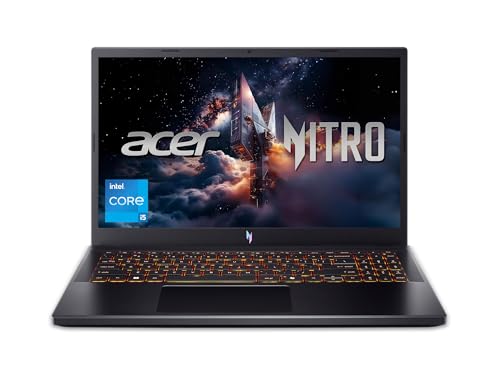
Acer Nitro V Gaming Laptop | Intel Core i5-13420H Processor | NVIDIA GeForce RTX 4050 Laptop GPU | 15.6" FHD IPS 165Hz Display | 8GB DDR5 | 512GB Gen 4 SSD | Wi-Fi 6 | Backlit KB | ANV15-52-586Z
Chosen because it specifies Intel Core i5-13420H Processor and NVIDIA GeForce RTX 4050 Laptop GPU.
View on AmazonThe listing describes an Acer Nitro V with an Intel Core i5-13420H, GeForce RTX 4050 laptop GPU and a 15.6-inch FHD IPS 165Hz display. It suits shoppers who want a higher refresh rate than 144Hz.
Buying Guide for an Older G15
- Match the model code: G513, GA503 and GA502 are different generations with different CPUs and GPUs.
- Check the GPU tier: RTX 3050, 3060 and 3070 perform very differently.
- Inspect condition: ask about battery health, fan noise and any previous repair, and avoid renewed units if you want a clean warranty.
- Confirm warranty: a new unit with maker coverage is worth more than a used one.
- Look at the display: 144Hz FHD is enough for most; QHD is sharper but heavier on the GPU.
- Plan for heat: expect warm surfaces under load and choose a performance mode accordingly.
FAQ
Is the ASUS ROG Strix G15 good for gaming?
Yes for 1080p, especially in lower GPU tiers like the RTX 3050. It is bulkier than the Zephyrus and can run warm under heavy load.
Does the Strix G15 overheat?
Reviews show warm surfaces and throttling in a stress run on one model, but we found no evidence of a universal defect. Results depend on the configuration and performance mode.
Is the Zephyrus G15 better than the Strix G15?
It is better for portability and display options. The Strix is better for cost and quieter fans at maximum load.
Which G15 is best buy for the money?
The Strix G15 with an RTX 3050 or similar tier is the budget route. The Zephyrus is the better pick if you carry the laptop and want stronger graphics.
Is there an ASUS G15 2023 model?
We could not confirm a 2023 G15 lineup in the sources we used. Check the maker page for exact model codes before buying.
Can a cooling pad fix G15 heat?
It can help airflow and lower surface temperature a little, but it cannot replace a good thermal design. Pair it with a cooler performance mode.
Is an RTX 3050 laptop still worth buying?
For 1080p play at medium to high settings, yes. For demanding new games at high settings or for QHD, a stronger GPU tier or a newer generation is a better fit.
Should I repaste or modify a G15 to lower temperatures?
Not as a first step. Updating software, choosing a cooler performance mode, capping frame rate and cleaning dust come first, and opening the laptop can affect your warranty. Check the maker’s terms before you try anything.
Which is quieter, the Strix G15 or the Zephyrus G15?
NanoReview’s 2022 comparison lists about 48 dB at max load for the Strix and 57.4 dB for the Zephyrus, so the Strix was quieter in that comparison. Results vary by configuration and mode.
Which One Should You Buy?
Choose the Strix G15 if budget and quieter max-load fans matter most and you game at a desk. Choose the Zephyrus G15 if you travel with your laptop and want a QHD screen and stronger graphics. If you can stretch to a newer generation, compare the Lenovo LOQ, HP Victus and Acer Nitro V models above before settling on an older G15.
Sources
- Notebookcheck, ASUS ROG Strix G15 G513QR review
- Tom’s Hardware, ASUS ROG Zephyrus G15 review
- Laptop Mag, ASUS ROG Zephyrus G15 (2022) review
- NanoReview, Zephyrus G15 vs Strix G15 comparison
- Store listing text for each product named above
Last updated: November 2026
FAQ
ROG G15 2023 and Newer: What Changed?
Is the ASUS ROG Strix G15 good for gaming?
Does the Strix G15 overheat?
Is the Zephyrus G15 better than the Strix G15?
Which G15 is best buy for the money?
Is there an ASUS G15 2023 model?
Can a cooling pad fix G15 heat?
Is an RTX 3050 laptop still worth buying?
More from Amazon
Programs that pair well with the guide above. Offers and eligibility are set by Amazon and may change.
A free business account with business pricing and bulk-buying tools for work, shop or home office.
Create a business accountFree shipping on eligible items, Prime Video and more. Eligible new members can start with a free trial.
Start a Prime free trialAudiobooks and podcasts to listen to on the go. Eligible new members can start with a free trial.
Try Audible freeAd-free music streaming. Eligible new subscribers can start with a free trial.
Try Music Unlimited freeAs an Amazon Associate we earn from qualifying purchases.