
Key takeaways
- GPU Tier: The RTX 5050 handles 1080p high settings, the RTX 5060 is the sweet spot for high-refresh 1080p to light 1440p, and the RTX 5070 or 5070 Ti are built for maxed 1440p and competitive frame rates.
- Display Quality: Standard FHD+ 165Hz panels are great for budget builds, but ROG Nebula 2.5K 240Hz displays deliver noticeably richer colors and sharper detail worth paying for at higher tiers.
- CPU Pairing: Intel Core i5 is fine for entry-level, the i7-14650HX balances price and multi-core performance, and the Core Ultra 9 275HX or Ryzen 9 9955HX3D are top-tier choices for CPU-bound workloads and future-proofing.
- Memory and Storage: 16GB DDR5 is the minimum for modern gaming, but 32GB is the comfort zone for multitasking and AAA titles, while 1TB to 2TB SSDs cover growing game library sizes.
- Cooling and Build: Larger chassis like the G18 offer better sustained performance and lower fan noise, whereas the G16 strikes a more portable balance without sacrificing critical thermals.
Finding the right gaming laptop means balancing raw GPU horsepower against what you can actually afford, and the ASUS ROG Strix lineup makes that decision harder by offering configurations at nearly every price tier. Buyers regularly get lost comparing panel refresh rates, CPU generations, and SSD specs, unsure which combination actually translates into smoother frames per second in demanding titles like Cyberpunk 2077 or Black Myth: Wukong. Whether you are stepping up from an aging desktop replacement or investing in a daily-driver rig for competitive shooters, understanding where each model sits on the budget-to-flagship scale is essential.
This guide ranks the best ASUS ROG gaming laptops currently available, from value-focused RTX 5050 builds to top-shelf RTX 5070 Ti machines loaded with AMD’s 3D V-cache processors. We evaluate display quality, thermal headroom, and real-world gaming performance so you can match your budget to the GPU and feature set that make sense. Each pick is placed in context with alternatives from MSI Katana, Acer Predator, and Lenovo Legion to ensure you are getting maximum value at every tier.
Our top picks


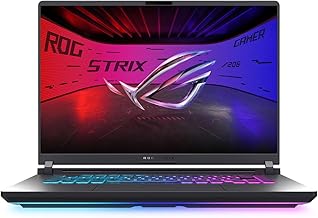


As an Amazon Associate we earn from qualifying purchases at no extra cost to you. Ratings are shown as listed on Amazon.
🛒 Best Price Today on Amazon
Prime members get fast, free shipping on everything above, plus member-only deals. New members get a 30-day free trial — cancel anytime.
Watch: Best ASUS ROG Gaming Laptops Ranked from Budget to Flagship — Video Review
How to Choose a/an ASUS ROG Gaming Laptops Ranked from Budget to Flagship
- GPU Tier: The RTX 5050 handles 1080p high settings, the RTX 5060 is the sweet spot for high-refresh 1080p to light 1440p, and the RTX 5070 or 5070 Ti are built for maxed 1440p and competitive frame rates.
- Display Quality: Standard FHD+ 165Hz panels are great for budget builds, but ROG Nebula 2.5K 240Hz displays deliver noticeably richer colors and sharper detail worth paying for at higher tiers.
- CPU Pairing: Intel Core i5 is fine for entry-level, the i7-14650HX balances price and multi-core performance, and the Core Ultra 9 275HX or Ryzen 9 9955HX3D are top-tier choices for CPU-bound workloads and future-proofing.
- Memory and Storage: 16GB DDR5 is the minimum for modern gaming, but 32GB is the comfort zone for multitasking and AAA titles, while 1TB to 2TB SSDs cover growing game library sizes.
- Cooling and Build: Larger chassis like the G18 offer better sustained performance and lower fan noise, whereas the G16 strikes a more portable balance without sacrificing critical thermals.
The Best ASUS ROG Gaming Laptops Ranked from Budget to Flagships Reviewed
ASUS ROG Strix G16 (RTX 5050, i5-13450HX)
This is the entry point into the 2025 ROG Strix family, pairing the RTX 5050 with the Intel Core i5-13450HX for dependable 1080p gaming at high settings. It is the most sensible pick for buyers who want the premium ROG chassis, Wi-Fi 7, and upgrade headroom without paying for GPU tiers they do not yet need.
ASUS ROG Strix G16 (RTX 5060, i7-14650HX, 16GB)
The RTX 5060 mated to the i7-14650HX and 16GB of DDR5 is the mainstream value champion of this lineup, delivering strong 165Hz FHD+ performance in modern esports and AAA titles alike. It hits the best price-to-frame-rate ratio for most buyers and competes directly with MSI Katana 15 and Lenovo Legion configurations at the same tier.
ASUS ROG Strix G18 (RTX 5060, Core Ultra 9, 18″)
Stepping up to an 18-inch 2.5K 240Hz Nebula panel and the Core Ultra 9 275HX gives you a more immersive, desktop-class experience while keeping the RTX 5060 value intact. The larger chassis also means ROG’s cooling system runs quieter under load, making it ideal for buyers who prioritize screen real estate and thermals over portability.
ASUS ROG Strix G16 (RTX 5070, Core Ultra 9, 2.5K)
This configuration upgrades to the RTX 5070 and pairs it with the Core Ultra 9 275HX, 32GB of DDR5, and a 2TB SSD behind a 2.5K 240Hz Nebula display. It is the balanced flagship for serious 1440p gamers who want top-tier visuals and competitive refresh rates without stepping into premium Ti territory.
ASUS ROG Strix G16 (RTX 5070 Ti, Ryzen 9 9955HX3D)
The crown of the lineup combines the RTX 5070 Ti with AMD’s Ryzen 9 9955HX3D and its stacked L3 cache, yielding exceptional frame consistency in CPU-heavy titles. With a 2.5K 240Hz Nebula panel and 32GB of DDR5, it is the definitive pick for enthusiasts who want maximum competitive performance in a portable form factor.
Frequently Asked Questions
Which ASUS ROG laptop is best for a strict budget?
The ROG Strix G16 with the RTX 5050 and i5-13450HX is the most affordable entry, giving you the full ROG build quality and Wi-Fi 7 connectivity at a price competitive with budget-tier MSI Katana and Acer Predator models.
Is the RTX 5060 enough for modern AAA gaming?
Yes, the RTX 5060 in the G16 or G18 comfortably handles 1080p high-refresh and even moderate 1440p gaming in most current titles, making it the best all-around value for the majority of buyers.
What does the ROG Nebula display actually improve?
ROG Nebula panels offer higher 2.5K resolution, 240Hz refresh rates, and superior color accuracy compared to standard FHD+ panels, which matters most when you are investing in RTX 5070 or higher GPUs that can actually drive those pixels.
Should I choose the G16 or the G18 chassis?
Choose the G16 for a more portable, balanced gaming experience, and opt for the G18 if you want a larger 18-inch screen, better sustained cooling, and do not mind the added weight for a desktop-replacement feel.
Final Thoughts
For most buyers, the ASUS ROG Strix G16 with the RTX 5060 and i7-14650HX remains the smartest balance of price, performance, and panel quality. Enthusiasts who want a meaningful step up should consider the G16 with the RTX 5070 and Core Ultra 9 on the 2.5K Nebula display, while competitive gamers chasing maximum frame consistency should look to the RTX 5070 Ti model powered by AMD’s Ryzen 9 9955HX3D.




