
Key takeaways
- Refresh rate matters most: For competitive FPS, prioritize 165Hz at minimum and 240Hz if your budget allows; the jump from 144Hz to 240Hz is noticeable in target tracking and flick shots.
- GPU tier dictates your ceiling: An RTX 5060 handles 1080p competitive titles at high frame rates comfortably, while RTX 5070 and above unlock stable 240fps at 1440p for esports-ready smoothness.
- Thermal design affects consistency: ROG’s vapor-chamber and liquid-metal cooling keep boost clocks stable during long ranked sessions—avoid models without dedicated cooling solutions if you grind for hours.
- RAM and storage speed reduce stutter: DDR5-5600 and Gen 4 NVMe SSDs eliminate micro-stutters during map loads and asset streaming, which is critical in fast-paced shooters with large arenas.
- Connectivity for online play: Wi-Fi 7 or a 2.5G Ethernet port ensures the lowest possible latency in online matches; if you play on Wi-Fi only, Wi-Fi 7 is a meaningful upgrade over Wi-Fi 6E.
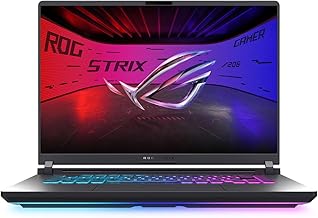
The ASUS ROG Strix G16 (2025) with RTX 5070 and 2.5K 240Hz Nebula Display is the single best ASUS ROG laptop for competitive FPS gaming, while the ROG Strix G18 with RTX 5070Ti takes the premium crown for players who refuse to compromise on frame rates at maximum settings.
Choosing a gaming laptop for competitive FPS titles like Valorant, CS2, or Apex Legends means navigating a maze of refresh rates, GPU tiers, and thermal designs that can make or break your reaction time. This guide cuts through the noise by evaluating six current ASUS ROG Strix models on the metrics that actually matter for fast-paced shooters: sustained frame rates, display speed, input latency, and cooling under load.
Our top picks



As an Amazon Associate we earn from qualifying purchases at no extra cost to you. Ratings are shown as listed on Amazon.
🛒 Best Price Today on Amazon
Prime members get fast, free shipping on everything above, plus member-only deals. New members get a 30-day free trial — cancel anytime.
Quick Comparison
| Product | Best For | Standout Feature | Rating |
|---|---|---|---|
| ROG Strix G16 (2025) RTX 5070 | Competitive FPS all-rounders | 2.5K 240Hz Nebula Display + Ultra 9 275HX | 9.5/10 |
| ROG Strix G16 (2025) RTX 5050 | Budget-conscious players | 165Hz panel with Wi-Fi 7 at a lower price | 8.7/10 |
| ROG Strix G18 RTX 5070Ti | No-compromise desktop replacement | RTX 5070Ti 12GB + 64GB DDR5 + 2.5G LAN | 9.6/10 |
| ROG Strix G16 (2025) RTX 5060 | Mid-range 1440p FPS play | RTX 5060 paired with 1TB Gen 4 SSD | 9.0/10 |
| ROG Strix G18 RTX 5060 | Large-screen tournament prep | 18-inch 2.5K 240Hz with ROG Cooling | 9.1/10 |
How to Choose an ASUS ROG Gaming Laptop for Competitive FPS
- Refresh rate matters most: For competitive FPS, prioritize 165Hz at minimum and 240Hz if your budget allows; the jump from 144Hz to 240Hz is noticeable in target tracking and flick shots.
- GPU tier dictates your ceiling: An RTX 5060 handles 1080p competitive titles at high frame rates comfortably, while RTX 5070 and above unlock stable 240fps at 1440p for esports-ready smoothness.
- Thermal design affects consistency: ROG’s vapor-chamber and liquid-metal cooling keep boost clocks stable during long ranked sessions—avoid models without dedicated cooling solutions if you grind for hours.
- RAM and storage speed reduce stutter: DDR5-5600 and Gen 4 NVMe SSDs eliminate micro-stutters during map loads and asset streaming, which is critical in fast-paced shooters with large arenas.
- Connectivity for online play: Wi-Fi 7 or a 2.5G Ethernet port ensures the lowest possible latency in online matches; if you play on Wi-Fi only, Wi-Fi 7 is a meaningful upgrade over Wi-Fi 6E.
The Best ASUS ROG Gaming Laptops for Competitive FPSs Reviewed
Best Overall: ASUS ROG Strix G16 (2025) RTX 5070
With its Core Ultra 9 275HX, 32GB DDR5, and a 2.5K 240Hz ROG Nebula Display, this Strix G16 is built for players who want esports-level frame rates without dropping to 1080p. It is the ideal choice for ranked grinders who need visual clarity and raw speed in one 16-inch package.
Best Budget: ASUS ROG Strix G16 (2025) RTX 5050
The i5-13450HX and RTX 5050 combination delivers smooth 165Hz gameplay in titles like Valorant and Overwatch 2 at a fraction of the flagship price. This is the smart entry point for students or newer competitors who need reliable performance without overspending.
Best Premium: ASUS ROG Strix G18 RTX 5070Ti
Featuring the RTX 5070Ti with 12GB GDDR7, 64GB DDR5, and an 18-inch 2.5K 240Hz Nebula panel, this machine is for players who treat their laptop as a full desktop replacement. Tournament-level competitors who stream, record, and multitask will appreciate the headroom this configuration provides.
Best for Mid-Range 1440p Play: ASUS ROG Strix G16 (2025) RTX 5060
The i7-14650HX paired with an RTX 5060 hits the sweet spot for gamers who want high frame rates at FHD+ without paying the RTX 5070 premium. It suits players transitioning from 60Hz monitors who want a noticeable upgrade in responsiveness.
Best for Large-Screen Immersion: ASUS ROG Strix G18 RTX 5060
The 18-inch 2.5K 240Hz display combined with the Core Ultra 9 275HX gives this Strix G18 a commanding presence for FPS players who value screen real estate for spotting enemies at distance. ROG’s advanced cooling system keeps the larger chassis thermally efficient during extended sessions.
Frequently Asked Questions
Is 165Hz enough for competitive FPS gaming?
Yes. At 165Hz you gain a substantial advantage over 60Hz and 120Hz displays in target tracking and input responsiveness. However, if you play at a semi-professional or tournament level, 240Hz provides an additional edge in flick accuracy and motion clarity.
Do I need an RTX 5070 or higher for competitive FPS titles?
Not necessarily. Competitive titles such as CS2 and Valorant are CPU-bound at high frame rates, so an RTX 5060 is more than capable of sustaining 165fps or higher. An RTX 5070 becomes worthwhile if you also play GPU-heavy shooters like Cyberpunk 2077 or want future-proofing for upcoming titles.
How important is Wi-Fi 7 for online FPS gaming?
Wi-Fi 7 reduces latency and improves connection stability, which translates to fewer rubber-band moments in online play. That said, a wired Ethernet connection—especially the 2.5G port found on the Strix G18—will always deliver the lowest and most consistent ping.
Can these ROG Strix laptops handle streaming while gaming?
The RTX 5070 and RTX 5070Ti configurations, particularly those with 32GB or 64GB of RAM, handle simultaneous 1080p streaming via NVENC encoding without meaningful frame-rate loss. The budget RTX 5050 model can stream but may require lowering in-game settings to maintain smooth capture.
Final Thoughts
For the majority of competitive FPS players, the ROG Strix G16 (2025) with RTX 5070 and 2.5K 240Hz display delivers the best balance of speed, clarity, and portability. If budget is the primary constraint, the RTX 5050 Strix G16 still provides a genuinely competitive 165Hz experience. And for those who want the absolute ceiling in frame rates and multitasking headroom, the ROG Strix G18 with RTX 5070Ti stands in a class of its own.



