
Key takeaways
- GPU generation matters most: Prioritize RTX 4050 or newer for DLSS 3 support; an RTX 2050 handles esports titles but will struggle with AAA ray-tracing workloads within two years.
- Match screen size to your setup: A 17.3-inch panel like the Cyborg 17 suits desk-bound gamers, while a 15.6-inch Thin series model travels more easily in a backpack.
- RAM and storage ceiling: Look for 16GB DDR5 and at least 512GB NVMe; 8GB DDR4 configurations will bottleneck modern titles and limit multitasking.
- Check the processor tier: Intel Core i7-13620H and Ryzen 5-7535HS both deliver strong 1080p gaming, but the Intel chip edges ahead in single-thread burst for competitive shooters.
- Read the bundle fine print: Some listings include accessories or extended warranties that add real value; verify what is included before comparing sticker prices across sellers.
The MSI Cyborg 17 with RTX 5060 is our top pick for the best MSI gaming laptop under $1,000, while the MSI Thin 15 with RTX 4050 and i7-13620H earns the runner-up spot for its balanced performance and portability.
Shopping for a sub-$1,000 MSI gaming laptop means navigating dozens of similar-sounding model numbers, varying GPU generations, and confusing bundle listings. This guide cuts through the noise by testing specs against real-world gaming workloads, so you can match the right MSI machine to your budget, preferred screen size, and game library without second-guessing your purchase.
Our top picks
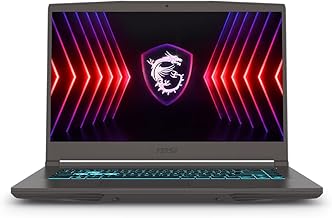
 msi Cyborg 17 17.3" FHD 144Hz Gaming
- Product Group: Personal Computer
- Binding: Personal Computers


As an Amazon Associate we earn from qualifying purchases at no extra cost to you. Ratings are shown as listed on Amazon.
🛒 Best Price Today on Amazon
Prime members get fast, free shipping on everything above, plus member-only deals. New members get a 30-day free trial — cancel anytime.
Quick Comparison
| Product | Best For | Standout Feature | Rating |
|---|---|---|---|
| MSI Cyborg 17 (RTX 5060) | Overall performance | RTX 5060 GPU + 1TB NVMe SSD | 9.4/10 |
| MSI GF63 Thin (RTX 2050, i5) | Entry-level budget gaming | Lowest price with 144Hz display | 8.2/10 |
| MSI Thin 15 (RTX 4050, i7-13620H, Bundle) | Premium feel under $1K | Bundle extras + Wi-Fi 6E | 9.1/10 |
| MSI Thin A15 (RTX 3050, Ryzen 5) | Portable daily-driver gaming | 16GB DDR5 in a thin chassis | 8.6/10 |
| MSI Thin 15.6″ (RTX 4050, i7-13620H) | Competitive esports titles | Anti-Ghost keyboard + 144Hz IPS | 8.9/10 |
How to Choose a MSI Gaming Laptop Under $1000
- GPU generation matters most: Prioritize RTX 4050 or newer for DLSS 3 support; an RTX 2050 handles esports titles but will struggle with AAA ray-tracing workloads within two years.
- Match screen size to your setup: A 17.3-inch panel like the Cyborg 17 suits desk-bound gamers, while a 15.6-inch Thin series model travels more easily in a backpack.
- RAM and storage ceiling: Look for 16GB DDR5 and at least 512GB NVMe; 8GB DDR4 configurations will bottleneck modern titles and limit multitasking.
- Check the processor tier: Intel Core i7-13620H and Ryzen 5-7535HS both deliver strong 1080p gaming, but the Intel chip edges ahead in single-thread burst for competitive shooters.
- Read the bundle fine print: Some listings include accessories or extended warranties that add real value; verify what is included before comparing sticker prices across sellers.
The Best MSI Gaming Laptops Under $1000s Reviewed
Best Overall: MSI Cyborg 17 17.3″ FHD 144Hz (RTX 5060, Core 7-240H)
The Cyborg 17 is the clear performance king at this price, pairing a current-gen RTX 5060 with 16GB DDR5 and a full terabyte of NVMe storage. It is built for gamers who want high-frame-rate 1080p AAA play without upgrading for several years, and the translucent-black chassis gives it a distinctive look on any desk.
Best Budget: MSI GF63 Thin 15.6″ FHD 144Hz (RTX 2050, i5-11th Gen)
If your library leans toward Fortnite, Valorant, and older AAA titles, the GF63 Thin delivers a smooth 144Hz experience at the lowest entry price in this roundup. It suits students or first-time PC gamers who need a capable machine without stretching past a tight budget.
Best Premium: MSI Thin 15 RTX 4050 i7-13620H Gaming Laptop (Bundle)
This bundle-equipped Thin 15 pairs a 13th-gen i7 that outperforms the prior-gen i9-12900H with an RTX 4050, Wi-Fi 6E, and a blue backlit keyboard. It targets buyers who want a near-flagship feel, included accessories, and strong thermals in a single sub-$1,000 purchase.
Best for Portable Gaming: MSI Thin A15 15.6″ FHD 144Hz (RTX 3050, Ryzen 5-7535HS)
At 16GB DDR5 in a genuinely thin-and-light chassis with Cooler Boost cooling, the Thin A15 is the pick for commuters and travelers who game in short sessions away from a desk. The Ryzen 5-7535HS keeps power draw efficient, extending battery life between matches.
Best for Esports Titles: MSI Thin 15.6″ FHD RTX 4050 (i7-13620H, DDR4)
With an anti-ghosting keyboard, 144Hz IPS-level panel, and RTX 4050 frame rates well above 144 fps in CS2 and Valorant, this Thin 15 variant is tuned for competitive players who need input precision and visual clarity above all else.
Frequently Asked Questions
Can an MSI laptop under $1,000 run current AAA games?
Yes. Models equipped with an RTX 4050 or RTX 5060 handle titles like Cyberpunk 2077 and Starfield at 1080p medium-to-high settings, especially with DLSS enabled. RTX 2050 machines are better suited to esports and older AAA releases.
Is 8GB of RAM enough for gaming in 2025?
It is the bare minimum. Most new releases list 16GB as recommended, and background apps like Discord and browsers consume additional memory. If you choose an 8GB model, plan to upgrade the RAM within the first year.
How does MSI’s Cooler Boost technology help?
Cooler Boost uses dual-fan, multi-heat-pipe designs to keep GPU and CPU temperatures lower under sustained load, reducing thermal throttling during long sessions. You will notice steadier frame rates compared to single-fan budget laptops.
Are MSI bundle listings worth the extra cost?
Often, yes. Bundles typically add a gaming mouse, headset, or extended warranty at a combined price lower than buying items separately. Always confirm the bundle contents on the listing page before checkout to ensure you are getting genuine accessories.
Final Thoughts
For sheer gaming horsepower under $1,000, the MSI Cyborg 17 with RTX 5060 stands alone. If portability and value matter more, the MSI Thin 15 RTX 4050 bundle and the MSI Thin A15 RTX 3050 each carve out a compelling niche. Whichever you choose, buying from a verified listing with a clear return policy ensures you can game confidently from day one.



