Key takeaways
- Latency: wired is always instant; premium 2.4GHz wireless is now nearly indistinguishable, while Bluetooth adds noticeable lag.
- Power: wired needs no charging; wireless requires battery management, though many last weeks per charge.
- Desk clutter: wireless frees your desk of cables; wired keeps a cord to your PC.
- Reliability: wired never drops signal; quality wireless is very stable, cheap wireless can stutter.
- Flexibility: tri-mode wireless boards switch between multiple devices and connection types.
- Cost: wired keyboards generally cost less for the same build quality.
The wireless versus wired keyboard debate used to have an obvious answer for gamers, wired, no contest. But wireless technology has advanced so far that the gap has all but closed, and in 2026 a top wireless gaming keyboard can be just as fast and responsive as a wired one. The question now is which suits your setup, your priorities, and your budget, rather than which is flatly better.
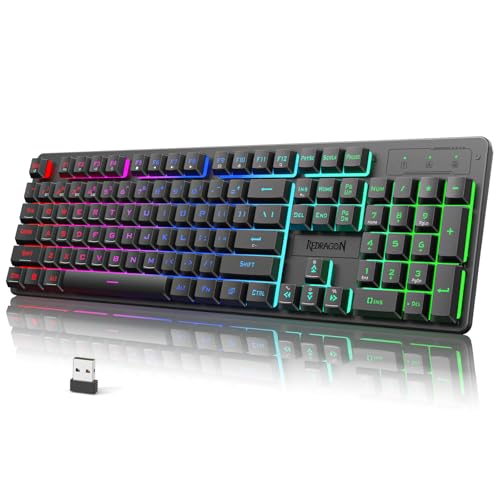
This comparison breaks down wireless versus wired gaming keyboards honestly: latency and responsiveness, battery life and reliability, desk clutter and portability, and value. Whether you are considering a versatile tri-mode wireless board like the Redragon S107KS or K521KS, a rechargeable TECKNET wireless keyboard, or a rock-solid wired option, this guide will help you pick the right one for the way you game.
Our top picks






As an Amazon Associate we earn from qualifying purchases at no extra cost to you. Ratings are shown as listed on Amazon.
⚡ Save on Your Next PC — Amazon Prime
Prime members get fast free shipping on the systems above, plus early access to Prime Day & Black Friday PC deals. New members get a 30-day free trial.
Watch: Wireless vs Wired Keyboard for Gaming — Video Review
Quick Verdict
For most gamers, a quality wired keyboard remains the safe, best-value choice: zero latency worries, no batteries, and lower cost. But modern wireless gaming keyboards using low-latency 2.4GHz connections are now genuinely competitive, even for fast games, and win big on cleaner desks and flexibility. Choose wired if you want maximum simplicity and value; choose a good 2.4GHz wireless board if you value a tidy setup and portability and do not mind charging it. Avoid cheap Bluetooth-only keyboards for serious gaming.
Key Differences
- Latency: wired is always instant; premium 2.4GHz wireless is now nearly indistinguishable, while Bluetooth adds noticeable lag.
- Power: wired needs no charging; wireless requires battery management, though many last weeks per charge.
- Desk clutter: wireless frees your desk of cables; wired keeps a cord to your PC.
- Reliability: wired never drops signal; quality wireless is very stable, cheap wireless can stutter.
- Flexibility: tri-mode wireless boards switch between multiple devices and connection types.
- Cost: wired keyboards generally cost less for the same build quality.
Wired Keyboards
A wired gaming keyboard is the definition of set-and-forget. Plug it into a USB port and it works instantly, forever, with zero input latency and no signal to drop, no battery to charge, and no receiver to lose. That reliability is why competitive players have long trusted wired boards, and why they remain the recommendation for anyone who wants pure simplicity.
Wired keyboards also tend to cost less than wireless models of comparable build and features, letting you get more keyboard for your money, a solid wired RGB mechanical board delivers premium feel at a lower price than its wireless equivalent. The only real downside is the cable itself, which adds a little desk clutter. If that does not bother you, wired is a fantastic, worry-free default.
Wireless Keyboards
Modern wireless gaming keyboards have erased the old latency penalty, at least over a dedicated 2.4GHz connection. Tri-mode boards like the Redragon S107KS and K521KS let you connect via low-latency 2.4GHz dongle for gaming, Bluetooth for a tablet or laptop, and USB-C wired when you want to charge and play, all in one keyboard. That flexibility is genuinely useful for a multi-device setup.
The benefits are a clean, cable-free desk, easy portability, and the freedom to reposition your keyboard however you like. The trade-offs are battery management, though many gaming boards last weeks on a charge, and a higher price for equivalent quality. Just be sure to game over the 2.4GHz connection, not Bluetooth, which adds latency that fast games will expose.
Which Should You Buy?
- Choose wired for the best value, zero-maintenance reliability, and instant response.
- Choose 2.4GHz wireless if a clean, cable-free desk and flexibility matter to you.
- Choose a tri-mode wireless board if you switch between a gaming PC, laptop, and tablet.
- Choose wireless if you value portability and want to reposition the keyboard freely.
- Avoid Bluetooth-only keyboards for serious gaming, always game over 2.4GHz or wired.
Frequently Asked Questions
Is wireless too slow for competitive gaming?
Not anymore, over a dedicated 2.4GHz connection. Premium wireless gaming keyboards now match wired latency closely enough that even competitive players use them. The caveat is Bluetooth, which does add noticeable lag and should be avoided for fast games.
How long do wireless gaming keyboards last on a charge?
It varies widely, but many gaming keyboards with large batteries last one to several weeks of regular use per charge, and longer with RGB lighting dimmed or off. Boards like the TECKNET wireless keyboard use big rechargeable cells for extended runtime.
Can I use a wireless keyboard while it charges?
Yes, if it is a tri-mode or USB-C model, you can plug it in and keep gaming in wired mode while it recharges. That flexibility means you are never locked out, which removes one of the old drawbacks of going wireless.
Do wired keyboards feel different from wireless?
The typing feel comes from the switches and build, not the connection type, so a wired and wireless version of the same keyboard feel identical. Choose based on latency, convenience, and price rather than expecting a difference in feel.
Final Verdict
The wireless-versus-wired gap has narrowed to the point where both are excellent gaming choices. Go wired for unbeatable value, simplicity, and instant response with nothing to charge. Go with a quality 2.4GHz wireless board, ideally tri-mode, if a tidy desk, flexibility, and portability are worth the small premium. Just game over 2.4GHz rather than Bluetooth, and either way you will have a fast, responsive keyboard.