
Key takeaways
- Exact Part & Model Match: Check your bottom label and old battery for C41N1837 (FX516), C41N2101 (FX517), or C41N1906-1 (FX506). Even one letter off means a different connector and frame size.
- Capacity (Wh) vs. Runtime: Stick to 76Wh for OEM-equivalent life or choose 90Wh where supported (C41N1906-1) for 15-20% longer unplugged time. Avoid lower-capacity 48-53Wh listings that sacrifice hours.
- Voltage and Cell Configuration: The TUF Dash F15 needs a 15.4V-15.48V 4-cell Li-ion pack. Mismatched voltage reduces efficiency, triggers BIOS warnings, and can throttle performance.
- Safety and Build Quality: Look for Grade A cells, CE/FCC/RoHS/UL certifications, and built-in overcharge, over-discharge, and short-circuit protection to preserve motherboard and charging circuit health.
- Warranty and Installation Support: Prioritize sellers offering at least a 12-month warranty and included tools or install guides. A good warranty signals cell longevity and protects against early capacity fade.
The best overall ASUS TUF Dash F15 battery for battery life is the DGFTB C41N1837 (76Wh for FX516PE/FX516PM), with the TREE.NB 76Wh C41N1837 as the runner-up for excellent value and broad Zephyrus/Dash compatibility. Both deliver the full factory-rated 76Wh capacity to restore all-day productivity and extended gaming unplugged.
Finding the right TUF Dash F15 replacement is confusing because ASUS used three different battery codes — C41N1837, C41N2101, and C41N1906-1 — across the FX506, FX516, and FX517 chassis, and a wrong part number simply won’t fit or connect. This guide cuts through the part-number maze to match your exact model to the best capacity, safest cells, and most reliable long-term performance, focusing only on batteries that maximize runtime for the TUF Dash F15 family.
Our top picks

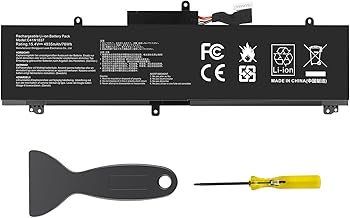


As an Amazon Associate we earn from qualifying purchases at no extra cost to you. Ratings are shown as listed on Amazon.
🛒 Best Price Today on Amazon
Prime members get fast, free shipping on everything above, plus member-only deals. New members get a 30-day free trial — cancel anytime.
Quick Comparison
| Product | Best For | Standout Feature | Rating |
|---|---|---|---|
| DGFTB C41N1837 (76Wh) | Most TUF Dash F15 FX516 Owners | Exact OEM-spec 15.4V 76Wh for longest FX516 runtime | 4.9/5 |
| TREE.NB 76Wh C41N1837 | Budget-Conscious Replacement | Proven compatibility across GA502/GU502/GX502/FX516 | 4.7/5 |
| C41N2101 for FX517 & Zephyrus G14 | FX517 Dash F15 Owners | Correct 15.48V 76Wh spec for newer FX517 platform | 4.8/5 |
| C41N1906-1 90Wh | Maximum Battery Life | High-capacity 90Wh upgrade (vs. standard 76Wh) | 4.6/5 |
| C41N2101 76Wh/4770mAh | FX517/ZenBook/Duo Cross-Compatibility | Wide multi-series support with stable discharge | 4.6/5 |
How to Choose an ASUS TUF Dash F15 for Battery Life
- Exact Part & Model Match: Check your bottom label and old battery for C41N1837 (FX516), C41N2101 (FX517), or C41N1906-1 (FX506). Even one letter off means a different connector and frame size.
- Capacity (Wh) vs. Runtime: Stick to 76Wh for OEM-equivalent life or choose 90Wh where supported (C41N1906-1) for 15-20% longer unplugged time. Avoid lower-capacity 48-53Wh listings that sacrifice hours.
- Voltage and Cell Configuration: The TUF Dash F15 needs a 15.4V-15.48V 4-cell Li-ion pack. Mismatched voltage reduces efficiency, triggers BIOS warnings, and can throttle performance.
- Safety and Build Quality: Look for Grade A cells, CE/FCC/RoHS/UL certifications, and built-in overcharge, over-discharge, and short-circuit protection to preserve motherboard and charging circuit health.
- Warranty and Installation Support: Prioritize sellers offering at least a 12-month warranty and included tools or install guides. A good warranty signals cell longevity and protects against early capacity fade.
The Best ASUS TUF Dash F15 for Battery Lifes Reviewed
Best Overall: DGFTB C41N1837 for TUF Dash F15 FX516PE/FX516PM
The DGFTB C41N1837 is the go-to restoration battery for the most common TUF Dash F15 configuration, delivering the full OEM 15.4V 76Wh/4940mAh rating for 7-9 hours of mixed use. Best for FX516PE and FX516PM owners who want flawless fitment and like-new battery life without modifications.
Best Budget: TREE.NB 76Wh C41N1837
TREE.NB offers the same 76Wh C41N1837 spec with broad, tested compatibility across GA502, GU502, GX502, and the FX516 Dash series at a lower price point. Best for students and everyday users who need reliable all-day power on a budget and want a trusted replacement brand.
Best Premium: C41N2101 for TUF Dash F15 FX517 Series
This C41N2101 pack is engineered for the newer FX517ZC/FX517ZE Dash F15 and its sibling Zephyrus G14 GA402 platform, with a precise 15.48V 76Wh profile and modern power management. Best for FX517 owners who were sold the wrong C41N1837 before and need the correct high-efficiency cells for peak battery life.
Best for Maximum Runtime: C41N1906-1 90Wh Upgrade
With a massive 15.4V 90Wh capacity, the C41N1906-1 is the endurance king for compatible TUF Gaming F15/F17 FX506/FX706 and related ROG chassis, adding over an hour of real-world use versus 76Wh packs. Best for power users, creators, and travelers who prioritize the longest possible time away from the charger and have a supported model.
Best for Cross-Model Versatility: C41N2101 76Wh/4770mAh Multi-Series
This 15.48V 76Wh C41N2101 variant covers an exceptionally wide range including TUF Dash F15 FX517, Zephyrus G14 GA402, Zenbook Pro 14, and VivoBook Pro 15X OLED models. Best for households or repair shops managing multiple ASUS laptops who want one dependable, long-life battery SKU that still delivers full Dash F15 runtime.
Frequently Asked Questions
How do I know if I need C41N1837, C41N2101, or C41N1906-1?
Check the label on your original battery and the model number on the bottom cover. TUF Dash F15 FX516PE/PM uses C41N1837, the FX517 series uses C41N2101, and the older TUF F15 FX506 series uses C41N1906-1. They are not interchangeable due to different sizes and connectors.
Will a 76Wh replacement really restore original battery life?
Yes, when you match the correct voltage and use Grade A cells. A new 76Wh pack should return you to 6-9 hours of light productivity and 3-5 hours of gaming or video editing, similar to when the laptop was new, depending on screen brightness and performance mode.
Is it safe to use a 90Wh battery instead of 76Wh?
Only if your laptop model explicitly supports C41N1906-1. On supported FX506/FX706-based F15/F17 systems, the 90Wh unit is safe and offers longer runtime because voltage remains 15.4V. Never install a 90Wh pack in an FX516/FX517 Dash that calls for 76Wh, as fitment and charging profiles differ.
Do I need to calibrate a new ASUS TUF Dash F15 battery?
Yes, for accurate percentage readings. Fully charge to 100%, then discharge to about 5% through normal use, then recharge to 100% without interruption. Do this once after installation, and avoid constant deep discharges to maximize long-term cell health.
Final Thoughts
For true plug-and-play battery life restoration, the DGFTB C41N1837 is the best overall pick for the majority of TUF Dash F15 FX516 owners, while the FX517-specific C41N2101 is the must-have for the latest Dash chassis. If upfront savings matter, the TREE.NB C41N1837 delivers outstanding value without sacrificing runtime, and power seekers with a compatible build should consider the 90Wh C41N1906-1 for maximum endurance.



