
Key takeaways
- GPU power limit, not just GPU name. An RTX 4050 running at 90W to 115W total graphics power will consistently outperform a power-constrained version of the same chip at 60W to 75W. Check the full specifications PDF or spec sheet for TGP or Maximum Graphics Power. If it is not listed, prefer thicker dual-fan models that are more likely to allow higher power.
- Dual-channel RAM. 16GB in a 2x8GB configuration provides noticeably better 1% lows in Warzone, Cyberpunk 2077, Fortnite, and Baldur’s Gate 3 than a single 8GB or 16GB stick. If a laptop ships with 8GB, budget for an immediate upgrade to 16GB.
- CPU class and cooling. For gaming, a 6-core Ryzen 5 or Core i5 in a well-cooled chassis is usually better than an 8-core chip in a thin single-fan chassis that cannot sustain its clocks. Look for dual fans, dual heat pipes, and side plus rear exhausts. Models under 20mm thick with shared heat pipes are built for portability, not long AAA sessions.
- Storage slots and access. One populated M.2 2280 slot plus one empty M.2 slot is ideal. Check the service manual to confirm whether the bottom panel uses standard Phillips screws and whether opening it affects warranty. Lenovo, HP, Dell, ASUS, and Acer all publish hardware maintenance manuals for most LOQ, Victus, G15, TUF Gaming, and Nitro models.
- Display specification on paper. Look for 15.6-inch or 16-inch IPS, 1920 x 1080 or 1920 x 1200, 144Hz or 165Hz, with a manufacturer rating of 300 nits and 100% sRGB or 62.5% sRGB and above. Avoid 60Hz panels and TN-type panels for gaming, even if the GPU looks better on paper.
The best gaming laptop under 1000 in 2026 is an RTX 4050 or RTX 4060-class machine with 16GB of RAM, a 512GB SSD, and a 144Hz or higher IPS display, with the Lenovo LOQ 15, ASUS TUF Gaming A15, Acer Nitro V 15, HP Victus 15, and Dell G15 forming the core shortlist for most buyers.
Our top picks
 ASUS TUF Gaming A16 Laptop: AMD Ryzen
- Product Group: Personal Computer
- Binding: Personal Computers
 ASUS TUF Gaming F16 Gaming Laptop
- Product Group: Personal Computer
- Binding: Personal Computers
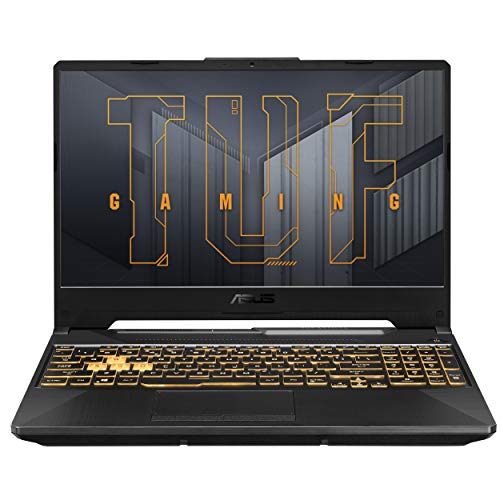 ASUS TUF Gaming A15 Gaming Laptop
- Product Group: Personal Computer
- Binding: Personal Computers
| Product | Key specs | Amazon rating | |
|---|---|---|---|
| ASUS TUF Gaming A16 Laptop: AMD Ryzen | Product Group: Personal Computer Binding: Personal Computers | 4.8★ | Check price |
| ASUS TUF Gaming F16 Gaming Laptop | Product Group: Personal Computer Binding: Personal Computers | 4.7★ | Check price |
| ASUS TUF Gaming A15 Gaming Laptop | Product Group: Personal Computer Binding: Personal Computers | 4.6★ | Check price |
| ASUS TUF Gaming A16 Laptop: AMD Ryzen | Product Group: Personal Computer Binding: Personal Computers | 4.4★ | Check price |
As an Amazon Associate we earn from qualifying purchases at no extra cost to you. Ratings are shown as listed on Amazon.
What to expect from the best affordable gaming laptop under 1000
Under $1000, you are not buying a compromise-free gaming notebook. You are buying a 1080p gaming machine where every manufacturer has to choose where to save money. Understanding those trade-offs is more useful than comparing spec sheets line by line, because two laptops with the same GPU name can perform and feel very different in daily use.
In 2026, the sub-$1000 market is centered on three GPU classes: GeForce RTX 4050 Laptop, GeForce RTX 4060 Laptop, and leftover RTX 3050 / RTX 2050 entry stock. For CPUs, expect AMD Ryzen 5 7535HS, Ryzen 7 7735HS, Ryzen 7 7840HS, or Intel Core i5-13420H, i5-13500H, i7-13620H and similar 13th-gen H-series parts. Most current models ship with 16GB DDR5 and a 512GB PCIe Gen 4 SSD, with Windows 11 Home.
For gaming at 1080p, that combination is sufficient for a clear tiered experience. RTX 4050 systems handle esports and most AAA games at high settings at 1080p with DLSS enabled. RTX 4060 systems, when they dip under $1000 during promotional periods, add meaningful headroom for ray tracing, higher settings, and more demanding open-world games. Older RTX 3050-class machines are only worth considering at the low end of the price range, typically $650 to $750, and primarily for esports, schoolwork, and lighter AAA titles.
Display, chassis, and upgradeability separate good values from bad ones. A dim 250-nit 120Hz panel, single-channel 8GB RAM, or a fully soldered motherboard can matter more for long-term satisfaction than whether the box says RTX 4050 or RTX 4060. Prioritize a balanced configuration over a headline GPU upgrade paired with cut corners elsewhere.
How to choose the fastest laptops under 1000 without chasing specs
Fastest does not mean highest boost clock on the box. For a gaming notebook under 1000, sustained performance depends on power limits, cooling design, and memory configuration.
Start with these criteria, in order:
- GPU power limit, not just GPU name. An RTX 4050 running at 90W to 115W total graphics power will consistently outperform a power-constrained version of the same chip at 60W to 75W. Check the full specifications PDF or spec sheet for TGP or Maximum Graphics Power. If it is not listed, prefer thicker dual-fan models that are more likely to allow higher power.
- Dual-channel RAM. 16GB in a 2x8GB configuration provides noticeably better 1% lows in Warzone, Cyberpunk 2077, Fortnite, and Baldur’s Gate 3 than a single 8GB or 16GB stick. If a laptop ships with 8GB, budget for an immediate upgrade to 16GB.
- CPU class and cooling. For gaming, a 6-core Ryzen 5 or Core i5 in a well-cooled chassis is usually better than an 8-core chip in a thin single-fan chassis that cannot sustain its clocks. Look for dual fans, dual heat pipes, and side plus rear exhausts. Models under 20mm thick with shared heat pipes are built for portability, not long AAA sessions.
- Storage slots and access. One populated M.2 2280 slot plus one empty M.2 slot is ideal. Check the service manual to confirm whether the bottom panel uses standard Phillips screws and whether opening it affects warranty. Lenovo, HP, Dell, ASUS, and Acer all publish hardware maintenance manuals for most LOQ, Victus, G15, TUF Gaming, and Nitro models.
- Display specification on paper. Look for 15.6-inch or 16-inch IPS, 1920 x 1080 or 1920 x 1200, 144Hz or 165Hz, with a manufacturer rating of 300 nits and 100% sRGB or 62.5% sRGB and above. Avoid 60Hz panels and TN-type panels for gaming, even if the GPU looks better on paper.
Top 10 gaming laptops under 1000: what the shortlist actually looks like
If you searched for top 10 gaming laptops under 1000, you will see the same five to seven product lines repeated across retailers, just in different RAM, SSD, and GPU configurations. That is normal. The sub-$1000 market in the U.S. is dominated by a small set of established lines:
- Lenovo LOQ 15 and LOQ 15IAX9 / LOQ 16 – often cited as the best Lenovo laptop under 1000 for gaming because of straightforward serviceability, Legion-derived keyboard layout, and clear TGP listings.
- ASUS TUF Gaming A15 and TUF Gaming F15 – the most common ASUS gaming laptop under 1000, known for MIL-STD-810H chassis testing, 144Hz to 165Hz options, and DDR5 configurations.
- Acer Nitro V 15 and Nitro 5 – frequent value leader with RTX 4050 plus 144Hz IPS combinations in the $750 to $899 market range.
- HP Victus 15 and Victus 16 – wide configuration range, often with Intel Core i5 H-series plus RTX 4050 and 144Hz display options.
- Dell G15 5530 – the default best Dell laptop under 1000 for gaming, with a thicker dual-fan chassis that favors sustained clocks over thinness.
- MSI Thin GF63 and Cyborg 15 – thin-and-light options that trade sustained cooling headroom for lower bare weight, better suited to students who carry daily.
- Gigabyte G5 – less common in stores but often appears in the same RTX 4050 price band with a 144Hz panel.
There are not truly ten distinct winners. There are three to four winning formulas sold under different brand names. Shop by configuration class rather than brand loyalty, then use brand differences for tie-breakers like keyboard, port layout, warranty service, and manual availability.
Comparison by use case: best gaming notebook under 1000 for you
A single ranking cannot serve an esports player, a student, and someone playing Cyberpunk 2077 for three hours at a time. Use this decision matrix instead:
| Your priority | Best fit under $1000 | Why it fits |
|---|---|---|
| Esports at high refresh: Valorant, CS2, Fortnite, Apex | RTX 4050 with 144Hz or 165Hz IPS | These titles are light on GPU and benefit more from refresh rate, low latency, and dual-channel RAM than from stepping up to RTX 4060 |
| AAA single-player: Cyberpunk, Starfield, open-world RPGs | RTX 4060 in dual-fan 19mm+ chassis if available, otherwise full-power RTX 4050 | Long sessions load GPU continuously, so power limit and cooling matter more than thinness |
| Best laptops under 1000 for students | RTX 4050 thin model under 5.0 lbs bare, 16GB RAM, 512GB+ SSD | Lower travel weight with charger, usable battery for classes, still capable for 1080p gaming plugged in |
| Upgrade later | Single bottom panel with 2x SO-DIMM and 2x M.2 | Allows adding a second SSD and moving from 16GB to 32GB without replacing the laptop |
| Bright dorm or living room | Models listed at 300 nits or higher with IPS | Brightness affects visibility every day, while 10 percent more GPU power only matters in some scenes |
ASUS, Dell, and Lenovo under $1000 compared
Buyers often search directly for an ASUS gaming laptop under 1000, best Dell laptop under 1000, or best Lenovo laptop under 1000. Here is how those ecosystems differ when configured similarly:
ASUS TUF Gaming A15 / F15
TUF is ASUS’s durability-focused budget line. Typical sub-$1000 configurations pair Ryzen 7 7735HS or Core i5-13500H with RTX 4050, 16GB DDR5, and 512GB SSD. Strengths are chassis rigidity, straightforward Armory Crate power profiles, and good port selection. Check whether the specific configuration uses a 144Hz or 165Hz panel and confirm RAM is 2x8GB rather than 1x16GB.
Dell G15 5530
The G15 is thicker and heavier than most competitors, usually 5.5 to 6.5 lbs bare plus a 1.2 to 1.6 lb charger. That weight buys cooling headroom and stable behavior during long sessions. It is a good pick as a primarily desk-based gaming notebook that occasionally travels, less ideal as a daily-carry student laptop. Dell publishes clear service manuals, which helps if you plan to add storage later.
Lenovo LOQ 15
LOQ sits below Legion and is Lenovo’s volume gaming line under $1000. It is often the easiest to evaluate because Lenovo lists TGP, display brightness, and color coverage more completely than most brands. LOQ models commonly offer dual SO-DIMM and dual M.2 access behind a single panel. For students and upgraders, that transparency and serviceability is a practical advantage.
HP Victus and Acer Nitro V compete directly with all three and often win on price in the $750 to $899 band. Do not rule them out if the display and memory configuration are equal. At this price, a Victus 15 with 16GB dual-channel and a 300-nit 144Hz panel is a better buy than a TUF or G15 with 8GB single-channel and a dimmer screen, regardless of brand preference.
Settings and setup that matter more than the GPU tier
Once you have the laptop, settings determine whether you actually get the performance you paid for. Use this baseline for 1080p on RTX 4050 and RTX 4060 systems:
- Play plugged in with the Best Performance or Turbo / Performance mode enabled. On battery, NVIDIA and AMD power limits drop sharply to protect battery life, which can cut frame rates by half.
- Enable DLSS Quality or Balanced in supported AAA games, with Frame Generation off on RTX 4050 if latency feels high. For esports, use native 1080p with low effects and high textures to maximize refresh rate.
- Set display to 144Hz or 165Hz in Windows Advanced Display settings. Many laptops ship at 60Hz by default even with a high-refresh panel installed.
- Update NVIDIA Game Ready drivers and chipset drivers from NVIDIA, AMD, or Intel directly after setup. Keep BIOS on the manufacturer version unless a newer version fixes a specific issue you have.
- Use a simple elevated stand for airflow. You do not need an aggressive cooler pad. Lifting the rear by 1 to 2 inches lowers recirculated hot air and helps dual-fan designs hold boost longer.
- For 16GB systems, close browsers with dozens of tabs while gaming. Running out of system RAM causes stutter that looks like GPU slowness but is actually paging.
Battery, weight, and thermals: honest expectations
Treat every gaming laptop under $1000 as a plugged-in gaming device. Most carry a 55Wh to 76Wh battery. During real gameplay, combined system draw from GPU, CPU, display, and fans is typically in the 55W to 90W range depending on power profile and title.
A simple energy calculation explains real-world reports: a 60Wh battery divided by 70W average draw equals about 0.86 hours, or roughly 50 minutes. Less demanding esports titles on battery saver may stretch toward 90 minutes. AAA gaming will land closer to 45 to 70 minutes. For classes, browsing, and video, expect 4 to 7 hours depending on screen brightness, which is why these models still work as best laptops under 1000 for students when used unplugged for school and plugged in for games.
For travel weight, add the charger. Thin RTX 4050 models are typically 4.4 to 4.8 lbs bare plus a 0.9 to 1.1 lb brick, for about 5.5 lbs total. Standard dual-fan models are 5.0 to 5.5 lbs plus a larger brick, for about 6.5 lbs total. Thicker RTX 4060 configurations can approach 7.5 lbs in the bag. If you carry daily, prioritize the lighter class and accept slightly lower sustained power limits.
For thermals, use design as your proxy since spec sheets do not tell the full story. Dual fans with separate CPU and GPU heat pipes and rear exhausts sustain clocks better than single-fan or single shared-pipe layouts. A 17mm to 21mm chassis with visible rear vents is preferable for long AAA sessions. An ultra-thin chassis with bottom-only vents is preferable for portability but will rely more aggressively on power-limit throttling to stay cool.
Frequently asked questions
What is the best affordable gaming laptop under 1000 for most people? For most buyers, it is a 15.6-inch RTX 4050 system with 16GB dual-channel DDR5, 512GB SSD, and a 144Hz IPS display rated at 300 nits. That configuration plays esports well above 144 FPS at competitive settings and handles AAA games at 1080p high with DLSS, without the weight and heat of higher tiers.
Which is better under $1000, RTX 4050 or RTX 4060? RTX 4060 has more VRAM and CUDA resources and is faster when both run at full power. In practice under $1000, a full-power RTX 4050 with good cooling and dual-channel RAM often provides a better overall experience than a power-limited RTX 4060 paired with 8GB RAM and a dim panel. Only choose the RTX 4060 configuration if RAM, SSD, display, and cooling are equal.
Is 16GB RAM enough for gaming in 2026? Yes for 1080p, provided it is dual-channel. 8GB is not enough for current AAA titles plus background apps and will cause stutter. If you keep laptops for four years, prefer a model with two SO-DIMM slots so you can move to 32GB later.
Can these laptops handle schoolwork? Yes. The same models recommended as student options handle Office, coding, CAD coursework, and light photo or video editing. For campus use, prioritize 16GB RAM, a 512GB or 1TB SSD, Wi-Fi 6, a 1080p webcam with privacy shutter, and weight under 5.0 lbs bare if you walk with it daily.
Should students choose Intel or AMD? Both are fine. AMD Ryzen HS-series models typically offer better battery life for lectures. Intel H-series models often offer slightly stronger single-thread bursts for plugged-in gaming. Choose based on display, RAM, and weight rather than brand of CPU alone.



