
Key takeaways
- Trusting the screen label: A 17-inch label does not guarantee that the sleeve accepts every 17.3-inch gaming laptop.
- Ignoring thickness: A bulky cooling system and large rear vents can prevent a laptop from entering a sleeve designed for a thin productivity computer.
- Forgetting the charger: The laptop may fit perfectly while the power brick makes the main compartment too crowded.
- Measuring the outside of the bag: Exterior dimensions include fabric, foam, seams, and pockets. Use interior measurements whenever available.
- Choosing capacity without checking support: A 40-liter bag can have plenty of volume but a poorly sized laptop pocket.
- Overlooking weight: A 6- to 9-pound laptop combined with a 2-pound charger and accessories can make an oversized backpack uncomfortable.
- Leaving no clearance: A zipper that closes only when the laptop is forced into place is a warning sign, not a secure fit.
🛒 Best Price Today on Amazon
Check today’s deals on the products above before you buy. Prices change often, so compare the live price on Amazon.
The Short Answer
Most gaming laptops that measure 15 to 16 inches fit comfortably in a backpack labeled for a 17-inch laptop. A 17-inch gaming laptop usually requires a roomy 17-inch bag with a sleeve measuring at least 16.5 by 11.5 inches, while an 18-inch model may need an extra-large backpack designed specifically for 18- to 19-inch computers.
The screen-size label is only a starting point. Gaming laptops have thicker bezels, large cooling vents, oversized hinges, and power adapters that take up more room than standard office laptops. For a reliable fit, compare your laptop’s actual length, width, and thickness with the backpack’s interior sleeve dimensions. Leave at least 0.5 inch of extra space in each direction and additional room for the charger.
Our top picks
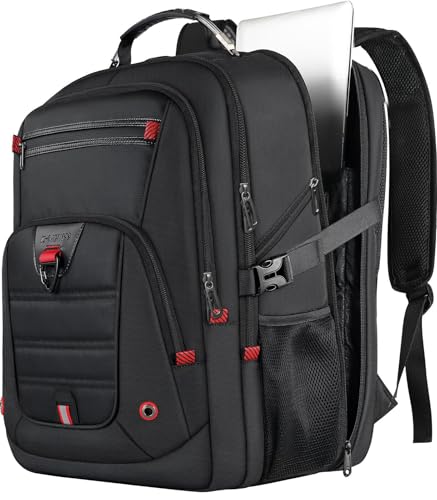 Z-MGKISS Extra Large Backpack for Men
- 【100% LIFETIME-PROMISE】: You can get 100% lifetime promise…
- 【Extra Large & Gaming Laptop Bag】: Big size…
- 【Multi-Pockets】: Our waterproof laptop bag backpack has 3…
 DUSLANG 17 inch Travel Laptop Backpack for
- Separate laptop compartment fits 17/15/14/13 Inch Macbook/Laptop.Separate compartment…
- Comfortable airflow back design with thick but soft…
- A luggage strap allows backpack fit on luggage/suitcase,…
 Acer Predator Robust Gaming Laptop Backpack Fits
- Carry even the largest gaming laptops like the…
- Pack light for your daily commute, then unzip…
- Keep your expensive gaming gear safe from rain,…
| Product | Key specs | |
|---|---|---|
| Z-MGKISS Extra Large Backpack for Men | 【100% LIFETIME-PROMISE】: You can get 100% lifetime promise… 【Extra Large & Gaming Laptop Bag】: Big size… 【Multi-Pockets】: Our waterproof laptop bag backpack has 3… | Check price |
| DUSLANG 17 inch Travel Laptop Backpack for | Separate laptop compartment fits 17/15/14/13 Inch Macbook/Laptop.Separate compartment… Comfortable airflow back design with thick but soft… A luggage strap allows backpack fit on luggage/suitcase,… | Check price |
| Acer Predator Robust Gaming Laptop Backpack Fits | Carry even the largest gaming laptops like the… Pack light for your daily commute, then unzip… Keep your expensive gaming gear safe from rain,… | Check price |
 SwissGear Gaming Laptop Backpack with Charger Port SwissGear Gaming Laptop Backpack with Charger Port | Pro Gaming Backpack: Designed by pro gamers, our… Charge On The Go: A must-have work or… Extra-Thick Padding: This heavy-duty backpack for men and… | Check price |
As an Amazon Associate we earn from qualifying purchases at no extra cost to you.
As a practical rule, choose a backpack with a laptop compartment that is 1 to 2 inches larger than the computer’s listed screen size. A 15.6-inch gaming laptop generally works in a 17-inch backpack. A 16-inch laptop may fit either a 17-inch bag or a generous 18-inch model. A 17.3-inch machine often needs a large 17-inch or 18-inch backpack, and an 18-inch model is best matched with an extra-large bag.
Standard Sizes
The measurements below describe common gaming-laptop classes, not just the diagonal screen measurement. Dimensions vary by manufacturer, graphics hardware, battery size, and cooling system, so measure the specific computer before buying a bag.
| Laptop class | Typical laptop dimensions | Typical weight | Recommended sleeve size | Recommended backpack capacity |
|---|---|---|---|---|
| 14-inch gaming laptop | 12.5–13.0 × 8.5–9.5 × 0.7–1.0 in (31.8–33.0 × 21.6–24.1 × 1.8–2.5 cm) |
3.5–5.0 lb (1.6–2.3 kg) |
13.5 × 10 × 1.5 in minimum (34.3 × 25.4 × 3.8 cm) |
18–24 L |
| 15.6-inch gaming laptop | 14.0–14.5 × 9.5–10.5 × 0.8–1.2 in (35.6–36.8 × 24.1–26.7 × 2.0–3.0 cm) |
4.5–6.5 lb (2.0–2.9 kg) |
15.5 × 11 × 1.75 in minimum (39.4 × 27.9 × 4.4 cm) |
22–30 L |
| 16-inch gaming laptop | 14.0–14.3 × 9.5–10.2 × 0.8–1.2 in (35.6–36.3 × 24.1–25.9 × 2.0–3.0 cm) |
4.5–6.5 lb (2.0–2.9 kg) |
15.5 × 11 × 1.75 in minimum (39.4 × 27.9 × 4.4 cm) |
22–30 L |
| 17.3-inch gaming laptop | 15.5–16.2 × 10.5–11.2 × 0.9–1.4 in (39.4–41.1 × 26.7–28.4 × 2.3–3.6 cm) |
5.5–8.0 lb (2.5–3.6 kg) |
17 × 12 × 2 in minimum (43.2 × 30.5 × 5.1 cm) |
28–35 L |
| 18-inch gaming laptop | 15.8–16.5 × 11.0–11.8 × 1.0–1.5 in (40.1–41.9 × 27.9–30.0 × 2.5–3.8 cm) |
6.0–9.0 lb (2.7–4.1 kg) |
17.5 × 12.5 × 2.25 in minimum (44.5 × 31.8 × 5.7 cm) |
30–40 L |
Backpack labels can be confusing. A “17-inch backpack” may refer to the largest screen size the manufacturer expects, not the actual dimensions of its padded sleeve. Some sleeves are only about 16 inches wide and will not accept a thick 17.3-inch gaming computer. Look for stated compartment measurements rather than relying on the label alone.
For context, compact gaming backpacks may hold 18 to 24 liters, while full-size travel models commonly hold 28 to 35 liters. Extra-large bags intended for 18- to 19-inch laptops can reach 35 to 45 liters. A large charger may weigh 1.5 to 3 pounds, or about 0.7 to 1.4 kilograms, so capacity matters as much as sleeve size. Current prices commonly range from about $30 to $60 for basic 17-inch bags, $80 to $130 for padded gaming backpacks with better organization, and $140 to $200 or more for premium 18-inch or reinforced models.
How to Measure Your Space
- Measure the laptop itself. Close the lid and measure the longest side from edge to edge. Then measure the front-to-back depth and the thickest point, including rubber feet or a permanently attached protective shell.
- Do not measure the screen diagonally. The advertised 15.6-, 17.3-, or 18-inch size is the diagonal measurement of the display, not the outside size of the computer.
- Measure the backpack sleeve. Measure usable interior space, not the outside of the bag. If the sleeve has thick padding, account for the space consumed by that padding.
- Allow clearance. Add at least 0.5 inch, or 1.3 centimeters, to the laptop’s length and width. Add about 0.25 to 0.5 inch, or 0.6 to 1.3 centimeters, for thickness. A tight fit can stress the zipper and corners.
- Check the opening. A compartment may be large enough inside but have a narrow zipper opening. Measure the opening at its narrowest point and compare it with the laptop’s widest edge.
- Plan for the power brick. Measure the charger separately. If the adapter is large, reserve at least 2 to 4 liters of additional space for it, plus room for the cable and mouse.
- Test the shape. Gaming laptops with rear exhausts or sharply angled corners may need more flexible space than a thin rectangular laptop. Never force the computer past a padded divider.
By Room or Use Case
Daily campus or office commuting
For a 14- to 16-inch gaming laptop, a 20- to 28-liter backpack is usually the most practical choice. It leaves room for a notebook, headphones, mouse, water bottle, and lunch without becoming excessively bulky. Look for a suspended laptop sleeve, padded base, sternum strap, and water-resistant fabric. A USB charging port is convenient, but it does not replace a protective compartment.
Travel and airport use
Travelers carrying a 17- or 18-inch computer should consider a 30- to 40-liter bag with a wide opening and a separate charger compartment. Extra depth is useful for a power brick, controller, portable monitor, and clothing, but a bag that is too deep can become heavy quickly. Check the airline’s personal-item dimensions before using an extra-large backpack as your under-seat bag. The laptop compartment should be accessible without unpacking the main section.
Gaming events and LAN parties
Gaming-event use favors organization over a slim profile. Choose a bag with a heavily padded laptop sleeve, reinforced bottom, cable pockets, and space for a mouse, headset, keyboard, or controller. A 17.3-inch laptop generally fits more comfortably in a 30- to 35-liter bag. For an 18-inch system, 35 liters or more is safer, especially when the charger is large.
Short walks and lighter loads
If you carry only the laptop, charger, and a few accessories, a 20- to 25-liter backpack may be enough for a 15.6-inch model. Avoid choosing a small bag solely because it looks streamlined. A tight laptop sleeve offers less impact protection and can put pressure on the hinge. For heavier 17- and 18-inch computers, wide shoulder straps and a padded back panel are more important than saving a few inches of exterior size.
Common Sizing Mistakes
- Trusting the screen label: A 17-inch label does not guarantee that the sleeve accepts every 17.3-inch gaming laptop.
- Ignoring thickness: A bulky cooling system and large rear vents can prevent a laptop from entering a sleeve designed for a thin productivity computer.
- Forgetting the charger: The laptop may fit perfectly while the power brick makes the main compartment too crowded.
- Measuring the outside of the bag: Exterior dimensions include fabric, foam, seams, and pockets. Use interior measurements whenever available.
- Choosing capacity without checking support: A 40-liter bag can have plenty of volume but a poorly sized laptop pocket.
- Overlooking weight: A 6- to 9-pound laptop combined with a 2-pound charger and accessories can make an oversized backpack uncomfortable.
- Leaving no clearance: A zipper that closes only when the laptop is forced into place is a warning sign, not a secure fit.
FAQ
Will a 15.6-inch gaming laptop fit in a 17-inch backpack?
Usually, yes. Most 15.6-inch gaming laptops measure about 14 to 14.5 inches wide and fit a sleeve with at least 15.5 inches of usable width. Confirm the compartment depth because thicker gaming models may not fit sleeves made for thin 17-inch office laptops.
Can a 17.3-inch laptop fit in a 17-inch backpack?
Sometimes, but the label alone is not enough. Look for a sleeve measuring at least 17 inches long by 12 inches wide, with approximately 2 inches of depth. A backpack designed for a standard 17-inch computer may be too small for a thick 17.3-inch gaming laptop.
What size backpack fits an 18-inch gaming laptop?
Choose an extra-large backpack labeled for 18- to 19-inch laptops, preferably with a sleeve at least 17.5 by 12.5 by 2.25 inches. A 30- to 40-liter capacity gives the best balance of computer protection and room for the large charger and accessories.
Is a 30-liter backpack large enough for a gaming laptop?
A 30-liter backpack is generally large enough for a 15- to 17.3-inch gaming laptop, charger, mouse, headset, and everyday items. It can also work for an 18-inch model if the sleeve dimensions match, but a 35- to 40-liter bag will be more comfortable when carrying bulky accessories or clothing.









