
Key takeaways
- GPU Power: For pre-2018 titles, an RTX 4050 or RTX 5060 is already overkill at 1080p and easily hits 144Hz+. Only choose an RTX 5070 if you want QHD+ resolution, ultra settings, or headroom for newer games.
- CPU and Memory: Older games are often CPU-bound. Look for a modern 14th Gen Intel Core i7/i9 or Core Ultra 9 with at least 16GB DDR5. 32GB is ideal for multitasking, mods, and future-proofing without a big price penalty.
- Display Resolution and Refresh Rate: A 144Hz FHD panel is perfect for high-FPS older titles on a budget. Step up to 165Hz QHD+ or 240Hz QHD+ if you want sharper visuals and benefit from the extra GPU power.
- Storage and Upgradability: A 1TB NVMe SSD is the sweet spot for a large library of older titles with fast load times. Ensure the chassis offers easy access to a second M.2 slot and RAM slots for later upgrades.
- Thermals and Portability: The CX62 was a 15.6-inch all-rounder. Thinner models like the Thin 15 are easier to carry to class or work, while larger 17- and 18-inch chassis like the Cyborg and Crosshair run cooler and offer more immersive screens.
The MSI Katana 15 HX is the best overall pick for replacing the MSI CX62 for older titles, delivering effortless max-settings 1440p performance, while the MSI Thin 15 RTX 4050 is the best budget runner-up for smooth 1080p gaming at a much lower price.
The MSI CX62 was a solid budget workhorse in its day, but it is long discontinued and its 6th-gen Intel CPU and GTX 940MX/960M graphics struggle with modern Windows, drivers, and even older games at high refresh rates. Buyers looking for that same reliable MSI value today face a crowded lineup of successors with very different GPUs, displays, and price points. This guide cuts through the confusion by rounding up the best modern MSI alternatives for playing older and esports titles flawlessly, comparing real-world gaming fit, display quality, and value so you can pick the right CX62 successor without overspending.
Our top picks
 msi Katana 15 HX 15.6” 165Hz QHD+
- Product Group: Personal Computer
- Binding: Personal Computers
 msi Cyborg 17 17.3" FHD 144Hz Gaming
- Product Group: Personal Computer
- Binding: Personal Computers
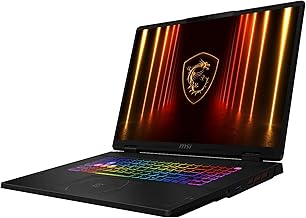


 msi Cyborg 17.3’’ Gaming Laptop
- Product Group: Personal Computer
- Binding: Personal Computers
As an Amazon Associate we earn from qualifying purchases at no extra cost to you. Ratings are shown as listed on Amazon.
🛒 Best Price Today on Amazon
Prime members get fast, free shipping on everything above, plus member-only deals. New members get a 30-day free trial — cancel anytime.
Quick Comparison
| Product | Best For | Standout Feature | Rating |
|---|---|---|---|
| MSI Katana 15 HX | Overall Performance | Intel Core i9-14900HX + RTX 5070 & 165Hz QHD+ | 4.9/5 |
| MSI Thin 15 RTX 4050 | Budget 1080p Gaming | 32GB RAM & 144Hz FHD at Great Value | 4.7/5 |
| MSI Crosshair 18 HX AI | Premium Desktop Replacement | 18″ 240Hz QHD+ & Core Ultra 9 275HX | 4.8/5 |
| MSI Cyborg 17 | Big-Screen Value | 17.3″ 144Hz & RTX 5060 with Translucent Design | 4.6/5 |
| MSI Thin 15 RTX 4050 Bundle | Portability & Students | Lightweight 15.6″ Chassis & Wi-Fi 6E | 4.6/5 |
How to Choose a/an MSI CX62 Gaming Laptop for Older Titles
- GPU Power: For pre-2018 titles, an RTX 4050 or RTX 5060 is already overkill at 1080p and easily hits 144Hz+. Only choose an RTX 5070 if you want QHD+ resolution, ultra settings, or headroom for newer games.
- CPU and Memory: Older games are often CPU-bound. Look for a modern 14th Gen Intel Core i7/i9 or Core Ultra 9 with at least 16GB DDR5. 32GB is ideal for multitasking, mods, and future-proofing without a big price penalty.
- Display Resolution and Refresh Rate: A 144Hz FHD panel is perfect for high-FPS older titles on a budget. Step up to 165Hz QHD+ or 240Hz QHD+ if you want sharper visuals and benefit from the extra GPU power.
- Storage and Upgradability: A 1TB NVMe SSD is the sweet spot for a large library of older titles with fast load times. Ensure the chassis offers easy access to a second M.2 slot and RAM slots for later upgrades.
- Thermals and Portability: The CX62 was a 15.6-inch all-rounder. Thinner models like the Thin 15 are easier to carry to class or work, while larger 17- and 18-inch chassis like the Cyborg and Crosshair run cooler and offer more immersive screens.
The Best MSI CX62 Gaming Laptop for Older Titless Reviewed
Best Overall: MSI Katana 15 HX
The Katana 15 HX is the ideal direct successor to the CX62 for most gamers. With its Core i9-14900HX, RTX 5070, and vibrant 165Hz QHD+ display, it crushes older titles at maximum settings well above 165 FPS while staying future-ready. Best for gamers who want one laptop to dominate legacy games and handle modern AAA titles without compromise.
Best Budget: MSI Thin 15 RTX 4050
This Thin 15 configuration nails the CX62 spirit of affordable, reliable performance. The Core i7-13620H and RTX 4050 are more than enough for flawless 1080p ultra gaming in older titles, and 32GB RAM with a 1TB SSD is generous at this price. Best for budget-conscious buyers, students, and casual players who want high refresh rate gaming without paying for excess GPU power.
Best Premium: MSI Crosshair 18 HX AI
The Crosshair 18 HX AI is a true desktop replacement that dwarfs the old CX62 in every metric. Its massive 18-inch 240Hz QHD+ display, 24-core Core Ultra 9 275HX, and RTX 5070 deliver an ultra-smooth, immersive experience for older titles and serious multitasking. Best for enthusiasts who want the biggest, fastest screen and top-tier horsepower for gaming, creation, and streaming.
Best for Big-Screen Gaming on a Budget: MSI Cyborg 17
The Cyborg 17 blends large-screen immersion with modern efficiency. Its 17.3-inch 144Hz FHD panel and RTX 5060 hit the sweet spot for older games at ultra settings, while the translucent chassis and lighter design make it more distinctive than the CX62 ever was. Best for gamers who crave a larger display for RPGs and strategy classics without jumping to an 18-inch premium price.
Best for Portability and Everyday Use: MSI Thin 15 RTX 4050 Bundle
This Thin 15 bundle offers the same excellent RTX 4050 gaming core in MSI’s most portable and understated chassis. It is lighter and more battery-friendly than larger gaming rigs, perfect for carrying between dorm, office, and couch gaming sessions. Best for students and mobile users who loved the CX62’s practicality and want a lightweight laptop that still plays older titles flawlessly.
Frequently Asked Questions
Is the original MSI CX62 still worth buying for older titles?
Not recommended unless you find one in excellent condition for under $200. Its 6th-gen CPU, DDR4 limit, and GTX 940MX/960M lack driver support and struggle with Windows 11 and modern launchers, while battery life and thermals have aged poorly. A modern Thin 15 or Katana offers 4-6x the performance with better efficiency and warranty support.
Do I need an RTX 5070 to play older games?
No. An RTX 4050 will max out almost any game from 2015 and earlier at 1080p well over 100 FPS. An RTX 5060 or 5070 is only useful if you are targeting QHD+ resolution, 240Hz refresh rates, heavy modding, or want to play newer demanding titles as well.
Will these laptops run older titles without compatibility issues?
Yes. All of these run Windows 11 Home or Pro and support DirectX 9-12, so classic titles from platforms like Steam and GOG run smoothly. For very old games, use compatibility mode or community patches, and take advantage of NVIDIA’s driver optimizations and integer scaling for retro visuals.
Are 32GB RAM and 1TB SSD necessary for older games?
They are not strictly required but are highly recommended today. Older games alone use 8-12GB, but 32GB prevents stutter when running Discord, browsers, and mods, and 1TB lets you keep a large library installed. All picks here include 32GB/1TB except the Cyborg 17 with 16GB, which is still fine and easily upgradable.
Final Thoughts
For most buyers seeking a modern MSI CX62 replacement for older titles, the MSI Katana 15 HX is the clear winner for its unbeatable QHD+ performance and future-proof specs, while the MSI Thin 15 RTX 4050 remains the smart budget choice. If you want maximum immersion, the MSI Crosshair 18 HX AI delivers a premium large-screen experience that leaves the original CX62 far behind.



